Table of Contents for
Linux Shell Scripting Bootcamp
 Linux Shell Scripting Bootcamp
Published by
Packt Publishing, 2017
Linux Shell Scripting Bootcamp
Published by
Packt Publishing, 2017
- Cover
- Table of Contents
- Linux Shell Scripting Bootcamp
- Linux Shell Scripting Bootcamp
- Credits
- About the Author
- Acknowledgement
- About the Reviewer
- www.PacktPub.com
- Customer Feedback
- Preface
- What you need for this book
- Who this book is for
- Conventions
- Reader feedback
- Customer support
- 1. Getting Started with Shell Scripting
- Demonstrating the use of scripts
- Summary
- 2. Working with Variables
- Validating parameters using conditional statements
- Comparison operators for strings
- Environment variables
- Summary
- 3. Using Loops and the sleep Command
- Screen manipulation
- Indenting your code
- Using the for statement
- Leaving a loop early
- The sleep command
- Watching a process
- Creating numbered backup files
- Summary
- 4. Creating and Calling Subroutines
- File redirection
- Command piping
- Subroutines
- Using parameters
- Making a current backup of your work
- Summary
- 5. Creating Interactive Scripts
- Summary
- 6. Automating Tasks with Scripts
- Summary
- 7. Working with Files
- Reading files
- Reading and writing files
- Reading and writing files interactively
- File checksums
- File encryption
- Summary
- 8. Working with wget and curl
- wget and recursion
- wget options
- curl
- Summary
- 9. Debugging Scripts
- Automatic backups
- More syntax errors
- Logic errors
- Using set to debug scripts
- Summary
- 10. Scripting Best Practices
- ssh and scp
- Find and use a good text editor
- Environment variables and aliases
- ssh prompt
- Testing an archive
- Progress indicator
- Creating new commands from a template
- Alerting the user
- Summary
- Index
Now let's look again at the method the backup scripts in the last chapter used to get the value from a file:
#!/bin/sh
#
# 6/2/2017
#
echo "Chapter 7 - Script 2"

FN=filenum1.txt              # input/output filename
MAXFILES=5                   # maximum number before going back to 1

if [ ! -f $FN ] ; then
  echo 1 > $FN               # create the file if it does not exist
fi

echo -n "Contents of $FN: "
cat $FN                      # display the contents

count=`cat $FN`              # put the output of cat into variable count
echo "Initial value of count from $FN: $count"

let count++
if [ $count -gt $MAXFILES ] ; then
 count=1
fi

echo "New value of count: $count"
echo $count > $FN

echo -n "New contents of $FN: "
cat $FN

echo "End of script2"
exit 0
Here is the screenshot for Script 2:
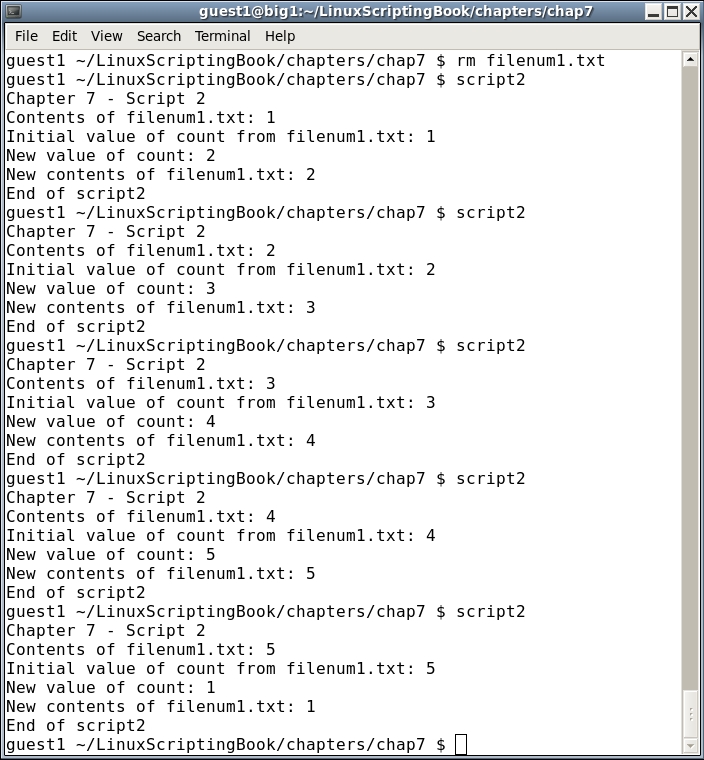
We start by setting the FN variable to the name of the file (filenum1.txt). It is displayed by the cat command and then the contents of the file are assigned to the count variable. It is displayed and then incremented by 1. The new value is written back to the file and then it is displayed again. Run this one at least 6 times to see how it wraps around.
This is just one simple way to create and read a file. Now let's look at a script that reads several lines from a file. It will use the file file1.txt that was created by the preceding Script 1.
#!/bin/sh
#
# 6/1/2017
#
echo "Chapter 7 - Script 3"
FN=file1.txt                 # filename
while IFS= read -r linevar   # use read to put line into linevar
do
  echo "$linevar"            # display contents of linevar
done < $FN                   # the file to use as input
echo "End of script3"
exit 0
And here is the output:
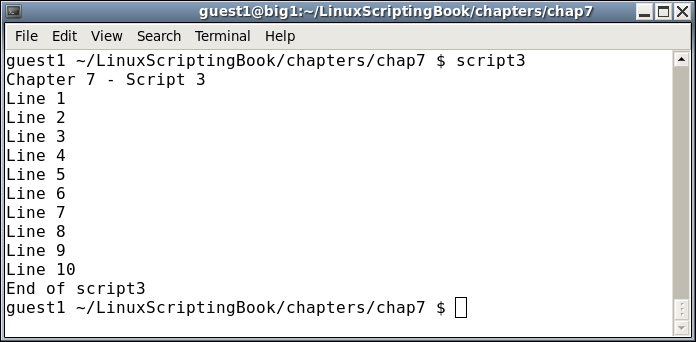
The structure here may look a little strange as it is rather different from what we have seen before. This script uses the read command to get each line of the file. In the statement:
while IFS= read -r linevar
The IFS= (Internal Field Separator) prevents read from trimming leading and trailing whitespace characters. The -r parameter to read causes backslash escape sequences to be ignored. The next line uses the redirection operator to enable file1.txt as the input for read.
done < $FN
There is a lot of new material here and so look this over carefully until you get comfortable with it.
There is a slight flaw in the above script. If the file does not exist an error will occur. Look at the following screenshot:
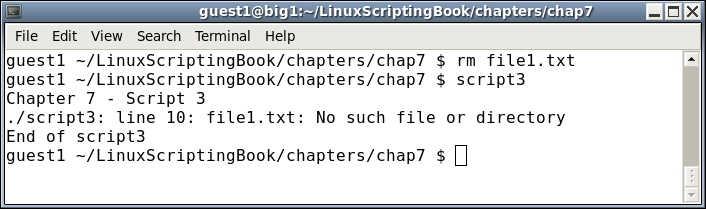
Shell scripts are interpreted, meaning each line is examined and run by the system one at a time. This is different from say a program written in the C language which is compiled. This means any syntax errors will appear during the compile stage and not when the program is run. We will discuss how to avoid most shell scripting syntax errors in Chapter 9, Debugging scripts.
Here is Script 4 with a solution to the missing file problem:
#!/bin/sh
#
# 6/1/2017
#
echo "Chapter 7 - Script 4"

FN=file1.txt                 # filename
if [ ! -f $FN ] ; then
 echo "File $FN does not exist."
 exit 100
fi

while IFS= read -r linevar   # use read to put line into linevar
do
  echo "$linevar"            # display contents of linevar
done < $FN                   # the file to use as input

echo "End of script4"
exit 0
And the following is the output:
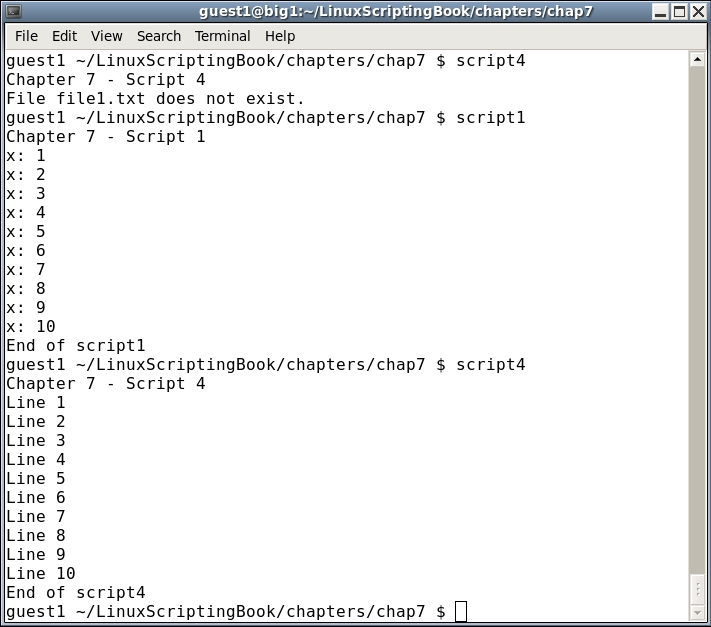
Keep this in mind when using files and always check to make sure the file exists before trying to read it.