Table of Contents for
System Forensics, Investigation, and Response, 3rd Edition
 System Forensics, Investigation, and Response, 3rd Edition
Published by
Jones & Bartlett Learning, 2017
System Forensics, Investigation, and Response, 3rd Edition
Published by
Jones & Bartlett Learning, 2017
- Cover Page
- Contents
- System Forensics, Investigation, and Response
- Title Page
- Copyright Page
- Content
- Preface
- About the Author
- PART I Introduction to Forensics
- CHAPTER 1 Introduction to Forensics
- What Is Computer Forensics?
- Understanding the Field of Digital Forensics
- Knowledge Needed for Computer Forensics Analysis
- The Daubert Standard
- U.S. Laws Affecting Digital Forensics
- Federal Guidelines
- CHAPTER SUMMARY
- KEY CONCEPTS AND TERMS
- CHAPTER 1 ASSESSMENT
- CHAPTER 2 Overview of Computer Crime
- How Computer Crime Affects Forensics
- Identity Theft
- Hacking
- Cyberstalking and Harassment
- Fraud
- Non-Access Computer Crimes
- Cyberterrorism
- CHAPTER SUMMARY
- KEY CONCEPTS AND TERMS
- CHAPTER 2 ASSESSMENT
- CHAPTER 3 Forensic Methods and Labs
- Forensic Methodologies
- Formal Forensic Approaches
- Documentation of Methodologies and Findings
- Evidence-Handling Tasks
- How to Set Up a Forensic Lab
- Common Forensic Software Programs
- Forensic Certifications
- CHAPTER SUMMARY
- KEY CONCEPTS AND TERMS
- CHAPTER 3 ASSESSMENT
- PART II Technical Overview: SystemForensics Tools, Techniques, and Methods
- CHAPTER 4 Collecting, Seizing, and Protecting Evidence
- Proper Procedure
- Handling Evidence
- Storage Formats
- Forensic Imaging
- RAID Acquisitions
- CHAPTER SUMMARY
- KEY CONCEPTS AND TERMS
- CHAPTER 4 ASSESSMENT
- CHAPTER LAB
- CHAPTER 5 Understanding Techniques for Hiding and Scrambling Information
- Steganography
- Encryption
- CHAPTER SUMMARY
- KEY CONCEPTS AND TERMS
- CHAPTER 5 ASSESSMENT
- CHAPTER 6 Recovering Data
- Undeleting Data
- Recovering Information from Damaged Media
- File Carving
- CHAPTER SUMMARY
- KEY CONCEPTS AND TERMS
- CHAPTER 6 ASSESSMENT
- CHAPTER 7 Email Forensics
- How Email Works
- Email Protocols
- Email Headers
- Tracing Email
- Email Server Forensics
- Email and the Law
- CHAPTER SUMMARY
- KEY CONCEPTS AND TERMS
- CHAPTER 7 ASSESSMENT
- CHAPTER 8 Windows Forensics
- Windows Details
- Volatile Data
- Windows Swap File
- Windows Logs
- Windows Directories
- Index.dat
- Windows Files and Permissions
- The Registry
- Volume Shadow Copy
- Memory Forensics
- CHAPTER SUMMARY
- KEY CONCEPTS AND TERMS
- CHAPTER 8 ASSESSMENT
- CHAPTER 9 Linux Forensics
- Linux and Forensics
- Linux Basics
- Linux File Systems
- Linux Logs
- Linux Directories
- Shell Commands for Forensics
- Kali Linux Forensics
- Forensics Tools for Linux
- CHAPTER SUMMARY
- KEY CONCEPTS AND TERMS
- CHAPTER 9 ASSESSMENT
- CHAPTER 10 Macintosh Forensics
- Mac Basics
- Macintosh Logs
- Directories
- Macintosh Forensic Techniques
- How to Examine a Mac
- Can You Undelete in Mac?
- CHAPTER SUMMARY
- KEY CONCEPTS AND TERMS
- CHAPTER 10 ASSESSMENT
- CHAPTER 11 Mobile Forensics
- Cellular Device Concepts
- What Evidence You Can Get from a Cell Phone
- Seizing Evidence from a Mobile Device
- JTAG
- CHAPTER SUMMARY
- KEY CONCEPTS AND TERMS
- CHAPTER 11 ASSESSMENT
- CHAPTER 12 Performing Network Analysis
- Network Packet Analysis
- Network Traffic Analysis
- Router Forensics
- Firewall Forensics
- CHAPTER SUMMARY
- KEY CONCEPTS AND TERMS
- CHAPTER 12 ASSESSMENT
- PART III Incident Response and Resources
- CHAPTER 13 Incident and Intrusion Response
- Disaster Recovery
- Preserving Evidence
- Adding Forensics to Incident Response
- CHAPTER SUMMARY
- KEY CONCEPTS AND TERMS
- CHAPTER 13 ASSESSMENT
- CHAPTER 14 Trends and Future Directions
- Technical Trends
- Legal and Procedural Trends
- CHAPTER SUMMARY
- KEY CONCEPTS AND TERMS
- CHAPTER 14 ASSESSMENT
- CHAPTER 15 System Forensics Resources
- Tools to Use
- Resources
- Laws
- CHAPTER SUMMARY
- KEY CONCEPTS AND TERMS
- CHAPTER 15 ASSESSMENT
- APPENDIX A Answer Key
- APPENDIX B Standard Acronyms
- Glossary of Key Terms
- References
- Index
Tools to Use
Software forensics tools can be either open source or commercial. Commercial forensic software ranges in price. Some products cost very little, and others are so costly that only large agencies or companies can afford them. There are so many tools available that it is virtually impossible to be proficient with all or even most of them. However, if you are at least aware of the tools and have a general knowledge of their functionality, you will be better prepared to select the appropriate tools for your forensic investigations.
ASR Data Acquisition & Analysis
ASR Data Acquisition & Analysis offers a variety of software: SMART Linux, SMART for Linux, SmartMount for Windows/Linux/Macintosh, Grok-NTFS for Windows/Linux/Macintosh, and Grok-LNK for Windows/Linux/Macintosh. These products are customized for forensic work, integrated acquisition, authentication, and analysis. See http://asrdata.com. You can see Grok-NTFS in FIGURE 15-1.
AccessData Forensic Toolkit
AccessData produces the Forensic Toolkit (FTK). This toolkit is a general-purpose suite of forensic tools. It can be used to create a forensic image of a drive, verify that image, and analyze the image. The analysis includes discovering malware, examining the Windows Registry, and breaking passwords in commonly used software, such as Excel spreadsheets or Adobe PDF documents. FTK is also capable of detecting pornographic images on a target drive.
OSForensics
Passmark Software produces the OSForensics tool. This is a general computer forensics tool that provides a very easy-to-use interface, allowing the forensic examiner to quickly and efficiently extract forensic evidence in a very user-friendly manner.
ComputerCOP
ComputerCOP has developed two unique forensic tools: Professional and Forensic Examiner. For information on both tools, see http://computercop.com. ComputerCOP Professional is an automated search tool that allows an examiner to immediately find electronic evidence for trial. Many supervision officers use it to monitor probationers’ and parolees’ computer use. ComputerCOP Forensic Examiner is a field forensic solution. It acts as both automated forensic search software and a simple-to-connect write blocker.
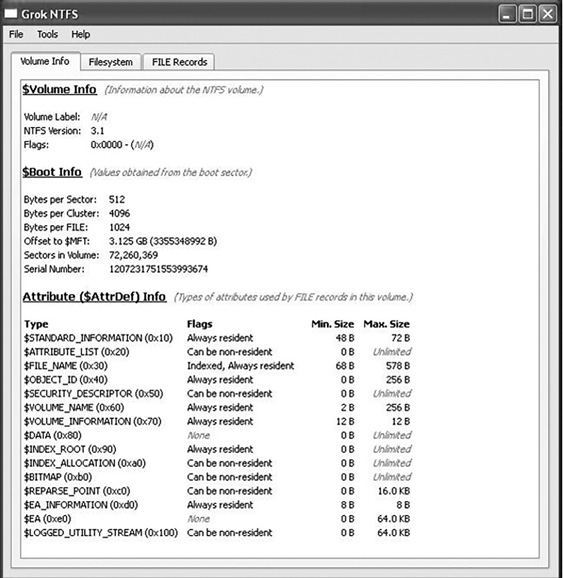
FIGURE 15-1
Grok-NTFS.
Courtesy of ASR Data
Digital Detective
Digital Detective offers Blade, HstEx, and NetAnalysis. HstEx is a Windows-based forensic data recover tool. It is designed to recover things such as deleted browser history and cache data. Netanalysis is a tool that extracts data from web browsers. For information on all these commercial tools, see http://www.digital-detective.co.uk. Blade is a Windows-based data recovery solution. It supports plug-ins that give it advanced data recovery and analysis capabilities. HstEx version 4 is shown in FIGURE 15-2.
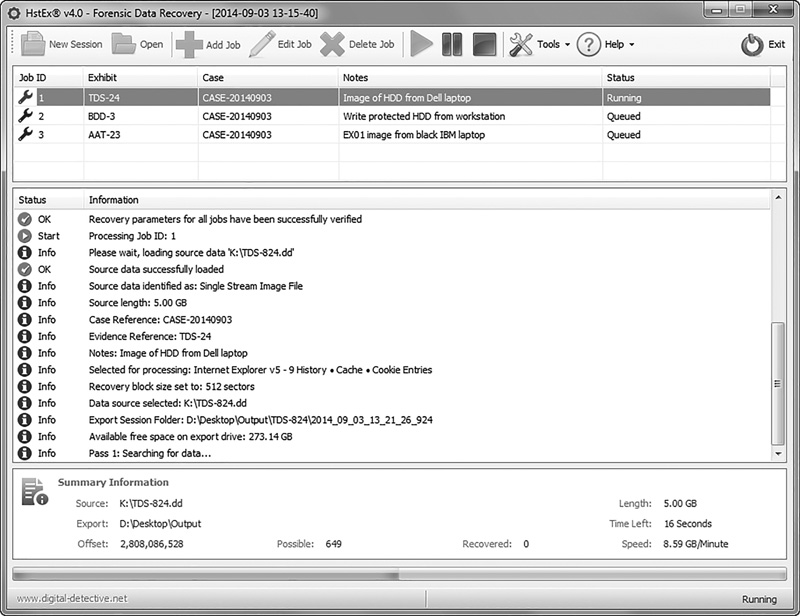
FIGURE 15-2
HstEx version 4.
Courtesy of Digital Detective Group Ltd
Digital Intelligence
Digital Intelligence, Inc., offers forensic hardware and software. Its software products include DRIVESPY, IMAGE, PART, PDBlock, and PDWipe. For information on all these products, see http://www.digitalintelligence.com.
Disk Investigator
This is a free utility that can be downloaded from http://www.theabsolute.net/sware/dskinv.html. This tool runs on Windows and has a graphical user interface. It is not as full featured as EnCase or FTK, but it is free and very easy to use. When you first launch the tool, you are presented with a cluster-by-cluster view of your hard drive in hexadecimal form. Under the View menu, you can view directories or the root. The Tools menu allows you to search for a specific file or to recover deleted files. The Disk Investigator tool is shown in FIGURE 15-3.
EnCase
Guidance Software offers a number of EnCase products, including Enterprise, eDiscovery, Forensic, and Portable. For more information on all these products, see http://www.guidancesoftware.com.
EnCase Enterprise allows the deepest level of visibility into laptops, desktops, file servers, and email servers. Use it to investigate human resources matters or to quickly determine the root cause of suspicious network activity. EnCase eDiscovery performs search, collection, preservation, and processing in a forensically sound manner. It collects and processes only potentially relevant data. EnCase Forensic gives you the ability to image a drive and preserve it in a forensically sound manner. The EnCase evidence file format is a digital evidence container validated and approved by courts worldwide. EnCase Forensic also contains a full suite of analysis, bookmarking, and reporting features. EnCase Portable is a pocketsized universal serial bus (USB) data collection and triage solution. Even nonexperts can use EnCase Portable so that specialists can focus on case management, processing, detailed analysis, and reporting.
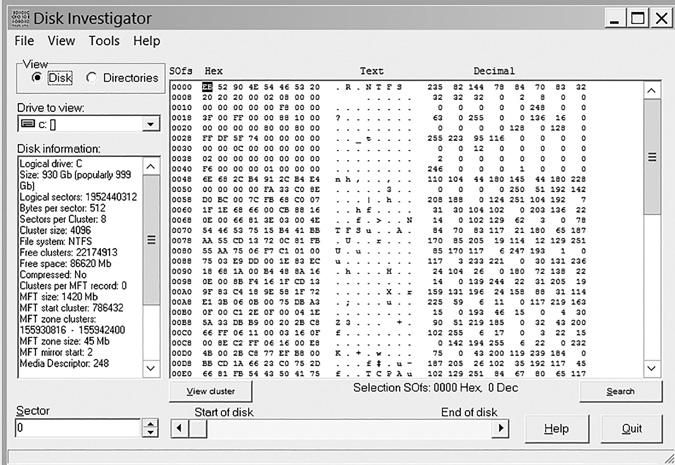
FIGURE 15-3
Disk Investigator.
Courtesy of Briggs Softworks
The Sleuth Kit
Sleuth Kit is a free suite of command-line tools. This product can be downloaded from http://www.sleuthkit.org/sleuthkit/. It includes a number of search utilities and can search for fragments of deleted tools. Many users find the command-line interface to be cumbersome; fortunately, a graphical user interface (GUI) called Autopsy has been created for Sleuth Kit and is available at http://www.sleuthkit.org/autopsy/download.php.
X-Ways Software Technology AG
X-Ways produces a number of products, including Evidor, X-Ways Forensics, and WinHex. For more information on all these products, see http://www.x-ways.net:
Evidor searches text on hard disks and retrieves the context of keyword occurrences on computer media. It examines the entire allocated space as well as currently unallocated space and slack space. That means it finds data from files that have been deleted if the files still exist physically.
X-Ways Forensics is an advanced work environment for system forensics examiners. It’s integrated with the WinHex hex and disk editors.
WinHex is a system forensics, data recovery, and IT security tool that includes a hex editor, disk editor, and RAM editor.
Other Tools
Other tools with more limited use are listed here. These tools are not general-purpose forensic utilities, but rather very specific tools with narrowly defined functionalities:
AccuBurn-R—AccuBurn-R produces exact copies of disks that have been imaged using CD/DVD Inspector. It supports all types and formats of disks. See http://www.infinadyne.com.
Darik’s Boot and Nuke (DBAN)—DBAN is a self-contained boot disk that securely wipes the hard disks of most computers. DBAN automatically and completely deletes the contents of any hard disk that it can detect. It is a useful utility for bulk or emergency data destruction. See http://www.dban.sourceforge.net.
Directory Snoop—Directory Snoop is a cluster-level search tool. It allows Windows users to search file allocation table (FAT) and New Technology File System (NTFS) disk drives to see what data may be hiding. Directory Snoop can recover deleted files and permanently erase sensitive files. See http://www.briggsoft.com/dsnoop.htm. You can see Directory Snoop in FIGURE 15-4.
L0phtCrack—L0phtCrack is password auditing and recovery software offered in three versions. You can get this tool at http://www.l0phtcrack.com/doc/
Process Monitor—Process Monitor is an advanced monitoring tool for Windows that shows real-time file system, Registry, and process/thread activity. It combines the features of two legacy utilities, Filemon and Regmon, and adds an extensive list of enhancements. See http://technet.microsoft.com/en-us/sysinternals/bb896645.aspx. Process Monitor is shown in FIGURE 15-5.
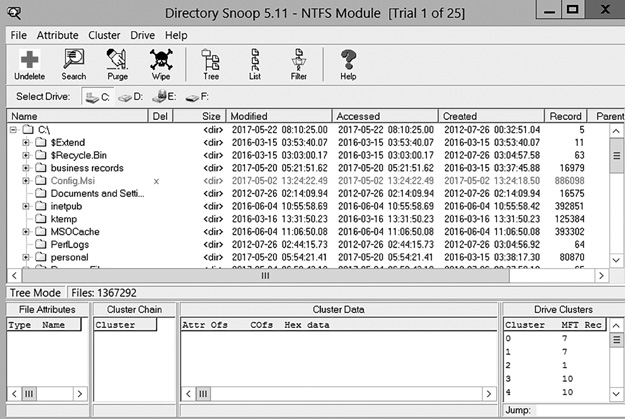
FIGURE 15-4
Directory Snoop.Courtesy of Windows Sysinternals
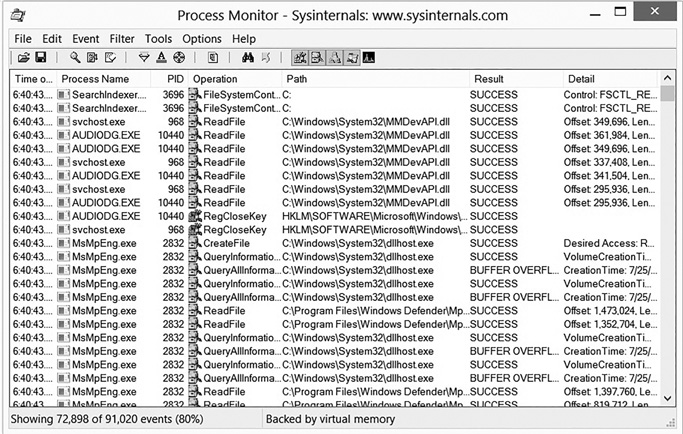
FIGURE 15-5
Process Monitor.Courtesy of ASR Data
Visual TimeAnalyzer—Visual TimeAnalyzer automatically tracks all computer use and activities, including working time and pauses. It presents detailed, richly illustrated reports. See http://www.neuber.com/timeanalyzer/.
Wayback Machine—The Wayback Machine is often useful during a forensic investigation to know the state of a website at a prior moment in time. There are a number of sites that take snapshots of websites and save them for posterity. One of the largest and most comprehensive is the Wayback Machine. Additional information can be found at http://archive.org/web/web.php.