Table of Contents for
System Forensics, Investigation, and Response, 3rd Edition
 System Forensics, Investigation, and Response, 3rd Edition
Published by
Jones & Bartlett Learning, 2017
System Forensics, Investigation, and Response, 3rd Edition
Published by
Jones & Bartlett Learning, 2017
- Cover Page
- Contents
- System Forensics, Investigation, and Response
- Title Page
- Copyright Page
- Content
- Preface
- About the Author
- PART I Introduction to Forensics
- CHAPTER 1 Introduction to Forensics
- What Is Computer Forensics?
- Understanding the Field of Digital Forensics
- Knowledge Needed for Computer Forensics Analysis
- The Daubert Standard
- U.S. Laws Affecting Digital Forensics
- Federal Guidelines
- CHAPTER SUMMARY
- KEY CONCEPTS AND TERMS
- CHAPTER 1 ASSESSMENT
- CHAPTER 2 Overview of Computer Crime
- How Computer Crime Affects Forensics
- Identity Theft
- Hacking
- Cyberstalking and Harassment
- Fraud
- Non-Access Computer Crimes
- Cyberterrorism
- CHAPTER SUMMARY
- KEY CONCEPTS AND TERMS
- CHAPTER 2 ASSESSMENT
- CHAPTER 3 Forensic Methods and Labs
- Forensic Methodologies
- Formal Forensic Approaches
- Documentation of Methodologies and Findings
- Evidence-Handling Tasks
- How to Set Up a Forensic Lab
- Common Forensic Software Programs
- Forensic Certifications
- CHAPTER SUMMARY
- KEY CONCEPTS AND TERMS
- CHAPTER 3 ASSESSMENT
- PART II Technical Overview: SystemForensics Tools, Techniques, and Methods
- CHAPTER 4 Collecting, Seizing, and Protecting Evidence
- Proper Procedure
- Handling Evidence
- Storage Formats
- Forensic Imaging
- RAID Acquisitions
- CHAPTER SUMMARY
- KEY CONCEPTS AND TERMS
- CHAPTER 4 ASSESSMENT
- CHAPTER LAB
- CHAPTER 5 Understanding Techniques for Hiding and Scrambling Information
- Steganography
- Encryption
- CHAPTER SUMMARY
- KEY CONCEPTS AND TERMS
- CHAPTER 5 ASSESSMENT
- CHAPTER 6 Recovering Data
- Undeleting Data
- Recovering Information from Damaged Media
- File Carving
- CHAPTER SUMMARY
- KEY CONCEPTS AND TERMS
- CHAPTER 6 ASSESSMENT
- CHAPTER 7 Email Forensics
- How Email Works
- Email Protocols
- Email Headers
- Tracing Email
- Email Server Forensics
- Email and the Law
- CHAPTER SUMMARY
- KEY CONCEPTS AND TERMS
- CHAPTER 7 ASSESSMENT
- CHAPTER 8 Windows Forensics
- Windows Details
- Volatile Data
- Windows Swap File
- Windows Logs
- Windows Directories
- Index.dat
- Windows Files and Permissions
- The Registry
- Volume Shadow Copy
- Memory Forensics
- CHAPTER SUMMARY
- KEY CONCEPTS AND TERMS
- CHAPTER 8 ASSESSMENT
- CHAPTER 9 Linux Forensics
- Linux and Forensics
- Linux Basics
- Linux File Systems
- Linux Logs
- Linux Directories
- Shell Commands for Forensics
- Kali Linux Forensics
- Forensics Tools for Linux
- CHAPTER SUMMARY
- KEY CONCEPTS AND TERMS
- CHAPTER 9 ASSESSMENT
- CHAPTER 10 Macintosh Forensics
- Mac Basics
- Macintosh Logs
- Directories
- Macintosh Forensic Techniques
- How to Examine a Mac
- Can You Undelete in Mac?
- CHAPTER SUMMARY
- KEY CONCEPTS AND TERMS
- CHAPTER 10 ASSESSMENT
- CHAPTER 11 Mobile Forensics
- Cellular Device Concepts
- What Evidence You Can Get from a Cell Phone
- Seizing Evidence from a Mobile Device
- JTAG
- CHAPTER SUMMARY
- KEY CONCEPTS AND TERMS
- CHAPTER 11 ASSESSMENT
- CHAPTER 12 Performing Network Analysis
- Network Packet Analysis
- Network Traffic Analysis
- Router Forensics
- Firewall Forensics
- CHAPTER SUMMARY
- KEY CONCEPTS AND TERMS
- CHAPTER 12 ASSESSMENT
- PART III Incident Response and Resources
- CHAPTER 13 Incident and Intrusion Response
- Disaster Recovery
- Preserving Evidence
- Adding Forensics to Incident Response
- CHAPTER SUMMARY
- KEY CONCEPTS AND TERMS
- CHAPTER 13 ASSESSMENT
- CHAPTER 14 Trends and Future Directions
- Technical Trends
- Legal and Procedural Trends
- CHAPTER SUMMARY
- KEY CONCEPTS AND TERMS
- CHAPTER 14 ASSESSMENT
- CHAPTER 15 System Forensics Resources
- Tools to Use
- Resources
- Laws
- CHAPTER SUMMARY
- KEY CONCEPTS AND TERMS
- CHAPTER 15 ASSESSMENT
- APPENDIX A Answer Key
- APPENDIX B Standard Acronyms
- Glossary of Key Terms
- References
- Index
Router Forensics
Using network forensics, you can determine the type of attack over a network. You can also, in some cases, trace the path back to the attacker. A router is a hardware or software device that forwards data packets across a network to a destination network. The destination network could be multiple networks away. A router may contain read-only memory with power-on self test code, flash memory containing the router’s operating system, nonvolatile random access memory (RAM) containing configuration information, and volatile RAM containing the routing tables and log information.
Router Basics
The basic networking hardware devices are as follows:
Network card
Hub
Switch
Router
A network interface card (NIC) is an expansion board you insert into a computer or a motherboard-mounted bit of hardware that allows the computer to be connected to a network. A NIC handles many things, such as the following:
Signal encoding and decoding
Data buffering and transmission
Media Access Control
Data encapsulation, or building the frame around the data
These are relatively simple devices that don’t store information that you can examine for any appreciable period of time.
A hub is used to connect computers on an Ethernet LAN. Essentially, a hub does not do anything to see that packets get to their proper destination. Instead, the hub takes any packet it receives and simply sends a copy of it out every port it has, except the port on which the packet entered the hub. This is based on the theory that the packet is going somewhere, so send it out all available avenues. This causes a lot of excess network traffic; hubs are used very rarely in modern networks.
A switch prevents traffic jams by ensuring that data goes straight from its origin to its proper destination, with no wandering in between. Switches remember the address of every node on the network and anticipate where data needs to go. A switch operates only with the computers on the same LAN. That is because a switch operates based on the MAC address in a packet, which is not routable. It cannot send data out to the Internet or across a wide area network (WAN). These functions require a router.
A router is similar to a switch, but it can also connect different logical networks or subnets and enable traffic that is destined for the networks on the other side of the router to pass through. Routers typically provide improved security functions compared with a switch. Routers utilize the IP address, which is routable, to determine the path of outgoing packets. Routers work at the Network Layer of the OSI model.
Routers determine where to send information from one computer to another. Routers are specialized computers that send your messages and those of every other Internet user speeding to their destinations along thousands of pathways. Routers maintain a routing table to keep track of routes, or which connections are to be used for different networks. Some of these routes are programmed in manually, but many are “learned” automatically by the router. It does this by examining incoming packets and, if one comes from an IP address the router has not seen before, adding that address to its routing table. Modern routers also inform each other about new routes and routes that are no longer working to make routing as efficient as possible.
Modern routers are complex devices. They don’t only direct packets along a path. Routers can often filter, shape, or give priority to traffic according to company or customer needs. Router capabilities and function depend highly on where the router is placed in a network. Clearly, a router directing traffic between a company’s floors will act different than a router on the network perimeter with the Internet. In contrast, the typical home router acts more as a firewall and issues IP addresses by its Dynamic Host Configuration Protocol (DHCP) capabilities.
Virtually all routers are programmable, maintain logs, and are configured by a command line interface. Among several router vendors, the largest market share holder is Cisco, so it is worthwhile to become familiar with at least the basics of working with a Cisco router. For a good overview of Cisco routers, the document at http://www.cisco.com/c/en/us/td/docs/ios/fundamentals/command/reference/cf_book.pdf will be a great help. Or search for Cisco IOS command reference guide materials.
Types of Router Attacks
Routers can be vulnerable to several types of attacks, including router table poisoning. Router table poisoning is one of the most common and effective attacks. To carry out this type of attack, an attacker alters the routing data update packets that the routing protocols need. This results in incorrect entries in the routing table. This, in turn, can result in artificial congestion, can overwhelm the router, or can allow an attacker access to data in the compromised network by sending data to a different destination or over a different route than anticipated.
Getting Evidence from the Router
Even though a router is just a special-purpose computer running a routing program, getting evidence from a router is quite different from getting evidence from a PC, laptop, or server. The first major difference is that with a router, you do not shut down the device and image it. The reason is that once you shut it down, you will have potentially lost valuable evidence. For this reason, router forensics requires a great deal of care. You must make absolutely certain not to alter anything, and you must be meticulous in documenting your process.
The first step is to connect with the router so you can run certain commands. HyperTerminal is a free tool that can be used to connect to and interact with your routers. Because the router is live, it is important to record everything you do. Fortunately, HyperTerminal makes this easy, as shown in FIGURE 12-5.
Several commands are important to router forensics. The most important and most commonly used commands from Cisco routers are described here. The commands for different brands of routers, or even different Cisco routers, may be different, but there are equivalent commands:
The
show versioncommand provides a significant amount of hardware and software detail about the router. It displays the platform, operating system version, system image file, any interfaces, the amount of RAM the router has, and the number of network and voice interfaces there are.
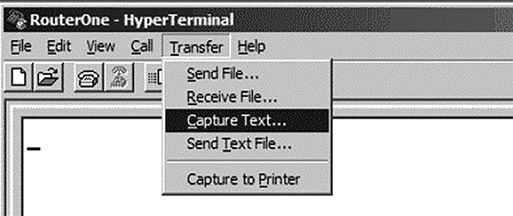
FIGURE 12-5
Recording with HyperTerminal.
Courtesy of HILGRAEVE.
The
show running-configcommand provides the currently executing configuration.The
show startup-configcommand provides the system’s start-up configurations.Differences between
show startup-configandshow running-configcan be indicative of a hacker having altered the system.The
show ip route commandshows the routing table. Manipulating that routing table is one primary reason hackers infiltrate routers.
You will probably find the preceding commands useful in your forensic examination. However, you may find several other commands useful as well, including the following:
show clock detailshow reloadshow ip arpshow usersshow loggingshow ip interfaceshow interfacesshow tcp brief allshow ip socketsshow ip nat translations verboseshow ip cache flowshow ip cefshow snmp usershow snmp group
The release of version 11.2 of Cisco IOS (operating system) introduced the new command show tech-support. This command has allowed for the collection of multiple sources of information concerning the router in a single command. This one command outputs the same as running all of the following commands:
show versionshow running-configshow stacksshow interfaceshow controllershow process cpushow process memoryshow buffers
For readers who are looking for more in-depth, highly technical router forensics information, the following papers might be interesting: