Table of Contents for
System Forensics, Investigation, and Response, 3rd Edition
 System Forensics, Investigation, and Response, 3rd Edition
Published by
Jones & Bartlett Learning, 2017
System Forensics, Investigation, and Response, 3rd Edition
Published by
Jones & Bartlett Learning, 2017
- Cover Page
- Contents
- System Forensics, Investigation, and Response
- Title Page
- Copyright Page
- Content
- Preface
- About the Author
- PART I Introduction to Forensics
- CHAPTER 1 Introduction to Forensics
- What Is Computer Forensics?
- Understanding the Field of Digital Forensics
- Knowledge Needed for Computer Forensics Analysis
- The Daubert Standard
- U.S. Laws Affecting Digital Forensics
- Federal Guidelines
- CHAPTER SUMMARY
- KEY CONCEPTS AND TERMS
- CHAPTER 1 ASSESSMENT
- CHAPTER 2 Overview of Computer Crime
- How Computer Crime Affects Forensics
- Identity Theft
- Hacking
- Cyberstalking and Harassment
- Fraud
- Non-Access Computer Crimes
- Cyberterrorism
- CHAPTER SUMMARY
- KEY CONCEPTS AND TERMS
- CHAPTER 2 ASSESSMENT
- CHAPTER 3 Forensic Methods and Labs
- Forensic Methodologies
- Formal Forensic Approaches
- Documentation of Methodologies and Findings
- Evidence-Handling Tasks
- How to Set Up a Forensic Lab
- Common Forensic Software Programs
- Forensic Certifications
- CHAPTER SUMMARY
- KEY CONCEPTS AND TERMS
- CHAPTER 3 ASSESSMENT
- PART II Technical Overview: SystemForensics Tools, Techniques, and Methods
- CHAPTER 4 Collecting, Seizing, and Protecting Evidence
- Proper Procedure
- Handling Evidence
- Storage Formats
- Forensic Imaging
- RAID Acquisitions
- CHAPTER SUMMARY
- KEY CONCEPTS AND TERMS
- CHAPTER 4 ASSESSMENT
- CHAPTER LAB
- CHAPTER 5 Understanding Techniques for Hiding and Scrambling Information
- Steganography
- Encryption
- CHAPTER SUMMARY
- KEY CONCEPTS AND TERMS
- CHAPTER 5 ASSESSMENT
- CHAPTER 6 Recovering Data
- Undeleting Data
- Recovering Information from Damaged Media
- File Carving
- CHAPTER SUMMARY
- KEY CONCEPTS AND TERMS
- CHAPTER 6 ASSESSMENT
- CHAPTER 7 Email Forensics
- How Email Works
- Email Protocols
- Email Headers
- Tracing Email
- Email Server Forensics
- Email and the Law
- CHAPTER SUMMARY
- KEY CONCEPTS AND TERMS
- CHAPTER 7 ASSESSMENT
- CHAPTER 8 Windows Forensics
- Windows Details
- Volatile Data
- Windows Swap File
- Windows Logs
- Windows Directories
- Index.dat
- Windows Files and Permissions
- The Registry
- Volume Shadow Copy
- Memory Forensics
- CHAPTER SUMMARY
- KEY CONCEPTS AND TERMS
- CHAPTER 8 ASSESSMENT
- CHAPTER 9 Linux Forensics
- Linux and Forensics
- Linux Basics
- Linux File Systems
- Linux Logs
- Linux Directories
- Shell Commands for Forensics
- Kali Linux Forensics
- Forensics Tools for Linux
- CHAPTER SUMMARY
- KEY CONCEPTS AND TERMS
- CHAPTER 9 ASSESSMENT
- CHAPTER 10 Macintosh Forensics
- Mac Basics
- Macintosh Logs
- Directories
- Macintosh Forensic Techniques
- How to Examine a Mac
- Can You Undelete in Mac?
- CHAPTER SUMMARY
- KEY CONCEPTS AND TERMS
- CHAPTER 10 ASSESSMENT
- CHAPTER 11 Mobile Forensics
- Cellular Device Concepts
- What Evidence You Can Get from a Cell Phone
- Seizing Evidence from a Mobile Device
- JTAG
- CHAPTER SUMMARY
- KEY CONCEPTS AND TERMS
- CHAPTER 11 ASSESSMENT
- CHAPTER 12 Performing Network Analysis
- Network Packet Analysis
- Network Traffic Analysis
- Router Forensics
- Firewall Forensics
- CHAPTER SUMMARY
- KEY CONCEPTS AND TERMS
- CHAPTER 12 ASSESSMENT
- PART III Incident Response and Resources
- CHAPTER 13 Incident and Intrusion Response
- Disaster Recovery
- Preserving Evidence
- Adding Forensics to Incident Response
- CHAPTER SUMMARY
- KEY CONCEPTS AND TERMS
- CHAPTER 13 ASSESSMENT
- CHAPTER 14 Trends and Future Directions
- Technical Trends
- Legal and Procedural Trends
- CHAPTER SUMMARY
- KEY CONCEPTS AND TERMS
- CHAPTER 14 ASSESSMENT
- CHAPTER 15 System Forensics Resources
- Tools to Use
- Resources
- Laws
- CHAPTER SUMMARY
- KEY CONCEPTS AND TERMS
- CHAPTER 15 ASSESSMENT
- APPENDIX A Answer Key
- APPENDIX B Standard Acronyms
- Glossary of Key Terms
- References
- Index
Hacking
Hacking is a generic term that has different meanings to different people. In the hacking community, it means to experiment with a system, learning its flaws, in order to better understand the system or to fix the flaws. In common speech, it means breaking into a system. This section uses the latter definition. It is certainly possible to break into a system remotely. Attackers can use a number of techniques to do this. The following sections discuss a few of these techniques.
SQL Injection
SQL injection may be the most common Web application attack. It is based on inserting Structured Query Language (SQL) commands into text boxes, such as the username and password text fields on the logon screen. To understand how SQL injection works, you have to first understand the basics of how a logon screen is programmed. According to the most recent Verizon Terremark Data Breach Investigations Report, SQL injection was once one of the most common types of web attacks, but its use has fallen off in recent years thanks to better website coding practices. Still, it is remarkable how many sites remain susceptible.
A logon screen requires the user to enter a username and password, and these then have to be validated. Most likely they are validated by checking a database that has a table of users to see if the password matches that user. All modern databases “speak” Structured Query Language SQL. If the programmer who created the logon is not careful, the webpage may be susceptible to SQL injection. Here is how that attack works. SQL looks a lot like English. For example, to check a username and password, you might want to query the database and see if there is any entry in the users’ table that matches the username and password that was entered. If there is, then you have a match. The SQL statements in the programming code for the website have to use quotation marks to separate the SQL code from the programming code. A typical SQL statement might look something like this:
SELECT * FROM tblUsers WHERE USERNAME = '" + txtUsername.Text
+' AND PASSWORD = '" + txtPassword.Text +"'
If you enter the username 'thisuser' and the password 'letmein', this code produces the SQL command
SELECT * FROM tblUsers WHERE USERNAME = 'thisuser' AND
PASSWORD = 'letmein'
This is fairly easy to understand even for nonprogrammers. Plus, it is effective. If there is a match in the database, that means the username and password match. If no records are returned from the database, that means there was no match, and this is not a valid logon.
SQL injection is basically about subverting this process. The idea is to create a statement that will always be true. For example, you enter into the username and password boxes the following ‘ or ‘1’ = ‘1. This causes the program to create this query:
SELECT * FROM tblUsers WHERE USERNAME = '' or '1' = '1' AND
PASSWORD = '' or '1' = '1'
So you are telling the database and application to return all records where username and password are blank or if 1 = 1. The fact is that 1 always equals 1, so this works. Now if the programmer wrote the application properly—to not allow any extra characters—this does not work. But in all too many cases, it does work. And then the intruder has logged on to your web application and can do whatever any authorized user can do.
The example just described is the simplest version of SQL injection. There are more advanced SQL injection techniques. In fact, SQL injection is limited only by your own knowledge of SQL. Obviously, SQL injection attacks can be very sophisticated, involving a complex array of SQL statements, or they can be as simple as the example just discussed.
There are even tools that make the process of executing this attack—or testing your website to see if it is vulnerable to this attack—even easier. A few are listed here:
Several tools from Database Security at http://www.databasesecurity.com/sqlinjectiontools.htm
Sqlmap at http://sqlmap.org
SQL Ninja at http://sqlninja.sourceforge.net
How Does This Crime Affect Forensics?
Regardless of the sophistication of the SQL injection attack, or the lack thereof, such attacks leave specific forensic evidence. The first place you should look is in the firewall logs. There should be some indication of where the connection came from. Second, search your database logs; some relational database engines log transactions, when they occurred, and what they were. This can be invaluable in your investigation.
Cross-Site Scripting
This is another very common attack. In this attack, the perpetrator seeks out someplace on the target website that allows end users to post text that other users will see. Product reviews are a great place for this. But instead of posting a review or other text, the attacker will post JavaScript. If the website does not filter the user input before displaying, then when other users navigate to this review, the script will execute. The attacker is only limited by his or her knowledge of JavaScript. One popular thing to do is to redirect the user to a phishing site.
To better understand this attack, let us walk through a scenario. Before we do, I want to point out that to the best of my knowledge, none of the major e-commerce or auction sites are vulnerable to this. In this scenario the attacker sets up a website that looks very much like the target site. He or she gives this site a name similar to the target site, off by only one letter. That makes it likely an end user will not notice the minor difference. Then the attacker infects the target site with cross-site scripting, inserting a script that will redirect the user to the phishing site. Once at the phishing site, the malicious site simply displays a notice stating “Your session has expired, please log in again.” When the user logs in, the malicious site captures the login information, then sends the user back to the real site. Now the attacker has that user’s login information. To the end user, it would appear as if they have always been on the same website.
How Does This Crime Affect Forensics?
This can be a complex crime to investigate. The first item to look for is any scripts in the website that are not accounted for by the website’s programmers. But in a large website that can be a very tedious task, and it is possible the attacker has removed the malicious script. A more efficient method is to search the web server’s logs for any redirect messages (these are HTTP messages in the 300 range). Then determine if any of these redirects cannot be accounted for via legitimate web coding.
Ophcrack
Probably one of the most basic tools for physically accessing a Windows machine is oph-crack. Ophcrack can be downloaded from http://ophcrack.sourceforge.net. It is a tool to crack the local passwords on Windows systems. It is usually pretty effective. In fact, if an attacker can sit at a Windows machine on your network with an Ophcrack compact disc (CD) or USB flash drive for 10 minutes or less, chances are that the attacker is going to get the local passwords. This is a significant problem on corporate networks that meet the following criteria:
It is usually possible to find an unoccupied desk.
If physical security is lax, an outsider can get in the building, often as a cleaning or maintenance person or temporary employee.
Focus is on domain accounts, not local. There is a good chance that the local accounts for one Windows machine are the same throughout. The systems are usually just imaged from a base system.
How does Ophcrack work? First, let’s discuss how Windows passwords work. When you choose your local Windows password, the password you choose is hashed and stored in the SAM file, which is found in the Windows\System32\ directory. The hash of the password is not the password itself, but it is created from the password using a hashing algorithm that makes two identical hashes for different passwords very unlikely.
To make this work, all you have to do is put the CD into the system and reboot. During the boot-up process, press the key needed to enter the system’s BIOS, often F2 or the Delete key, to change the boot order. Additionally, pressing the F10 or F12 key might bring up a boot menu, where you can then choose Boot from CD. Note that in FIGURE 2-2, the passwords that Ophcrack found are blocked out.
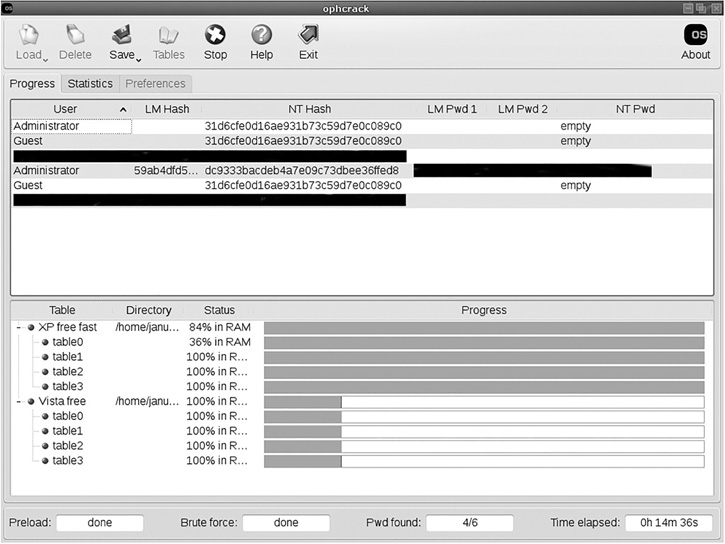
FIGURE 2-2
Ophcrack. Note: This screenshot was taken from a live machine, so all nonstandard user accounts and all passwords were redacted.
Courtesy of Objectif Securite
There’s a lot to know about hashes and cryptography, but for now you just need to know that a hash is one-way; you don’t “unhash” something. When you log on to Windows, the system hashes whatever you type in and compares it with whatever hash is in the SAM file. If there is an exact match, then you are given access.
A rainbow table is a table of precomputed hashes. The simplest, but largest, rainbow table is created by the software creating tables of all the possible keyboard combinations that could be used for a password, then creating hashes of these passwords. There are methods to make smaller, more focused, rainbow tables, but this is essentially the process. All you have to do is search for the hash that is in the SAM file, and the column matching it will have the password. This is called a rainbow table because it contains every conceivable combination of keyboard characters under the rainbow and their associated hashed versions. These tables get huge very fast, so most are no more than 8 to 10 characters in length, which works for most passwords.
The problem is getting the SAM file to start with. When Windows boots up, long before you even get the logon screen, the system locks the SAM file—preventing you from copying or editing it. Well, that is where Ophcrack comes in. It boots to a Linux Live CD and then scans its rainbow table searching for matches. It displays all the passwords it finds in an easy-to-use graphical user interface.
Once the attacker has a valid logon account, particularly an administrator account, he or she can log on to that computer. This doesn’t let the attacker join the domain, but he or she now has a foothold in your network. You can see this in Figure 2-2.
How Does This Crime Affect Forensics?
There may or may not be much in the logs for this crime. If the target system is a Windows Server 2003, 2008, or 2012 machine, then the rebooting of the machine will show in the log. If you see a reboot followed by a successful logon with an account like Administrator, it is an indication that a tool like ophcrack might have been used. Another issue to examine is physical security. If a physical intrusion is suspected, then traditional forensic methods, such as examining security cameras and even fingerprints, become important. Of course, having an account logged on at a time when the actual user who is assigned to that account is not present is also a clear sign that a breach of some kind has occurred.
Tricking Tech Support
The following is a simple trick, and one that is a follow-up to using Ophcrack to break local accounts. After the attacker has gained access to a local account, he or she will really want to get domain admin privileges. The command net user can help do this. First, the attacker writes the following two-line script:
net user /domain /add localaccountname password
net group /domain "Domain Admins" /add localaccount
The attacker then saves that script in the All Users startup folder. The next step is to get a domain admin to log on to this machine. If that happens, the script runs—in the background and not visible—and your local account is now a domain admin. But how do you get a domain administrator to log on? Well, it just so happens that in many organizations, the tech support personnel are in the domain admin group. So the attacker merely needs to do something to render the machine not fully operational. When a tech support person logs on to fix that problem, the script is run.
How Does This Crime Affect Forensics?
Searching the system for any unrecognized scripts, particularly in any startup folders, is a good first step if you suspect a physical breach. Of course, the usage of the compromised account also yields clues. If the network admin account shows it was used at a time when the network administrator was away, this suggests the account has been compromised. And, as with ophcrack, physical security is an issue in this crime; therefore, investigating physical breaches of the premises is important.
Hacking in General
Entire books have been written on hacking techniques, and entire certification courses focus on such skills. The purpose here is to introduce you to some techniques that an attacker might use. To go into all the common hacking techniques attackers use is beyond the scope of this text. However, this section illustrates an important point: computer crime investigators should have a strong working knowledge of hacking techniques. Your forensic investigations will be drastically improved if you have an understanding of the techniques that attackers use.