Table of Contents for
System Forensics, Investigation, and Response, 3rd Edition
 System Forensics, Investigation, and Response, 3rd Edition
Published by
Jones & Bartlett Learning, 2017
System Forensics, Investigation, and Response, 3rd Edition
Published by
Jones & Bartlett Learning, 2017
- Cover Page
- Contents
- System Forensics, Investigation, and Response
- Title Page
- Copyright Page
- Content
- Preface
- About the Author
- PART I Introduction to Forensics
- CHAPTER 1 Introduction to Forensics
- What Is Computer Forensics?
- Understanding the Field of Digital Forensics
- Knowledge Needed for Computer Forensics Analysis
- The Daubert Standard
- U.S. Laws Affecting Digital Forensics
- Federal Guidelines
- CHAPTER SUMMARY
- KEY CONCEPTS AND TERMS
- CHAPTER 1 ASSESSMENT
- CHAPTER 2 Overview of Computer Crime
- How Computer Crime Affects Forensics
- Identity Theft
- Hacking
- Cyberstalking and Harassment
- Fraud
- Non-Access Computer Crimes
- Cyberterrorism
- CHAPTER SUMMARY
- KEY CONCEPTS AND TERMS
- CHAPTER 2 ASSESSMENT
- CHAPTER 3 Forensic Methods and Labs
- Forensic Methodologies
- Formal Forensic Approaches
- Documentation of Methodologies and Findings
- Evidence-Handling Tasks
- How to Set Up a Forensic Lab
- Common Forensic Software Programs
- Forensic Certifications
- CHAPTER SUMMARY
- KEY CONCEPTS AND TERMS
- CHAPTER 3 ASSESSMENT
- PART II Technical Overview: SystemForensics Tools, Techniques, and Methods
- CHAPTER 4 Collecting, Seizing, and Protecting Evidence
- Proper Procedure
- Handling Evidence
- Storage Formats
- Forensic Imaging
- RAID Acquisitions
- CHAPTER SUMMARY
- KEY CONCEPTS AND TERMS
- CHAPTER 4 ASSESSMENT
- CHAPTER LAB
- CHAPTER 5 Understanding Techniques for Hiding and Scrambling Information
- Steganography
- Encryption
- CHAPTER SUMMARY
- KEY CONCEPTS AND TERMS
- CHAPTER 5 ASSESSMENT
- CHAPTER 6 Recovering Data
- Undeleting Data
- Recovering Information from Damaged Media
- File Carving
- CHAPTER SUMMARY
- KEY CONCEPTS AND TERMS
- CHAPTER 6 ASSESSMENT
- CHAPTER 7 Email Forensics
- How Email Works
- Email Protocols
- Email Headers
- Tracing Email
- Email Server Forensics
- Email and the Law
- CHAPTER SUMMARY
- KEY CONCEPTS AND TERMS
- CHAPTER 7 ASSESSMENT
- CHAPTER 8 Windows Forensics
- Windows Details
- Volatile Data
- Windows Swap File
- Windows Logs
- Windows Directories
- Index.dat
- Windows Files and Permissions
- The Registry
- Volume Shadow Copy
- Memory Forensics
- CHAPTER SUMMARY
- KEY CONCEPTS AND TERMS
- CHAPTER 8 ASSESSMENT
- CHAPTER 9 Linux Forensics
- Linux and Forensics
- Linux Basics
- Linux File Systems
- Linux Logs
- Linux Directories
- Shell Commands for Forensics
- Kali Linux Forensics
- Forensics Tools for Linux
- CHAPTER SUMMARY
- KEY CONCEPTS AND TERMS
- CHAPTER 9 ASSESSMENT
- CHAPTER 10 Macintosh Forensics
- Mac Basics
- Macintosh Logs
- Directories
- Macintosh Forensic Techniques
- How to Examine a Mac
- Can You Undelete in Mac?
- CHAPTER SUMMARY
- KEY CONCEPTS AND TERMS
- CHAPTER 10 ASSESSMENT
- CHAPTER 11 Mobile Forensics
- Cellular Device Concepts
- What Evidence You Can Get from a Cell Phone
- Seizing Evidence from a Mobile Device
- JTAG
- CHAPTER SUMMARY
- KEY CONCEPTS AND TERMS
- CHAPTER 11 ASSESSMENT
- CHAPTER 12 Performing Network Analysis
- Network Packet Analysis
- Network Traffic Analysis
- Router Forensics
- Firewall Forensics
- CHAPTER SUMMARY
- KEY CONCEPTS AND TERMS
- CHAPTER 12 ASSESSMENT
- PART III Incident Response and Resources
- CHAPTER 13 Incident and Intrusion Response
- Disaster Recovery
- Preserving Evidence
- Adding Forensics to Incident Response
- CHAPTER SUMMARY
- KEY CONCEPTS AND TERMS
- CHAPTER 13 ASSESSMENT
- CHAPTER 14 Trends and Future Directions
- Technical Trends
- Legal and Procedural Trends
- CHAPTER SUMMARY
- KEY CONCEPTS AND TERMS
- CHAPTER 14 ASSESSMENT
- CHAPTER 15 System Forensics Resources
- Tools to Use
- Resources
- Laws
- CHAPTER SUMMARY
- KEY CONCEPTS AND TERMS
- CHAPTER 15 ASSESSMENT
- APPENDIX A Answer Key
- APPENDIX B Standard Acronyms
- Glossary of Key Terms
- References
- Index
Windows Directories
Certain directories in Windows are more likely than others to contain evidence. Obviously, a technically savvy criminal can erase evidence; however, not all criminals are technically savvy, and even those who are might have missed something. Or, the computer might have been seized before they could erase the incriminating evidence. Although there are many directories on a computer, the following are the most forensically interesting:
C:\Windows documents and settings—This folder is the default location to save documents. A criminal can save documents anywhere on the computer; however, it is a good idea to check this folder.
C:\users—This is where you will find user profile information, documents, pictures, and more for all users, not just the one currently logged on.
C:\Program Files—By default, programs are installed in subdirectories of this directory.
C:\Program Files (x86)—In 64-bit systems, 32-bit programs are installed here.
C:\Users\username\Documents—The current user’s Documents folder. This is a very important place to look.
And, of course, you should do a general search of the entire suspect drive—not just these specific folders and directories.
UserAssist
UserAssist is a feature of Windows 2000 and later. Its purpose is to help programs launch faster. For this reason, it maintains a record of programs that have been launched. By examining the appropriate Registry key for UserAssist, one can view all the programs that have been executed on that machine. This information is stored in the Registry (HKEY_ CURRENT_USER\Software\Microsoft\Windows\CurrentVersion\Explorer\UserAssist), but it’s encrypted, so you’ll need something like the free UserAssist tool to find out more.
You can get the UserAssist tool from http://www.downloadcrew.com/article/23805-userassist. An example of this tool is shown in FIGURE 8-7. As you can see, this gives a lot of information as to what programs were run, and when.
Most major forensics tools, including Guidance Software’s Encase, AccessData’s Forensic Toolkit (FTK), and Passmark’s OSForensics, will retrieve the UserAssist entries, as well as other entries, for you.
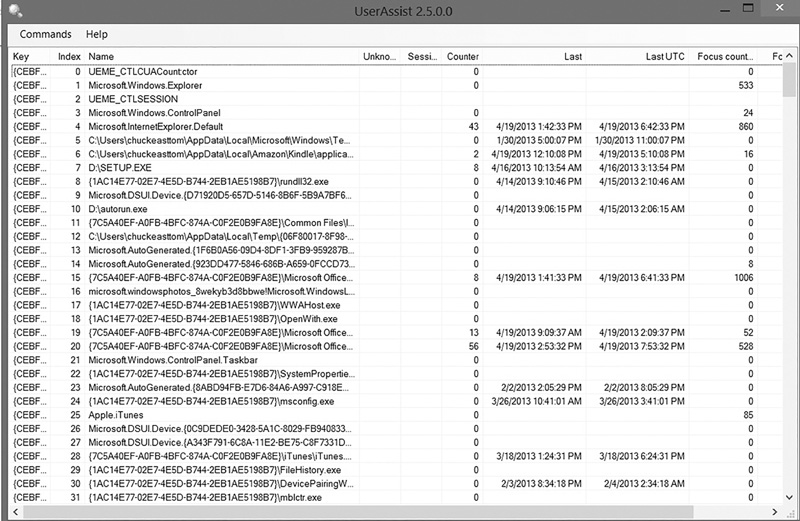
FIGURE 8-7
UserAssist.
Used with permission from Microsoft
Unallocated/Slack Space
You will need to search the entire disk to locate all relevant documents, logs, emails, and more in most of your cases. At times, though, you may want to find relevant data only in the unallocated space. To do so, you would search the unallocated space for keywords. Tools such as AccessData’s FTK allow an investigator to take an entire image and try to identify all of the documents in the file system, including the unallocated space. If you want to search the entire disk many times over, tools such as FTK can help you build a full-text index. Full-text indexing allows you to build a binary tree–based dictionary of all the words that exist in an image, and you can search the entire image for those words in seconds.
Alternate Data Streams
This is a clever way that a criminal can hide things on the target computer. Alternate data streams are essentially a method of attaching one file to another file, using NTFS. According to Irongeek.com:
Alternative Data Stream support was added to NTFS (Windows NT, Windows 2000 and Windows XP) to help support Macintosh Hierarchical File System (HFS), which uses resource forks to store icons and other information for a file. While this is the intended use (as well as a few Windows internal functions) there are other uses for Alternative Data Streams that should concern system administrators and security professionals. Using Alternative Data Streams a user can easily hide files that can go undetected unless closely inspected.
For example, if a criminal wants to attach a script to a text file, the following command will attach that script using alternate data streams:
type somescript.vbs> ADSFile.txt:somescript.vbsA number of tools are available that will detect whether files are attached via alternate data streams. One of the most widely known is List Alternate Data Streams. You can download it for free from http://www.heysoft.de/en/software/lads.php?lang=EN.