Table of Contents for
System Forensics, Investigation, and Response, 3rd Edition
 System Forensics, Investigation, and Response, 3rd Edition
Published by
Jones & Bartlett Learning, 2017
System Forensics, Investigation, and Response, 3rd Edition
Published by
Jones & Bartlett Learning, 2017
- Cover Page
- Contents
- System Forensics, Investigation, and Response
- Title Page
- Copyright Page
- Content
- Preface
- About the Author
- PART I Introduction to Forensics
- CHAPTER 1 Introduction to Forensics
- What Is Computer Forensics?
- Understanding the Field of Digital Forensics
- Knowledge Needed for Computer Forensics Analysis
- The Daubert Standard
- U.S. Laws Affecting Digital Forensics
- Federal Guidelines
- CHAPTER SUMMARY
- KEY CONCEPTS AND TERMS
- CHAPTER 1 ASSESSMENT
- CHAPTER 2 Overview of Computer Crime
- How Computer Crime Affects Forensics
- Identity Theft
- Hacking
- Cyberstalking and Harassment
- Fraud
- Non-Access Computer Crimes
- Cyberterrorism
- CHAPTER SUMMARY
- KEY CONCEPTS AND TERMS
- CHAPTER 2 ASSESSMENT
- CHAPTER 3 Forensic Methods and Labs
- Forensic Methodologies
- Formal Forensic Approaches
- Documentation of Methodologies and Findings
- Evidence-Handling Tasks
- How to Set Up a Forensic Lab
- Common Forensic Software Programs
- Forensic Certifications
- CHAPTER SUMMARY
- KEY CONCEPTS AND TERMS
- CHAPTER 3 ASSESSMENT
- PART II Technical Overview: SystemForensics Tools, Techniques, and Methods
- CHAPTER 4 Collecting, Seizing, and Protecting Evidence
- Proper Procedure
- Handling Evidence
- Storage Formats
- Forensic Imaging
- RAID Acquisitions
- CHAPTER SUMMARY
- KEY CONCEPTS AND TERMS
- CHAPTER 4 ASSESSMENT
- CHAPTER LAB
- CHAPTER 5 Understanding Techniques for Hiding and Scrambling Information
- Steganography
- Encryption
- CHAPTER SUMMARY
- KEY CONCEPTS AND TERMS
- CHAPTER 5 ASSESSMENT
- CHAPTER 6 Recovering Data
- Undeleting Data
- Recovering Information from Damaged Media
- File Carving
- CHAPTER SUMMARY
- KEY CONCEPTS AND TERMS
- CHAPTER 6 ASSESSMENT
- CHAPTER 7 Email Forensics
- How Email Works
- Email Protocols
- Email Headers
- Tracing Email
- Email Server Forensics
- Email and the Law
- CHAPTER SUMMARY
- KEY CONCEPTS AND TERMS
- CHAPTER 7 ASSESSMENT
- CHAPTER 8 Windows Forensics
- Windows Details
- Volatile Data
- Windows Swap File
- Windows Logs
- Windows Directories
- Index.dat
- Windows Files and Permissions
- The Registry
- Volume Shadow Copy
- Memory Forensics
- CHAPTER SUMMARY
- KEY CONCEPTS AND TERMS
- CHAPTER 8 ASSESSMENT
- CHAPTER 9 Linux Forensics
- Linux and Forensics
- Linux Basics
- Linux File Systems
- Linux Logs
- Linux Directories
- Shell Commands for Forensics
- Kali Linux Forensics
- Forensics Tools for Linux
- CHAPTER SUMMARY
- KEY CONCEPTS AND TERMS
- CHAPTER 9 ASSESSMENT
- CHAPTER 10 Macintosh Forensics
- Mac Basics
- Macintosh Logs
- Directories
- Macintosh Forensic Techniques
- How to Examine a Mac
- Can You Undelete in Mac?
- CHAPTER SUMMARY
- KEY CONCEPTS AND TERMS
- CHAPTER 10 ASSESSMENT
- CHAPTER 11 Mobile Forensics
- Cellular Device Concepts
- What Evidence You Can Get from a Cell Phone
- Seizing Evidence from a Mobile Device
- JTAG
- CHAPTER SUMMARY
- KEY CONCEPTS AND TERMS
- CHAPTER 11 ASSESSMENT
- CHAPTER 12 Performing Network Analysis
- Network Packet Analysis
- Network Traffic Analysis
- Router Forensics
- Firewall Forensics
- CHAPTER SUMMARY
- KEY CONCEPTS AND TERMS
- CHAPTER 12 ASSESSMENT
- PART III Incident Response and Resources
- CHAPTER 13 Incident and Intrusion Response
- Disaster Recovery
- Preserving Evidence
- Adding Forensics to Incident Response
- CHAPTER SUMMARY
- KEY CONCEPTS AND TERMS
- CHAPTER 13 ASSESSMENT
- CHAPTER 14 Trends and Future Directions
- Technical Trends
- Legal and Procedural Trends
- CHAPTER SUMMARY
- KEY CONCEPTS AND TERMS
- CHAPTER 14 ASSESSMENT
- CHAPTER 15 System Forensics Resources
- Tools to Use
- Resources
- Laws
- CHAPTER SUMMARY
- KEY CONCEPTS AND TERMS
- CHAPTER 15 ASSESSMENT
- APPENDIX A Answer Key
- APPENDIX B Standard Acronyms
- Glossary of Key Terms
- References
- Index
Steganography
Steganography is the art and science of writing hidden messages. The goal is to hide information so that even if it is intercepted, it is not clear that information is hidden there. The most common method today is to hide messages in pictures. One of the most common methods of performing this technique is by using the least significant bit (LSB) method (when the last bit or least significant bit is used to store data). The LSB method depends on the fact that computers store things in bits and bytes. Now consider for a moment an 8-bit byte. For example, consider 11111111. If you convert this to decimal numbers, it equals 255. Now if you change the first 1 to a 0, you get 01111111. This equals 127 in decimal numbers, which is a pretty major change.
However, what if, instead of changing the first 0, you change the last 0? That would give you 11111110, which is equal to 254 in decimal numbers. This is a trivial change. That is why this last bit is called the least significant bit. Changing the least significant bit from a 0 to a 1 or from a 1 to a 0 makes the smallest change in the original information. Also consider that if the steganographic software overwrites the least significant bit with a 0 and it was already a 0, or overwrites the least significant bit with a 1 and it was already a 1, then there is no change to the original information.
Colored pixels in a computer are stored in bits. In Windows, for example, 24-bit is the normal color resolution. If you examine the Windows color palette, you’ll find that you define a color by selecting three values between 0 and 255 in the Red, Green, and Blue text boxes shown in FIGURE 5-1.
Now consider what happens if you change just one bit. In FIGURE 5-2, you see a color that is defined by three numbers: 252, 101, and 100. You can change the 101 by just one bit and make it 100, as you see in FIGURE 5-3.
Your eye cannot really tell the difference; even if this book were in color, the difference would be impossible to detect. This is the basis for modern image steganography. If you change the least significant bit in a pixel, the image still looks the same. But a picture is made up of thousands—sometimes millions—of pixels. So by changing the least significant bit of many pixels, you can hide data in an image. If someone finds the image, even by using a tool such as Photoshop or GIMP (GNU Image Manipulation Program) to magnify the image, that person will not be able to see that data is hidden in it. Only by comparing the original image, bit by bit, to the steganized image can it be determined that information may be hidden within. As mentioned earlier, steganography and encryption can be used together.
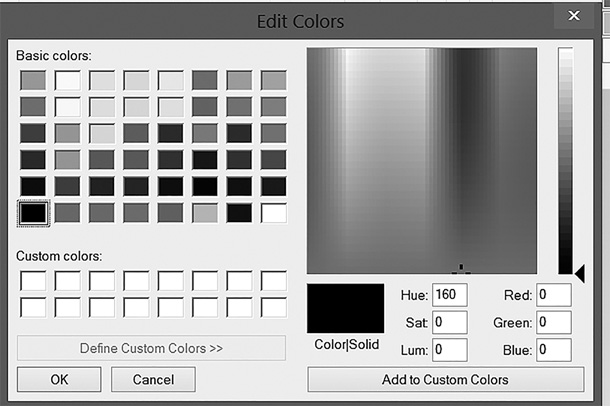
FIGURE 5-1
The Windows color palette in the Edit Colors dialog box.
Used with permission from Microsoft.
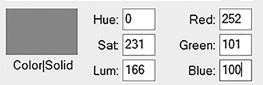
FIGURE 5-2
Windows color.
Used with permission from Microsoft.
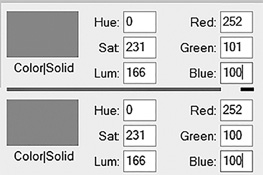
FIGURE 5-3
Windows color changed by one bit.
Used with permission from Microsoft.
It used to be the case that steganography required someone to be able to write specific computer program code to manipulate the bits in an image. This took training and skill; therefore, steganography was used only by computer professionals. However, a number of tools are now available on the web that will hide information within an image for you:
QuickStego—Is very easy to use, but very limited
Invisible Secrets—Is much more robust, with both a free and a commercial version
MP3Stego—Hides payload in MP3 files
Stealth Files 4—Works with sound files, video files, and image files
Snow—Hides data in white space
StegVideo—Hides data in a video sequence
The following are some basic steganography terms you should know:
The payload is the information to be covertly communicated. In other words, it is the message you want to hide.
The carrier or carrier file is the signal, stream, or file in which the payload is hidden.
The channel is the type of medium used. This may be a passive channel, such as photos, video, or sound files, or even an active channel, such as a Voice over IP (VoIP) voice call or streaming video connection.
Historical Steganography
Obviously, using digital images and files to hide messages did not exist prior to the advent of modern computers. However, hiding messages is not new. It has been done since ancient times. The following methods were once used to hide messages:
The ancient Chinese wrapped notes in wax and swallowed them for transport. This was a crude but effective method of hiding messages.
In ancient Greece, a messenger’s head might be shaved, a message written on his head, then his hair was allowed to grow back. Obviously, this method required some time to work effectively.
The German scholar Johannes Trithemius (1462–1516) wrote a book on cryptography and described a technique where a message was hidden by having each letter taken as a word from a specific column.
During World War II, the French Resistance sent messages written on the backs of couriers using invisible ink.
Steganophony
Steganophony is a term for hiding messages in sound files. This can be done with the LSB method. However, another method to use with steganophony is the echo method, which adds extra sound to an echo inside an audio file. It is that extra sound that contains information. Steganophony can be used with static files, such as MP3 files, but can also be used dynamically with VoIP and similar multimedia technologies, also utilizing the LSB method and imperceptibly changing the sound being transmitted.
Video Steganography
Information can also be hidden in video files, a practice called video steganography. There are various ways to do this, including the LSB method. Whatever method is used, it is important to realize that video files are obviously larger than other file types. This provides a great deal of opportunity for hiding information.
More Advanced Steganography
Although using the least significant bits, particularly with an image, is rather common and a widely used steganography method, it is not the only option. One other option is bit-plane complexity segmentation steganography (BPCS). The carrier is often an image that stores colors in 24 bits, and this fact can be used to increase storage area for payload. The complex areas on the bit planes are replaced with the payload. A bit plane of any discrete digital file is the set of bits that corresponds to a given bit position; for example, in 24-bit files there are 24-bit planes. This can be applied to signals as well as files.
Steganalysis
Steganalysis is the process of analyzing a file or files for hidden content. It is a difficult task. At best, it can show a likelihood that a given file has additional information hidden in it.
A common method for detecting LSB steganography is to examine close-color pairs. Close-color pairs consist of two colors whose binary values differ only in the LSB. If this is seen too frequently in a given file, it can indicate that steganographically hidden messages may be present.
There are several methods for analyzing an image to detect hidden messages. The raw quick pair method is one. It is based on statistics of the numbers of unique colors and close-color pairs in a 24-bit image. Basically, it performs a quick analysis to determine if there are more close-color pairs than would be expected.
Another option uses the chi-square method from statistics. Chi-square analysis calculates the average LSB and builds a table of frequencies and a second table with pairs of values. Then it performs a chi-square test on these two tables. Essentially, it measures the theoretical versus the calculated population difference. When analyzing audio files, you can use steganalysis that involves examining noise distortion in the carrier file. Noise distortion could indicate the presence of a hidden signal.
Many modern forensic tools also check for the presence of steganographically hidden messages. Forensic Toolkit (FTK) and EnCase both check for steganography, and FTK has an entire image detection engine devoted to this task. Details about this feature of FTK can be found at http://accessdata.com/resources/digital-forensics/explicit-image-detection-brochure.
There are several free or inexpensive tools for detecting steganography, including the following:
StegSecret: http://stegsecret.sourceforge.net
But be aware that none of these methods is perfect. A great deal depends on the size of the payload compared with the size of the carrier file. This determines what percentage of the bits need to be changed. For example, if you have a 10-kilobyte text message in a 2-megabyte image file, it will be hard to detect. However, if you hide a 1-megabyte image in a 2-megabyte image, it will be easier to find.
It is also the case that the specific steganographic tool you use will determine how reliable steganalysis tests are. Some stegographic tools are more efficient than others. Depending on how well information has been hidden, and if it is encrypted, it may be impossible to detect.
A forensic examiner must be very familiar with steganography. This means you should be able to do steganography. Many tools are available on the web. The following sections discuss two of them.
Invisible Secrets
In this section, you’ll learn about Invisible Secrets, which is very inexpensive and has a free trial version. It is also easy to use.
You can download Invisible Secrets from http://www.invisiblesecrets.com/download.html. First, you must choose whether you want to hide a file or extract a hidden file. For this example, suppose you want to hide a file. You select your chosen option in the Invisible Secrets Select Action dialog box, shown in FIGURE 5-4, and then click the Next button.
Now select an image you want to use as the carrier file. You can see this in FIGURE 5-5. Select the file you want to hide. It can be a text file or another image file. You can also choose to encrypt as well as hide. This is shown in FIGURE 5-6.
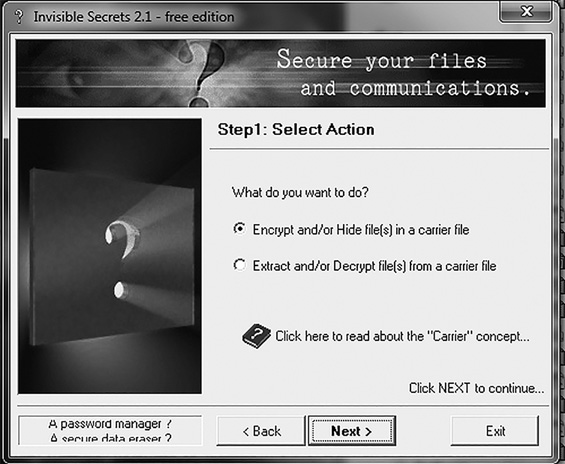
FIGURE 5-4
Choose to hide a file or extract a hidden file in the Invisible Secrets Select Action dialog box.
Courtesy of NeoByte Solutions
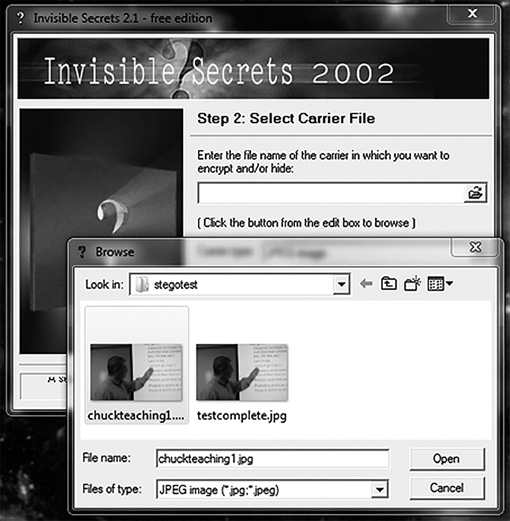
FIGURE 5-5
Select an image to use as the carrier file in the Invisible Secrets Select a Carrier File dialog box.
Courtesy of NeoByte Solutions
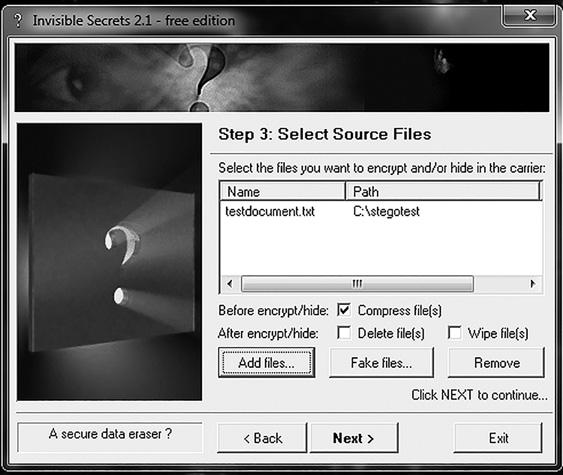
FIGURE 5-6
Select the file to hide in the Invisible Secrets Select Source Files dialog box.
Courtesy of NeoByte Solutions
Now, select a password for your hidden file, as shown in FIGURE 5-7. Then, pick a name for the resulting file that contains your hidden file, as shown in FIGURE 5-8.
That’s it. You have just done steganography. Now consider this for just a moment. If it is that easy and tools are available on the Internet, then this is something many criminals probably use. Fortunately, not all criminals are tech savvy, so you will still find many computers with evidence that is not hidden with steganography. However, during your career as a forensic examiner, you will come across steganography from time to time, and more often in complex cases involving organized crime, spying, and terrorism.
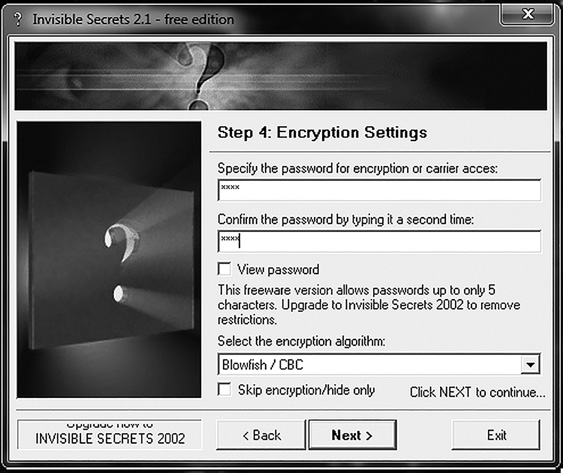
FIGURE 5-7
Select a password in the Invisible Secrets Encryption Settings dialog box.
Courtesy of NeoByte Solutions
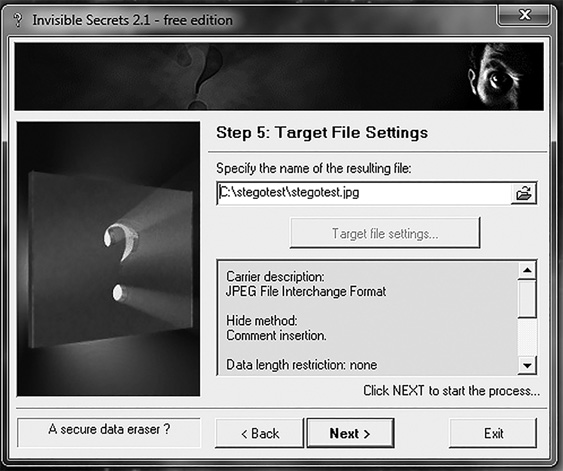
FIGURE 5-8
Name the new file in the Invisible Secrets Target File Settings dialog box.
Courtesy of NeoByte Solutions
MP3Stego
You can download MP3Stego from http://www.petitcolas.net/fabien/steganography/mp3stego/. This program is used to hide data in MP3 files. It takes the information (usually text) and combines it with a sound file to create a new sound file that contains the hidden information. From the MP3Stego readme file are these instructions:
encode -E data.txt -P pass sound.wav sound.mp3: Compresses sound.wav and hides data.txt, using the password “pass”. This produces the output called sound.mp3. The text in data.txt is encrypted usingpass.decode -X -P pass sound.mp3: Uncompresses sound.mp3 into the file sound. mp3.pcm and attempts to extract hidden information. The-Pflag denotes the following password “pass.” The hidden message is decrypted, uncompressed, and saved into sound.mp3.
This is a very simple program to use, and it is freely available on the Internet.
Additional Resources
This is enough steganography for you to work as a forensic examiner, but if you want to learn more, you might find the following resources of value:
An Australian Broadcasting Corporation story on steganography: http://www.abc.net.au/catalyst/stories/s1320215.htm
A technical paper on steganography: http://www.jjtc.com/stegdoc/
A ComputerWorld article on steganography: http://www.computerworld.com/s/article/71726/Steganography_Hidden_Data
An RQP paper: http://www.ws.binghamton.edu/fridrich/Research/acm_2001_03.pdf
A paper on the detection of LSB steganography: http://www.cecs.uci.edu/~papers/icme06/pdfs/0001377.pdf
A paper on the detection of audio steganography: http://www.ece.ucdavis.edu/~yliu/pub/papers/Tracy_ISC08.pdf