Table of Contents for
System Forensics, Investigation, and Response, 3rd Edition
 System Forensics, Investigation, and Response, 3rd Edition
Published by
Jones & Bartlett Learning, 2017
System Forensics, Investigation, and Response, 3rd Edition
Published by
Jones & Bartlett Learning, 2017
- Cover Page
- Contents
- System Forensics, Investigation, and Response
- Title Page
- Copyright Page
- Content
- Preface
- About the Author
- PART I Introduction to Forensics
- CHAPTER 1 Introduction to Forensics
- What Is Computer Forensics?
- Understanding the Field of Digital Forensics
- Knowledge Needed for Computer Forensics Analysis
- The Daubert Standard
- U.S. Laws Affecting Digital Forensics
- Federal Guidelines
- CHAPTER SUMMARY
- KEY CONCEPTS AND TERMS
- CHAPTER 1 ASSESSMENT
- CHAPTER 2 Overview of Computer Crime
- How Computer Crime Affects Forensics
- Identity Theft
- Hacking
- Cyberstalking and Harassment
- Fraud
- Non-Access Computer Crimes
- Cyberterrorism
- CHAPTER SUMMARY
- KEY CONCEPTS AND TERMS
- CHAPTER 2 ASSESSMENT
- CHAPTER 3 Forensic Methods and Labs
- Forensic Methodologies
- Formal Forensic Approaches
- Documentation of Methodologies and Findings
- Evidence-Handling Tasks
- How to Set Up a Forensic Lab
- Common Forensic Software Programs
- Forensic Certifications
- CHAPTER SUMMARY
- KEY CONCEPTS AND TERMS
- CHAPTER 3 ASSESSMENT
- PART II Technical Overview: SystemForensics Tools, Techniques, and Methods
- CHAPTER 4 Collecting, Seizing, and Protecting Evidence
- Proper Procedure
- Handling Evidence
- Storage Formats
- Forensic Imaging
- RAID Acquisitions
- CHAPTER SUMMARY
- KEY CONCEPTS AND TERMS
- CHAPTER 4 ASSESSMENT
- CHAPTER LAB
- CHAPTER 5 Understanding Techniques for Hiding and Scrambling Information
- Steganography
- Encryption
- CHAPTER SUMMARY
- KEY CONCEPTS AND TERMS
- CHAPTER 5 ASSESSMENT
- CHAPTER 6 Recovering Data
- Undeleting Data
- Recovering Information from Damaged Media
- File Carving
- CHAPTER SUMMARY
- KEY CONCEPTS AND TERMS
- CHAPTER 6 ASSESSMENT
- CHAPTER 7 Email Forensics
- How Email Works
- Email Protocols
- Email Headers
- Tracing Email
- Email Server Forensics
- Email and the Law
- CHAPTER SUMMARY
- KEY CONCEPTS AND TERMS
- CHAPTER 7 ASSESSMENT
- CHAPTER 8 Windows Forensics
- Windows Details
- Volatile Data
- Windows Swap File
- Windows Logs
- Windows Directories
- Index.dat
- Windows Files and Permissions
- The Registry
- Volume Shadow Copy
- Memory Forensics
- CHAPTER SUMMARY
- KEY CONCEPTS AND TERMS
- CHAPTER 8 ASSESSMENT
- CHAPTER 9 Linux Forensics
- Linux and Forensics
- Linux Basics
- Linux File Systems
- Linux Logs
- Linux Directories
- Shell Commands for Forensics
- Kali Linux Forensics
- Forensics Tools for Linux
- CHAPTER SUMMARY
- KEY CONCEPTS AND TERMS
- CHAPTER 9 ASSESSMENT
- CHAPTER 10 Macintosh Forensics
- Mac Basics
- Macintosh Logs
- Directories
- Macintosh Forensic Techniques
- How to Examine a Mac
- Can You Undelete in Mac?
- CHAPTER SUMMARY
- KEY CONCEPTS AND TERMS
- CHAPTER 10 ASSESSMENT
- CHAPTER 11 Mobile Forensics
- Cellular Device Concepts
- What Evidence You Can Get from a Cell Phone
- Seizing Evidence from a Mobile Device
- JTAG
- CHAPTER SUMMARY
- KEY CONCEPTS AND TERMS
- CHAPTER 11 ASSESSMENT
- CHAPTER 12 Performing Network Analysis
- Network Packet Analysis
- Network Traffic Analysis
- Router Forensics
- Firewall Forensics
- CHAPTER SUMMARY
- KEY CONCEPTS AND TERMS
- CHAPTER 12 ASSESSMENT
- PART III Incident Response and Resources
- CHAPTER 13 Incident and Intrusion Response
- Disaster Recovery
- Preserving Evidence
- Adding Forensics to Incident Response
- CHAPTER SUMMARY
- KEY CONCEPTS AND TERMS
- CHAPTER 13 ASSESSMENT
- CHAPTER 14 Trends and Future Directions
- Technical Trends
- Legal and Procedural Trends
- CHAPTER SUMMARY
- KEY CONCEPTS AND TERMS
- CHAPTER 14 ASSESSMENT
- CHAPTER 15 System Forensics Resources
- Tools to Use
- Resources
- Laws
- CHAPTER SUMMARY
- KEY CONCEPTS AND TERMS
- CHAPTER 15 ASSESSMENT
- APPENDIX A Answer Key
- APPENDIX B Standard Acronyms
- Glossary of Key Terms
- References
- Index
RAID Acquisitions
You may already be comfortable with the concept of RAID; however, if you are not, this section provides a brief overview.
RAID stands for redundant array of independent disks. The most common RAID levels are as follows:
RAID 0 (disk striping) distributes data across multiple disks in a way that gives improved speed for data retrieval.
RAID 1 mirrors the contents of the disks. The disk is completely mirrored so there is an identical copy of the drive running on the machine.
RAID 3 or 4 (striped disks with dedicated parity) combines three or more disks in a way that protects data against loss of any one disk. Fault tolerance is achieved by adding an extra disk to the array and dedicating it to storing parity information. The storage capacity of the array is reduced by one disk.
RAID 5 (striped disks with distributed parity) combines three or more disks in a way that protects data against the loss of any one disk. It is similar to RAID 3, but the parity is not stored on one dedicated drive; instead, parity information is interspersed across the drive array. The storage capacity of the array is a function of the number of drives minus the space needed to store parity. This configuration can withstand the loss of any one drive.
RAID 6 (striped disks with dual parity) combines four or more disks in a way that protects data against loss of any two disks.
RAID 1+0 (or 10) is a mirrored data set (RAID 1), which is then striped (RAID 0), hence the “1+0” name. A RAID 1+0 array requires a minimum of four drives: two mirrored drives to hold half of the striped data, plus another two mirrored drives for the other half of the data.
Some people have some difficulty understanding RAID 3, 4, 5, and 6 and specifically how the parity bit works to store data. It is all predicated on the basic mathematical operation of exclusive or (XOR). For example, suppose two drives in a three-drive RAID 5 array contained the following data:
Drive A: 01101111
Drive B: 11010100
To calculate parity data for the two drives, an exclusive or is performed on their data:
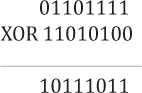
The resulting parity data, 10111011, is then stored on Drive C.
Now if either Drive A or B fails, the data can be recreated. Let us assume that Drive B fails.
We just exclusively or the data stored on Drive C with the data still on Drive A.
Drive A: 01101111
Drive C: 10111011
And you get back 11010100, which is the data originally on Drive B. This is how parity bits work in RAID.
Acquiring a RAID array has some challenges that are not encountered when acquiring a single drive. Some people recommend acquiring each disk separately. This is fine for RAID 1 because each disk is a separate entity; however with RAID 0, 3, 4, 5, and 6, there is data striping. The data is striped across multiple disks. In these situations, acquiring the disks separately is not recommended. Instead, make a forensic image of the entire RAID array. This requires a rather large target drive to copy it to.