Table of Contents for
System Forensics, Investigation, and Response, 3rd Edition
 System Forensics, Investigation, and Response, 3rd Edition
Published by
Jones & Bartlett Learning, 2017
System Forensics, Investigation, and Response, 3rd Edition
Published by
Jones & Bartlett Learning, 2017
- Cover Page
- Contents
- System Forensics, Investigation, and Response
- Title Page
- Copyright Page
- Content
- Preface
- About the Author
- PART I Introduction to Forensics
- CHAPTER 1 Introduction to Forensics
- What Is Computer Forensics?
- Understanding the Field of Digital Forensics
- Knowledge Needed for Computer Forensics Analysis
- The Daubert Standard
- U.S. Laws Affecting Digital Forensics
- Federal Guidelines
- CHAPTER SUMMARY
- KEY CONCEPTS AND TERMS
- CHAPTER 1 ASSESSMENT
- CHAPTER 2 Overview of Computer Crime
- How Computer Crime Affects Forensics
- Identity Theft
- Hacking
- Cyberstalking and Harassment
- Fraud
- Non-Access Computer Crimes
- Cyberterrorism
- CHAPTER SUMMARY
- KEY CONCEPTS AND TERMS
- CHAPTER 2 ASSESSMENT
- CHAPTER 3 Forensic Methods and Labs
- Forensic Methodologies
- Formal Forensic Approaches
- Documentation of Methodologies and Findings
- Evidence-Handling Tasks
- How to Set Up a Forensic Lab
- Common Forensic Software Programs
- Forensic Certifications
- CHAPTER SUMMARY
- KEY CONCEPTS AND TERMS
- CHAPTER 3 ASSESSMENT
- PART II Technical Overview: SystemForensics Tools, Techniques, and Methods
- CHAPTER 4 Collecting, Seizing, and Protecting Evidence
- Proper Procedure
- Handling Evidence
- Storage Formats
- Forensic Imaging
- RAID Acquisitions
- CHAPTER SUMMARY
- KEY CONCEPTS AND TERMS
- CHAPTER 4 ASSESSMENT
- CHAPTER LAB
- CHAPTER 5 Understanding Techniques for Hiding and Scrambling Information
- Steganography
- Encryption
- CHAPTER SUMMARY
- KEY CONCEPTS AND TERMS
- CHAPTER 5 ASSESSMENT
- CHAPTER 6 Recovering Data
- Undeleting Data
- Recovering Information from Damaged Media
- File Carving
- CHAPTER SUMMARY
- KEY CONCEPTS AND TERMS
- CHAPTER 6 ASSESSMENT
- CHAPTER 7 Email Forensics
- How Email Works
- Email Protocols
- Email Headers
- Tracing Email
- Email Server Forensics
- Email and the Law
- CHAPTER SUMMARY
- KEY CONCEPTS AND TERMS
- CHAPTER 7 ASSESSMENT
- CHAPTER 8 Windows Forensics
- Windows Details
- Volatile Data
- Windows Swap File
- Windows Logs
- Windows Directories
- Index.dat
- Windows Files and Permissions
- The Registry
- Volume Shadow Copy
- Memory Forensics
- CHAPTER SUMMARY
- KEY CONCEPTS AND TERMS
- CHAPTER 8 ASSESSMENT
- CHAPTER 9 Linux Forensics
- Linux and Forensics
- Linux Basics
- Linux File Systems
- Linux Logs
- Linux Directories
- Shell Commands for Forensics
- Kali Linux Forensics
- Forensics Tools for Linux
- CHAPTER SUMMARY
- KEY CONCEPTS AND TERMS
- CHAPTER 9 ASSESSMENT
- CHAPTER 10 Macintosh Forensics
- Mac Basics
- Macintosh Logs
- Directories
- Macintosh Forensic Techniques
- How to Examine a Mac
- Can You Undelete in Mac?
- CHAPTER SUMMARY
- KEY CONCEPTS AND TERMS
- CHAPTER 10 ASSESSMENT
- CHAPTER 11 Mobile Forensics
- Cellular Device Concepts
- What Evidence You Can Get from a Cell Phone
- Seizing Evidence from a Mobile Device
- JTAG
- CHAPTER SUMMARY
- KEY CONCEPTS AND TERMS
- CHAPTER 11 ASSESSMENT
- CHAPTER 12 Performing Network Analysis
- Network Packet Analysis
- Network Traffic Analysis
- Router Forensics
- Firewall Forensics
- CHAPTER SUMMARY
- KEY CONCEPTS AND TERMS
- CHAPTER 12 ASSESSMENT
- PART III Incident Response and Resources
- CHAPTER 13 Incident and Intrusion Response
- Disaster Recovery
- Preserving Evidence
- Adding Forensics to Incident Response
- CHAPTER SUMMARY
- KEY CONCEPTS AND TERMS
- CHAPTER 13 ASSESSMENT
- CHAPTER 14 Trends and Future Directions
- Technical Trends
- Legal and Procedural Trends
- CHAPTER SUMMARY
- KEY CONCEPTS AND TERMS
- CHAPTER 14 ASSESSMENT
- CHAPTER 15 System Forensics Resources
- Tools to Use
- Resources
- Laws
- CHAPTER SUMMARY
- KEY CONCEPTS AND TERMS
- CHAPTER 15 ASSESSMENT
- APPENDIX A Answer Key
- APPENDIX B Standard Acronyms
- Glossary of Key Terms
- References
- Index
Windows Logs
All versions of Windows support logging; however, the method to get to the log can vary from one version to another. With Windows 10 and Windows Server 2012, and now Server 2016, you find the logs by clicking on the Start button in the lower-left corner of the desktop and then clicking Control Panel. You then select Administrative Tools and then Event Viewer. You would check for the following logs:
Security log—This is probably the most important log from a forensic point of view. It has both successful and unsuccessful logon events.
Application log—This log contains various events logged by applications or programs. Many applications record their errors here in the Application log.
System log—The System log contains events logged by Windows system components. This includes events like driver failures. This particular log is not as interesting from a forensic perspective as the other logs are.
ForwardedEvents log—The ForwardedEvents log is used to store events collected from remote computers. This has data in it only if event forwarding has been configured.
Applications and Services logs—This log is used to store events from a single application or component rather than events that might have systemwide impact.
FIGURE 8-6 shows the Windows logs.
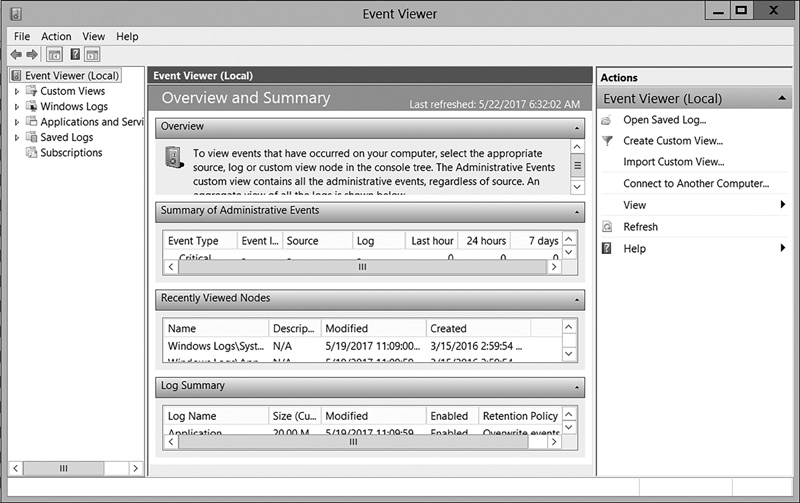
FIGURE 8-6
Viewing Windows logs.
Used with permission from Microsoft
Windows servers have similar logs; however, it is possible that the logs will be empty. For example, the tool auditpol.exe can turn logging on and off. Savvy criminals might turn the logging off while they do their misdeeds, and then turn it back on. In addition, the tool Win-Zapper allows you to selectively erase individual records in the log, so it is possible that the logs will yield no evidence, even if a crime did take place.
In the security log, you will find numbers designating entries. It is beyond the scope of this text to cover all of them, but a few common issues of concern are discussed here:
4902—Changes to the audit policy such as using Auditpol.exe. Auditpol.exe is a tool for admins to change policies; however, hackers sometimes use it to temporarily turn off logging. Seeing this number in the log may indicate a hacker was in your system and disabled logging.
4741—A computer account was created. Obviously, accounts are created in normal network operations. But, if this account creation cannot be accounted for by network administrators, then an attacker may have created this account. This is closely related to 4742, which shows a computer account was changed.
4782—The password hash account was accessed. Again, this can occur during normal operations, but you do want to check and see if it is accounted for by normal operations.
4728—A member was added to a security-enabled global group. If your administrators can account for this, then it is normal operations. If not, then it could indicate an attacker was elevating privileges and now has wider access to your network.
Another system monitoring tool that is often used on PCs, servers, routers, switches, and other devices is Tripwire, which you can find at http://www.tripwire.com. A newer tool is CimTrak, which you can find at https://www.cimcor.com/cimtrak. These programs store a secure hash of files and the static part of device memory and monitor for changes to the files and/or memory. Security practitioners can use the tools to harden their defenses and make their systems “aware” of attacks when they occur. They can also allow files or memory to be checkpointed and restored to a preattack condition. This class of tool can also be very important to the forensic examiner, because a large amount of information is made available due to different generations of files, as well as multiple log files.