Table of Contents for
Mastering phpMyAdmin 3.4 for Effective MySQL Management
 Mastering phpMyAdmin 3.4 for Effective MySQL Management
Published by
Packt Publishing, 2012
Mastering phpMyAdmin 3.4 for Effective MySQL Management
Published by
Packt Publishing, 2012
- Cover
- Mastering phpMyAdmin 3.4 for Effective MySQL Management
- Mastering phpMyAdmin 3.4 for Effective MySQL Management
- Credits
- About the Author
- About the Reviewers
- www.PacktPub.com
- Preface
- What you need for this book
- Who this book is for
- Conventions
- Reader feedback
- Customer support
- 1. Getting Started with phpMyAdmin
- What is phpMyAdmin?
- Installing phpMyAdmin
- Configuring phpMyAdmin
- Installing phpMyAdmin configuration storage
- Upgrading phpMyAdmin
- Summary
- 2. Configuring Authentication and Security
- Securing phpMyAdmin
- Summary
- 3. Over Viewing the Interface
- Customizing general settings
- Character sets and collations
- Navigation panel
- Main panel
- User preferences
- Query window
- Summary
- 4. Creating and Browsing Tables
- Creating our first table
- Inserting data manually
- Browse mode
- Profiling queries
- Creating an additional table
- Summary
- 5. Changing Data and Structure
- Changing table structure
- Summary
- 6. Exporting Structure and Data (Backup)
- Exporting a database
- Exporting a table
- Exporting selectively
- Exporting multiple databases
- Saving the export file on the server
- Memory limits
- Summary
- 7. Importing Structure and Data
- Importing SQL files
- Importing CSV files
- Importing other formats
- Reading files from a web server upload directory
- Displaying an upload progress bar
- Summary
- 8. Searching Data
- Performing a complete database search
- Stopping an errant query
- Summary
- 9. Performing Table and Database Operations
- Changing table attributes
- Emptying or deleting a table
- Renaming, moving, and copying tables
- Performing other table operations
- Multi-table operations
- Database operations
- Summary
- 10. Benefiting from the Relational System
- Defining relations with the relation view
- Defining relations with the Designer
- Benefiting from the defined relations
- Column commenting
- Summary
- 11. Entering SQL Statements
- The Query window
- Multi-statement queries
- Pretty printing (syntax highlighting)
- The SQL Validator
- Summary
- 12. Generating Multi-table Queries
- Exploring column criteria
- Generating automatic joins (internal relations)
- Executing the query
- The visual builder
- Summary
- 13. Synchronizing Data and Supporting Replication
- Supporting MySQL replication
- Summary
- 14. Using Query Bookmarks
- Creating bookmarks
- Recalling bookmarks from the bookmarks list
- Passing a parameter to a bookmark
- Summary
- 15. Documenting the System
- Generating relational schemas
- Summary
- 16. Transforming Data using MIME
- Enabling transformations
- Examples of transformations
- Summary
- 17. Supporting Features Added in MySQL 5
- Supporting routines—stored procedures and functions
- Executing code with triggers
- Using information_schema
- Partitioning
- Exploring the event scheduler
- Summary
- 18. Tracking Changes
- Prerequisites
- Principles
- Initiating tracking for one table
- Testing the tracking mechanism
- Determining tracking status
- Structure snapshot
- Exporting a version
- Creating a new version
- Deleting tracking information
- Summary
- 19. Administrating the MySQL Server
- Database information
- Server information
- Summary
- A. Troubleshooting and Support
- Seeking support
- Contributing to the project
Triggers are code that we associate with a table to be executed when certain actions occur, for example, after a new INSERT statement in the book table. The action does not need to happen within phpMyAdmin.
Contrary to routines that are related to an entire database and are visible on the database's Structure page, triggers for each table are accessed from this specific table's Structure page.
Note
Prior to MySQL 5.1.6, we needed the SUPER privilege to create and delete triggers. In version 5.1.6, a TRIGGER table-level privilege was added to the privilege system. Hence, a user no longer needs the powerful SUPER privilege for these tasks.
In order to perform the following exercise, we will need a new INT column—total_page_count—in our author table.
The idea here is that every time a book is created, its page count will be added to the total page count of the books from this author. Some people may advocate that it would be better not to keep a separate column for the total here, and instead compute the total every time we need it. In fact, a design decision must be made when dealing with this situation in the real world. Do we need to retrieve the total page count very quickly, for example, for web purposes? what is the response time to compute this value from a production table with thousands of rows? Anyway, since I need it as an example, the design decision is easy to make here.
Let us not forget that following its addition to the table's structure, the total_page_count column should initially be seeded with the correct total. (However, this is not the purpose of our trigger.)
The current phpMyAdmin version does not have an interface for trigger creation. Therefore, we enter the trigger definition in a query box taking special care to enter // in the delimiter box:
CREATE TRIGGER after_book_insert AFTER INSERT ON book
FOR EACH ROW
BEGIN
UPDATE author
SET total_page_count = total_page_count + NEW.page_count
WHERE id = NEW.author_id;
END
//
Later, the Structure page for our book table reveals a new Triggers section that can be used the same way as routines, to edit or delete a trigger, as shown in the following screenshot:
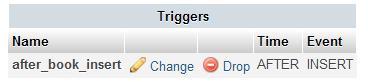
Contrary to testing stored procedures or functions, there is neither a CALL sequence nor a function inside a SELECT statement to execute the trigger. Any time the defined operation (a book INSERT) happens, the code will execute (in our case, after the insertion). Therefore, we simply have to insert a new book to see that the author.total_page_count column is updated.
Of course, a completely automatic management of this column would involve creating AFTER UPDATE and AFTER DELETE triggers on the book table.