Table of Contents for
Mastering phpMyAdmin 3.4 for Effective MySQL Management
 Mastering phpMyAdmin 3.4 for Effective MySQL Management
Published by
Packt Publishing, 2012
Mastering phpMyAdmin 3.4 for Effective MySQL Management
Published by
Packt Publishing, 2012
- Cover
- Mastering phpMyAdmin 3.4 for Effective MySQL Management
- Mastering phpMyAdmin 3.4 for Effective MySQL Management
- Credits
- About the Author
- About the Reviewers
- www.PacktPub.com
- Preface
- What you need for this book
- Who this book is for
- Conventions
- Reader feedback
- Customer support
- 1. Getting Started with phpMyAdmin
- What is phpMyAdmin?
- Installing phpMyAdmin
- Configuring phpMyAdmin
- Installing phpMyAdmin configuration storage
- Upgrading phpMyAdmin
- Summary
- 2. Configuring Authentication and Security
- Securing phpMyAdmin
- Summary
- 3. Over Viewing the Interface
- Customizing general settings
- Character sets and collations
- Navigation panel
- Main panel
- User preferences
- Query window
- Summary
- 4. Creating and Browsing Tables
- Creating our first table
- Inserting data manually
- Browse mode
- Profiling queries
- Creating an additional table
- Summary
- 5. Changing Data and Structure
- Changing table structure
- Summary
- 6. Exporting Structure and Data (Backup)
- Exporting a database
- Exporting a table
- Exporting selectively
- Exporting multiple databases
- Saving the export file on the server
- Memory limits
- Summary
- 7. Importing Structure and Data
- Importing SQL files
- Importing CSV files
- Importing other formats
- Reading files from a web server upload directory
- Displaying an upload progress bar
- Summary
- 8. Searching Data
- Performing a complete database search
- Stopping an errant query
- Summary
- 9. Performing Table and Database Operations
- Changing table attributes
- Emptying or deleting a table
- Renaming, moving, and copying tables
- Performing other table operations
- Multi-table operations
- Database operations
- Summary
- 10. Benefiting from the Relational System
- Defining relations with the relation view
- Defining relations with the Designer
- Benefiting from the defined relations
- Column commenting
- Summary
- 11. Entering SQL Statements
- The Query window
- Multi-statement queries
- Pretty printing (syntax highlighting)
- The SQL Validator
- Summary
- 12. Generating Multi-table Queries
- Exploring column criteria
- Generating automatic joins (internal relations)
- Executing the query
- The visual builder
- Summary
- 13. Synchronizing Data and Supporting Replication
- Supporting MySQL replication
- Summary
- 14. Using Query Bookmarks
- Creating bookmarks
- Recalling bookmarks from the bookmarks list
- Passing a parameter to a bookmark
- Summary
- 15. Documenting the System
- Generating relational schemas
- Summary
- 16. Transforming Data using MIME
- Enabling transformations
- Examples of transformations
- Summary
- 17. Supporting Features Added in MySQL 5
- Supporting routines—stored procedures and functions
- Executing code with triggers
- Using information_schema
- Partitioning
- Exploring the event scheduler
- Summary
- 18. Tracking Changes
- Prerequisites
- Principles
- Initiating tracking for one table
- Testing the tracking mechanism
- Determining tracking status
- Structure snapshot
- Exporting a version
- Creating a new version
- Deleting tracking information
- Summary
- 19. Administrating the MySQL Server
- Database information
- Server information
- Summary
- A. Troubleshooting and Support
- Seeking support
- Contributing to the project
We define transformation as a mechanism by which all the cells related to a column are transformed at browse time, using the metadata defined for this column. Only the cells visible on the current results page are transformed.
The use of this feature is controlled by the $cfg['BrowseMIME'] directive in config.inc.php. The default value of this directive is TRUE, meaning that transformations are enabled. However, the phpMyAdmin configuration storage must be in place (refer to Chapter 1) as the metadata necessary for the transformation is not available in the official MySQL table structure. It's an addition made especially for phpMyAdmin.
Note
The transformation logic itself is coded in PHP scripts, stored in libraries/transformations, and is called using a plugin architecture. In the documentation section on phpMyAdmin's home site (currently at http://www.phpmyadmin.net/home_page/docs.php), there is a link pointing to additional information for developers who would like to learn the internal structure of the plugins in order to code their own transformation.
If we go to the Table view of the Structure page for the book table and click on the Change link for the cover_photo column, we see three additional attributes (provided the transformations feature is enabled):
- MIME type
- Browser transformation
- Transformation options
This is shown in the following screenshot:
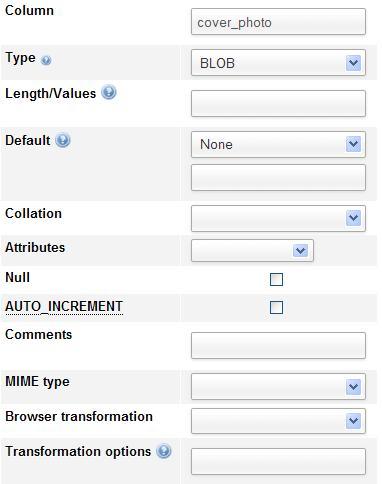
For a specific column, it's possible to indicate only one type of transformation. Here, the column is a BLOB. Hence, it can hold any kind of data. In order for phpMyAdmin to interpret and act correctly on the data, the transformation system must be informed of the data format and the intended results. Accordingly, we have to ensure that we upload data that always follows the same file format.
We will first learn the purpose of these attributes and then try some possibilities in the Examples of transformation section, later in this chapter.
The MIME specification (http://en.wikipedia.org/wiki/MIME) has been chosen as a metadata attribute to categorize the kind of data that a column holds. Multipurpose Internet Mail Extensions (MIME) , originally designed to extend mail, are now used to describe content types for other protocols as well. In the context of phpMyAdmin, the current possible values are:
- image/jpeg
- image/png
- text/plain
- application/octetstream
The text/plain type can be chosen for a column containing any kind of text (for example, XHTML or XML text). In the Examples of transformations section, you will see which MIME type you are required to choose to achieve a specific effect.
This is where we set the exact transformation to be done. More than one transformation may be supported per MIME type. For example, for the image/jpeg MIME type, we have two transformations available: image/jpeg: inline for a clickable thumbnail of the image, and image/jpeg: link to display just a link.
The following screenshot shows the list of the available transformations:
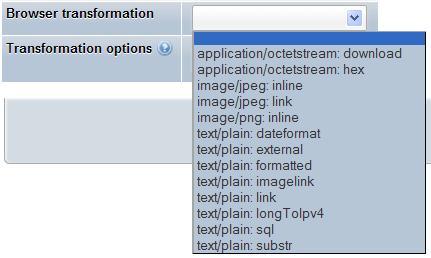
A more complete transformation explanation and a list of the possible options are available on clicking the question mark icon next to Transformation options, and then clicking on the transformation descriptions link that appears.
In the Examples of transformations section, we will see that some transformations accept options. For example, we can indicate the width and height in pixels for a transformation that generates an image. A comma is used to separate the values in the options list, and some options may need to be enclosed within quotes.
Some options have a default value, and we must be careful to respect the documented order for options. For example, if there are two options, and we only want to specify a value for the second option, we can use empty quotes as a placeholder for the first option, to let the system use its default value.
Normal thumbnail generation requires that some components exist on the web server, and that a parameter in config.inc.php be correctly configured.
phpMyAdmin uses some internal functions to create the thumbnails. These functions need the GD2 library to be present on our PHP server.
phpMyAdmin can detect the presence of the correct GD2 library, but this detection takes some time. It also takes place not once per session, but almost every time an action is taken in phpMyAdmin.
Setting the $cfg['GD2Available'] parameter in config.inc.php to its default value'auto' indicates that the detection of the library's presence and version is needed.
If we know that the GD2 library is available, setting $cfg['GD2Available'] to yes will make execution quicker. If the GD2 library is not available, you are recommended to set this parameter to no.
To find out which GD2 library we have on the server, we can go to phpMyAdmin's home page and click on Show PHP information. If this link is not present, we need to set the $cfg['ShowPhpInfo'] parameter to true. We then look for a section titled gd and verify which version is identified. In the following screenshot, all is fine as we can see that the GD version is 2.X with JPEG and PNG support:
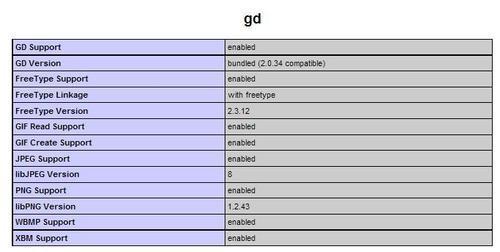
The PHP component in our web server needs to have support for the JPEG and PNG images if we want to generate thumbnails for these types of images. For more details, please refer to http://php.net/manual/en/ref.image.php.
On some servers, the default value in php.ini for memory_limit is 8M, meaning 8 MiB. This is too low for correct image manipulation, because the GD functions used to produce the final images need working memory. For example, in one test, a value of 11M in memory_limit was needed to generate the thumbnail from a 300 KiB JPEG image. Also, if multiple rows are viewed at once, more working memory will be needed.