Table of Contents for
Mastering phpMyAdmin 3.4 for Effective MySQL Management
 Mastering phpMyAdmin 3.4 for Effective MySQL Management
Published by
Packt Publishing, 2012
Mastering phpMyAdmin 3.4 for Effective MySQL Management
Published by
Packt Publishing, 2012
- Cover
- Mastering phpMyAdmin 3.4 for Effective MySQL Management
- Mastering phpMyAdmin 3.4 for Effective MySQL Management
- Credits
- About the Author
- About the Reviewers
- www.PacktPub.com
- Preface
- What you need for this book
- Who this book is for
- Conventions
- Reader feedback
- Customer support
- 1. Getting Started with phpMyAdmin
- What is phpMyAdmin?
- Installing phpMyAdmin
- Configuring phpMyAdmin
- Installing phpMyAdmin configuration storage
- Upgrading phpMyAdmin
- Summary
- 2. Configuring Authentication and Security
- Securing phpMyAdmin
- Summary
- 3. Over Viewing the Interface
- Customizing general settings
- Character sets and collations
- Navigation panel
- Main panel
- User preferences
- Query window
- Summary
- 4. Creating and Browsing Tables
- Creating our first table
- Inserting data manually
- Browse mode
- Profiling queries
- Creating an additional table
- Summary
- 5. Changing Data and Structure
- Changing table structure
- Summary
- 6. Exporting Structure and Data (Backup)
- Exporting a database
- Exporting a table
- Exporting selectively
- Exporting multiple databases
- Saving the export file on the server
- Memory limits
- Summary
- 7. Importing Structure and Data
- Importing SQL files
- Importing CSV files
- Importing other formats
- Reading files from a web server upload directory
- Displaying an upload progress bar
- Summary
- 8. Searching Data
- Performing a complete database search
- Stopping an errant query
- Summary
- 9. Performing Table and Database Operations
- Changing table attributes
- Emptying or deleting a table
- Renaming, moving, and copying tables
- Performing other table operations
- Multi-table operations
- Database operations
- Summary
- 10. Benefiting from the Relational System
- Defining relations with the relation view
- Defining relations with the Designer
- Benefiting from the defined relations
- Column commenting
- Summary
- 11. Entering SQL Statements
- The Query window
- Multi-statement queries
- Pretty printing (syntax highlighting)
- The SQL Validator
- Summary
- 12. Generating Multi-table Queries
- Exploring column criteria
- Generating automatic joins (internal relations)
- Executing the query
- The visual builder
- Summary
- 13. Synchronizing Data and Supporting Replication
- Supporting MySQL replication
- Summary
- 14. Using Query Bookmarks
- Creating bookmarks
- Recalling bookmarks from the bookmarks list
- Passing a parameter to a bookmark
- Summary
- 15. Documenting the System
- Generating relational schemas
- Summary
- 16. Transforming Data using MIME
- Enabling transformations
- Examples of transformations
- Summary
- 17. Supporting Features Added in MySQL 5
- Supporting routines—stored procedures and functions
- Executing code with triggers
- Using information_schema
- Partitioning
- Exploring the event scheduler
- Summary
- 18. Tracking Changes
- Prerequisites
- Principles
- Initiating tracking for one table
- Testing the tracking mechanism
- Determining tracking status
- Structure snapshot
- Exporting a version
- Creating a new version
- Deleting tracking information
- Summary
- 19. Administrating the MySQL Server
- Database information
- Server information
- Summary
- A. Troubleshooting and Support
- Seeking support
- Contributing to the project
Each time phpMyAdmin transmits a query, the MySQL server interprets it and provides feedback. The syntax of the query must follow MySQL rules, which are not the same as the SQL Standard. However, conforming to SQL Standard ensures that our queries are usable on other SQL implementations.
A free external service, the Mimer SQL Validator, is available to us, thanks to Mimer Information Technology AB. It validates our query according to the Core SQL-99 rules and generates a report. The Validator is available directly from phpMyAdmin, and its home page is located at http://developer.mimer.com/validator/index.htm.
Note
For statistical purposes, this service anonymously stores on its server, the queries it receives. When storing the queries, it replaces database, table, and column names with generic names. Strings and numbers that are part of the query are replaced with generic values so as to protect the original information.
This Validator is available as a SOAP service. Our PHP server must have XML, PCRE, and SOAP support. SOAP support is offered by either a PHP extension or by a PEAR module. If we choose the PEAR way, the following command (executed on the server by the system administrator) installs the modules we need:
pear install Net_Socket Net_URL HTTP_Request Mail_Mime Net_DIME SOAP
If we have problems with this command due to some of the modules being in a beta state, we can execute the following command, which installs SOAP and other dependent modules:
pear -d preferred_state=beta install -a SOAP
Some parameters must be configured in config.inc.php. Setting $cfg['SQLQuery']['Validate'] to TRUE enables the Validate SQL link.
We should also enable the Validator itself (as other validators might be available on future phpMyAdmin versions). This is done by setting $cfg['SQLValidator']['use'] to TRUE.
The Validator is accessed with an anonymous Validator account by default, as configured using the following commands:
$cfg['SQLValidator']['username'] = '';
$cfg['SQLValidator']['password'] = '';
Instead, if Mimer Information Technology has provided us with an account, we can use that account information here.
There are two kinds of reports returned by the Validator—one if the query conforms to the standard, and the other if it does not conform.
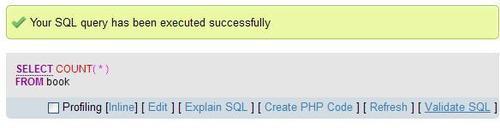
We will try a simple query: SELECT COUNT(*) FROM book. As usual, we enter this query in the query box and send it. On the results page, we now see an additional link— Validate SQL as shown in the following screenshot:
Clicking on Validate SQL produces a report as shown in the following screenshot:
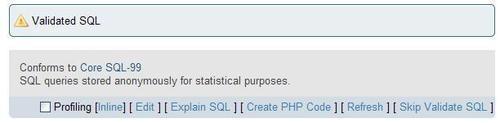
We have the option of clicking on Skip Validate SQL to see our original query.
Let us try another query, which works correctly in MySQL: SELECT * FROM book WHERE language = 'en'. Sending it to the Validator produces a report as shown in the following screenshot:
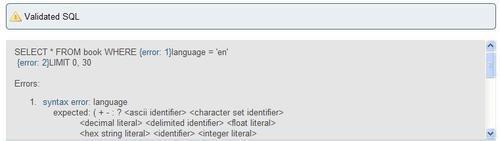
Each time the Validator finds a problem, it adds a message such as {error: 1} at the point of the error and adds a footnote in the report. In this query, the language column name is non-standard. Hence, the Validator tells us that it was expecting an identifier at this point. Another non-standard error is reported about the use of a LIMIT clause, which was added to the query by phpMyAdmin.
Another case is that of the backquote. If we just click on Browse for the book table, phpMyAdmin generates SELECT * FROM `book`, enclosing the table name with backquote. This is MySQL's way of protecting identifiers, which might contain special characters, such as spaces, international characters, or reserved words. However, sending this query to the Validator shows us that the backquotes do not conform to standard SQL. We may even get two errors, one for each backquote.