Table of Contents for
Mastering phpMyAdmin 3.4 for Effective MySQL Management
 Mastering phpMyAdmin 3.4 for Effective MySQL Management
Published by
Packt Publishing, 2012
Mastering phpMyAdmin 3.4 for Effective MySQL Management
Published by
Packt Publishing, 2012
- Cover
- Mastering phpMyAdmin 3.4 for Effective MySQL Management
- Mastering phpMyAdmin 3.4 for Effective MySQL Management
- Credits
- About the Author
- About the Reviewers
- www.PacktPub.com
- Preface
- What you need for this book
- Who this book is for
- Conventions
- Reader feedback
- Customer support
- 1. Getting Started with phpMyAdmin
- What is phpMyAdmin?
- Installing phpMyAdmin
- Configuring phpMyAdmin
- Installing phpMyAdmin configuration storage
- Upgrading phpMyAdmin
- Summary
- 2. Configuring Authentication and Security
- Securing phpMyAdmin
- Summary
- 3. Over Viewing the Interface
- Customizing general settings
- Character sets and collations
- Navigation panel
- Main panel
- User preferences
- Query window
- Summary
- 4. Creating and Browsing Tables
- Creating our first table
- Inserting data manually
- Browse mode
- Profiling queries
- Creating an additional table
- Summary
- 5. Changing Data and Structure
- Changing table structure
- Summary
- 6. Exporting Structure and Data (Backup)
- Exporting a database
- Exporting a table
- Exporting selectively
- Exporting multiple databases
- Saving the export file on the server
- Memory limits
- Summary
- 7. Importing Structure and Data
- Importing SQL files
- Importing CSV files
- Importing other formats
- Reading files from a web server upload directory
- Displaying an upload progress bar
- Summary
- 8. Searching Data
- Performing a complete database search
- Stopping an errant query
- Summary
- 9. Performing Table and Database Operations
- Changing table attributes
- Emptying or deleting a table
- Renaming, moving, and copying tables
- Performing other table operations
- Multi-table operations
- Database operations
- Summary
- 10. Benefiting from the Relational System
- Defining relations with the relation view
- Defining relations with the Designer
- Benefiting from the defined relations
- Column commenting
- Summary
- 11. Entering SQL Statements
- The Query window
- Multi-statement queries
- Pretty printing (syntax highlighting)
- The SQL Validator
- Summary
- 12. Generating Multi-table Queries
- Exploring column criteria
- Generating automatic joins (internal relations)
- Executing the query
- The visual builder
- Summary
- 13. Synchronizing Data and Supporting Replication
- Supporting MySQL replication
- Summary
- 14. Using Query Bookmarks
- Creating bookmarks
- Recalling bookmarks from the bookmarks list
- Passing a parameter to a bookmark
- Summary
- 15. Documenting the System
- Generating relational schemas
- Summary
- 16. Transforming Data using MIME
- Enabling transformations
- Examples of transformations
- Summary
- 17. Supporting Features Added in MySQL 5
- Supporting routines—stored procedures and functions
- Executing code with triggers
- Using information_schema
- Partitioning
- Exploring the event scheduler
- Summary
- 18. Tracking Changes
- Prerequisites
- Principles
- Initiating tracking for one table
- Testing the tracking mechanism
- Determining tracking status
- Structure snapshot
- Exporting a version
- Creating a new version
- Deleting tracking information
- Summary
- 19. Administrating the MySQL Server
- Database information
- Server information
- Summary
- A. Troubleshooting and Support
- Seeking support
- Contributing to the project
It took a while before phpMyAdmin started to include support for stored procedures and functions. The reason is that these are blocks of code (like a sub-program) that are kept as a part of the database. phpMyAdmin, being a web interface, is more oriented towards operations that are performed quickly using a mouse.
Nonetheless, phpMyAdmin has a few features that permit a developer to create such routines, save them, recall them to make some modifications, and delete them.
Procedures are accessed by a CALL statement to which we can pass parameters (more details at http://dev.mysql.com/doc/refman/5.5/en/call.html). On the other hand, functions are accessed from SQL statements (for example, SELECT), and are similar to other MySQL internal functions, thus returning a value.
The CREATE ROUTINE and ALTER ROUTINE privileges are needed to be able to create, see, and delete a stored procedure or function. The EXECUTE privilege is needed to run the routine, although the privilege is normally granted automatically to the routine's creator.
We will create a procedure to change the page count for a specific book, by adding a specific number of pages. The book's ISBN and the number of pages to be added will be the input parameters to this procedure. We are using the SQL query box (refer to Chapter 11) to enter this procedure.
The standard SQL delimiter is the semicolon, and this character will be used inside our procedure to delimit SQL statements. However, the CREATE PROCEDURE statement is by itself a SQL statement; hence, we must come up with a way to indicate to the MySQL parser where this statement ends. The query box has a Delimiter input box, which contains a semicolon by default. Therefore, we change it to another string, which, by convention, is a double slash "//".
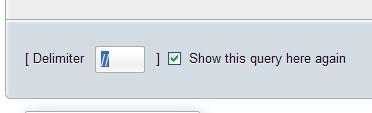
We then enter the procedure's code in the main query box:
CREATE PROCEDURE `add_page`(IN param_isbn VARCHAR(25),
IN param_pages INT, OUT param_message VARCHAR(100))
BEGIN
IF param_pages > 100 THEN
SET param_message = 'the number of pages is too big';
ELSE
UPDATE book SET page_count = page_count + param_pages WHERE
isbn=param_isbn;
SET param_message = 'success';
END IF;
END
//
On clicking Go, we get a success message if the syntax is correct. If it is not, well it's time to revise our typing abilities or debug our syntax. Unfortunately, MySQL does not come with a procedure debugger.
Again, in the query box, we test our procedure by entering the following statements. Here, we are using a SQL variable, @message, which will receive the contents of the OUT parameter param_message:
call add_page('1-234567-22-0', 4, @message);
SELECT @message;
If all went well, we should see that the @message variable contains success.
We can then verify whether the page count for this book has increased. We also need to test the problematic case:
call add_page('1-234567-22-0', 101, @message);
SELECT @message;
This procedure is now available for calling (for example) from your PHP scripts using the mysqli extension, which is the one recommended to access all the functionalities provided by MySQL 4.1 and above.
A procedure is stored inside a database, and is not tied to a specific table. Therefore, the interface for manipulating procedures and functions can be found at the database level, on the Structure page under the Routines slider, which appears if at least one routine is already defined.
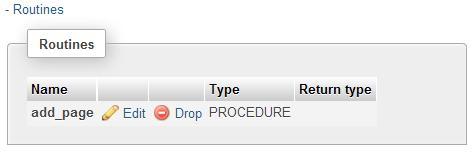
The first icon brings this procedure's text into a query box for editing. The second icon would be used to delete this procedure. When editing the procedure, we notice that the text has been somewhat modified.
DROP PROCEDURE `add_page`//
CREATE DEFINER=`marc`@`%` PROCEDURE `add_page`(IN param_isbn VARCHAR(25), IN param_pages INT, OUT param_message VARCHAR(100))
BEGIN
IF param_pages > 100 THEN
SET param_message = 'the number of pages is too big';
ELSE
UPDATE book SET page_count = page_count + param_pages WHERE
isbn=param_isbn;
SET param_message = 'success';
END IF;
END
First, a DROP PROCEDURE statement appears. This is normal because MySQL does not offer a statement that would permit changing the body of a procedure. Therefore, we have to delete a procedure every time we want to change it. It's true that the ALTER PROCEDURE statement exists, but it can only change the procedure's characteristics, for example, by adding a comment. Then, a DEFINER clause is shown. It was generated at creation time, and indicates who created this procedure.
At this point, we make any changes we need to the code, and click on Go to save this procedure.
Note
It might be tempting to open the book table on its Structure page and look for a list of procedures that manipulate this table, such as our add_page() procedure. However, all procedures are stored at the database level, and there is no direct link between the code itself (UPDATE book) and the place where the procedure is stored.
Functions are similar to stored procedures. However, a function may return just one value, whereas a stored procedure can have more than one OUT parameter. On the other hand, using a stored function from within a SELECT statement may seem more natural as it avoids the need for an intermediate SQL variable to hold the value of an OUT parameter.
What is the goal of functions? As an example, a function can be used to calculate the total cost of an order, including tax and shipping. Putting this logic inside the database instead of at the application level helps to document the application-database interface. It also avoids duplicating business logic in every application that needs to deal with this logic.
We should not confuse MySQL 5.0 functions with UDF (User-Defined Functions), which existed prior to MySQL 5.0. A UDF consists of code written in C or C++, compiled into a shared object, and referenced with a CREATE FUNCTION statement and the SONAME keyword.
phpMyAdmin's treatment of functions is, in many ways, similar to what we have covered in procedures:
- A query box in which to enter a function
- The use of a delimiter
- A mechanism to manipulate a function that is already defined
Let us define a function that retrieves the country name, based on its code. I prefer to use a param_ prefix to clearly identify the parameters inside the function's definition and a var_ prefix for local variables. We will use our trusty SQL query box to enter the function's code, again indicating to this box to use // as the delimiter.
CREATE FUNCTION get_country_name(param_country_code CHAR(2))
RETURNS VARCHAR(50)
READS SQL DATA
BEGIN
DECLARE var_country_name VARCHAR(50) DEFAULT 'not found';
SELECT description
FROM country
WHERE code = param_country_code
INTO var_country_name;
RETURN var_country_name;
END
//
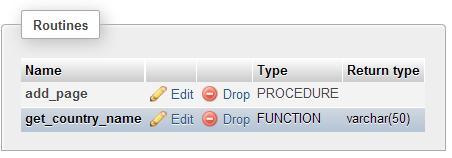
We should note that our newly-created function can be seen on the database's Structure page, along with its friend, the add_page procedure:
To test the function we just created, enter the following query in a query box (refer to Chapter 11):
SELECT CONCAT('ca->', get_country_name('ca'), ', zz->',
get_country_name('zz')) as test;
This will produce the following result:
ca->Canada, zz->not found
When exporting a database, procedures and functions appear in an SQL export. This is because the Add CREATE PROCEDURE / FUNCTION / EVENT checkbox is selected by default in the Object creation options dialog of the Export page (it can be seen in the Custom export mode). Here is the part of the export file related to procedures and functions:
DELIMITER $$
--
-- Procedures
--
CREATE DEFINER=`marc`@`%` PROCEDURE `add_page`(IN param_isbn
VARCHAR(25), IN param_pages INT, OUT param_message VARCHAR(100))
BEGIN
IF param_pages > 100 THEN
SET param_message = 'the number of pages is too big';
ELSE
UPDATE book SET page_count = page_count + param_pages WHERE
isbn=param_isbn;
SET param_message = 'success';
END IF;
END$$
--
-- Functions
--
CREATE DEFINER=`marc`@`%` FUNCTION `get_country_name`
(param_country_code CHAR(2)) RETURNS varchar(50) CHARSET latin1
READS SQL DATA
BEGIN
DECLARE var_country_name VARCHAR(50) DEFAULT 'not found';
SELECT description into var_country_name FROM country WHERE
code = param_country_code;
RETURN var_country_name;
END$$
DELIMITER ;