Table of Contents for
Mastering phpMyAdmin 3.4 for Effective MySQL Management
 Mastering phpMyAdmin 3.4 for Effective MySQL Management
Published by
Packt Publishing, 2012
Mastering phpMyAdmin 3.4 for Effective MySQL Management
Published by
Packt Publishing, 2012
- Cover
- Mastering phpMyAdmin 3.4 for Effective MySQL Management
- Mastering phpMyAdmin 3.4 for Effective MySQL Management
- Credits
- About the Author
- About the Reviewers
- www.PacktPub.com
- Preface
- What you need for this book
- Who this book is for
- Conventions
- Reader feedback
- Customer support
- 1. Getting Started with phpMyAdmin
- What is phpMyAdmin?
- Installing phpMyAdmin
- Configuring phpMyAdmin
- Installing phpMyAdmin configuration storage
- Upgrading phpMyAdmin
- Summary
- 2. Configuring Authentication and Security
- Securing phpMyAdmin
- Summary
- 3. Over Viewing the Interface
- Customizing general settings
- Character sets and collations
- Navigation panel
- Main panel
- User preferences
- Query window
- Summary
- 4. Creating and Browsing Tables
- Creating our first table
- Inserting data manually
- Browse mode
- Profiling queries
- Creating an additional table
- Summary
- 5. Changing Data and Structure
- Changing table structure
- Summary
- 6. Exporting Structure and Data (Backup)
- Exporting a database
- Exporting a table
- Exporting selectively
- Exporting multiple databases
- Saving the export file on the server
- Memory limits
- Summary
- 7. Importing Structure and Data
- Importing SQL files
- Importing CSV files
- Importing other formats
- Reading files from a web server upload directory
- Displaying an upload progress bar
- Summary
- 8. Searching Data
- Performing a complete database search
- Stopping an errant query
- Summary
- 9. Performing Table and Database Operations
- Changing table attributes
- Emptying or deleting a table
- Renaming, moving, and copying tables
- Performing other table operations
- Multi-table operations
- Database operations
- Summary
- 10. Benefiting from the Relational System
- Defining relations with the relation view
- Defining relations with the Designer
- Benefiting from the defined relations
- Column commenting
- Summary
- 11. Entering SQL Statements
- The Query window
- Multi-statement queries
- Pretty printing (syntax highlighting)
- The SQL Validator
- Summary
- 12. Generating Multi-table Queries
- Exploring column criteria
- Generating automatic joins (internal relations)
- Executing the query
- The visual builder
- Summary
- 13. Synchronizing Data and Supporting Replication
- Supporting MySQL replication
- Summary
- 14. Using Query Bookmarks
- Creating bookmarks
- Recalling bookmarks from the bookmarks list
- Passing a parameter to a bookmark
- Summary
- 15. Documenting the System
- Generating relational schemas
- Summary
- 16. Transforming Data using MIME
- Enabling transformations
- Examples of transformations
- Summary
- 17. Supporting Features Added in MySQL 5
- Supporting routines—stored procedures and functions
- Executing code with triggers
- Using information_schema
- Partitioning
- Exploring the event scheduler
- Summary
- 18. Tracking Changes
- Prerequisites
- Principles
- Initiating tracking for one table
- Testing the tracking mechanism
- Determining tracking status
- Structure snapshot
- Exporting a version
- Creating a new version
- Deleting tracking information
- Summary
- 19. Administrating the MySQL Server
- Database information
- Server information
- Summary
- A. Troubleshooting and Support
- Seeking support
- Contributing to the project
In this section, we will look at the benefits of the defined relations that we can currently test. Other benefits will be described in Chapter 12 and Chapter 15. Additional benefits of the phpMyAdmin configuration storage will appear in Chapter 14, Chapter 16, and Chapter 18.
These benefits are available for both internal and foreign key relations.
Let us browse the book table. We see that the values of the related key (author_id) are now links. Moving the cursor over any author_id value reveals the author's name (as defined by the display column of the author table).

Clicking on the author_id brings us to the relevant table —author—for this specific author:

Instead of viewing the keys, we might prefer to see the display column for all the rows. Going back to the book table, we can select the Relational display column display option and click on Go. This produces a screen similar to the following screenshot:
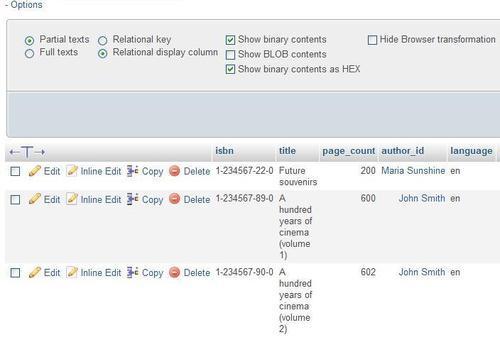
We now switch back to viewing the keys by selecting Relational key and clicking on Go.
Displaying the book table, in Insert mode (or in Edit mode), there is now a drop-down list of the possible keys for each column that has a defined relation. The list contains the keys and the description (display column) in both orders—key to the display column as well as display column to the key. This enables us to use the keyboard and type the first letter of either the key or the display column.
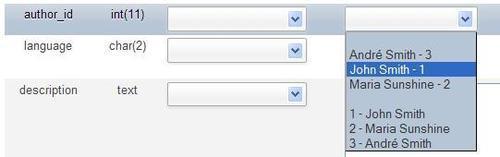
Note
Only the key (in this case 1) will be stored in the book table. The display column is shown only to assist us.
By default, this drop-down list will appear if there are a maximum of 100 rows in the foreign table. This is controlled by the following parameter:
$cfg['ForeignKeyMaxLimit'] = 100;
For foreign tables bigger than that, a distinct window appears—the foreign-table window (refer to the next section) that can be browsed.
We might prefer to see information differently in the drop-down list. Here, John Smith is the content and 1 is the ID. The default display is controlled by the following line of code:
$cfg['ForeignKeyDropdownOrder'] = array( 'content-id', 'id-content');
We can use one or both of the strings—content-id and id-content—in the defining array and in the order we prefer. Thus, defining $cfg['ForeignKeyDropdownOrder'] to array('id-content') would produce a list with only those choices:
1 John Smith
2 Maria Sunshine
3 André Smith
Our current author table has very few entries. Thus, to illustrate this mechanism, we will set the $cfg['ForeignKeyMaxLimit'] to an artificially low number, 1. Now in the Insert mode for the book table, we see a small table-shaped icon and a Browse foreign values link for author_id column. This icon opens another window, which will present the values of the author table and a Search input field. On the left, the values are sorted by key value (here, the id column), and on the right, they are sorted by description.
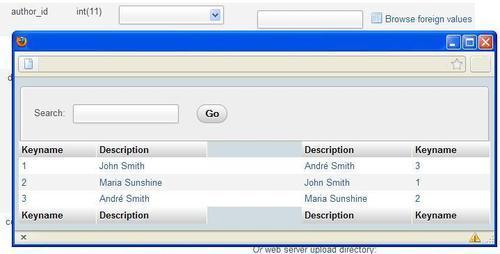
Choosing one of the values (by clicking either a key value or a description) closes this window and brings the value back to the author_id column.
We discussed the Operations page and its Table maintenance section in Chapter 9. For this exercise, we suppose that both the book and author tables are not under the control of the InnoDB or PBXT storage engine. If we have defined an internal relation for the author table, a new choice appears for the book table—Check referential integrity.
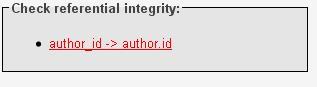
A link (author_id -> author.id) appears for each defined relation, and clicking on it starts verification. For each row, the presence of the corresponding key in the foreign table is verified and errors, if any, are reported. If the resulting page reports zero rows, it is good news!
This operation exists because for tables under the storage engines that do not support foreign key natively, neither MySQL nor phpMyAdmin enforces referential integrity. It is perfectly possible, for example, to insert data in the book table with invalid values for author_id column.
phpMyAdmin keeps the metadata for internal relations synchronized with every change that is made to the tables via phpMyAdmin. For example, renaming a column that is part of a relation would make phpMyAdmin rename this column in the metadata for the relation. This guarantees that an internal relation continues to function, even after a column's name is changed. The same thing happens when a column or table is dropped.