Table of Contents for
Mastering phpMyAdmin 3.4 for Effective MySQL Management
 Mastering phpMyAdmin 3.4 for Effective MySQL Management
Published by
Packt Publishing, 2012
Mastering phpMyAdmin 3.4 for Effective MySQL Management
Published by
Packt Publishing, 2012
- Cover
- Mastering phpMyAdmin 3.4 for Effective MySQL Management
- Mastering phpMyAdmin 3.4 for Effective MySQL Management
- Credits
- About the Author
- About the Reviewers
- www.PacktPub.com
- Preface
- What you need for this book
- Who this book is for
- Conventions
- Reader feedback
- Customer support
- 1. Getting Started with phpMyAdmin
- What is phpMyAdmin?
- Installing phpMyAdmin
- Configuring phpMyAdmin
- Installing phpMyAdmin configuration storage
- Upgrading phpMyAdmin
- Summary
- 2. Configuring Authentication and Security
- Securing phpMyAdmin
- Summary
- 3. Over Viewing the Interface
- Customizing general settings
- Character sets and collations
- Navigation panel
- Main panel
- User preferences
- Query window
- Summary
- 4. Creating and Browsing Tables
- Creating our first table
- Inserting data manually
- Browse mode
- Profiling queries
- Creating an additional table
- Summary
- 5. Changing Data and Structure
- Changing table structure
- Summary
- 6. Exporting Structure and Data (Backup)
- Exporting a database
- Exporting a table
- Exporting selectively
- Exporting multiple databases
- Saving the export file on the server
- Memory limits
- Summary
- 7. Importing Structure and Data
- Importing SQL files
- Importing CSV files
- Importing other formats
- Reading files from a web server upload directory
- Displaying an upload progress bar
- Summary
- 8. Searching Data
- Performing a complete database search
- Stopping an errant query
- Summary
- 9. Performing Table and Database Operations
- Changing table attributes
- Emptying or deleting a table
- Renaming, moving, and copying tables
- Performing other table operations
- Multi-table operations
- Database operations
- Summary
- 10. Benefiting from the Relational System
- Defining relations with the relation view
- Defining relations with the Designer
- Benefiting from the defined relations
- Column commenting
- Summary
- 11. Entering SQL Statements
- The Query window
- Multi-statement queries
- Pretty printing (syntax highlighting)
- The SQL Validator
- Summary
- 12. Generating Multi-table Queries
- Exploring column criteria
- Generating automatic joins (internal relations)
- Executing the query
- The visual builder
- Summary
- 13. Synchronizing Data and Supporting Replication
- Supporting MySQL replication
- Summary
- 14. Using Query Bookmarks
- Creating bookmarks
- Recalling bookmarks from the bookmarks list
- Passing a parameter to a bookmark
- Summary
- 15. Documenting the System
- Generating relational schemas
- Summary
- 16. Transforming Data using MIME
- Enabling transformations
- Examples of transformations
- Summary
- 17. Supporting Features Added in MySQL 5
- Supporting routines—stored procedures and functions
- Executing code with triggers
- Using information_schema
- Partitioning
- Exploring the event scheduler
- Summary
- 18. Tracking Changes
- Prerequisites
- Principles
- Initiating tracking for one table
- Testing the tracking mechanism
- Determining tracking status
- Structure snapshot
- Exporting a version
- Creating a new version
- Deleting tracking information
- Summary
- 19. Administrating the MySQL Server
- Database information
- Server information
- Summary
- A. Troubleshooting and Support
- Seeking support
- Contributing to the project
In the previous chapters, we dealt mostly with table columns. In this chapter, we will learn how to perform some operations that influence tables or databases as a whole. We will cover table attributes and how to modify them, and will also discuss multi-table operations.
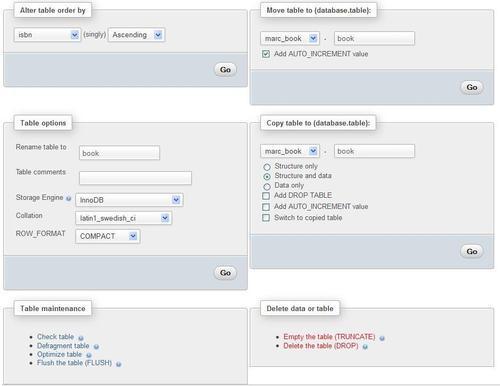
Various links that enable table operations have been put together on the Operations page of the Table view. Here is an overview of this page:
During its lifetime, a table repeatedly gets modified and is, therefore, continually growing and shrinking. Outages may occur on the server, leaving some tables in a damaged state.
Using the Operations page, we can perform various operations, which are listed next. However, not every operation is available for every storage engine.
- Check table: Scans all rows to verify that deleted links are correct. A checksum is also calculated to verify the integrity of the keys. If everything is all right, we will obtain a message stating OK or Table is already up to date; if any other message shows up, it's time to repair this table (refer to the Repair table bullet point).
- Analyze table: Analyzes and stores the key distribution; this will be used on subsequent
JOINoperations to determine the order in which the tables should be joined. This operation should be periodically done (in case data has changed in the table) to improveJOINefficiency. - Repair table: Repairs any corrupted data for tables in the
MyISAMandARCHIVEengines. Note that a table might be so corrupted that we cannot even go intoTableview for it! In such a case, refer to the Multi-table operations section for the procedure to repair it. - Defragment table: Random insertions or deletions in an
InnoDBtable fragment its index. The table should be periodically defragmented for faster data retrieval. This operation causes MySQL to rebuild the table and only applies toInnoDB. - Optimize table: This is useful when the table contains overheads. After massive deletions of rows or length changes for
VARCHARcolumns, lost bytes remain in the table. phpMyAdmin warns us in various places (for example, in theStructureview) if it feels the table should be optimized. This operation reclaims the unused space in the table. In the case of MySQL 5.x, the relevant tables that can be optimized use theMyISAM, InnoDB, andARCHIVEengines. - Flush table: This must be done when there have been many connection errors and the MySQL server blocks further connections. Flushing will clear some internal caches and allow normal operations to resume.
Note
The operations are based on the available underlying MySQL queries—phpMyAdmin only calls those queries. More details are available at http://dev.mysql.com/doc/refman/5.5/en/table-maintenance-sql.html.