
An important difference between the dump and backup commands is that backup can be run while the Neo4j instance is live. For dump to run, the instance must be stopped. Therefore, the first step to taking a backup with the Neo4j Community Edition is to stop Neo4j:
    bin/neo4j stop
    Stopping Neo4j.. stopped
Next, we will run the following commands from the neo4j-admin tool:
    mkdir /backups/astronaut.db-backup/
    bin/neo4j-admin dump --database=graph.db --to=backups/astronaut.db-backup/2017-09-11.dump
    bin/neo4j start
Before getting into the load functionality, let's create a new node for the ISS-53/54 (Soyuz) mission. From within Neo4j Browser, we'll execute this CREATE Cypher statement:
CREATE (m:Mission {name: 'ISS-53/54 (Soyuz)'});
Now, let's run two MATCH/CREATE queries that will find two existing astronauts (Joeseph M. Acaba and Mark T. VandeHei) and tie them to the ISS-53/54 (Soyuz) mission node:
MATCH (m:Mission),(a:Astronaut) WHERE m.name='ISS-53/54 (Soyuz)' AND
  a.name='Joseph M. Acaba' CREATE (a)-[:FLEW_ON]->(m);
MATCH (m:Mission),(a:Astronaut) WHERE m.name='ISS-53/54 (Soyuz)' AND
  a.name='Mark T. VandeHei' CREATE (a)-[:FLEW_ON]->(m);
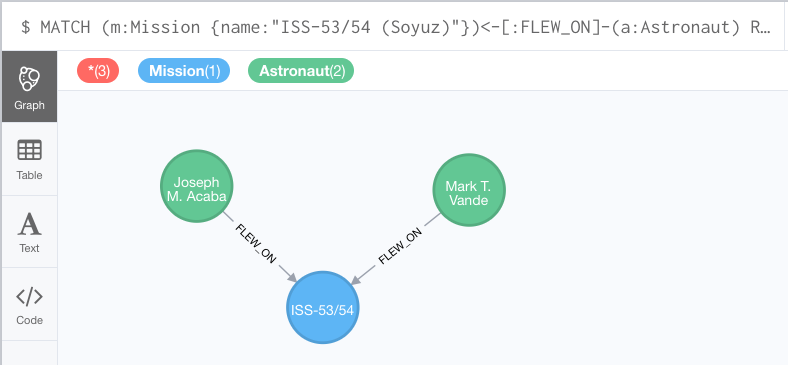
Querying for that mission and the astronauts that flew on it should yield results similar to this:
MATCH (m:Mission {name:"ISS-53/54 (Soyuz)"})<-[:FLEW_ON]-(a:Astronaut) RETURN m,a;
The output for the preceding query would look like this:
Now that we have altered the data (created a new node with two new relationships), let's restore from our backup to revert to the original state. As with the restore command, the Neo4j instance must be stopped before a load command will function. Therefore, we will stop our instance and then run the load command:
    bin/neo4j stop
    Stopping Neo4j.. stopped

    bin/neo4j-admin load --from=backups/astronaut.db-backup/2017-9-11.dump --database=graph.db -force
With that complete, we will restart our instance:
bin/neo4j start
Now, we'll jump back over to our Neo4j Browser and rerun our Cypher query to check for the ISS-53/54 (Soyuz) mission and its astronauts:
MATCH (m:Mission {name:"ISS-53/54 (Soyuz)"})<-[:FLEW_ON]-(a:Astronaut) RETURN m,a;
Or, if we simply query for only the mission node itself (no relationships), we are presented with a similar result:
MATCH (m:Mission {name:"ISS-53/54 (Soyuz)"})RETURN m;
The output for the preceding query would look like this:
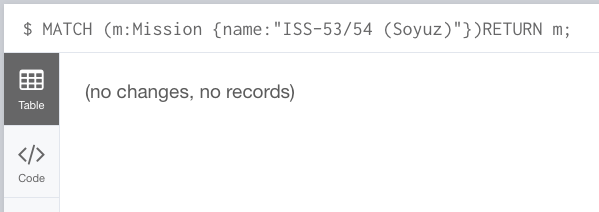
As the query results show, running the load command to restore our database to its state prior to the addition of the ISS-53/54 (Soyuz) mission was indeed successful.