
DynamoDB allows you to create an index on an attribute other than the primary key attribute, known as a secondary index. We can use these indexes in scan and query operations to retrieve data more efficiently.
If an item is inserted, deleted, or updated in the table, DynamoDB will automatically maintain any related secondary index for that table.
DynamoDB supports two types of secondary index:
- Global secondary index: The global secondary index is called global because any attribute in the base table can be used as a partition key in the index. For the global secondary index, you must define one partition key attribute. Here, the sort key attribute is optional, so this can have a simple key as well as a composite key. A user can create a maximum of five global secondary indexes per table. Global secondary indexes can be created while creating the table, and you can also add them at a later point. The global secondary index allows us to query across multiple partitions. We can create an index by clicking the index tab and providing the partition key. You can also define the sort key:
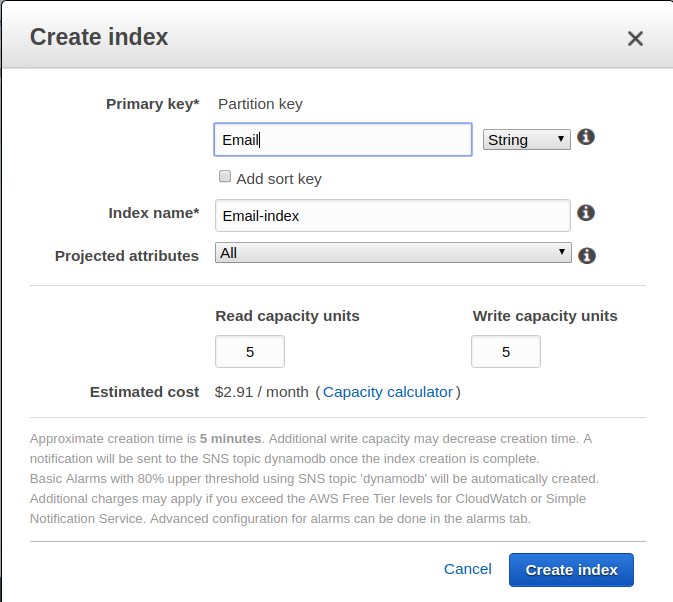
- Local secondary index: The local secondary index is called local because it has the same partition key as the base table. We can use other attributes of the base table to define the sort key, and thus the local secondary index is always the composite key. We have to create a local secondary index while creating the table itself. We cannot add or delete a local secondary index at a later point in time. The local secondary index allows you to query only one partition, the same as the base table. In the local secondary index we have to use the partition key, which we created for the base key. For example, if we created the partition key on field id, we have to use same the partition key, we cannot create a partition key on another attribute like Email, which is allowed in global secondary indexes.