Table of Contents for
Responsive Web Design with HTML5 and CSS3 - Second Edition
 Responsive Web Design with HTML5 and CSS3 - Second Edition
Published by
Packt Publishing, 2015
Responsive Web Design with HTML5 and CSS3 - Second Edition
Published by
Packt Publishing, 2015
- Cover
- Table of Contents
- Responsive Web Design with HTML5 and CSS3 Second Edition
- Responsive Web Design with HTML5 and CSS3 Second Edition
- Credits
- About the Author
- About the Reviewers
- www.PacktPub.com
- Preface
- What you need for this book
- Who this book is for
- Conventions
- Reader feedback
- Customer support
- 1. The Essentials of Responsive Web Design
- Defining responsive web design
- Setting browser support levels
- Our first responsive example
- The shortcomings of our example
- Summary
- 2. Media Queries – Supporting Differing Viewports
- Media query syntax
- Combining media queries
- Using media queries to alter a design
- Considerations for organizing and authoring media queries
- Combine media queries or write them where it suits?
- The viewport meta tag
- Media Queries Level 4
- Summary
- 3. Fluid Layouts and Responsive Images
- Introducing Flexbox
- Getting Flexy
- Responsive images
- Summary
- 4. HTML5 for Responsive Web Designs
- Starting an HTML5 page the right way
- Easy-going HTML5
- New semantic elements in HTML5
- HTML5 text-level semantics
- Obsolete HTML features
- Putting HTML5 elements to use
- WCAG and WAI-ARIA for more accessible web applications
- Embedding media in HTML5
- Responsive HTML5 video and iFrames
- A note about 'offline first'
- Summary
- 5. CSS3 – Selectors, Typography, Color Modes, and New Features
- Anatomy of a CSS rule
- Quick and useful CSS tricks
- Word wrapping
- Facilitating feature forks in CSS
- New CSS3 selectors and how to use them
- CSS3 structural pseudo-classes
- CSS custom properties and variables
- CSS calc
- CSS Level 4 selectors
- Web typography
- New CSS3 color formats and alpha transparency
- Summary
- 6. Stunning Aesthetics with CSS3
- Box shadows
- Background gradients
- Repeating gradients
- Background gradient patterns
- Multiple background images
- High-resolution background images
- CSS filters
- A warning on CSS performance
- Summary
- 7. Using SVGs for Resolution Independence
- The graphic that is a document
- Creating SVGs with popular image editing packages and services
- Inserting SVGs into your web pages
- Inserting an SVG inline
- What you can do with each SVG insertion method (inline, object, background-image, and img)
- Extra SVG capabilities and oddities
- Animating SVG with JavaScript
- Optimising SVGs
- Using SVGs as filters
- A note on media queries inside SVGs
- Summary
- 8. Transitions, Transformations, and Animations
- CSS3 2D transforms
- CSS3 3D transformations
- Animating with CSS3
- Summary
- 9. Conquer Forms with HTML5 and CSS3
- Understanding the component parts of HTML5 forms
- HTML5 input types
- How to polyfill non-supporting browsers
- Styling HTML5 forms with CSS3
- Summary
- 10. Approaching a Responsive Web Design
- View and use the design on real devices
- Embracing progressive enhancement
- Defining a browser support matrix
- Tiering the user experience
- Linking CSS breakpoints to JavaScript
- Avoid CSS frameworks in production
- Coding pragmatic solutions
- Use the simplest code possible
- Hiding, showing, and loading content across viewports
- Validators and linting tools
- Performance
- The next big things
- Summary
- Index
Before HTML5, adding things such as date pickers, placeholder text, and range sliders into forms has always needed JavaScript. Similarly, there has been no easy way to tell users what we expect them to input into certain input fields, for example, whether we want users to input telephone numbers, e-mail addresses, or URLs. The good news is that HTML5 largely solves these common problems.
We have two main aims in this chapter. Firstly, to understand HTML5 form features and secondly, to understand how we can lay out forms more simply for multiple devices with the latest CSS features.
In this chapter, we will learn how to:
- Easily add placeholder text into relevant form input fields
- Disable auto-completion of form fields where necessary
- Set certain fields to be required before submission
- Specify different input types such as e-mail, telephone number, and URL
- Create number range sliders for easy value selection
- Place date and color pickers into a form
- Learn how we can use a regular expression to define an allowed form value
- How to style forms using Flexbox
I think the easiest way to get to grips with HTML5 forms is to work our way through an example form. From the finest of daytime TV examples, I have one I made earlier. A minor introduction is needed.
Two facts: firstly, I love films. Secondly, I'm very opinionated on what is a good film and what is not.
Every year, when the Oscar nominations are announced, I can't help feeling the wrong films have got 'the nod' from the Academy. Therefore, we will start with an HTML5 form that enables fellow cinephiles to vent their frustrations at the continual travesties of the Oscar nominations.
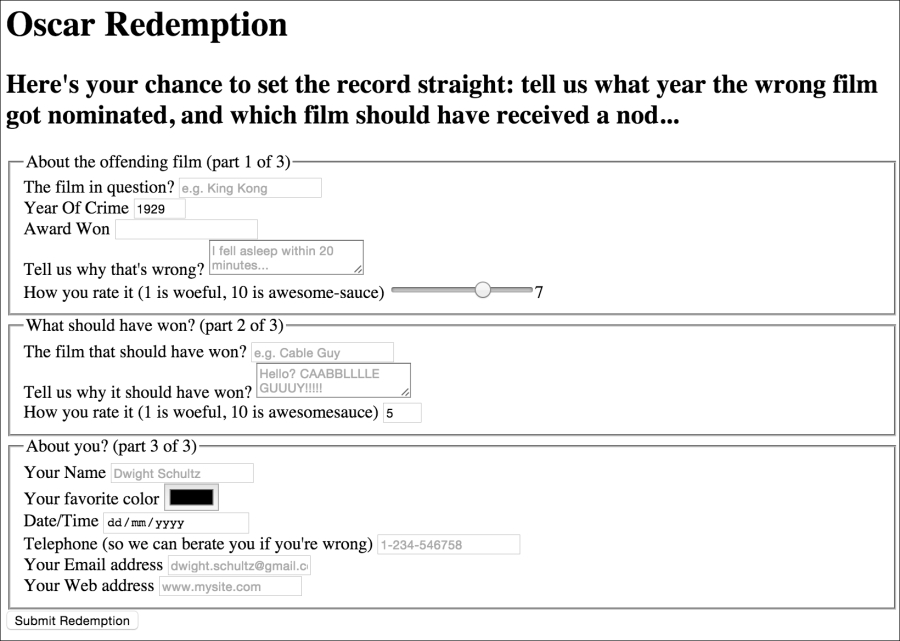
It's made up of a few fieldset elements, within which we are including a raft of the HTML5 form input types and attributes. Besides standard form input fields and text areas, we have a number spinner, a range slider, and placeholder text for many of the fields.
Here's how it looks with no styles applied in Chrome:
If we 'focus' on the first field and start inputting text, the placeholder text is removed. If we blur focus without entering anything (by clicking outside of the input box again) the placeholder text re-appears. If we submit the form (without entering anything), the following happens:
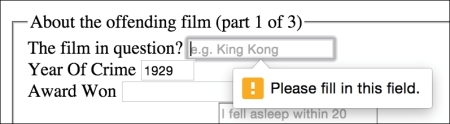
The great news is that all these user interface elements, including the aforementioned slider, placeholder text, and spinner, and the input validation, are all being handled natively by the browser via HTML5, and no JavaScript. Now, the form validation isn't entirely cross browser compatible, but we will get to that shortly. First of all, let's get a handle on all the new capabilities of HTML5 that relate to forms and make all this possible. Once we understand all the mechanics, we can get to work styling it up.