Table of Contents for
Responsive Web Design with HTML5 and CSS3 - Second Edition
 Responsive Web Design with HTML5 and CSS3 - Second Edition
Published by
Packt Publishing, 2015
Responsive Web Design with HTML5 and CSS3 - Second Edition
Published by
Packt Publishing, 2015
- Cover
- Table of Contents
- Responsive Web Design with HTML5 and CSS3 Second Edition
- Responsive Web Design with HTML5 and CSS3 Second Edition
- Credits
- About the Author
- About the Reviewers
- www.PacktPub.com
- Preface
- What you need for this book
- Who this book is for
- Conventions
- Reader feedback
- Customer support
- 1. The Essentials of Responsive Web Design
- Defining responsive web design
- Setting browser support levels
- Our first responsive example
- The shortcomings of our example
- Summary
- 2. Media Queries – Supporting Differing Viewports
- Media query syntax
- Combining media queries
- Using media queries to alter a design
- Considerations for organizing and authoring media queries
- Combine media queries or write them where it suits?
- The viewport meta tag
- Media Queries Level 4
- Summary
- 3. Fluid Layouts and Responsive Images
- Introducing Flexbox
- Getting Flexy
- Responsive images
- Summary
- 4. HTML5 for Responsive Web Designs
- Starting an HTML5 page the right way
- Easy-going HTML5
- New semantic elements in HTML5
- HTML5 text-level semantics
- Obsolete HTML features
- Putting HTML5 elements to use
- WCAG and WAI-ARIA for more accessible web applications
- Embedding media in HTML5
- Responsive HTML5 video and iFrames
- A note about 'offline first'
- Summary
- 5. CSS3 – Selectors, Typography, Color Modes, and New Features
- Anatomy of a CSS rule
- Quick and useful CSS tricks
- Word wrapping
- Facilitating feature forks in CSS
- New CSS3 selectors and how to use them
- CSS3 structural pseudo-classes
- CSS custom properties and variables
- CSS calc
- CSS Level 4 selectors
- Web typography
- New CSS3 color formats and alpha transparency
- Summary
- 6. Stunning Aesthetics with CSS3
- Box shadows
- Background gradients
- Repeating gradients
- Background gradient patterns
- Multiple background images
- High-resolution background images
- CSS filters
- A warning on CSS performance
- Summary
- 7. Using SVGs for Resolution Independence
- The graphic that is a document
- Creating SVGs with popular image editing packages and services
- Inserting SVGs into your web pages
- Inserting an SVG inline
- What you can do with each SVG insertion method (inline, object, background-image, and img)
- Extra SVG capabilities and oddities
- Animating SVG with JavaScript
- Optimising SVGs
- Using SVGs as filters
- A note on media queries inside SVGs
- Summary
- 8. Transitions, Transformations, and Animations
- CSS3 2D transforms
- CSS3 3D transformations
- Animating with CSS3
- Summary
- 9. Conquer Forms with HTML5 and CSS3
- Understanding the component parts of HTML5 forms
- HTML5 input types
- How to polyfill non-supporting browsers
- Styling HTML5 forms with CSS3
- Summary
- 10. Approaching a Responsive Web Design
- View and use the design on real devices
- Embracing progressive enhancement
- Defining a browser support matrix
- Tiering the user experience
- Linking CSS breakpoints to JavaScript
- Avoid CSS frameworks in production
- Coding pragmatic solutions
- Use the simplest code possible
- Hiding, showing, and loading content across viewports
- Validators and linting tools
- Performance
- The next big things
- Summary
- Index
So far in this chapter, we have looked at how CSS3 has given us new powers of selection and the ability to add custom typography to our designs. Now, we'll look at ways that CSS3 allows us to work with color that were simply not possible before.
Firstly, CSS3 provides two new ways to declare color: RGB and HSL. In addition, these two formats enable us to use an alpha channel alongside them (RGBA and HSLA respectively).
Red, Green, and Blue (RGB) is a coloring system that's been around for decades. It works by defining different values for the red, green, and blue components of a color. For example, a red color might be defined in CSS as a HEX (hexadecimal) value, #fe0208:
.redness {
  color: #fe0208;
}
Tip
For a great post describing how to understand HEX values more intuitively, I can recommend this blog post at Smashing Magazine: http://www.smashingmagazine.com/2012/10/04/the-code-side-of-color/
However, with CSS3, that color can equally be described by an RGB value:
.redness {
  color: rgb(254, 2, 8);
}
Most image editing applications show colors as both HEX and RGB values in their color picker. The Photoshop color picker, has R, G, and B boxes showing the values for each channel. For example, the R value might be 254, the G value 2, and the B value 8. This is easily transferable to the CSS color property value. In the CSS, after defining the color mode (for example, RGB) the values for red, green, and blue colors are comma separated in that order within parenthesis (as we have in the previous code).
Besides RGB, CSS3 also allows us to declare color values as Hue, Saturation, and Lightness (HSL).
What makes HSL such a joy to use is that it's relatively simple to understand the color that will be represented based on the values given. For example, unless you're some sort of color picking ninja, I'd wager you couldn't instantly tell me what color rgb(255, 51, 204) is? Any takers? No, me neither. However, show me the HSL value of hsl(315, 100%, 60%) and I could take a guess that it is somewhere between Magenta and Red color (it's actually a festive pink color). How do I know this? Simple.
HSL works on a 360° degree color wheel. It looks like this:
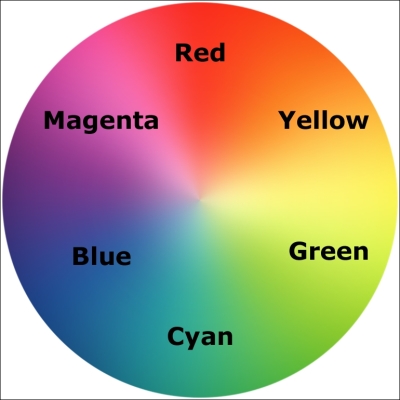
The first figure in a HSL color definition represents Hue. Looking at our wheel we can see that Yellow is at 60°, Green at 120°, Cyan at 180°, Blue at 240°, Magenta at 300°, and finally Red at 360°. So as the aforementioned HSL color had a hue of 315, it's easy to know that it will be between Magenta (at 300°) and Red (at 360°).
The following two values in an HSL definition are for saturation and lightness, specified as percentages. These merely alter the base hue. For a more saturated or 'colorful' appearance, use a higher percentage in the second value. The final value, controlling the Lightness, can vary between 0 percent for black and 100 percent for white.
So, once you've defined a color as an HSL value, it's also easy to create variations on it, merely by altering the saturation and lightness percentages. For example, our red color can be defined in HSL values as follows:
.redness {
  color: hsl(359, 99%, 50%);
}
If we wanted to make a slightly darker color, we could use the same HSL value and merely alter the lightness (the final value) percentage value only:
.darker-red {
  color: hsl(359, 99%, 40%);
}
In conclusion, if you can remember the mnemonic 'Young Guys Can Be Messy Rascals' (or any other mnemonic you care to memorize) for the HSL color wheel, you'll be able to approximately write HSL color values without resorting to a color picker, and also create variations upon it. Show that trick to the savant Ruby, Node, and .NET guys and gals at the office party and earn some quick kudos!
So far you'd be forgiven for wondering why on earth we'd bother using HSL or RGB instead of our trusty HEX values we've been using for years. Where HSL and RGB differ from HEX is that they allow the use of an alpha transparency channel so something beneath an element can 'show through'.
An HSLA color declaration is similar in syntax to a standard HSL rule. However, in addition, you must declare the value as hsla (rather than merely hsl) and add an additional opacity value, given as a decimal value between 0 (completely transparent) and 1 (completely opaque). For example:
.redness-alpha {
  color: hsla(359, 99%, 50%, .5);
}
The RGBA syntax follows the same convention as the HSLA equivalent:
.redness-alpha-rgba {
  color: rgba(255, 255, 255, 0.8);
}
Tip
Why not just use opacity?
CSS3 also allows elements to have opacity set with the opacity declaration. A value is set between 0 and 1 in decimal increments (for example, opacity set to .1 is 10 percent). However, this differs from RGBA and HSLA in that setting an opacity value on an element effects the entire element. Whereas, setting a value with HSLA or RGBA meanwhile allows particular parts of an element to have an alpha layer. For example, an element could have an HSLA value for the background but a solid color for the text within it.
Although in the very early specification stages, it should be possible in the not too distant future to enjoy color manipulations in CSS using the color() function.
Until there is wide browser support, this kind of thing is best handled by CSS pre/post processors (do yourself a favor and buy yourself a book on the subject right now; I recommend Sass and Compass for Designers by that wonderful chap, Ben Frain).
You can follow the progress of the CSS Color Module Level 4 at http://dev.w3.org/csswg/css-color-4/.