In this last chapter, you look at some alternative multimedia programs that you can use instead of Dreamweaver. There is also a final quiz at the end to test your knowledge.
Note
This chapter does not have any projects.
Additional Creative Cloud Software for Your Projects
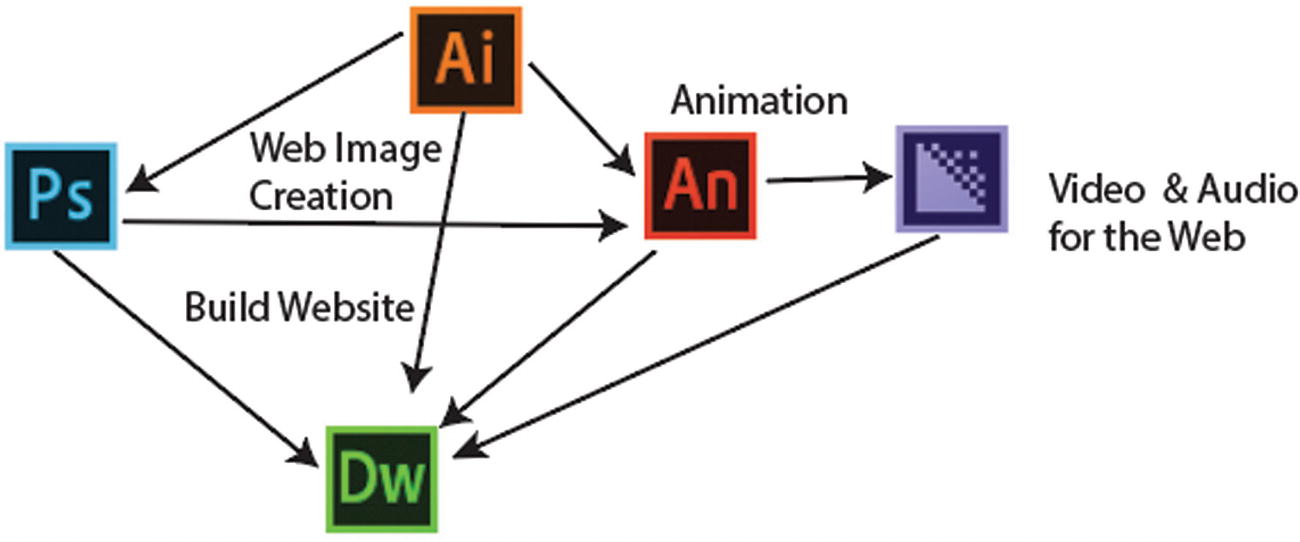
The five core Adobe programs you reviewed
For sound: Audition CC
For additional video effects: Premiere Pro CC, After Effects CC, Prelude CC
For images: Lightroom CC
For 3D and animations: Character Animator, Dimension CC, and Fuse CC
All the resultant graphics or video that you export from these programs can be incorporated into a website that is designed using Dreamweaver CC.
Having said that, Adobe Creative Cloud has a few new programs for creating an image-driven website. Some of these may be useful to your company or clients, and you may want to research them further for your next project.
What Additional Adobe Creative Cloud Software Can You Use to Display Graphics or Multimedia Online?
Open your Creative Cloud console and scroll down the list to look at the following software icons.
Adobe InDesign CC

Adobe InDesign CC
However, did you know that besides exporting interactive PDFs (forms and transitions), you can also create EPUB documents? EPUBs are like mini-websites in digital book form that you can read on an e-reader like Adobe Digital Editions or any other e-reader application on your tablet or smartphone. Like a website, an EPUB can contain images, video, audio, animation in the form of an OAM file, or animations created within InDesign. EPUBs are another wonderful way to create a simple self-published magazine, book, or catalog for your clients to read on their mobile device. Apress has books on this topic if you want to learn more.
Adobe Experience Design
Adobe Experience Design or XD CC
Afterward, you can export your files in the form of PNG, SVG, JPG, and interactive PDF, which could be viewed by a client before the images are added to Dreamweaver CC.
Remember that this program is for creating prototypes, not the final website. So, to finish the website, you need to take the information from the prototype and ultimately lay out the whole website. Hopefully, at some point there will be an integration where HTML pages from the prototypes are published to Portfolio or Dreamweaver so that designers and developers can interact with these HTML files after export.
Note
Adobe Acrobat Pro DC has the ability to export a file as HTML. This may be a feasible way to extract some further information (however limited) out of an interactive PDF for your website, but it’s certainly not a perfect solution.
Adobe Portfolio
Lightroom Classic and Portfolio
If you are an artist and plan to create a website that is mainly about your artwork (photos, illustrations, video, and audio) with very little text, rather than create a large complicated website, Portfolio might be all you need.

The Behance account link
The important thing about Portfolio is the template is already mobile-friendly, and you can use all your knowledge from the Photoshop, Illustrator, Animate, and Media Encoder chapters of this book. The one main drawback is that you may feel limited by the amount of customization you can do. These are all things to consider when designing a project for a client when it concerns designing and then later who oversees the future maintenance and updating of the site.
Adobe Spark: Storytelling with Audio and Video

Spark for storytelling
Spark Page: Text and photos for crafting web stories. Is good for travel stories, photo albums, and newsletters that require some movement.
Spark Post: Allows the adjustment of graphics with, text, layers, and filters. The process that would normally take place in Photoshop or InDesign has been simplified in Post for beginning users who tap buttons to control settings.
Spark Video : Allows you to work with audio to tell a story. As with After Effects or Animate, you can also add effects like panning and zooming. However, this is not the same as editing film content, more like an animation that you create in Animate CC. In this instance, text, images, icons, and themes are combined into a presentation. Afterward, you speak your voice audio over the story to create the video. Later, you can export as an MP4 (H.264) video file that you can add to your website or social media site. For more information, refer to https://spark.adobe.com .
Exporting to Phone GAP Build
Adobe Phone GAP Build enables software programmers to build applications for mobile devices using CSS3, HTML5, and JavaScript, instead of relying on platform-specific APIs like those in Android, iOS, or Windows Phone. So, you could design the structure of an app in Dreamweaver and then use Phone GAP to complete the work.
Test Your Knowledge Quiz
- 1.In Photoshop, which two panels are used to create a video?
- a.
Properties and Channels
- b.
Layers and Styles
- c.
Layers and Timeline
- a.
- 2.To create a GIF animation in Photoshop, which export method must be used?
- a.
Export As
- b.
Save for Web (Legacy)
- c.
Quick Export As
- a.
- 3.Which of the following file formats cannot contain transparency?
- a.
GIF
- b.
PNG
- c.
JPEG
- a.
- 4.Which panel in Photoshop is useful for creating a set of steps that you can use many times?
- a.
Layers
- b.
Actions
- c.
Styles
- a.
- 5.You can use Illustrator to export video and animations.
- a.
True
- b.
False
- a.
- 6.What coding language is used with the SVG Interactivity panel?
- a.
JavaScript
- b.
CSS
- c.
HTML
- a.
- 7.Which color mode should you convert your files to before you export them for the web?
- a.
CMYK
- b.
RGB
- a.
- 8.Illustrator Objects are
- a.
vector
- b.
raster
- a.
- 9.In Animate, which format do you export a video as?
- a.
MP4
- b.
MOV
- c.
AVI
- a.
- 10.Animate GIF animations can contain audio.
- a.
True
- b.
False
- a.
- 11.Which of the following tweens can you not create with a library symbol?
- a.
Motion tween
- b.
Classic tween
- c.
Shape tween
- a.
- 12.By default, in which folder does HTML5 Canvas stores its audio files?
- a.
Sounds
- b.
Audio
- c.
Music
- a.
- 13.Which two video formats for the web does Media Encoder not export?
- a.
MP4
- b.
WebM
- c.
Ogg
- a.
- 14.Media Encoder allows you to export a WAV file.
- a.
True
- b.
False
- a.
- 15.If you want a range of frames from a video, which three formats can you export from Media Encoder to get an image sequence?
- a.
PNG
- b.
JPEG
- c.
MP3
- d.
GIF
- a.
- 16.In Media Encoder, which Export Setting allows you to colorize your entire video?
- a.
Lumetri Look /LUT
- b.
Image Overlay
- c.
Time Tuner
- a.
- 17.In Dreamweaver, which tag should you use to keep your SVG files interactive?
- a.
<img>
- b.
<div>
- c.
<object>
- a.
- 18.To insert your compressed HTML5 Canvas in a template-based webpage, which icon from the Insert panel would you choose?
- a.
HTML5 Video
- b.
Animated Composition
- c.
Plugin
- a.
- 19.Which coding would you use to display your image in the background of a <div> tag?
- a.
HTML
- b.
CSS
- c.
JavaScript
- a.
- 20.Which panel in Dreamweaver allows you to edit the attribute of your <video> and <audio> tags?
- a.
CSS Designer
- b.
Assets
- c.
Properties
- a.
- 1.
c
- 2.
b
- 3.
c
- 4.
b
- 5.
b
- 6.
a
- 7.
b
- 8.
a
- 9.
b
- 10.
b
- 11.
c
- 12.
a
- 13.
b, c
- 14.
a
- 15.
a, b, d
- 16.
a
- 17.
c
- 18.
b
- 19.
b
- 20.
c
Summary
In this chapter, you looked at a few other Adobe programs that are part of the Creative Cloud that you may want to use for your own projects. You also took a quiz to test your knowledge. I hope that you enjoyed this book, and that you are able to apply the knowledge that you acquired from building the Hot Glass Tango site for your future multimedia projects.