Table of Contents for
The Modern Web
 The Modern Web
Published by
No Starch Press, 2013
The Modern Web
Published by
No Starch Press, 2013
- The Modern Web
- Cover
- The Modern Web
- Advance Praise for
- Praise for Peter Gasston’s
- Dedication
- About the Author
- About the Technical Reviewer
- Acknowledgments
- Introduction
- The Device Landscape
- The Multi-screen World
- Context: What We Don’t Know
- What You’ll Learn
- A. Further Reading
- 1. The Web Platform
- A Quick Note About Terminology
- Who You Are and What You Need to Know
- Getting Our Terms Straight
- The Real HTML5
- CSS3 and Beyond
- Browser Support
- Test and Test and Test Some More
- Summary
- B. Further Reading
- 2. Structure and Semantics
- New Elements in HTML5
- WAI-ARIA
- The Importance of Semantic Markup
- Microformats
- RDFa
- Microdata
- Data Attributes
- Web Components: The Future of Markup?
- Summary
- C. Further Reading
- 3. Device-Responsive CSS
- Media Queries
- Media Queries in JavaScript
- Adaptive vs. Responsive Web Design
- Viewport-Relative Length Units
- Responsive Design and Replaced Objects
- Summary
- D. Further Reading
- 4. New Approaches to CSS Layouts
- Multi-columns
- Flexbox
- Grid Layout
- The Further Future
- Summary
- E. Further Reading
- 5. Modern JavaScript
- New in JavaScript
- JavaScript Libraries
- Polyfills and Shims
- Testing and Debugging
- Summary
- F. Further Reading
- 6. Device Apis
- Geolocation
- Orientation
- Fullscreen
- Vibration
- Battery Status
- Network Information
- Camera and Microphone
- Web Storage
- Drag and Drop
- Interacting with Files
- Mozilla’s Firefox OS and WebAPIs
- PhoneGap and Native Wrappers
- Summary
- G. Further Reading
- 7. Images and Graphics
- Comparing Vectors and Bitmaps
- Scalable Vector Graphics
- The canvas Element
- When to Choose SVG or Canvas
- Summary
- H. Further Reading
- 8. New Forms
- New Input Types
- New Attributes
- Datalists
- On-Screen Controls and Widgets
- Displaying Information to the User
- Client-side Form Validation
- The Constraint Validation API
- Forms and CSS
- Summary
- I. Further Reading
- 9. Multimedia
- The Media Elements
- Media Fragments
- The Media API
- Media Events
- Advanced Media Interaction
- Summary
- J. Further Reading
- 10. Web Apps
- Web Apps
- Hybrid Apps
- TV Apps
- Webinos
- Application Cache
- Summary
- K. Further Reading
- 11. The Future
- Web Components
- The Future of CSS
- Summary
- L. Further Reading
- M. Browser Support as of March 2013
- The Browsers in Question
- Enabling Experimental Features
- Chapter 1: The Web Platform
- Chapter 2: Structure and Semantics
- Chapter 3: Device-Responsive CSS
- Chapter 4: New Approaches to CSS Layouts
- Chapter 5: Modern JavaScript
- Chapter 6: Device APIs
- Chapter 7: Images and Graphics
- Chapter 8: New Forms
- Chapter 9: Multimedia
- Chapter 10: Web Apps
- Chapter 11: The Future
- N. Further Reading
- Introduction
- Chapter 1: The Web Platform
- Chapter 2: Structure and Semantics
- Chapter 3: Device-Responsive CSS
- Chapter 4: New Approaches to CSS Layouts
- Chapter 5: Modern JavaScript
- Chapter 6: Device APIs
- Chapter 7: Images and Graphics
- Chapter 8: New Forms
- Chapter 9: Multimedia
- Chapter 10: Web Apps
- Chapter 11: The Future
- Index
- About the Author
- Copyright
Web Storage
Recording information about previous activity is usually done with cookies, but one of their drawbacks is that you can store only small amounts of data. The Web Storage API was created to allow user agents to store more data on the user’s device. This data can be stored only until the browser is closed, which is known as session storage, or kept until the user or another script actively flushes the data, which is called local storage. Both operate in essentially the same way, except for that one key difference—permanence.
To store data, you save it in key:value pairs, similar to how you store cookies now, except the quantity of data that can be saved is greater. The API has two key objects, which are straightforward and memorable: localStorage for local storage and sessionStorage for session storage.
Note
In the examples in this section I use sessionStorage, but you can swap this for localStorage if you prefer more permanent storage; the syntax applies equally.
The web storage syntax is pretty flexible, allowing three different ways to store an item: with the setItem() method, with square bracket notation, or with dot notation. As a simple example, the next code snippet shows how you might store this author’s name; all three different ways of storing data are shown for comparison, and all are perfectly valid.
sessionStorage.setItem('author','Peter Gasston');
sessionStorage['author'] = 'Peter Gasston';
sessionStorage.author = 'Peter Gasston';
Some developer tools allow you to inspect the contents of storage, so Figure 6-7 shows the result of this code, regardless of which approach you use.
Retrieving items from storage is just as flexible a process; you can use the getItem() method, which accepts only the name of the relevant key as an argument, or the square bracket or dot notation method without any value. In the next code snippet, all three techniques are shown and are equivalent:
var author = sessionStorage.getItem('author');
var author = sessionStorage['author'];
var author = sessionStorage.author;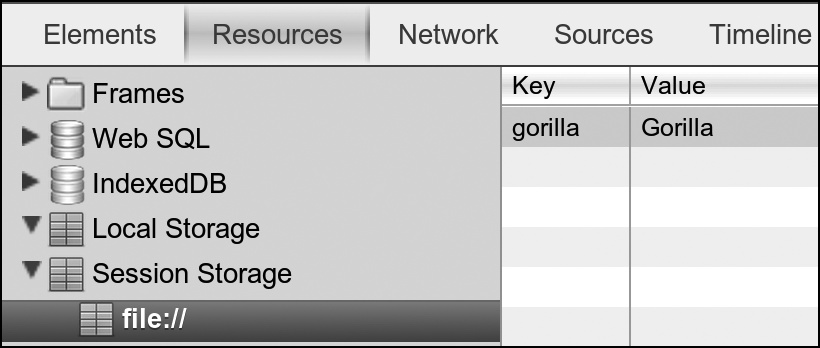
Note
Although I’m storing only very simple values in these examples, in most browsers, you can store up to 5MB of data for each subdomain. This is the figure recommended in the specification, although it’s not mandatory.
You can delete a single item from storage using the removeItem() method, which like getItem(), takes a single key name as an argument and deletes the stored item with the matching key:
sessionStorage.removeItem('author');
In the file storage.html, I’ve put together a simple demo that adds and removes items from the storage. To see the result, you need developer tools that show the contents of the storage, such as in the Resources tab of the WebKit Web Inspector. The contents don’t update in real time, so you have to refresh to see changes.
The nuclear option to remove all items in storage (although only on the specific domain storing them, of course) is the clear() method:
sessionStorage.clear();
A storage event on localStorage is fired whenever storage is changed. This returns an object with some useful properties such as key, which gives the name of the key that has changed, and oldValue and newValue, which give the old and new values of the item that has changed. Note this event fires only on other open instances (tabs or windows) of the same domain, not the active one; its utility lies in monitoring changes if the user has multiple tabs open, for example.
The next code block runs a function that fires whenever storage is modified and logs an entry into the console. You can try it yourself in the file storage-event.html, but you’ll need to open the file and developer console in two different tabs to see the changes occur—remember, changes to the value will show in the other window, not the one where the click occurs.
window.addEventListener('storage', function (e) {
  var msg = 'Key ' + e.key + ' changed from ' + e.oldValue + ' to ' + e.newValue;
  console.log(msg);
}, false);
Storage is being taken even further with the development of the Indexed Database (IndexedDB) API, which aims to create a full-fledged storage database in the browser that you access via JavaScript. Many browsers have already made an attempt at this, but the vendors couldn’t decide on a common format. IndexedDB is an independently created standard aimed at keeping everyone happy. Its heavily technical nature takes it out of the scope of this book, but if you need advanced storage capabilities, keep it in mind.