Table of Contents for
The Modern Web
 The Modern Web
Published by
No Starch Press, 2013
The Modern Web
Published by
No Starch Press, 2013
- The Modern Web
- Cover
- The Modern Web
- Advance Praise for
- Praise for Peter Gasston’s
- Dedication
- About the Author
- About the Technical Reviewer
- Acknowledgments
- Introduction
- The Device Landscape
- The Multi-screen World
- Context: What We Don’t Know
- What You’ll Learn
- A. Further Reading
- 1. The Web Platform
- A Quick Note About Terminology
- Who You Are and What You Need to Know
- Getting Our Terms Straight
- The Real HTML5
- CSS3 and Beyond
- Browser Support
- Test and Test and Test Some More
- Summary
- B. Further Reading
- 2. Structure and Semantics
- New Elements in HTML5
- WAI-ARIA
- The Importance of Semantic Markup
- Microformats
- RDFa
- Microdata
- Data Attributes
- Web Components: The Future of Markup?
- Summary
- C. Further Reading
- 3. Device-Responsive CSS
- Media Queries
- Media Queries in JavaScript
- Adaptive vs. Responsive Web Design
- Viewport-Relative Length Units
- Responsive Design and Replaced Objects
- Summary
- D. Further Reading
- 4. New Approaches to CSS Layouts
- Multi-columns
- Flexbox
- Grid Layout
- The Further Future
- Summary
- E. Further Reading
- 5. Modern JavaScript
- New in JavaScript
- JavaScript Libraries
- Polyfills and Shims
- Testing and Debugging
- Summary
- F. Further Reading
- 6. Device Apis
- Geolocation
- Orientation
- Fullscreen
- Vibration
- Battery Status
- Network Information
- Camera and Microphone
- Web Storage
- Drag and Drop
- Interacting with Files
- Mozilla’s Firefox OS and WebAPIs
- PhoneGap and Native Wrappers
- Summary
- G. Further Reading
- 7. Images and Graphics
- Comparing Vectors and Bitmaps
- Scalable Vector Graphics
- The canvas Element
- When to Choose SVG or Canvas
- Summary
- H. Further Reading
- 8. New Forms
- New Input Types
- New Attributes
- Datalists
- On-Screen Controls and Widgets
- Displaying Information to the User
- Client-side Form Validation
- The Constraint Validation API
- Forms and CSS
- Summary
- I. Further Reading
- 9. Multimedia
- The Media Elements
- Media Fragments
- The Media API
- Media Events
- Advanced Media Interaction
- Summary
- J. Further Reading
- 10. Web Apps
- Web Apps
- Hybrid Apps
- TV Apps
- Webinos
- Application Cache
- Summary
- K. Further Reading
- 11. The Future
- Web Components
- The Future of CSS
- Summary
- L. Further Reading
- M. Browser Support as of March 2013
- The Browsers in Question
- Enabling Experimental Features
- Chapter 1: The Web Platform
- Chapter 2: Structure and Semantics
- Chapter 3: Device-Responsive CSS
- Chapter 4: New Approaches to CSS Layouts
- Chapter 5: Modern JavaScript
- Chapter 6: Device APIs
- Chapter 7: Images and Graphics
- Chapter 8: New Forms
- Chapter 9: Multimedia
- Chapter 10: Web Apps
- Chapter 11: The Future
- N. Further Reading
- Introduction
- Chapter 1: The Web Platform
- Chapter 2: Structure and Semantics
- Chapter 3: Device-Responsive CSS
- Chapter 4: New Approaches to CSS Layouts
- Chapter 5: Modern JavaScript
- Chapter 6: Device APIs
- Chapter 7: Images and Graphics
- Chapter 8: New Forms
- Chapter 9: Multimedia
- Chapter 10: Web Apps
- Chapter 11: The Future
- Index
- About the Author
- Copyright
Geolocation
Location-based services are handy in all sorts of ways, from helping users with mobile devices find their way around to providing tailored information about the region they live in. The Geolocation API accesses a device’s location services, which use GPS, wireless, or cell tower data to provide information about the device’s location that will be used by your location-based apps.
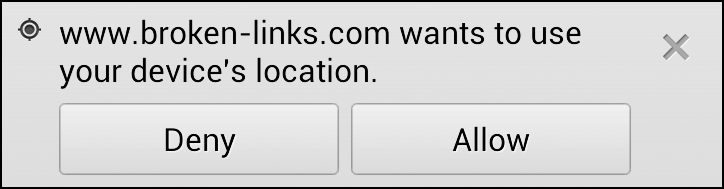
Location data obviously involves privacy concerns, so in most (if not all) browsers, users must give explicit permission to access this data, usually in the form of an on-screen prompt that allows them to opt in or out of providing their location, as shown in Figure 6-1.
The data is held in the geolocation object, a child of window.navigator, which you can access using the getCurrentPosition() method:
navigator.geolocation.getCurrentPosition(function(where){
  // Do something
});
A successful callback returns an object (I’ve called it where) containing a coords child object. This child object has a series of properties pertaining to the user’s position, such as his or her altitude and heading, but the ones I’m really interested in are latitude and longitude. In this code, I’m accessing these properties and displaying them in an alert:
navigator.geolocation.getCurrentPosition(function(where){
  alert(where.coords.latitude + ',' + where.coords.longitude);
});
You can try this for yourself in position-current.html; my results are shown in Figure 6-2.
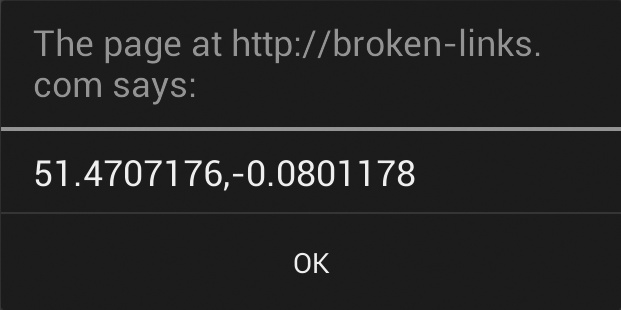
geolocation object, referencing the street I live on; please don’t stalk me.
Occasionally an error is returned when looking for the position; an optional error callback can check for this. The following code creates two functions, one for successful location and one for an error:
var geo = navigator.geolocation,
  lcn_success = function(where) { … },
  lcn_error = function() { … };
geo.getCurrentPosition(lcn_success, lcn_error);
Sometimes a GPS device can take a little while to find the user’s exact position, and, of course, the user may also be on the move, so instead of a one-off location, you can choose to watch the user’s position, receiving updated results when location data changes. You do this with the watchPosition() method, also on the geolocation object, which works in the same way as getCurrentPosition():
navigator.geolocation.watchPosition(function(where){
  console.log(where.coords.latitude,where.coords.longitude);
});
To cancel watching a user’s position, use the clearWatch() method with the unique ID created by the watchPosition() method; in this example, the process ends when the user clicks the #stop link:
var geo = navigator.geolocation,
    watchID = geo.watchPosition( … ),
    endWatch = document.getElementById('stop');
endWatch.addEventListener('click', function () {
  geo.clearWatch(watchID);
}, false);
In position-watch-clear.html, you can see a demo of this in action. Open the page in a mobile device and move around, and you should see the location update as your device gets a better fix on your location.