Table of Contents for
Python: Penetration Testing for Developers
 Python: Penetration Testing for Developers
Published by
Packt Publishing, 2016
Python: Penetration Testing for Developers
Published by
Packt Publishing, 2016
- Cover
- Table of Contents
- Python: Penetration Testing for Developers
- Python: Penetration Testing for Developers
- Python: Penetration Testing for Developers
- Credits
- Preface
- What you need for this learning path
- Who this learning path is for
- Reader feedback
- Customer support
- 1. Module 1
- 1. Understanding the Penetration Testing Methodology
- Understanding what penetration testing is not
- Assessment methodologies
- The penetration testing execution standard
- Penetration testing tools
- Summary
- 2. The Basics of Python Scripting
- Python – the good and the bad
- A Python interactive interpreter versus a script
- Environmental variables and PATH
- Understanding dynamically typed languages
- The first Python script
- Developing scripts and identifying errors
- Python formatting
- Python variables
- Operators
- Compound statements
- Functions
- The Python style guide
- Arguments and options
- Your first assessor script
- Summary
- 3. Identifying Targets with Nmap, Scapy, and Python
- Understanding Nmap
- Nmap libraries for Python
- The Scapy library for Python
- Summary
- 4. Executing Credential Attacks with Python
- Identifying the target
- Creating targeted usernames
- Testing for users using SMTP VRFY
- Summary
- 5. Exploiting Services with Python
- Understanding the chaining of exploits
- Automating the exploit train with Python
- Summary
- 6. Assessing Web Applications with Python
- Identifying hidden files and directories with Python
- Credential attacks with Burp Suite
- Using twill to walk through the source
- Understanding when to use Python for web assessments
- Summary
- 7. Cracking the Perimeter with Python
- Understanding the link between accounts and services
- Cracking inboxes with Burp Suite
- Identifying the attack path
- Gaining access through websites
- Summary
- 8. Exploit Development with Python, Metasploit, and Immunity
- Understanding the Windows memory structure
- Understanding memory addresses and endianness
- Understanding the manipulation of the stack
- Understanding immunity
- Understanding basic buffer overflow
- Writing a basic buffer overflow exploit
- Understanding stack adjustments
- Understanding the purpose of local exploits
- Understanding other exploit scripts
- Reversing Metasploit modules
- Understanding protection mechanisms
- Summary
- 9. Automating Reports and Tasks with Python
- Understanding how to create a Python class
- Summary
- 10. Adding Permanency to Python Tools
- Understanding the difference between multithreading and multiprocessing
- Building industry-standard tools
- Summary
- 2. Module 2
- 1. Python with Penetration Testing and Networking
- Approaches to pentesting
- Introducing Python scripting
- Understanding the tests and tools you'll need
- Learning the common testing platforms with Python
- Network sockets
- Server socket methods
- Client socket methods
- General socket methods
- Moving on to the practical
- Summary
- 2. Scanning Pentesting
- What are the services running on the target machine?
- Summary
- 3. Sniffing and Penetration Testing
- Implementing a network sniffer using Python
- Learning about packet crafting
- Introducing ARP spoofing and implementing it using Python
- Testing the security system using custom packet crafting and injection
- Summary
- 4. Wireless Pentesting
- Wireless attacks
- Summary
- 5. Foot Printing of a Web Server and a Web Application
- Introducing information gathering
- Information gathering of a website from SmartWhois by the parser BeautifulSoup
- Banner grabbing of a website
- Hardening of a web server
- Summary
- 6. Client-side and DDoS Attacks
- Tampering with the client-side parameter with Python
- Effects of parameter tampering on business
- Introducing DoS and DDoS
- Summary
- 7. Pentesting of SQLI and XSS
- Types of SQL injections
- Understanding the SQL injection attack by a Python script
- Learning about Cross-Site scripting
- Summary
- 3. Module 3
- 1. Gathering Open Source Intelligence
- Gathering information using the Shodan API
- Scripting a Google+ API search
- Downloading profile pictures using the Google+ API
- Harvesting additional results from the Google+ API using pagination
- Getting screenshots of websites with QtWebKit
- Screenshots based on a port list
- Spidering websites
- 2. Enumeration
- Performing a ping sweep with Scapy
- Scanning with Scapy
- Checking username validity
- Brute forcing usernames
- Enumerating files
- Brute forcing passwords
- Generating e-mail addresses from names
- Finding e-mail addresses from web pages
- Finding comments in source code
- 3. Vulnerability Identification
- Automated URL-based Directory Traversal
- Automated URL-based Cross-site scripting
- Automated parameter-based Cross-site scripting
- Automated fuzzing
- jQuery checking
- Header-based Cross-site scripting
- Shellshock checking
- 4. SQL Injection
- Checking jitter
- Identifying URL-based SQLi
- Exploiting Boolean SQLi
- Exploiting Blind SQL Injection
- Encoding payloads
- 5. Web Header Manipulation
- Testing HTTP methods
- Fingerprinting servers through HTTP headers
- Testing for insecure headers
- Brute forcing login through the Authorization header
- Testing for clickjacking vulnerabilities
- Identifying alternative sites by spoofing user agents
- Testing for insecure cookie flags
- Session fixation through a cookie injection
- 6. Image Analysis and Manipulation
- Hiding a message using LSB steganography
- Extracting messages hidden in LSB
- Hiding text in images
- Extracting text from images
- Enabling command and control using steganography
- 7. Encryption and Encoding
- Generating an MD5 hash
- Generating an SHA 1/128/256 hash
- Implementing SHA and MD5 hashes together
- Implementing SHA in a real-world scenario
- Generating a Bcrypt hash
- Cracking an MD5 hash
- Encoding with Base64
- Encoding with ROT13
- Cracking a substitution cipher
- Cracking the Atbash cipher
- Attacking one-time pad reuse
- Predicting a linear congruential generator
- Identifying hashes
- 8. Payloads and Shells
- Extracting data through HTTP requests
- Creating an HTTP C2
- Creating an FTP C2
- Creating an Twitter C2
- Creating a simple Netcat shell
- 9. Reporting
- Converting Nmap XML to CSV
- Extracting links from a URL to Maltego
- Extracting e-mails to Maltego
- Parsing Sslscan into CSV
- Generating graphs using plot.ly
- A. Bibliography
- Index
There is a lot of misunderstanding among new Python enthusiasts regarding how to generate Python classes. Python's manner of dealing with classes and instance variables is slightly different from that of many other languages. This is not a bad thing; in fact, once you get used to the way the language works, you can start understanding the reasons for the way the classes are defined as well thought out.
If you search for the topic of Python and self on the Internet, you will find extensive opinions on the use of the defined variable that is placed at the beginning of nonstatic functions in Python classes, you will see extensive opinions about it. These range from why it is a great concept that makes life easier, to the fact that it is difficult to contend with and makes creating multithreaded scripts a chore. Typically, confusion originates from developers who move from another language to Python. Regardless of which side of the fence you will fall on, the examples provided in this chapter are a way of building Python classes.
Note
In the next chapter, we will highlight the multithreading of scripts, which requires a fundamental understanding of how Python classes work.
Guido van Rossum, the creator of Python, has responded to some of the criticism related to self in a blog post, available at http://neopythonic.blogspot.com/2008/10/why-explicit-self-has-to-stay.html. To help you stay focused on this section of the https://github.com/PacktPublishing/Python-Penetration-Testing-for-Developers, extensive definitions of Python classes, imports, and objects will not be repeated, as they are already well-defined. If you would like additional detailed information related to Python classes, you can find it at http://learnpythonthehardway.org/book. Specifically, exercises 40 through 44 do a pretty good job at explaining the "Pythonic" concepts about classes and object-oriented principles, which include inheritance and composition.
Previously, we described how to write the naming conventions for a class that is Pythonic, so we will not repeat that here. Instead, we are going to focus on a couple of items that will be required in our script. First, we are going to define our class and our first function—the __init__ function.
The __init__ function is what is used during the instantiation of the class. This means that a class is called to create an object that can be referenced through the running script as a variable. The __init__ function helps define the initial details of that object, where it basically acts as the constructor for a Python class. To help put this in perspective, the __del__ function is the opposite, as it is the destructor in Python.
If a function is going to use the details of the instance, the first parameter passed has to be a consistent variable, which is typically called self. If you want, you can call it something else, but that is not Pythonic. If a function does not have this variable, then the instantiated values cannot be used directly within that function. All values that follow the self variable in the __init__ function are what would be directly passed to the class during its instantiation. Other languages pass these values through hidden parameters; Python does this using self. Now that you have understood the basics of a Python script, we can start building our parsing script.
The class we are defining for this example is extremely simple in nature. It will have only three functions: __init__, a function that processes the passed data, and finally, a function that returns the processed data. We are going to set up the class to accept the nmap XML file and the verbosity level, and if none of it is passed, it defaults to 0. The following is the definition of the actual class and the __init__ function for the nmap parser:
class Nmap_parser:
    def __init__(self, nmap_xml, verbose=0):
        self.nmap_xml = nmap_xml
        self.verbose = verbose
        self.hosts = {}
        try:
            self.run()
        except Exception, e:
            print("[!] There was an error %s") % (str(e))
            sys.exit(1)
Now we are going to define the function that will do the work for this class. As you will notice, we do not need to pass any variables in the function, as they are contained within self. In larger scripts, I personally add comments to the beginning of functions to explain what is being done. In this way, when I have to add some more functionality into them years later, I do not have to lose time deciphering hundreds of lines of code.
Note
As with the previous chapters, the full script can be found on the GitHub page at https://raw.githubusercontent.com/funkandwagnalls/pythonpentest/master/nmap_parser.py.
The run function tests to make sure that it can open the XML file, and then loads it into a variable using the etree library's parse function. The function then defines the initial necessary variables and gets the root of the XML tree:
def run(self):
    if not self.nmap_xml:
        sys.exit("[!] Cannot open Nmap XML file: %s \n[-] Ensure that your are passing the correct file and format" % (self.nmap_xml))
    try:
        tree = etree.parse(self.nmap_xml)
    except:
        sys.exit("[!] Cannot open Nmap XML file: %s \n[-] Ensure that your are passing the correct file and format" % (self.nmap_xml))
    hosts={}
    services=[]
    hostname_list=[]
    root = tree.getroot()
    hostname_node = None
    if self.verbose> 0:
        print ("[*] Parsing the Nmap XML file: %s") % (self.nmap_xml)
Next, we build a for loop that iterates through each host and defines the hostname as Unknown hostname for each cycle initially. This is done to prevent a hostname from one host from being recorded for another host. Similar blanking is done for the addresses prior to trying to retrieve them. You can see in the following code that a nested for loop iterates through the host address node.
Each attribute of each addrtype tag is loaded into the temp variable. This value is then tested to see what type of address will be extracted. Next, the addr tag's attribute is loaded into the variables appropriate for its address type, such as hwaddress, and address for Internet Protocol version 4 (IPv4), and addressv6 for IP version 6 (IPv6):
for host in root.iter('host'):
    hostname = "Unknown hostname"
    for addresses in host.iter('address'):
        hwaddress = "No MAC Address ID'd"
        ipv4 = "No IPv4 Address ID'd"
        addressv6 = "No IPv6 Address ID'd"
        temp = addresses.get('addrtype')
        if "mac" in temp:
            hwaddress = addresses.get('addr')
            if self.verbose> 2:
                print("[*] The host was on the same broadcast domain")
        if "ipv4" in temp:
            address = addresses.get('addr')
            if self.verbose> 2:
                print("[*] The host had an IPv4 address")
        if "ipv6" in temp:
            addressv6 = addresses.get('addr')
            if self.verbose> 2:
                print("[*] The host had an IPv6 address")
For hostnames, we did something slightly different. We could have created another for loop to try and identify all available hostnames per host, but most scans have only one or no hostname. To show a different way to grab data from an XML file, you can see that the hostname node is loaded into the appropriately named variable by first identifying the parent elements hostnames, and then the child element hostname. If the script does not find a hostname, we again set the variable to Unknown hostname:
Note
This script is set up as a teaching concept, but we also want to be prepared for future changes, if necessary. Keeping this in mind, if we wish to later change the way we extract the hostname direct node extraction to a for loop, we can. This was prepared in the script by loading the identified hostname into a hostname list prior to the next code section. Normally, this would not be needed for the way in which we extracted the hostname. It is easier to prepare the script for a future change here than to go back and change everything related to the loading of the attribute throughout the rest of the code afterwards.
            try:
                hostname_node = host.find('hostnames').find('hostname')
            except:
                if self.verbose > 1:
                    print ("[!] No hostname found")
            if hostname_node is not None:
                hostname = hostname_node.get('name')
            else:
                hostname = "Unknown hostname"
                if self.verbose > 1:
                    print("[*] The hosts hostname is %s") % (str(hostname_node))
            hostname_list.append(hostname)+--
Now that we have captured how to identify the hostname, we are going to try and capture all the ports for each host. We do this by iterating over all the port nodes and loading them into the item variable. Next, we extract from the node the attributes of state, servicename, protocol, and portid. Then, these values are loaded into a services list:
            for item in host.iter('port'):
                state = item.find('state').get('state')
                #if state.lower() == 'open':
                service = item.find('service').get('name')
                protocol = item.get('protocol')
                port = item.get('portid')
                services.append([hostname_list, address, protocol, port, service, hwaddress, state])
Now, there is a list of values with all the services for each host. We are going to break it out to a dictionary for easy reference. So, we generate a for loop that iterates through the length of the list, reloads each services value into a temporary variable, and then loads it into the instance's self.hosts dictionary using the value of the iteration as a key:
        hostname_list=[]
        for i in range(0, len(services)):
            service = services[i]
            index = len(service) - 1
            hostname = str1 = ''.join(service[0])
            address = service[1]
            protocol = service[2]
            port = service[3]
            serv_name = service[4]
            hwaddress = service[5]
            state = service[6]
            self.hosts[i] = [hostname, address, protocol, port, serv_name, hwaddress, state]
            if self.verbose > 2:
                print ("[+] Adding %s with an IP of %s:%s with the service %s")%(hostname,address,port,serv_name)
At the end of this function, we add a simple test case to verify that the data was discovered, and it can be presented if the verbosity is turned up:
        if self.hosts:
            if self.verbose > 4:
                print ("[*] Results from NMAP XML import: ")
                for key, entry in self.hosts.iteritems():
                    print("[*] %s") % (str(entry))
            if self.verbose > 0:
                print ("[+] Parsed and imported unique ports %s") % (str(i+1))
        else:
            if self.verbose > 0:
                print ("[-] No ports were discovered in the NMAP XML file")
With the primary processing function complete, the next step is to create a function that can return the specific instance's hosts data. This function simply returns the value of self.hosts when called:
    def hosts_return(self):
        # A controlled return method
        # Input: None
        # Returned: The processed hosts
        try:
             return self.hosts
        except Exception as e:
            print("[!] There was an error returning the data %s") % (e)
We have shown repeatedly the basic variable value setting through arguments and options, so to save space, the details of this code in the nmap_parser.py script are not covered here; they can be found online. Instead of that, we are going to show how we to process multiple XML files through our class instances.
It starts out very simply. We test to see whether our XML files that were loaded by arguments have any commas in the variable xml. If they do, it means that the user has provided a comma-delimitated list of XML files to be processed. So, we are going to split by the comma and load the values into xml_list for processing. Then, we are going to test each XML file and verify that it is an nmap XML file by loading the XML file into a variable with etree.parse, getting the root of the file, and then checking the attribute value of the scanner tag.
If we get nmap, we know that the file is an nmap XML. If not, we exit the script with an appropriate error message. If there are no errors, we call the Nmap_parser class and instantiate it as an object with the current XML file and the verbosity level. Then, we append it to a list. So basically, the XML file is passed to the Nmap_parser class and the object itself is stored in the hosts list. This allows us to easily process multiple XML files and store the object for later manipulation, as necessary:
    if "," in xml:
        xml_list = xml.split(',')
    else:
        xml_list.append(xml)
    for x in xml_list:
        try:
            tree_temp = etree.parse(x)
        except:
            sys.exit("[!] Cannot open XML file: %s \n[-] Ensure that your are passing the correct file and format" % (x))
        try:
            root = tree_temp.getroot()
            name = root.get("scanner")
            if name is not None and "nmap" in name:
                if verbose > 1:
                    print ("[*] File being processed is an NMAP XML")
                hosts.append(Nmap_parser(x, verbose))
            else:
                print("[!] File % is not an NMAP XML") % (str(x))
                sys.exit(1)
        except Exception, e:
            print("[!] Processing of file %s failed %s") % (str(x), str(e))
            sys.exit(1)
Each of these instances' data that was loaded into the dictionary may have duplicate information within it. Just think of what it is like during a penetration test; when you scan for specific weaknesses, you often look over the same IP addresses. Each time you run the scan, you may find the same ports and services and the relevant states. For that data to be normalized, it needs to be combined and duplicates need to be eliminated.
Of course, when dealing with typical internal IP addresses or Request For Comment (RFC) 1918 addresses, a 10.0.0.1 address could be in many different internal networks. So, if you use this script to combine results from multiple networks, you may be combining results that are not actually duplicates. Keep this in mind when you actually execute the script.
So now, we load a temporary variable with each instance of data in a for loop. This will create a count of all the values in the dictionary and, in turn, use this as the reference for each value set. A new dictionary called hosts_dict is used to store this data:
    if not hosts:
        sys.exit("[!] There was an issue processing the data")
    for inst in hosts:
        hosts_temp = inst.hosts_return()
        if hosts_temp is not None:
            for k, v in hosts_temp.iteritems():
                hosts_dict[count] = v
                count+=1
            hosts_temp.clear()
Now that we have a dictionary with data that is ordered by a simple reference, we can use it to eliminate duplicates. What we do now is iterate through the newly formed dictionary and create key-value pairs within tuples. Each tuple is then loaded into the list, which allows the data to be sorted.
We again iterate through the list, which breaks down the two values stored in the tuple into a new key-value pair. Functionally, we are manipulating the way we normally store data in Python data structures to easily remove duplicates.
Then, we perform a straight comparison of the current value, which is the list of port data with the processed_hosts dictionary values. This is the new and final dictionary that contains the verified unique values discovered from all the XML files.
If a value has already been found in the processed_hosts dictionary, we continue the loop with continue, without loading the details into the dictionary. Had the value not been in the dictionary, we would have added it to the dictionary using the new counter, key:
    if verbose > 3:
        for key, value in hosts_dict.iteritems():
            print("[*] Key: %s Value: %s") % (key,value)
    temp = [(k, hosts_dict[k]) for k in hosts_dict]
    temp.sort()
    key = 0
    for k, v in temp:
        compare = lambda x, y: collections.Counter(x) == collections.Counter(y)
        if str(v) in str(processed_hosts.values()):
            continue
        else:
            key+=1
            processed_hosts[key] = v
Now we test and make sure that the data is properly ordered and presented in our new data structure:
    if verbose > 0:
        for key, target in processed_hosts.iteritems():
            print("[*] Hostname: %s IP: %s Protocol: %s Port: %s Service: %s State: %s MAC address: %s" % (target[0],target[1],target[2],target[3],target[4],target[6],target[5]))
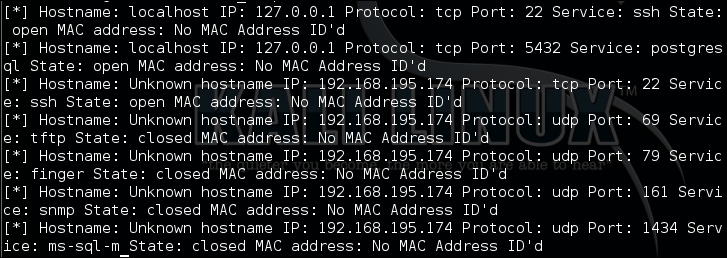
Running the script produces the following results, which show that we have successfully extracted the data and formatted it into a useful structure:
We can now comment out the loop that prints the data and use our data structure to create an Excel spreadsheet. To do this, we are going to create our own local module, which can then be used within this script. The script will be called to generate the Excel spreadsheet. To do this, we need to know the name by which we are going to call it and how we would like to reference it. Then, we create the relevant import statement at the top of the nmap_parser.py for the Python module, which we will call nmap_doc_generator.py:
try:
    import nmap_doc_generator as gen
except Exception as e:
    print(e)
    sys.exit("[!] Please download the nmap_doc_generator.py script")
Next, we replace the printing of the dictionary at the bottom of the nmap_parser.py script with the following code:
gen.Nmap_doc_generator(verbose, processed_hosts, filename, simple)
The simple flag was added to the list of options to allow the spreadsheet to be output in different formats, if you like. This tool can be useful in real penetration tests and for final reports. Everyone has a preference when it comes to what output is easier to read and what colors are appropriate for the branding of their reports for whatever organization they work for.
Now we create our new module. It can be imported into the nmap_parser.py script. The script is very simple thanks the xlsxwriter library, which we can again install with pip. The following code brings the script by setting up the necessary libraries so that we can generate the Excel spreadsheet:
import sys
try:
    import xlsxwriter
except:
    sys.exit("[!] Install the xlsx writer library as root or through sudo: pip install xlsxwriter")
Next, we create the class and the constructor for Nmap_doc_generator:
class Nmap_doc_generator():
    def __init__(self, verbose, hosts_dict, filename, simple):
        self.hosts_dict = hosts_dict
        self.filename = filename
        self.verbose = verbose
        self.simple = simple
        try:
            self.run()
        except Exception as e:
            print(e)
Then we create the function that will be executed for the instance. From this function, a secondary function called generate_xlsx is executed. This function is created in this manner so that we can use this very module for other report types in future, if desired. All that we would have to do is create additional functions that can be invoked with options supplied when the nmap_parser.py script is run. That's beyond the scope of this example, however, so the extent of the run function is as follows:
    def run(self):
        # Run the appropriate module
        if self.verbose > 0:
            print ("[*] Building %s.xlsx") % (self.filename)
            self.generate_xlsx()
The next function we define is generate_xlsx, which includes all the features required to generate the Excel spreadsheet. The first thing we need to do is define the actual workbook, the worksheet, and the formatting within. We begin this by setting the actual filename extension, if none exists:
    def generate_xlsx(self):
        if "xls" or "xlsx" not in self.filename:
            self.filename = self.filename + ".xlsx"
        workbook = xlsxwriter.Workbook(self.filename)
Then we start creating the actual row formats, beginning with the header row. We highlight it as a bold row with two different possible colors, depending on whether the simple flag is set or not:
        # Row one formatting
        format1 = workbook.add_format({'bold': True})
    # Header color
    # Find colors: http://www.w3schools.com/tags/ref_colorpicker.asp
  if self.simple:
            format1.set_bg_color('#538DD5')
  else:
      format1.set_bg_color('#33CC33') # Report Format
Note
You can identify the actual color number that you want in your spreadsheet using a Microsoft-like color selection tool. It can be found at http://www.w3schools.com/tags/ref_colorpicker.asp.
Since we want to configure this as a spreadsheet—so that it can have alternating colors—we are going to set two additional formatting configurations. Like the previous formatting configuration, this will be saved as variables that can easily be referenced depending on the whether the row is even or odd. Even rows will be white, since the header row has a color fill, and odd rows will have a color fill. So, when the simple variable is set, we are going to change the color of the odd row. The following code highlights this logic structure:
        # Even row formatting
        format2 = workbook.add_format({'text_wrap': True})
        format2.set_align('left')
        format2.set_align('top')
        format2.set_border(1)
        # Odd row formatting
        format3 = workbook.add_format({'text_wrap': True})
        format3.set_align('left')
        format3.set_align('top')
    # Row color
  if self.simple:
      format3.set_bg_color('#C5D9F1')
  else:
      format3.set_bg_color('#99FF33') # Report Format
        format3.set_border(1)
With the formatting defined, we now have to set the column widths and headings, and these will be used throughout the rest of the spreadsheet. There is a bit of trial and error here, as the column widths should be wide enough for the data that will be populated in the spreadsheet and properly represent the headings without unnecessarily scaling out off the screen. Defining the column width is done by range, the starting column number, the ending column number, and finally the size of the column width. These three comma-delimited values are placed in the set_column function parameters:
        if self.verbose > 0:
            print ("[*] Creating Workbook: %s") % (self.filename)
        # Generate Worksheet 1
        worksheet = workbook.add_worksheet("All Ports")
        # Column width for worksheet 1
        worksheet.set_column(0, 0, 20)
        worksheet.set_column(1, 1, 17)
        worksheet.set_column(2, 2, 22)
        worksheet.set_column(3, 3, 8)
        worksheet.set_column(4, 4, 26)
        worksheet.set_column(5, 5, 13)
        worksheet.set_column(6, 6, 12)
With the columns defined, set the starting location for the rows and the columns, populate the header rows, and make the data present in them filterable. Think about how useful it is to look for hosts with open JBoss ports or if a client wants to know the ports that have been successfully filtered by the perimeter firewall:
        # Define starting location for Worksheet one
        row = 1
        col = 0
        # Generate Row 1 for worksheet one
        worksheet.write('A1', "Hostname", format1)
        worksheet.write('B1', "Address", format1)
        worksheet.write('C1', "Hardware Address", format1)
        worksheet.write('D1', "Port", format1)
        worksheet.write('E1', "Service Name", format1)
        worksheet.write('F1', "Protocol", format1)
        worksheet.write('G1', "Port State", format1)
        worksheet.autofilter('A1:G1')
So, with the formatting defined, we can actually start populating the spreadsheet with the relevant data. To do this we create a for loop that populates the key and value variables. In this instance of report generation, key is not useful for the spreadsheet, since none of the data from it is used to generate the spreadsheet. On the other hand, the value variable contains the list of results from the nmap_parser.py script. So, we populate the six relevant value representations in positional variables:
        # Populate Worksheet 1
        for key, value in self.hosts_dict.items():
            try:
                hostname = value[0]
                address = value[1]
                protocol = value[2]
                port = value[3]
                service_name = value[4]
                hwaddress = value[5]
                state = value[6]
            except:
                if self.verbose > 3:
                    print("[!] An error occurred parsing host ID: %s for Worksheet 1") % (key)
At the end of each iteration, we are going to increment the row counter. Otherwise, if we did this at the beginning, we would be writing blank rows between data rows. To start the processing, we need to determine whether the row is even or odd, as this changes the formatting, as mentioned before. The easiest way to do this is to use the modulus operator, or %, which divides the left operand by the right operand and returns the remainder.
If there is no remainder, we know that it is even, and as such, so is the row. Otherwise, the row is odd and we need to use the requisite format. Instead of writing the entire function row writing operation twice, we are again going to use a temporary variable that will hold the current row format, called temp_format, as shown here:
                    print("[!] An error occurred parsing host ID: %s for Worksheet 1") % (key)
            try:
                if row % 2 != 0:
                    temp_format = format2
                else:
                    temp_format = format3
Now, we can write the data from left to right. Each component of the data goes into the next column, which means that we take the column value of 0 and add 1 to it each time we write data to the row. This allows us to easily span the spreadsheet from left to right without having to manipulate multiple values:
                worksheet.write(row, col,     hostname, temp_format)
                worksheet.write(row, col + 1, address, temp_format)
                worksheet.write(row, col + 2, hwaddress, temp_format)
                worksheet.write(row, col + 3, port, temp_format)
                worksheet.write(row, col + 4, service_name, temp_format)
                worksheet.write(row, col + 5, protocol, temp_format)
                worksheet.write(row, col + 6, state, temp_format)
                row += 1
            except:
                if self.verbose > 3:
                    print("[!] An error occurred writing data for Worksheet 1")
Finally, we close the workbook that writes the file to the current working directory:
        try:
            workbook.close()
        except:
            sys.exit("[!] Permission to write to the file or location provided was denied")
All the necessary script components and modules have been created, which means that we can generate our Excel spreadsheet from the nmap XML outputs. In the arguments of the nmap_parser.py script, we set a default filename to xml_output, but we can pass other values as necessary. The following is the output from the help of the nmap_parser.py script:
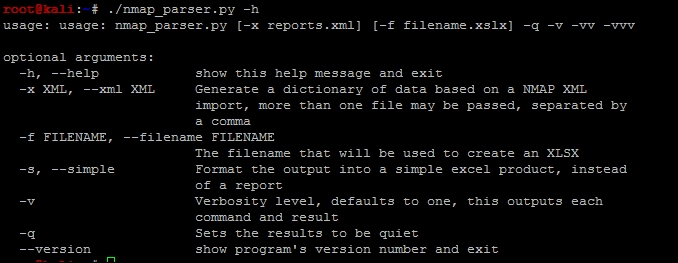
With this detailed information we can now execute the script against the four different nmap scan XMLs that we have created as shown in the following screenshot:
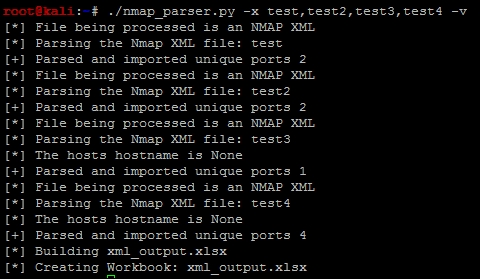
The output of the script is this Excel spreadsheet:

Instead, if we set the simple flag and create a new spreadsheet with a different filename, we get the following output:
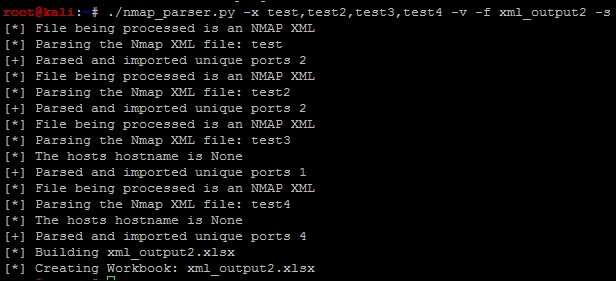
This creates the new spreadsheet, xml_output2.xlsx, with the simple format, as shown here:

Note
The code for this module can be found at https://raw.githubusercontent.com/funkandwagnalls/pythonpentest/master/nmap_doc_generator.py.