Table of Contents for
Python: Penetration Testing for Developers
 Python: Penetration Testing for Developers
Published by
Packt Publishing, 2016
Python: Penetration Testing for Developers
Published by
Packt Publishing, 2016
- Cover
- Table of Contents
- Python: Penetration Testing for Developers
- Python: Penetration Testing for Developers
- Python: Penetration Testing for Developers
- Credits
- Preface
- What you need for this learning path
- Who this learning path is for
- Reader feedback
- Customer support
- 1. Module 1
- 1. Understanding the Penetration Testing Methodology
- Understanding what penetration testing is not
- Assessment methodologies
- The penetration testing execution standard
- Penetration testing tools
- Summary
- 2. The Basics of Python Scripting
- Python – the good and the bad
- A Python interactive interpreter versus a script
- Environmental variables and PATH
- Understanding dynamically typed languages
- The first Python script
- Developing scripts and identifying errors
- Python formatting
- Python variables
- Operators
- Compound statements
- Functions
- The Python style guide
- Arguments and options
- Your first assessor script
- Summary
- 3. Identifying Targets with Nmap, Scapy, and Python
- Understanding Nmap
- Nmap libraries for Python
- The Scapy library for Python
- Summary
- 4. Executing Credential Attacks with Python
- Identifying the target
- Creating targeted usernames
- Testing for users using SMTP VRFY
- Summary
- 5. Exploiting Services with Python
- Understanding the chaining of exploits
- Automating the exploit train with Python
- Summary
- 6. Assessing Web Applications with Python
- Identifying hidden files and directories with Python
- Credential attacks with Burp Suite
- Using twill to walk through the source
- Understanding when to use Python for web assessments
- Summary
- 7. Cracking the Perimeter with Python
- Understanding the link between accounts and services
- Cracking inboxes with Burp Suite
- Identifying the attack path
- Gaining access through websites
- Summary
- 8. Exploit Development with Python, Metasploit, and Immunity
- Understanding the Windows memory structure
- Understanding memory addresses and endianness
- Understanding the manipulation of the stack
- Understanding immunity
- Understanding basic buffer overflow
- Writing a basic buffer overflow exploit
- Understanding stack adjustments
- Understanding the purpose of local exploits
- Understanding other exploit scripts
- Reversing Metasploit modules
- Understanding protection mechanisms
- Summary
- 9. Automating Reports and Tasks with Python
- Understanding how to create a Python class
- Summary
- 10. Adding Permanency to Python Tools
- Understanding the difference between multithreading and multiprocessing
- Building industry-standard tools
- Summary
- 2. Module 2
- 1. Python with Penetration Testing and Networking
- Approaches to pentesting
- Introducing Python scripting
- Understanding the tests and tools you'll need
- Learning the common testing platforms with Python
- Network sockets
- Server socket methods
- Client socket methods
- General socket methods
- Moving on to the practical
- Summary
- 2. Scanning Pentesting
- What are the services running on the target machine?
- Summary
- 3. Sniffing and Penetration Testing
- Implementing a network sniffer using Python
- Learning about packet crafting
- Introducing ARP spoofing and implementing it using Python
- Testing the security system using custom packet crafting and injection
- Summary
- 4. Wireless Pentesting
- Wireless attacks
- Summary
- 5. Foot Printing of a Web Server and a Web Application
- Introducing information gathering
- Information gathering of a website from SmartWhois by the parser BeautifulSoup
- Banner grabbing of a website
- Hardening of a web server
- Summary
- 6. Client-side and DDoS Attacks
- Tampering with the client-side parameter with Python
- Effects of parameter tampering on business
- Introducing DoS and DDoS
- Summary
- 7. Pentesting of SQLI and XSS
- Types of SQL injections
- Understanding the SQL injection attack by a Python script
- Learning about Cross-Site scripting
- Summary
- 3. Module 3
- 1. Gathering Open Source Intelligence
- Gathering information using the Shodan API
- Scripting a Google+ API search
- Downloading profile pictures using the Google+ API
- Harvesting additional results from the Google+ API using pagination
- Getting screenshots of websites with QtWebKit
- Screenshots based on a port list
- Spidering websites
- 2. Enumeration
- Performing a ping sweep with Scapy
- Scanning with Scapy
- Checking username validity
- Brute forcing usernames
- Enumerating files
- Brute forcing passwords
- Generating e-mail addresses from names
- Finding e-mail addresses from web pages
- Finding comments in source code
- 3. Vulnerability Identification
- Automated URL-based Directory Traversal
- Automated URL-based Cross-site scripting
- Automated parameter-based Cross-site scripting
- Automated fuzzing
- jQuery checking
- Header-based Cross-site scripting
- Shellshock checking
- 4. SQL Injection
- Checking jitter
- Identifying URL-based SQLi
- Exploiting Boolean SQLi
- Exploiting Blind SQL Injection
- Encoding payloads
- 5. Web Header Manipulation
- Testing HTTP methods
- Fingerprinting servers through HTTP headers
- Testing for insecure headers
- Brute forcing login through the Authorization header
- Testing for clickjacking vulnerabilities
- Identifying alternative sites by spoofing user agents
- Testing for insecure cookie flags
- Session fixation through a cookie injection
- 6. Image Analysis and Manipulation
- Hiding a message using LSB steganography
- Extracting messages hidden in LSB
- Hiding text in images
- Extracting text from images
- Enabling command and control using steganography
- 7. Encryption and Encoding
- Generating an MD5 hash
- Generating an SHA 1/128/256 hash
- Implementing SHA and MD5 hashes together
- Implementing SHA in a real-world scenario
- Generating a Bcrypt hash
- Cracking an MD5 hash
- Encoding with Base64
- Encoding with ROT13
- Cracking a substitution cipher
- Cracking the Atbash cipher
- Attacking one-time pad reuse
- Predicting a linear congruential generator
- Identifying hashes
- 8. Payloads and Shells
- Extracting data through HTTP requests
- Creating an HTTP C2
- Creating an FTP C2
- Creating an Twitter C2
- Creating a simple Netcat shell
- 9. Reporting
- Converting Nmap XML to CSV
- Extracting links from a URL to Maltego
- Extracting e-mails to Maltego
- Parsing Sslscan into CSV
- Generating graphs using plot.ly
- A. Bibliography
- Index
The Python scripting language has five types of variables: numbers, strings, lists, dictionaries, and tuples. These variables have different intended purposes, reasons for use, and methods of declaration. Before seeing how these variable types work, you need to understand how to debug your variables and ensure that your scripts are working.
Note
Lists, tuples, and dictionaries fall under a variable category know as data structures. This chapter covers enough details to get you off the ground and running, but most of the questions you notice about Python in help forums are related to proper use and handling of data structures. Keep this in mind when you start venturing on your own projects outside of the details given in this module. Additional information about data structures and how to use them can be found at https://docs.python.org/2/tutorial/datastructures.html.
The simple solution for debugging variable values is to make sure that the expected data is passed to a variable. This is especially important if you need to convert a value in a variable from one type to another, which will be covered later in this chapter. So, you need to know what the value in the variable is, and often what type it is. This means that you will have to debug your scripts as you build them; this is usually done through the use of print statements. You will often see initial scripts sprinkled with print statements throughout the code. To help you clean these at a later point in time, I recommend adding a comment to them. I typically use a simple #DEBUG comment, as shown here:
print(variable_name) #DEBUG
This will allow you to quickly search for and delete the #DEBUG line. In vi or vim, this is very simple—by first pressing Esc, then pressing :, and then executing the following command, which searches for and deletes the entire line:
g/.*DEBUG/d
If you wanted to temporarily comment out all of the #DEBUG lines and delete them later, you can use the following:
%s/.*DEBUG/#&
Variables that hold strings are basically words, statements, or sentences placed in a reference. This item allows easy reuse of values as needed throughout a script. Additionally, these variables can be manipulated to produce different values over the course of the script. To pass a value to the variable, the equal to sign is used after the word has been selected to assign a value. In a string, the value is enclosed in either quotes or double quotes. The following example shows how to assign a value using double quotes:
variable_name = "This is the sentence passed"
The following example shows single quotes assigned to a variable:
variable_name = 'This is the sentence passed'
The reason for allowing both single and double quotes is to grant a programmer the means to insert one or the other into a variable as a part of a sentence. See the following example to highlight the differences:
variable_name = 'This is the "sentence" passed'
In addition to passing strings or printing values in this method, you can use the same type of quote to escape the special character. This is done by preceding any special character with a \ sign, which effectively escapes the special capability. The following example highlights this:
variable_name = "This is the \"sentence\" passed"
The important thing about declaring strings is to pick a type of quote to use—either single or double—and use it consistently through the script. Additionally, as you can see in Python, variable sizes do not have to be declared initially. This is because they are interpreted at runtime. Now you know how to create variables with strings in them. The next step is to create variables with numbers in them.
Creating variables that hold numbers is very straight forward. You define a variable name and then assign it a value by placing a number on the right-hand side of an equal to sign, as shown here:
variable_name = 5
Once a variable has been defined, it holds a reference to the value it was passed. These variables can be overwritten, can have mathematical operations executed against them, and can even be changed in the middle of the program. The following example shows variables of the same type being added together and printed. First, we show the same variable added and printed, and then we show two different variables. Finally, the two variables are added together, assigned to a new variable, and printed.
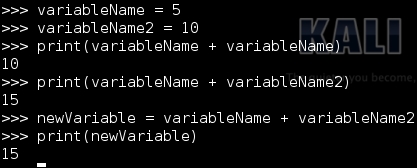
Notice that the numerical values passed to the variables do not have quotes. If they did, the Python interpreter would consider them as strings, and the results would be significantly different. Refer to the following screenshot, which shows the same method prescribed to numeric variables with string equivalents:
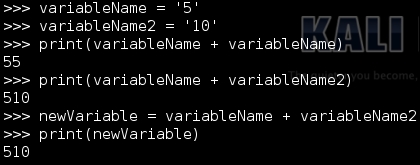
As you can see, the values are—instead—merged into a single string verses adding them together. Python has built-in functions that allow us to interpret strings as numbers and numbers as strings. Additionally, you can determine what a variable is using the type function. This screenshot shows the declaration of two variables, one as a string and one as an integer:
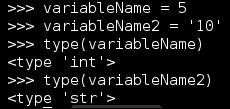
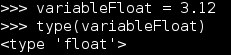
Had the variable been declared with a decimal value in it, it would have been declared as a floating-point number or a float for short. This is still a numeric variable, but it requires a different method of storage, and as you can see, the interpreter has determined that for you. The following screenshot shows an example of this:
As mentioned in the number variables section, Python has functions that are built-in in a manner that allows you to convert one variable type to another. As a simple example, we are going to convert a number into a string and string into a number. When using the interactive interpreter, the variable value will be printed immediately if it is not passed to a new variable; however, in a script, it will not. This method of manipulation is extremely useful if data is passed by the Command-line Interface (CLI) and you want to ensure the method that the data will be handled.
This is executed using the following three functions: int(), str(), and float(). These functions do exactly what you think they would; int() changes the applicable variables of other types to integers, str() turns other applicable variable types to strings, and float() turns applicable variables to floating-point numbers. It is important to keep in mind that if the variable cannot be converted to the desired type, you will receive a ValueError exception, as shown in this screenshot:

As an example, let's take a string and an integer and try to add them together. If the two values are not of the same type, you will receive a TypeError exception. This is demonstrated in the following screenshot:
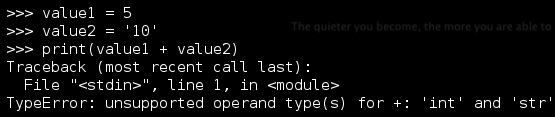
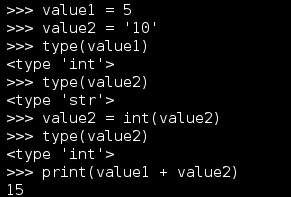
This is where you will have to determine what type the variable is and choose one of them to convert to the same type. Which one you choose to convert will depend on the expected outcome. If you want a variable that contains the total value of two numbers, then you need to convert string variables into number type variables. If you want the values to be combined together, then you would convert the non-string variable into a string. This example shows the definition of two values: one of a string and one of an integer. The string will be converted into an integer to allow the mathematical operation to continue, as follows:
Now that you can see how easy this is, consider what would happen if a string variable was the representative of a float value and was converted to an integer. The decimal portion of the number will be lost. This does not round the value up or down; it just strips the decimal part and gives a whole number. Refer to the following screenshot to understand an example of this:
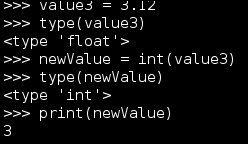
So be sure to change the numeric variable to the appropriate type. Otherwise, some data will be lost.
Lists are data structures that hold values in a method that can be organized, adjusted, and easily manipulated. An easy way to identify a list in Python is by [], which denotes where the values will reside. The manipulation of these lists is based on adjusting the values by position, typically. To create a list, define a variable name, and on the right-hand side of the equal to sign, place brackets with comma-separated values. This simple script counts the length of a predefined list and iterates and prints the position and value of the list. It is important to remember that a list starts at position 0, not 1. Since a list can contain different types of variables in order to include other lists, we are going to print the values as strings to be safe:
#!/usr/bin/env python

list_example = [100,222,333,444,"string value"]
list_example_length = len(list_example)
for iteration in list_example:
    index_value = list_example.index(iteration)
    print("The length of list list_example is %s, the value at position %s is %s") % (str(list_example_length), str(index_value), str(iteration).strip('[]'))

print("Script finished")
The following screenshot shows the successful execution of this script:

As you can see, extracting values from a list and converting them into numerical or string values are important concepts. Lists are used to hold multiple values, and extracting these values so that they can be represented is often necessary. The following code shows you how to do this for a string:
#!/usr/bin/env python

list_example = [100,222,333,444]
list_value = list_example[2]
string_value_from_list = str(list_value)
print("String value from list: %s") % (str(list_value))
It is important to note that a list cannot be printed as an integer, so it has to be either converted to a string or iterated through and printed. To show only the simple differences, the following code demonstrates how to extract an integer value from the list and print both it and a string:
#!/usr/bin/env python

list_example = [100,222,333,444]
list_value = list_example[2]
int_value_from_list = int(list_value))
print("String value from list: %s") % (str(list_value))
print("Integer value from list: %d") % (int_value_from_list)
List values can be manipulated further with list-specific functions. All you have to do is call the name of the list and then add .function(x) to the list, where function is the name of the specific activity you want to accomplish and x is the position or data you want to manipulate. Some common functions used include adding values to the end of a list, such as the number 555, which would be accomplished like this: list_example.append(555). You can even combine lists; this is done using the extend function, which adds the relevant items at the end of the list. This is accomplished by executing the function as follows: list_example.extend(list_example2). If you want to remove the value of 555, you can simply execute list_example.remove(555). Values can be inserted in specific locations using the appropriately named insert function like this: list_example.insert(0, 555). The last function that will be described here is the pop function, which allows you to either remove the value at a specific location by passing a positional value, or remove the last entry in the list by specifying no value.
Tuples are similar to lists, but unlike lists, they are defined using (). Also, they are immutable; that is, they cannot be changed. The motive behind this is to provide a means of controlling data in complex operations that will not destroy it during the process. A tuples can be deleted, and a new tuple can be created to hold portions of a different tuple's data and show as if the data has changed. The simple rule with tuples is as follows: if you want data to be unaltered, use tuples; otherwise, use lists.
Dictionaries are a means of associating a key with a value. If you see curly brackets, it means that you are looking at a dictionary. The key represents a reference to a specific value stored in an unsorted data structure. You may be asking yourself why you would do this when standard variables already do something similar. Dictionaries provide you with the means to store other variables and variable types as values. They also allow quick and easy referencing as necessary. You will see detailed examples of dictionaries in later chapters; for now, check out the following example:
#!/usr/bin/env python
dictionary_example = {'james':123,'jack':456}
print(dictionary_example['james'])
This example will print the numbers related to the 'james' key, as shown in the following screenshot:

Adding data to dictionaries is extremely simple; you just have to assign a new key to the dictionary and a value for that key. For example, to add the value of 789 to a 'john' key, you can execute the following: dictionary_example['john'] = 789. This will assign the new value and key to the dictionary. More details about dictionaries will be covered later, but this is enough to gain an understanding of them.
People who have programmed or scripted previously are probably used to declaring a variable with a default value or setting up constructors.
In Python, this is not necessary to get started, but it is a good habit to set a default value in a variable prior to its use. Besides being good practice, it will also mitigate some of the reasons for your scripts to have unexpected errors and crashes. This will also add traceability if a value is passed to a variable that was unexpected.
Tip
In Python, constructor methods are handled by __init__ and __new__ when a new object is instantiated. When creating new classes, however, it is only required to use the __init__ function to act as the constructor for the class. This will not be needed until much later, but keep it in mind; it is important if you want to develop a multithreaded application.
Let's say that you want to produce a string with a dynamic value, or include a variable in the string as it is printed and interpret the value in real time. With Python, you can do it in a number of ways. You can either combine the data using arithmetic symbols, such as +, or insert values using special character combinations.
The first example will use a combination of two strings and a variable joined with the statement to create a dynamic statement, as shown here:
#!/usr/bin/env python
name = "Hacker"
print("My profession is "+name+", what is yours?")
This produces the following output:

After creating the first script, you can improve it by inserting a value directly into the string. This is done by using the % special character and appending s for a string or d for a digit to produce the intended result. The print statement then has the % sign appended to it, with parameters wrapped around the requisite variable or variables. This allows you to control data quickly and easily and clean up your details as you prototype or create your scripts.
The variables in the parameters are passed to replace the keyed symbol in the statement. Here is an example of this type of script:
#!/usr/bin/env python
name = "Hacker"
print("My profession is %s, what is yours?") % (name)
The following image shows the code being executed:

An added benefit is that you can insert multiple values into this script without drastically altering it, as shown in the following example:
#!/usr/bin/env python

name = "Hacker"
name2 = "Penetration Tester"

print("My profession is %s, what is yours? %s") % (name, name2)

This form of insertion can be done with digits as mentioned in the preceding lines and by changing %s to %d:
#!/usr/bin/env python

name = "Hacker"
name2 = "Penetration Tester"
years = 15

print("My profession is %s, what is yours? %s, with %d years experience!") % (name, name2, years)
The output can be seen in this screenshot:

Instead of using variables, statements can be passed directly. There is usually little reason to do such things, as variables provide you with a means to change code and have it applied to the entire script. When possible, variables should be used to define statements as necessary. This is very important when you start writing statements that will be passed to systems. Use a combination of joined variables to create commands that will be executed in your Python scripts. If you do so, you can change the content provided to the system by simply changing a specific value. More examples on this will be covered later.