
In this section, we will start to manually create some features in order to quantify our textual passwords. Let's first create a new column in the data DataFrame called length, which will represent the length of the password:
# 1. the length of the password

# on the left of the equal sign, note we are defining a new column called 'length'. We want this column to hold the
# length of the password.

# on the right of the equal sign, we use the apply method of pandas Series/DFs. We will apply a function (len in this case)
# to every element in the column 'text'

data['length'] = data['text'].apply(len)

# see our changes take effect
data.head()
Here is the output:
| Text | Length | |
|---|---|---|
| 0 | 7606374520 | 10 |
| 1 | piontekendre | 12 |
| 2 | rambo144 | 8 |
| 3 | primoz123 | 9 |
| 4 | sal1387 | 7 |
Let's use this new column to see the most common passwords of five or more characters:
# top passwords of length 5 or more
data[data.length > 4]["text"].value_counts()[:10]

123456       8
123456789    7
12345        6
43162        5
7758521      5
11111        5
5201314      5
111111       4
123321       4
102030       4
These seem more like what we expected; we even see 111111, which was on the list we saw at the beginning of this chapter. We continue now by adding another column, num_caps, that will count the number of capital letters in the password. This will eventually give us some insight into the strength of a password:
# store a new column
data['num_caps'] = data['text'].apply(caps)

# see our changes take effect
data.head(10)
We can now see our two new columns, both of which give us some quantifiable means of assessing password strength. Longer passwords with more capital letters tend to correlate to stronger passwords. But of course this is not the whole picture:
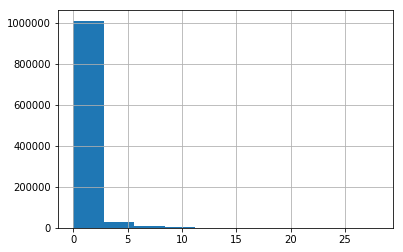
data['num_caps'].hist() # most passwords do not have any caps in them
Running this code will yield the following histogram, revealing a right skew of capital letters, meaning that most people stay on the lower end of capital letters:
Calling the describe method of the DataFrame will reveal some high-level descriptive statistics about our data:
# grab some basic descriptive statistics
data.describe()
Here is the output:
|
Length |
num_caps |
|
|---|---|---|
|
count |
1.048485e+06 |
1.048485e+06 |
|
mean |
8.390173e+00 |
2.575392e-01 |
|
std |
2.269470e+01 |
1.205588e+00 |
|
min |
1.000000e+00 |
0.000000e+00 |
|
25% |
7.000000e+00 |
0.000000e+00 |
|
50% |
8.000000e+00 |
0.000000e+00 |
|
75% |
9.000000e+00 |
0.000000e+00 |
|
max |
8.192000e+03 |
2.690000e+02 |
The max row of the length attribute is telling us that we have some massive passwords (over 8,000 characters). We will isolate the passwords that are over 100 characters:
# let's see our long passwords
data[data.length > 100]
The long passwords can be seen here:
|
Text |
Length |
num_caps |
|
|---|---|---|---|
|
38830 |
><script>alert(1)</script>\r123Lenda#\rhallibu... |
8192 |
242 |
|
387398 |
\r251885394\rmello2\rmaitre1123\rfk6Ehruu\rthi... |
8192 |
176 |
|
451793 |
39<0Y~c.;A1Bj\r3ddd4t\r516ks516\rag0931266\rac... |
8192 |
223 |
|
517600 |
12345\rhdjcb100\r060571\rkaalimaa\rrelaxmax\rd... |
8192 |
184 |
|
580134 |
or1=1--\r13817676085\r594112\rmactools\r880148... |
8192 |
216 |
|
752693 |
pass\rmbmb266888\r1988luolin\r15877487956\rcri... |
8192 |
180 |
|
841857 |
==)!)(=\raviral\rrimmir33\rhutcheson\rrr801201... |
8192 |
269 |
|
1013991 |
AAj6H\rweebeth\rmonitor222\rem1981\ralexs123\r... |
8192 |
269 |
We can clearly see that eight of the rows of our DataFrame became malformed. To make this a bit easier, let's use pandas to get rid of these eight problematic rows. We could do work to sanitize this data; however, this case study will focus on deeper insights:
print data[data.length > 100].shape # only 8 rows that became malformed
# to make this easy, let's just drop those problematic rows

# we will drop passwords that are way too long
data.drop(data[data.length > 100].index, axis=0, inplace=True)
(8, 3)


# 1,048,485 - 8 == 1,048,477 makes sense
print data.shape
(1048477, 3)


data.describe()
The following table is the output of the preceding code:
| Length | num_caps | |
|---|---|---|
| count | 1.048477e+06 | 1.048477e+06 |
| mean | 8.327732e+00 | 2.558635e-01 |
| std | 2.012173e+00 | 1.037190e+00 |
| min | 1.000000e+00 | 0.000000e+00 |
| 25% | 7.000000e+00 | 0.000000e+00 |
| 50% | 8.000000e+00 | 0.000000e+00 |
| 75% | 9.000000e+00 | 0.000000e+00 |
| max | 2.900000e+01 |
2.800000e+01 |
We will now turn to scikit-learn to add some automatic feature extraction.