Table of Contents for
Node.js 8 the Right Way
 Node.js 8 the Right Way
Published by
Pragmatic Bookshelf, 2018
Node.js 8 the Right Way
Published by
Pragmatic Bookshelf, 2018
- Title Page
- Node.js 8 the Right Way
- Node.js 8 the Right Way
- Node.js 8 the Right Way
- Node.js 8 the Right Way
- Acknowledgments
- Preface
- Why Node.js the Right Way?
- What’s in This Book
- What This Book Is Not
- Code Examples and Conventions
- Online Resources
- Part I. Getting Up to Speed on Node.js 8
- 1. Getting Started
- Thinking Beyond the web
- Node.js’s Niche
- How Node.js Applications Work
- Aspects of Node.js Development
- Installing Node.js
- 2. Wrangling the File System
- Programming for the Node.js Event Loop
- Spawning a Child Process
- Capturing Data from an EventEmitter
- Reading and Writing Files Asynchronously
- The Two Phases of a Node.js Program
- Wrapping Up
- 3. Networking with Sockets
- Listening for Socket Connections
- Implementing a Messaging Protocol
- Creating Socket Client Connections
- Testing Network Application Functionality
- Extending Core Classes in Custom Modules
- Developing Unit Tests with Mocha
- Wrapping Up
- 4. Connecting Robust Microservices
- Installing ØMQ
- Publishing and Subscribing to Messages
- Responding to Requests
- Routing and Dealing Messages
- Clustering Node.js Processes
- Pushing and Pulling Messages
- Wrapping Up
- Node.js 8 the Right Way
- Part II. Working with Data
- 5. Transforming Data and Testing Continuously
- Procuring External Data
- Behavior-Driven Development with Mocha and Chai
- Extracting Data from XML with Cheerio
- Processing Data Files Sequentially
- Debugging Tests with Chrome DevTools
- Wrapping Up
- 6. Commanding Databases
- Introducing Elasticsearch
- Creating a Command-Line Program in Node.js with Commander
- Using request to Fetch JSON over HTTP
- Shaping JSON with jq
- Inserting Elasticsearch Documents in Bulk
- Implementing an Elasticsearch Query Command
- Wrapping Up
- Node.js 8 the Right Way
- Part III. Creating an Application from the Ground Up
- 7. Developing RESTful Web Services
- Advantages of Express
- Serving APIs with Express
- Writing Modular Express Services
- Keeping Services Running with nodemon
- Adding Search APIs
- Simplifying Code Flows with Promises
- Manipulating Documents RESTfully
- Emulating Synchronous Style with async and await
- Providing an Async Handler Function to Express
- Wrapping Up
- 8. Creating a Beautiful User Experience
- Getting Started with webpack
- Generating Your First webpack Bundle
- Sprucing Up Your UI with Bootstrap
- Bringing in Bootstrap JavaScript and jQuery
- Transpiling with TypeScript
- Templating HTML with Handlebars
- Implementing hashChange Navigation
- Listing Objects in a View
- Saving Data with a Form
- Wrapping Up
- 9. Fortifying Your Application
- Setting Up the Initial Project
- Managing User Sessions in Express
- Adding Authentication UI Elements
- Setting Up Passport
- Authenticating with Facebook, Twitter, and Google
- Composing an Express Router
- Bringing in the Book Bundle UI
- Serving in Production
- Wrapping Up
- Node.js 8 the Right Way
- 10. BONUS: Developing Flows with Node-RED
- Setting Up Node-RED
- Securing Node-RED
- Developing a Node-RED Flow
- Creating HTTP APIs with Node-RED
- Handling Errors in Node-RED Flows
- Wrapping Up
- A1. Setting Up Angular
- A2. Setting Up React
- Node.js 8 the Right Way
Setting Up Node-RED
To begin, create a directory called nodered to house your Node-RED-based code. Then open a terminal to this directory and create an initial package.json.
| | $ npm init -y |
Next, install the node-red package locally.
| | $ npm install --save --save-exact node-red@0.16.2 |
Then open your package.json in a text editor and add a start script to the scripts section like so:
| | "scripts": { |
| » | "start": "node-red -v -u ./config -f ./config/flows.json", |
| | "test": "echo \"Error: no test specified\" && exit 1" |
| | }, |
Here we’re specifying a couple of command-line arguments to the node-red command. The -v flag turns on verbose mode. The -u flag is short for --userDir and specifies a path to a directory to store configuration information.
The -f flag points to a JSON file that will contain our flows. In Node-RED, a flow is a program that directs events as they flow through a network of nodes.
You’ll be working with flows a lot in this chapter. To begin, run npm start now:
| | $ npm start |
| | |
| | > nodered@1.0.0 start ./code/nodered |
| | > node-red -v -u ./config -f ./config/flows.json |
| | |
| | 19 Jun 04:34:00 - [info] |
| | |
| | Welcome to Node-RED |
| | =================== |
| | |
| | 19 Jun 04:34:00 - [info] Node-RED version: v0.16.2 |
| | 19 Jun 04:34:00 - [info] Node.js version: v8.1.0 |
| | 19 Jun 04:34:00 - [info] Linux 4.4.0-79-generic x64 LE |
| | 19 Jun 04:34:00 - [info] Loading palette nodes |
| | 19 Jun 04:34:01 - [warn] ------------------------------------------------------ |
| | 19 Jun 04:34:01 - [warn] [rpi-gpio] Info : Ignoring Raspberry Pi specific node |
| | 19 Jun 04:34:01 - [warn] ------------------------------------------------------ |
| | 19 Jun 04:34:01 - [info] Settings file : ./code/nodered/config/settings.js |
| | 19 Jun 04:34:01 - [info] User directory : ./code/nodered/config |
| | 19 Jun 04:34:01 - [info] Flows file : ./code/nodered/config/flows.json |
| | 19 Jun 04:34:01 - [info] Server now running at http://127.0.0.1:1880/ |
| | 19 Jun 04:34:01 - [info] Starting flows |
| | 19 Jun 04:34:01 - [info] Started flows |
Toward the end of the output, it’ll inform you that the server is listening on port 1880. If you open http://localhost:1880 in a browser you should see something like this:
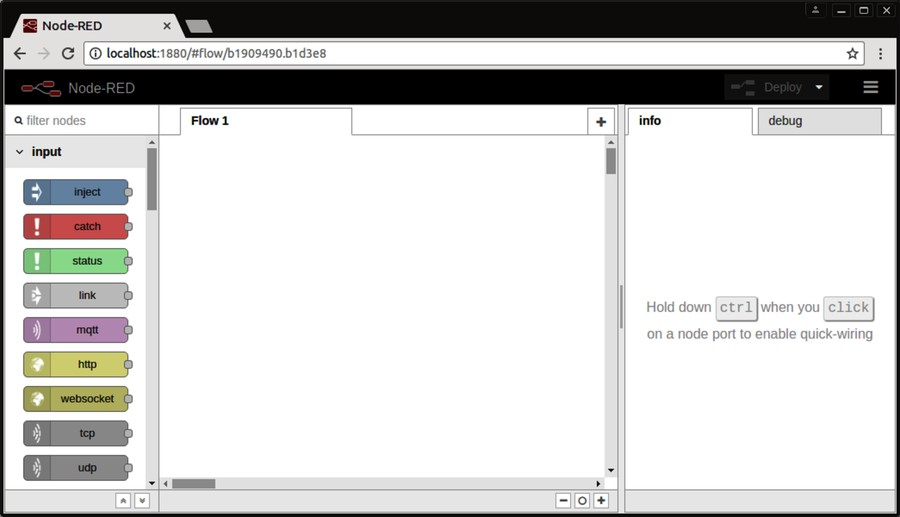
If you see this, great! Back in your terminal, use Ctrl-C to shut down the server. Next we’ll set up some security around Node-RED.