Table of Contents for
Node.js 8 the Right Way
 Node.js 8 the Right Way
Published by
Pragmatic Bookshelf, 2018
Node.js 8 the Right Way
Published by
Pragmatic Bookshelf, 2018
- Title Page
- Node.js 8 the Right Way
- Node.js 8 the Right Way
- Node.js 8 the Right Way
- Node.js 8 the Right Way
- Acknowledgments
- Preface
- Why Node.js the Right Way?
- What’s in This Book
- What This Book Is Not
- Code Examples and Conventions
- Online Resources
- Part I. Getting Up to Speed on Node.js 8
- 1. Getting Started
- Thinking Beyond the web
- Node.js’s Niche
- How Node.js Applications Work
- Aspects of Node.js Development
- Installing Node.js
- 2. Wrangling the File System
- Programming for the Node.js Event Loop
- Spawning a Child Process
- Capturing Data from an EventEmitter
- Reading and Writing Files Asynchronously
- The Two Phases of a Node.js Program
- Wrapping Up
- 3. Networking with Sockets
- Listening for Socket Connections
- Implementing a Messaging Protocol
- Creating Socket Client Connections
- Testing Network Application Functionality
- Extending Core Classes in Custom Modules
- Developing Unit Tests with Mocha
- Wrapping Up
- 4. Connecting Robust Microservices
- Installing ØMQ
- Publishing and Subscribing to Messages
- Responding to Requests
- Routing and Dealing Messages
- Clustering Node.js Processes
- Pushing and Pulling Messages
- Wrapping Up
- Node.js 8 the Right Way
- Part II. Working with Data
- 5. Transforming Data and Testing Continuously
- Procuring External Data
- Behavior-Driven Development with Mocha and Chai
- Extracting Data from XML with Cheerio
- Processing Data Files Sequentially
- Debugging Tests with Chrome DevTools
- Wrapping Up
- 6. Commanding Databases
- Introducing Elasticsearch
- Creating a Command-Line Program in Node.js with Commander
- Using request to Fetch JSON over HTTP
- Shaping JSON with jq
- Inserting Elasticsearch Documents in Bulk
- Implementing an Elasticsearch Query Command
- Wrapping Up
- Node.js 8 the Right Way
- Part III. Creating an Application from the Ground Up
- 7. Developing RESTful Web Services
- Advantages of Express
- Serving APIs with Express
- Writing Modular Express Services
- Keeping Services Running with nodemon
- Adding Search APIs
- Simplifying Code Flows with Promises
- Manipulating Documents RESTfully
- Emulating Synchronous Style with async and await
- Providing an Async Handler Function to Express
- Wrapping Up
- 8. Creating a Beautiful User Experience
- Getting Started with webpack
- Generating Your First webpack Bundle
- Sprucing Up Your UI with Bootstrap
- Bringing in Bootstrap JavaScript and jQuery
- Transpiling with TypeScript
- Templating HTML with Handlebars
- Implementing hashChange Navigation
- Listing Objects in a View
- Saving Data with a Form
- Wrapping Up
- 9. Fortifying Your Application
- Setting Up the Initial Project
- Managing User Sessions in Express
- Adding Authentication UI Elements
- Setting Up Passport
- Authenticating with Facebook, Twitter, and Google
- Composing an Express Router
- Bringing in the Book Bundle UI
- Serving in Production
- Wrapping Up
- Node.js 8 the Right Way
- 10. BONUS: Developing Flows with Node-RED
- Setting Up Node-RED
- Securing Node-RED
- Developing a Node-RED Flow
- Creating HTTP APIs with Node-RED
- Handling Errors in Node-RED Flows
- Wrapping Up
- A1. Setting Up Angular
- A2. Setting Up React
- Node.js 8 the Right Way
Chapter
5
Transforming Data and Testing Continuously
Broadly speaking, there are two kinds of data: the kind that your own apps produce and the kind that comes from somewhere else. It would be nice if you only ever had to deal with data that you created. But the reality is that you’ll almost certainly have to work with outside data sources during your career, perhaps frequently!
Between this chapter and the next, you’ll use Node.js to take real data from the wild and put it into your own local datastore. This work can be neatly approached in two phases: transforming the raw data into an intermediate format, and importing that intermediate data into the datastore.
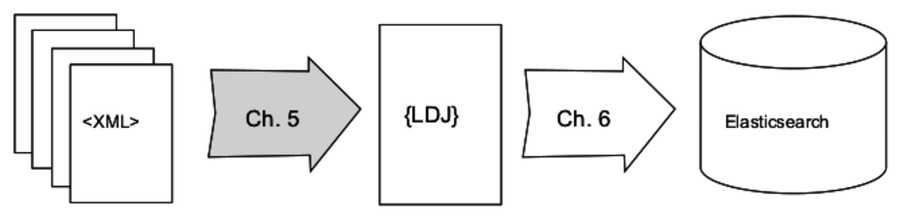
In this chapter, you’ll learn how to use Node.js to transform XML data into the lingua franca of modern data formats, JSON and its close cousin line-delimited JSON (LDJ). Then, in the following chapter, you’ll create a command-line tool to bring this LDJ content into Elasticsearch, a NoSQL database that indexes JSON objects.
While writing, testing, and debugging tools to transform raw XML data into LDJ, we’ll investigate the following aspects of Node.js:
- Node.js Core
-
Using Chrome DevTools, it’s possible to inspect a running Node.js application. You’ll learn how to set breakpoints, step through your running Node.js code, and interrogate scoped variables.
- Patterns
-
Much of this chapter involves extracting data from XML files and transforming it into JSON for insertion into a document database. We’ll use Cheerio for this, a DOM-based XML parser with a jQuery-like API. To use it effectively, you’ll learn the basics of CSS selectors.
- JavaScriptisms
-
In the Node.js ecosystem, it’s fairly common to have modules that export a single stateless function rather than a collection of objects, classes, or methods. In this chapter, you’ll develop such a module iteratively using behavior-driven development (BDD) techniques.
- Supporting Code
-
We’re going to double down on npm in this chapter, adding scripts to launch Mocha tests in standalone mode, continuous testing mode, and debug mode. You’ll also learn to use Chai, an assertion library that pairs well with Mocha to write expressive, behavioral tests.
To kick off the chapter, we have to procure the data that we’re going to be working with. Then we’ll pick through it to get an understanding of the data format, as well as our desired output.
For processing data, it’s quite useful to develop unit tests. For this reason, prior to developing the data-processing code we’ll set up the infrastructure for continuously running Mocha tests. Moreover, we’ll approach the problem through BDD techniques by using Chai, a popular assertion library.
Getting into the nitty-gritty details of querying the raw XML data, we’ll use Cheerio, a module that lets you dive into HTML and XML data by using CSS selectors to find interesting elements. Don’t worry if you’re not yet familiar with writing CSS selectors—it’s a useful skill, and we’ll build up gradually.
In the final part of this chapter, you’ll use the parsing code to roll through the raw data and produce new data that’s ready for insertion into a database. You’ll learn to walk down a directory tree sequentially, and how to step through your code using Chrome DevTools.
It’s a lot to cover, but you can do it. Let’s get started!