Table of Contents for
Node.js 8 the Right Way
 Node.js 8 the Right Way
Published by
Pragmatic Bookshelf, 2018
Node.js 8 the Right Way
Published by
Pragmatic Bookshelf, 2018
- Title Page
- Node.js 8 the Right Way
- Node.js 8 the Right Way
- Node.js 8 the Right Way
- Node.js 8 the Right Way
- Acknowledgments
- Preface
- Why Node.js the Right Way?
- What’s in This Book
- What This Book Is Not
- Code Examples and Conventions
- Online Resources
- Part I. Getting Up to Speed on Node.js 8
- 1. Getting Started
- Thinking Beyond the web
- Node.js’s Niche
- How Node.js Applications Work
- Aspects of Node.js Development
- Installing Node.js
- 2. Wrangling the File System
- Programming for the Node.js Event Loop
- Spawning a Child Process
- Capturing Data from an EventEmitter
- Reading and Writing Files Asynchronously
- The Two Phases of a Node.js Program
- Wrapping Up
- 3. Networking with Sockets
- Listening for Socket Connections
- Implementing a Messaging Protocol
- Creating Socket Client Connections
- Testing Network Application Functionality
- Extending Core Classes in Custom Modules
- Developing Unit Tests with Mocha
- Wrapping Up
- 4. Connecting Robust Microservices
- Installing ØMQ
- Publishing and Subscribing to Messages
- Responding to Requests
- Routing and Dealing Messages
- Clustering Node.js Processes
- Pushing and Pulling Messages
- Wrapping Up
- Node.js 8 the Right Way
- Part II. Working with Data
- 5. Transforming Data and Testing Continuously
- Procuring External Data
- Behavior-Driven Development with Mocha and Chai
- Extracting Data from XML with Cheerio
- Processing Data Files Sequentially
- Debugging Tests with Chrome DevTools
- Wrapping Up
- 6. Commanding Databases
- Introducing Elasticsearch
- Creating a Command-Line Program in Node.js with Commander
- Using request to Fetch JSON over HTTP
- Shaping JSON with jq
- Inserting Elasticsearch Documents in Bulk
- Implementing an Elasticsearch Query Command
- Wrapping Up
- Node.js 8 the Right Way
- Part III. Creating an Application from the Ground Up
- 7. Developing RESTful Web Services
- Advantages of Express
- Serving APIs with Express
- Writing Modular Express Services
- Keeping Services Running with nodemon
- Adding Search APIs
- Simplifying Code Flows with Promises
- Manipulating Documents RESTfully
- Emulating Synchronous Style with async and await
- Providing an Async Handler Function to Express
- Wrapping Up
- 8. Creating a Beautiful User Experience
- Getting Started with webpack
- Generating Your First webpack Bundle
- Sprucing Up Your UI with Bootstrap
- Bringing in Bootstrap JavaScript and jQuery
- Transpiling with TypeScript
- Templating HTML with Handlebars
- Implementing hashChange Navigation
- Listing Objects in a View
- Saving Data with a Form
- Wrapping Up
- 9. Fortifying Your Application
- Setting Up the Initial Project
- Managing User Sessions in Express
- Adding Authentication UI Elements
- Setting Up Passport
- Authenticating with Facebook, Twitter, and Google
- Composing an Express Router
- Bringing in the Book Bundle UI
- Serving in Production
- Wrapping Up
- Node.js 8 the Right Way
- 10. BONUS: Developing Flows with Node-RED
- Setting Up Node-RED
- Securing Node-RED
- Developing a Node-RED Flow
- Creating HTTP APIs with Node-RED
- Handling Errors in Node-RED Flows
- Wrapping Up
- A1. Setting Up Angular
- A2. Setting Up React
- Node.js 8 the Right Way
Chapter
6
Commanding Databases
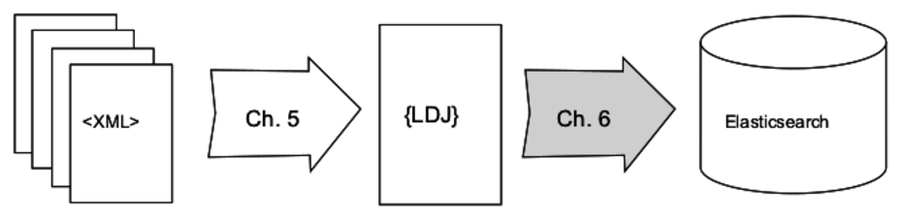
In this chapter you’ll be crafting a rich command-line utility program for interacting with Elasticsearch—a schema-free, RESTful, NoSQL database that stores and indexes JSON documents over HTTP. Your program will be configurable through many options, and will support advanced query capabilities. Importantly, it will be able to import documents in bulk, like the corpus of Project Gutenberg documents produced in the preceding chapter. The following image shows where we’re headed.
With the experience you gain here, you’ll be able to develop your own richly featured Node.js command-line programs, as well as communicate with other RESTful, JSON-based services. You’ll also be in a good position to judge whether Elasticsearch is the right database for your future Node.js projects.
Doing this work will introduce you to these aspects of Node.js development:
- Node.js Core
-
In this chapter, we’ll revisit piping streams of data, but this time in the context of communicating with remote services over HTTP. We’ll also use npm to interactively create a package.json file, the cornerstone of a Node.js project.
- Patterns
-
You’ll use the Commander module’s method-chaining pattern for building out command-line programs. And you’ll use the Request module for performing HTTP requests.
- JavaScriptisms
-
In JavaScript, a caller can invoke your function without providing all the arguments that the function expects. To compensate for missing arguments, when defining a function, you can supply a default parameter value that is evaluated at runtime. You’ll use this technique, as well as some useful Array methods such as filter and join.
- Supporting Code
-
Outside of Node.js proper, this chapter will introduce you to Elasticsearch, a JSON-based document datastore. In addition, to manipulate JSON you’ll use an exciting command-line tool called jq.
Over the course of this book, you’ve already been briefly exposed to a couple of domain-specific languages (DSLs) like RDF (XML), as well as CSS selectors and how to make good use of them with Node.js. In this chapter we’ll touch on a few more. You’ll learn Elasticsearch’s query syntax, which is needed to find matching documents. In addition, you’ll learn how to use jq’s filter expressions to manipulate JSON on the command line.
These DSLs could warrant whole books in their own right, but I can only afford partial coverage in this book. It is my sincere goal to provide you with the best footing on your way to becoming a great Node.js developer. For that reason, I feel it’s necessary to introduce you to these topics, even if you’ll have to take the rest of the journey on your own.
At the outset of this chapter, you’ll install Elasticsearch and confirm that it’s running. After that, for the rest of the chapter, you’ll be developing a program called esclu from the ground up. This process will provide a rough blueprint of what it’s like to develop a featureful command-line program in Node.js.
Rather than dive deep on Elasticsearch features at the outset, we’ll explore them as we go, meeting each one as we expand the capabilities of the command-line program. Let’s get to it!