Table of Contents for
Packet Tracer Network Simulator
 Packet Tracer Network Simulator
Published by
Packt Publishing, 2014
Packet Tracer Network Simulator
Published by
Packt Publishing, 2014
- Cover
- Table of Contents
- Packet Tracer Network Simulator
- Packet Tracer Network Simulator
- Credits
- About the Author
- About the Reviewers
- www.PacktPub.com
- Preface
- Who this book is for
- Conventions
- Reader feedback
- Customer support
- 1. Getting Started with Packet Tracer
- Installing Packet Tracer
- Interface overview
- Creating a simple topology
- Summary
- 2. Network Devices
- Customizing devices with modules
- Emulating WAN
- Accessing the CLI
- Summary
- 3. Generic IP End Devices
- Servers
- Other end devices
- Configuring end devices
- Summary
- 4. Creating a Network Topology
- Testing connectivity with PDUs
- Using the simulation mode
- Clustering a topology
- Summary
- 5. Navigating and Modifying the Physical Workspace
- Moving devices physically
- Managing cables and distances
- Customizing icons and backgrounds
- Summary
- 6. Configuring Routing with the CLI
- Dynamic routing protocols
- The Routing table
- Load sharing
- Summary
- 7. Border Gateway Protocol (BGP)
- BGP versus dynamic routing protocols
- Configuring BGP in Packet Tracer
- Summary
- 8. IPv6 on Packet Tracer
- IPv6 static and dynamic routing
- Using both IPv4 and IPv6
- Summary
- 9. Setting Up a Wireless Network
- Wireless networks and physical workspaces
- Summary
- 10. Configuring VLANs and Trunks
- InterVLAN routing with routers and layer 3 switches
- Switch-to-switch trunk links
- Analyzing broadcasts in the simulation mode
- Summary
- 11. Creating Packet Tracer Assessments
- The initial network
- The answer network
- Testing the activity
- Summary
- Index
We've finally arrived at the final chapter of this book. So far, we've been using Packet Tracer to learn things ourselves, but in this chapter, we will create assessments with Packet Tracer to test how much other people have learned. In addition to being a simulator, Packet Tracer combines the feature of an assessment tool with a lot of potential. Creating an assessment is as easy as creating an initial network or creating an answer network (or rather, a final network).
The Activity Wizard guides you through the creation of an assessment. It is made accessible by navigating to Extensions | Activity Wizard, or by pressing Alt + W. In this chapter, we'll create a simple assessment with a PC, router, switch, and a server, and configure a simple Access Control List (ACL).
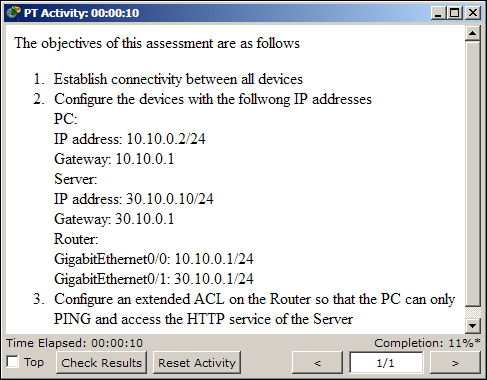
The Welcome screen allows you to enter Author Information (author name and comments). The Instructions section is where you enter questionsand objectives for the user to see. This section uses HTML syntax to format the instructions. A set of supported tags are listed in Packet Tracer's help file.
This is an example of using HTML ordered lists with the <ol> and <li> tags.