Table of Contents for
Packet Tracer Network Simulator
 Packet Tracer Network Simulator
Published by
Packt Publishing, 2014
Packet Tracer Network Simulator
Published by
Packt Publishing, 2014
- Cover
- Table of Contents
- Packet Tracer Network Simulator
- Packet Tracer Network Simulator
- Credits
- About the Author
- About the Reviewers
- www.PacktPub.com
- Preface
- Who this book is for
- Conventions
- Reader feedback
- Customer support
- 1. Getting Started with Packet Tracer
- Installing Packet Tracer
- Interface overview
- Creating a simple topology
- Summary
- 2. Network Devices
- Customizing devices with modules
- Emulating WAN
- Accessing the CLI
- Summary
- 3. Generic IP End Devices
- Servers
- Other end devices
- Configuring end devices
- Summary
- 4. Creating a Network Topology
- Testing connectivity with PDUs
- Using the simulation mode
- Clustering a topology
- Summary
- 5. Navigating and Modifying the Physical Workspace
- Moving devices physically
- Managing cables and distances
- Customizing icons and backgrounds
- Summary
- 6. Configuring Routing with the CLI
- Dynamic routing protocols
- The Routing table
- Load sharing
- Summary
- 7. Border Gateway Protocol (BGP)
- BGP versus dynamic routing protocols
- Configuring BGP in Packet Tracer
- Summary
- 8. IPv6 on Packet Tracer
- IPv6 static and dynamic routing
- Using both IPv4 and IPv6
- Summary
- 9. Setting Up a Wireless Network
- Wireless networks and physical workspaces
- Summary
- 10. Configuring VLANs and Trunks
- InterVLAN routing with routers and layer 3 switches
- Switch-to-switch trunk links
- Analyzing broadcasts in the simulation mode
- Summary
- 11. Creating Packet Tracer Assessments
- The initial network
- The answer network
- Testing the activity
- Summary
- Index
The Internet is a huge network and is made up of many smaller networks. To learn about routes in other networks, each network has to run a routing protocol. While protocols such as EIGRP (Enhanced Interior Gateway Routing Protocol), OSPF (Open Shortest Path First), and RIP (Routing Information Protocol) work well for many networks, they do not scale to support the needs of a gigantic network like the Internet, nor do they provide the level of administrative separation required. So, BGP (Border Gateway Protocol) is used by ISP (Internet Service Provider) and large enterprises to advertise IP routes to one another.
In this chapter, we'll learn about BGP and its features when compared to other routing protocols. We will also learn the commands used in BGP and configure it in Cisco Packet Tracer.
BGP is a very robust routing protocol that is used to exchange routing information between multiple Autonomous Systems (AS). This brings up the question of what an AS is. An AS is a collection of IP prefixes (read IP networks) that are maintained by a network operator. This network operator could be an enterprise or an ISP.
Each AS has a number assigned to it called ASN (Autonomous System Number). Public AS numbers are assigned by the IANA (Internet Assigned Numbers Authority) to the RIRs (Regional Internet Registries). These RIRs, in turn, assign them to individual enterprises or ISPs.
Configuration of BGP largely depends on how an organization is connected to an ISP. There are four possible ways in which this can be done:
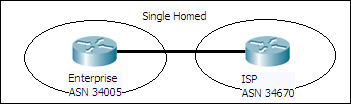
- Single homed (one link to one ISP): This is the simplest design (shown in the following screenshot) and has one link from the enterprise connecting to the ISP. This design has no redundancy or failover:
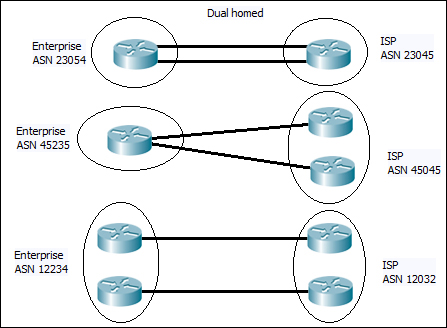
- Dual homed (two or more links to one ISP): This design has a single ISP but has two or more links connecting to it. This provides some amount of reliability in the event of link issues. The following screenshot has examples of dual homed design:
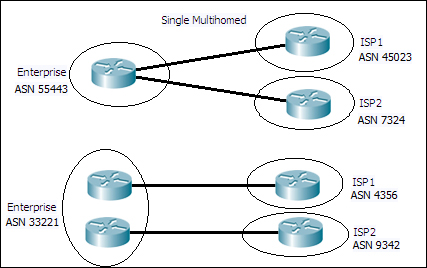
- Single multihomed (one link to two or more ISPs): This case (shown in the following screenshot) has multiple ISPs with one link connecting to each of them:
- Dual mutihomed (two or more links per ISP to two or more ISPs): This design (shown in the following screenshot) provides the highest level of reliability and availability. In this case, there are two or more ISPs with two or more links connecting each of them:
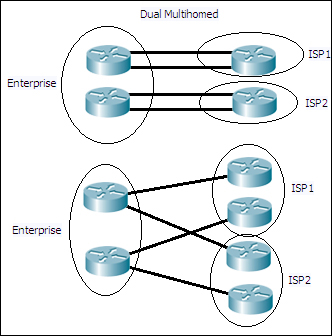
BGP may not always be used in all the previously-discussed designs. For some designs such as single homed, it is better to just have a static default route in the enterprise router towards the ISP, and another on the ISP side for just the network prefix of the enterprise. However, implementing BGP on multihomed networks ensures that the most efficient route is used as these networks have two or more links to ISP(s).
There are two types of BGP:
- eBGP (External BGP)
- iBGP (Internal BGP)
This type of BGP is used to exchange routes between two types of AS. The administrative distance of eBGP is 20. By default, the update packets in eBGP have the TTL set to 1, so that only directly connected BGP routers receive it. However, this behavior can be changed by using commands. Also, an eBGP peer will advertise all the valid routes it has learned from its eBGP and iBGP peers. When an eBGP neighbor advertises a route, it sets the next-hop field of the route to its own address.
This type of BGP is used to exchange routes within an AS. The administrative distance of iBGP is 200. Updates in iBGP do not have TTL value limitations. An iBGP peer does not advertise a route to another iBGP peer if the route was learned via iBGP. This is done to prevent routing loops within an AS. The next-hop field of the route updates remains unchanged when one iBGP peer advertises to another iBGP peer. This behavior can be modified with the use of commands.