Table of Contents for
Building E-Commerce Solutions with WooCommerce - Second Edition
 Building E-Commerce Solutions with WooCommerce - Second Edition
Published by
Packt Publishing, 2015
Building E-Commerce Solutions with WooCommerce - Second Edition
Published by
Packt Publishing, 2015
- Cover
- Table of Contents
- Building E-Commerce Solutions with WooCommerce Second Edition
- Building E-Commerce Solutions with WooCommerce Second Edition
- Credits
- About the Author
- About the Reviewers
- www.PacktPub.com
- Preface
- What you need for this book
- Who this book is for
- Conventions
- Reader feedback
- Customer support
- 1. Setting Up WooCommerce
- Installing WooCommerce
- Setting up WooCommerce
- Summary
- 2. Creating Your First Products
- Creating your first product
- Setting the categories, tags, and images for your product
- Summary
- 3. Using Downloadable Products and Variations
- Using attributes
- Setting up variable and grouped products
- Other product types
- Summary
- 4. Payments, Shipping, and Coupons
- Shipping methods and prices
- Using discount coupons
- Summary
- 5. Working with WooCommerce Themes
- Making or buying a theme
- Installing a WooCommerce theme
- Using the Storefront theme
- Summary
- 6. Customizing a WooCommerce Theme
- WordPress theme basics
- Developing WooCommerce themes
- Summary
- 7. Running Your Online Store
- Deploying your WooCommerce store
- Working with sales orders
- Reporting
- Summary
- 8. More Possibilities Using Plugins
- Popular and useful WooCommerce plugins
- A store in multiple languages
- Summary
- Index
If you need to run a website in multiple languages, there's one major player in the market that you need to go to: WPML (https://wpml.org/). Unfortunately, WordPress does not support multilingual websites out of the box, so using plugins is always mandatory. Creating a store in multiple languages is a pretty complex process and requires you to thoroughly read the documentation provided by WPML. You'll need the Multilingual CMS plugin that is currently available from $79. Running WPML can become resource-intensive, so keep in mind that it can have consequences for your hosting plan as well:
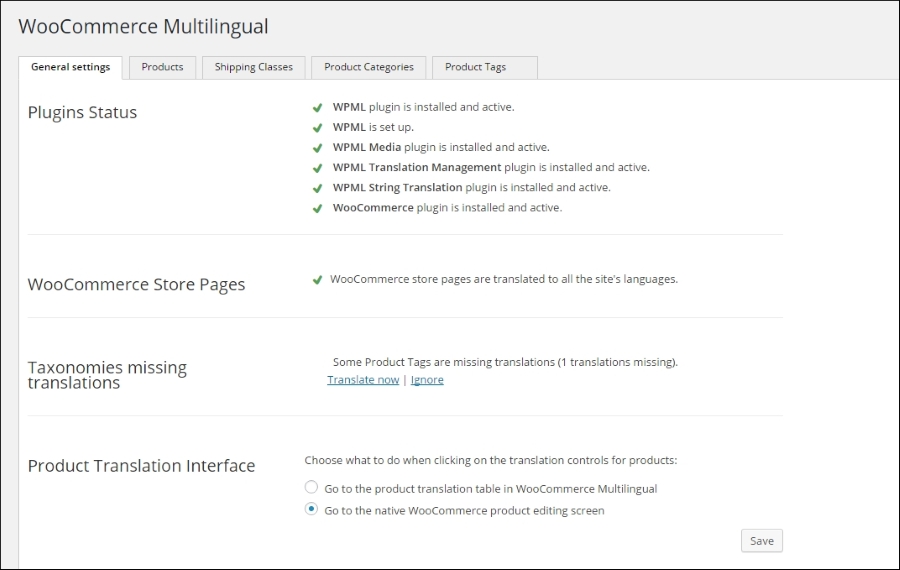
You'll need to install several plugins offered by WPML:
- WPML Multilingual CMS
- WPML Translation Management
- WPML Media
- WPML CMS Nav
- WMPL String translation
- WooCommerce Multilingual
The WPML plugin offers a pretty good guide for beginners at https://wpml.org/documentation/getting-started-guide/. Besides that, please also read the documentation the was made for WooCommerce users: https://wpml.org/documentation/related-projects/woocommerce-multilingual/.
All the plugins are included when buying the WPML package.
We've seen in this chapter that the majority of WooCommerce plugins are offered by commercial parties. Sometimes, there's a free, limited version of the plugin available. Now, there's nothing wrong with this because if your online business relies on it, it's better to have a developer that is actually maintaining the plugin code. This doesn't mean that with a free plugin the code won't be maintained, but we've seen lots of situations in the past where free plugins were not regularly updated. However, if you're looking for free plugins, here are a couple of examples that are worth checking out:
- The WooCommerce customizer (https://wordpress.org/plugins/woocommerce-customizer/) offers a couple of combined functions which are simple but actually missing in the WooCommerce core. You can, for instance, set the number of products shown on the product page and change some of the default texts used within the checkout process.
- WooCommerce does not use sequential order numbers. This is caused by the fact that the numbering is shared with other post types like pages, posts, products, and so on. The result of this is an order number sequence that doesn't make sense at all. This free plugin solves this issue: https://wordpress.org/plugins/woocommerce-sequential-order-numbers/. However, test it in your situation first; I've seen examples where the plugin didn't play together nicely with the payment plugins.
- WooCommerce doesn't offer wishlist functionality out of the box. The plugin YITH WooCommerce Wishlist (https://wordpress.org/plugins/yith-woocommerce-wishlist/) solves this in a nice way and is regularly updated. There's also a pro version available that is offering more options.
Of course, the plugins mentioned above just were examples to show you what WooCommerce is capable of doing. There are many, many more possibilities, so always carefully check if your requirements can be met using an existing extension. If the functionality that you need is not available, it sometimes makes sense to have it created just for your situation. In such a case, always ask for programmers that have experience with creating custom WooCommerce plugins!