Table of Contents for
Building E-Commerce Solutions with WooCommerce - Second Edition
 Building E-Commerce Solutions with WooCommerce - Second Edition
Published by
Packt Publishing, 2015
Building E-Commerce Solutions with WooCommerce - Second Edition
Published by
Packt Publishing, 2015
- Cover
- Table of Contents
- Building E-Commerce Solutions with WooCommerce Second Edition
- Building E-Commerce Solutions with WooCommerce Second Edition
- Credits
- About the Author
- About the Reviewers
- www.PacktPub.com
- Preface
- What you need for this book
- Who this book is for
- Conventions
- Reader feedback
- Customer support
- 1. Setting Up WooCommerce
- Installing WooCommerce
- Setting up WooCommerce
- Summary
- 2. Creating Your First Products
- Creating your first product
- Setting the categories, tags, and images for your product
- Summary
- 3. Using Downloadable Products and Variations
- Using attributes
- Setting up variable and grouped products
- Other product types
- Summary
- 4. Payments, Shipping, and Coupons
- Shipping methods and prices
- Using discount coupons
- Summary
- 5. Working with WooCommerce Themes
- Making or buying a theme
- Installing a WooCommerce theme
- Using the Storefront theme
- Summary
- 6. Customizing a WooCommerce Theme
- WordPress theme basics
- Developing WooCommerce themes
- Summary
- 7. Running Your Online Store
- Deploying your WooCommerce store
- Working with sales orders
- Reporting
- Summary
- 8. More Possibilities Using Plugins
- Popular and useful WooCommerce plugins
- A store in multiple languages
- Summary
- Index
Now that we've seen where to go for WooCommerce extensions, which ones will be useful to our store? Although WooCommerce already offers all the basic functions for an online store, there's always something that we can improve or need to do differently.
Once your store is up and running, it's important to start working on improvements. To be able to do that you first need to collect data about your visitors. Google Analytics is the free and most widely used tool to do so. If you've ever run any website before, you're probably familiar with it.
Unfortunately, even if you have already connected your website to Google Analytics, it will not track e-commerce conversions. Since that is important to have available, we need to take additional steps to solve this issue.
By searching the WordPress.org plugin repository, some plugins are available, but none of these have been actively maintained at the moment of writing.
Therefore, a good combination is the Google Analytics plugin of Yoast (free) combined with the WooCommerce add-on ($49) from https://yoast.com/wordpress/plugins/ga-ecommerce/.
Tip
When working with commercial plugins, you'll often find that the plugin cannot be installed by searching the WordPress.org repository from the WordPress administrative panel. On a website like WooThemes.com or CodeCanyon.com, you buy your product and receive a ZIP archive in most cases. Such an archive file contains everything that you need, but you first need to extract (unzip) it before being able to use the plugin. The archive often contains the plugin along with documentation and sometimes, other resources. If you don't extract the files, uploading the complete ZIP archive to your WordPress installation will simply fail. If you need more detailed instructions, you can find them on my blog at http://www.joomblocks.com/how-to-install-a-commercial-wordpress-plugin.
During the last couple of years, the Yoast SEO plugin has, more or less, become the standard SEO plugin available. It's the expertise of the Yoast team on the SEO subject combined with a very user-friendly plugin that makes the plugin so popular. The free version gives more than enough options to start. Use them like you're used to for regular pages and posts.
Below you'll see an example of using the basic fields of the Yoast SEO plugin:
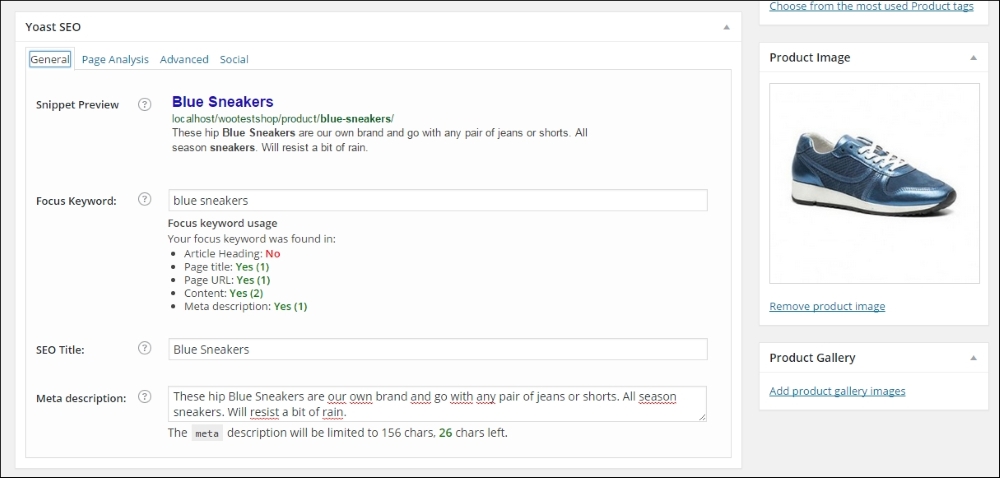
Yoast also offers a paid extension for WooCommerce, which gives some additional possibilities to influence the Twitter, Facebook, and Pinterest integration. It also gives you control over the WooCommerce default breadcrumbs and improves the quality of your sitemap. More information can be found at https://yoast.com/wordpress/plugins/yoast-woocommerce-seo/.
The following screenshot show the additional settings the paid SEO for WooCommerce extension is offering:
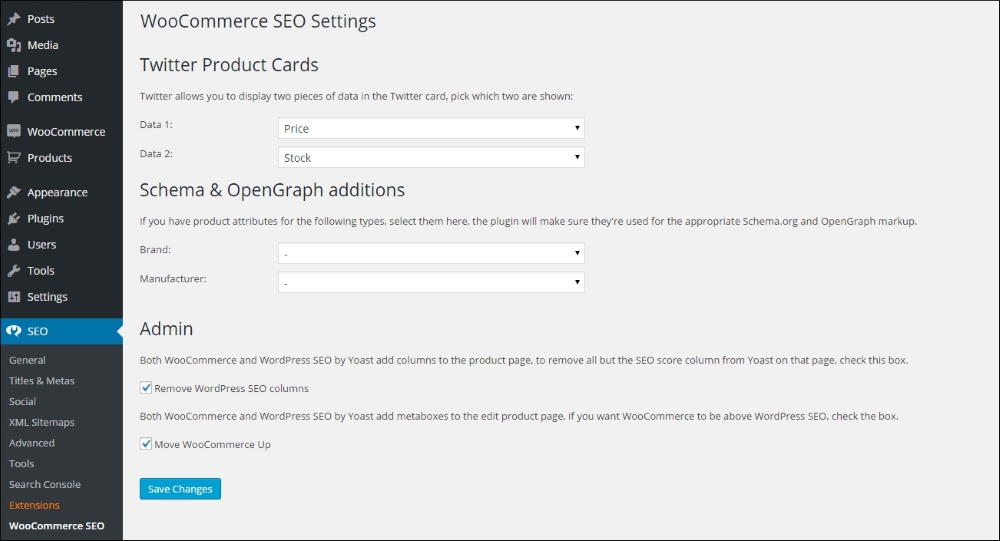
Note that to be able to use Schema & OpenGraph additions, you first need to create attributes for your products. After creating attributes for Brand and/or Manufacturer, you'll be able to use them in the WooCommerce SEO plugin as shown in the screenshot above. Refer to Chapter 3, Using Downloadable Products and Variations, for more information about working with attributes.
WooCommerce already provides you with some pretty good possibilities to create different types of products, but sometimes, this isn't enough. If you need more options, have a look at the following plugins.
WooCommerce product add-ons are available from WooThemes for a current price of $49. It gives you the possibility to add custom fields to your product, for example, when you need your customer to add a text to customize a product:
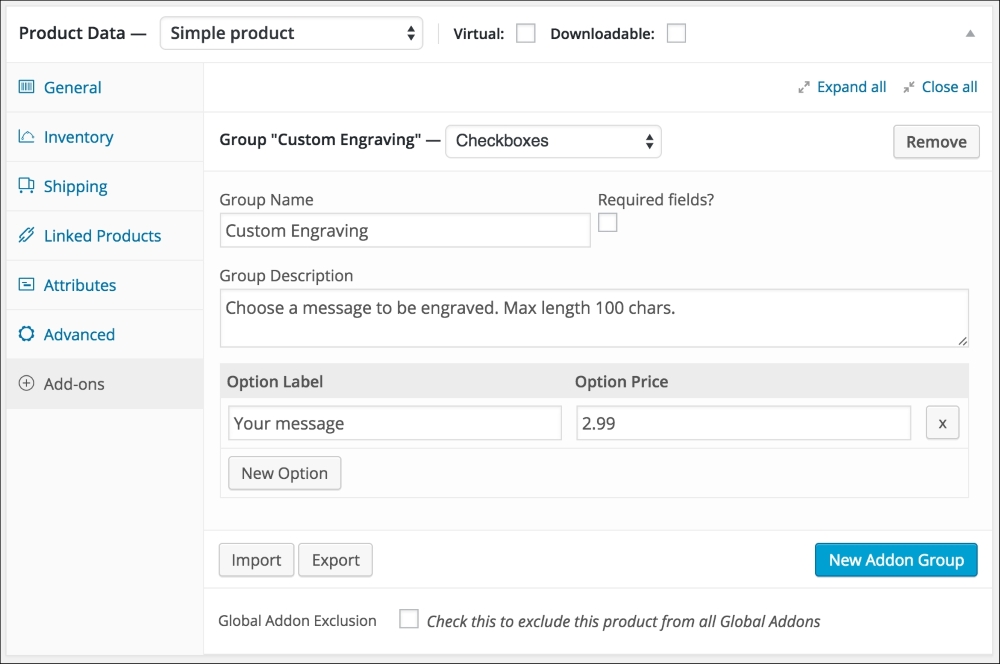
Alternatively, the CodeCanyon plugin, WooCommerce custom fields & Product add-ons, has a similar functionality. On top of that, using this plugin it's also possible to gather additional information from your customer during checkout. The plugin is available here: http://codecanyon.net/item/woocommerce-custom-fields-product-addons/11332742.
Another possibility to change fields on the checkout page, if available through WooThemes: http://www.woothemes.com/products/woocommerce-checkout-field-editor/.
Next, we're going to have a look at some plugins that will help you doing online marketing for your store in various ways.
E-mail marketing is, or should, play an important role in your online business. There are lots of solutions out there, but MailChimp (http://mailchimp.com) is a very popular choice because of the free plan up to 2000 subscribers. Using the MailChimp integration plugin, your customers will be able to sign up to your e-mail list when they go through the checkout. Besides this, the plugin also offers a nice widget for your WordPress dashboard that shows the subscriber statistics. Since it is offered on the WooThemes website, we may assume that it will still work with the latest version of WooCommerce. You may find the plugin here: http://www.Woothemes.com/products/newsletter-subscription/. The plugin is also able to use the Ecommerce360 functionality of Mailchimp that gives you the possibility to track visitors and customers coming from your e-mail campaigns individually. Currently, the price for this extension is $49. It can also be used to connect WooCommerce to the e-mail marketing provider Campaign Monitor (https://www.campaignmonitor.com/), instead of Mailchimp. Both e-mail providers have plenty of functions available. Mailchimp has a pretty good free plan, which makes it easy and accessible for starting sellers.
There's also a cheaper alternative available at CodeCanyon for $19: http://codecanyon.net/item/mailchimp-for-wordpress/11479536, which even includes a visual form designer.
Are you working with a different e-mail marketing solution for your newsletters? There's a good chance that there are integration plugins available. Just check the various extension websites and ask your e-mail provider, if needed.
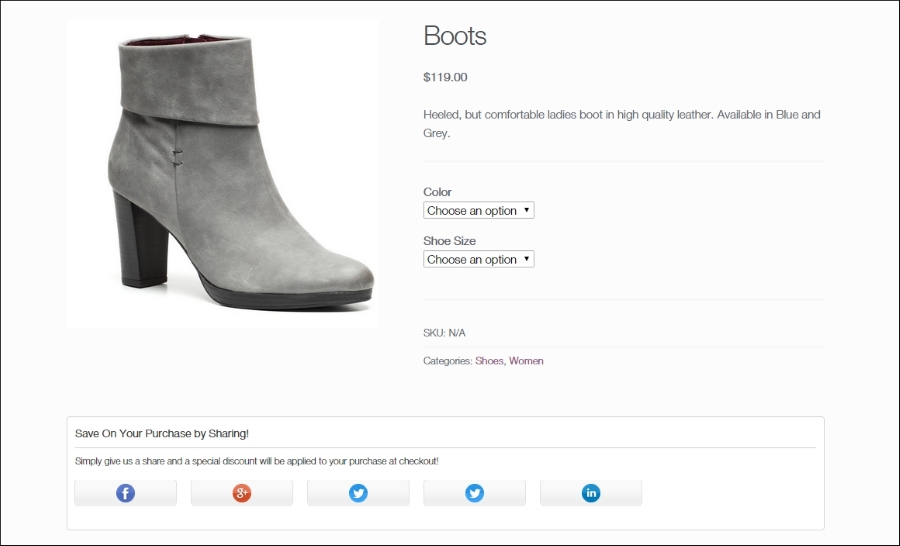
Having the standard social like and share buttons in your store is something that we cannot do without. We could use the default share buttons you see everywhere, but there are better alternatives available. One of them is the Social coupon for WordPress plugin available on CodeCanyon at http://codecanyon.net/item/social-coupon-for-wordpress/3417466.
What makes this extension so interesting is that our visitors can share the product page on social media networks to obtain a discount coupon code that they can immediately use. This could be the ideal last step to convince visitors to buy. If products get shared a lot, this will automatically drive new traffic to your store! Below you'll find a screenshot of this plugin working on our demo store:
Advertising is going to be important as your store has just gone live and no one will be able to find you through the search engines yet. We recommend having a closer look at this area and learn to use the various possibilities. Besides the well-known regular Google AdWords ads, you could consider using Google shopping as well. More information can be found in Google Merchant Center at http://www.google.com/merchants.
You'll need a plugin for WooCommerce to be able to connect the products in your store automatically to Google. You may buy this plugin here: http://www.woothemes.com/products/google-product-feed/. It's currently priced at $79 for a single website. There are also other alternatives out there, but for those you need to pay. Free plugins to export your products to the Google Merchant Center are often not maintained.
Alternatively, if you do not have a lot of different products, it's also possible to just fill in a Google spreadsheet with your data and upload that one.
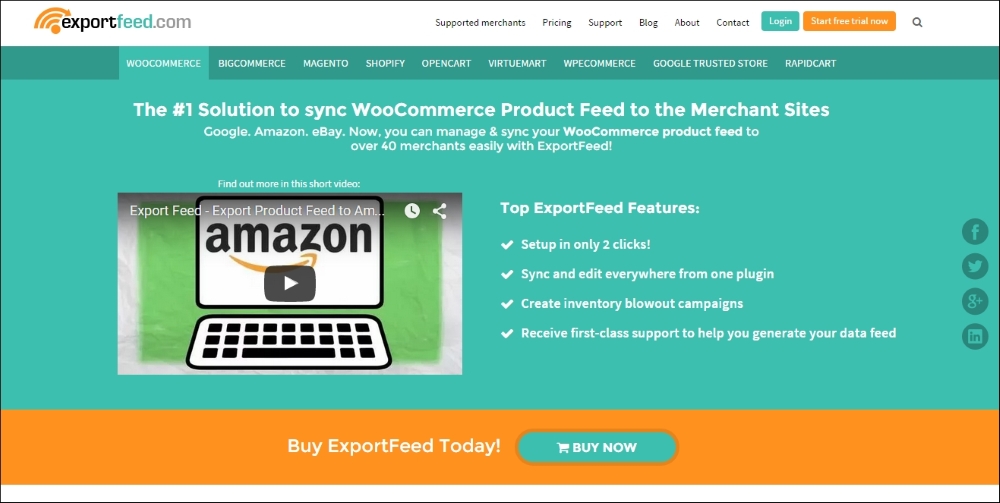
On the other side of the spectrum, we see services like the ones offered by http://www.exportfeed.com/. This isn't cheap, but they offer a full service including the possibility to export your products automatically to marketplaces like for instance Amazon and eBay. If you have lots of products and want to be able to sell them everywhere, this is probably a good solution.
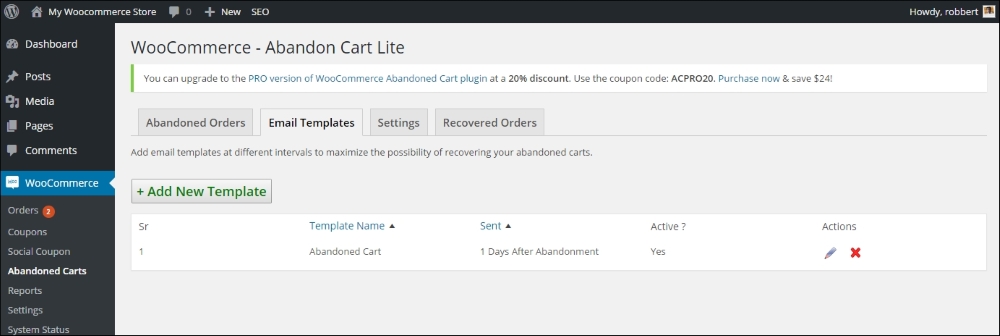
Lots of visitors on your website will have the intention to buy something from you but, in the end, they don't. Something else came in between and they got distracted. End of story, and you lost your sale. Fortunately, there's something that you can do to help minimize this. There are plugins available that send your customer an e-mail at a specific time after they have abandoned their cart. You could even include a discount coupon in the reminder message.
There are several plugins on the market that help retrieve abandoned carts. Plugins like these will only work if the customer left their e-mail address, for example by creating an account. To name few possibilities https://www.tychesoftwares.com/store/premium-plugins/woocommerce-abandoned-cart-pro/. With a price of €119, this is a pretty expensive plugin. Luckily, there's also a light version which is available for free at the WordPress.org website (https://wordpress.org/plugins/woocommerce-abandoned-cart/) that gives you the possibility to check the plugin and decide later on if chasing abandoned carts is something that is really going to increase the revenue of your business.
There are lots of additional plugins available to expand the functions that are available in order to run your store. From shipping calculations to invoicing and reporting, there are extensions available in every area.
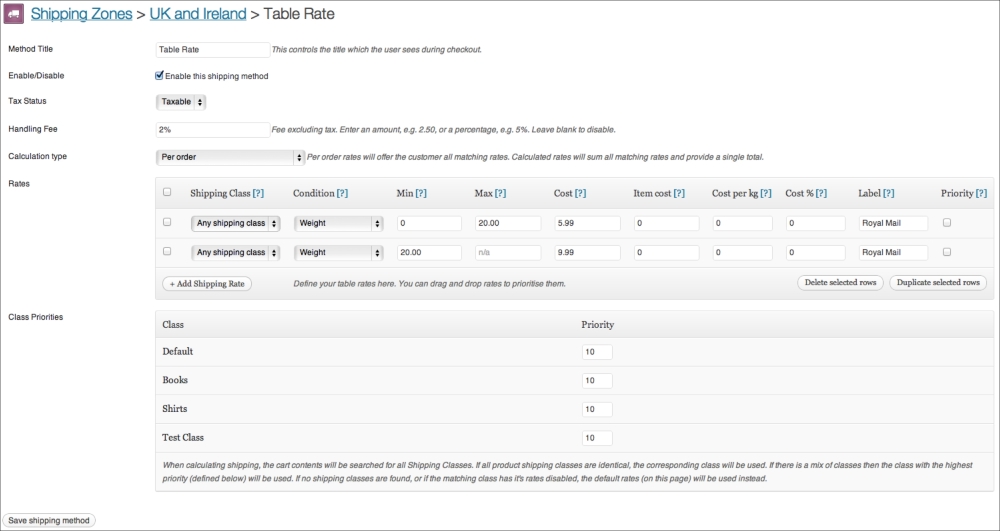
We mentioned earlier in this book that the possibilities to calculate the shipping costs in WooCommerce are not always enough to suit your needs. Sometimes, you need to be able to store tables with shipping amounts based on volume or weight of the individual products or the total cart. This is where the Table rate shipping extensions will be helpful. There are multiple plugins available on the market. Let's start with the table rate shipping extension offered on the WooThemes website: http://www.woothemes.com/products/table-rate-shipping/.
The screenshot below shows you the table rate shipping plugin. In this example, the shipping fee that the customer pays is based on the country and total weight of the order:
This is a pretty expensive extension with a price of $199 for a single website. The extension is flexible and easy to use, but maybe other alternatives can work just as well. The table rate shipping extension offered at CodeCanyon offers similar functions on a bargain rate of only $22: http://codecanyon.net/item/woocommerce-table-rate-shipping/3796656. However, note that setting up table rate shipping can become complex. The support offered by WooThemes might therefore be one of the reasons to still choose that plugin.
Tip
Note: why would you bother with using an extension from WooThemes.com if plugins found elsewhere are much cheaper? The reason is simple: if you're starting an online business, then you are creating something for a longer period. Extensions bought on the WooThemes store probably will be updated for a longer period. We say probably because, even on WooThemes.com, we won't be sure that extensions will always be updated and continue to be supported. Based on our experience, we expect that your chances are better when using the official WooCommerce extensions, but there are no guarantees. And we've also seen examples of extensions on CodeCanyon that are already available for a couple of years and keep on getting updated. It's up to you to decide.
WooCommerce is offering the possibility to generate invoices for your store, but these won't be valid for all countries. Of course, we have the e-mails that will be sent out, but these are order confirmations only. The PDF Invoices extension available on the WooThemes website does just what we need. It's able to create a PDF invoice and use sequential invoice numbers. The invoice file is automatically attached to the e-mail that will be sent when the order is marked as completed.
The plugin is available here: http://www.woothemes.com/products/pdf-invoices/.
The other vendors that we mentioned at the beginning of this chapter are offering invoicing plugins as well. Just check which one fits your needs.
A function that is often asked for is being able to use subscriptions. Let's say that we would offer access to a closed area of our website with very valuable content. We'd like our customers to buy a subscription in this case and charge them every month. By default, that's not possible in WooCommerce. With the subscription extension, we can do so. This plugin can also be bought at the WooThemes website for $199 (http://www.woothemes.com/products/woocommerce-subscriptions/).
To be able to charge customers every month, our payment gateway needs to support such transactions. This isn't always the case. PayPal is supported out of the box by the plugin. For other payment gateways, have a look at this overview: http://docs.woothemes.com/document/payment-gateways/.
Tip
Note: More detailed instructions on creating a subscription-based website with WooCommerce can be found in Packt Publishing's book, WooCommerce Cookbook by Patrick Rauland (https://www.packtpub.com/web-development/woocommerce-cookbook).
In Chapter 7, Running Your Online Store, we noticed that the reporting and management possibilities of WooCommerce can sometimes be a bit limited. And even looking at the available extensions, the choice is still very limited.
The Cart reports extension available on the WooThemes website extends the standard functions with a few additional reports. It delivers interesting information about the number of carts that were abandoned and products that were abandoned while in the cart. If the cart was created by a logged-in user, we can even send them an e-mail about it. The extension is available here: http://www.woothemes.com/products/woocommerce-cart-reports/.
Another extension that can get integrated into the reporting function of WooCommerce is the Cost of goods plugin. It gives you the possibility to check your margins by date or product. The extension is available here: http://www.woothemes.com/products/woocommerce-cost-of-goods/.
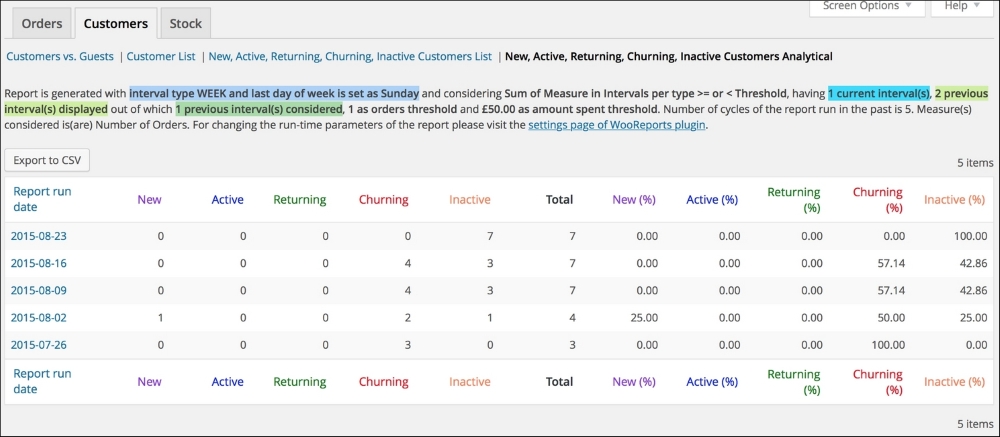
Finally, we would also like to mention the following reporting plugin: http://woo.report/. At the moment of writing, this extension could be downloaded for free, but it seems that in the near future, a fee will be charged. This extension delivers some really good insights on customer behavior, sales per product, and value of your stock. These things are missing in WooCommerce itself.
WooCommerce can easily be used as an online catalog, but prices will always remain visible. If you want to hide your prices and only show them to authenticated users, this plugin is the one that you need: http://www.woothemes.com/products/catalog-visibility-options/.
This plugin also offers the possibility to hide the e-commerce functionality completely so that your store will only be an online catalog:

If we would already have a product catalog available, WooCommerce is not giving us the possibility to automatically import product data. The Product CSV Import Suite available at WooThemes can be a real time-saver: http://www.woothemes.com/products/product-csv-import-suite/.
If you are moving from another WooCommerce store, you can just export product data from the first site and import them to the new website using the WordPress importer plugin. In other situations where you have to import your products from another software solution, it's better to use a plugin like the one mentioned previously.
At the moment of writing this, this plugin is priced at $199. You can easily create a CSV file using Google Sheets or Microsoft Excel. If you're currently using a different solution to store your product data, then often there's a possibility to export this data using the CSV file format. The plugin offers enough flexibility to map your product fields to the fields available in WooCommerce.
Alternatively, take a look at the WP All Import plugin at http://www.wpallimport.com/.
We've seen during Chapter 1, Setting Up WooCommerce, that the standard available tax calculations are not always flexible enough when you're doing business in the USA.
The TaxNow plugin, using the Avalara service, can overcome this problem, but it is a paid service. More information about TaxNow can be found here: http://www.avalara.com/products/avatax. The WooCommerce plugin can be bought here for $49: http://www.adipietro.com/product/taxnow-for-WooCommerce/.