Table of Contents for
Building E-Commerce Solutions with WooCommerce - Second Edition
 Building E-Commerce Solutions with WooCommerce - Second Edition
Published by
Packt Publishing, 2015
Building E-Commerce Solutions with WooCommerce - Second Edition
Published by
Packt Publishing, 2015
- Cover
- Table of Contents
- Building E-Commerce Solutions with WooCommerce Second Edition
- Building E-Commerce Solutions with WooCommerce Second Edition
- Credits
- About the Author
- About the Reviewers
- www.PacktPub.com
- Preface
- What you need for this book
- Who this book is for
- Conventions
- Reader feedback
- Customer support
- 1. Setting Up WooCommerce
- Installing WooCommerce
- Setting up WooCommerce
- Summary
- 2. Creating Your First Products
- Creating your first product
- Setting the categories, tags, and images for your product
- Summary
- 3. Using Downloadable Products and Variations
- Using attributes
- Setting up variable and grouped products
- Other product types
- Summary
- 4. Payments, Shipping, and Coupons
- Shipping methods and prices
- Using discount coupons
- Summary
- 5. Working with WooCommerce Themes
- Making or buying a theme
- Installing a WooCommerce theme
- Using the Storefront theme
- Summary
- 6. Customizing a WooCommerce Theme
- WordPress theme basics
- Developing WooCommerce themes
- Summary
- 7. Running Your Online Store
- Deploying your WooCommerce store
- Working with sales orders
- Reporting
- Summary
- 8. More Possibilities Using Plugins
- Popular and useful WooCommerce plugins
- A store in multiple languages
- Summary
- Index
So far we've been able to setup our online store, add different type of products and take the necessary steps to add payment and shipping methods. We already installed the free Storefront theme earlier, but our shop still looks very standard though. It's time to change the look and feel of our store!
In this chapter we'll cover:
- Using the available widgets and shortcodes
- Making or buying a theme
- Finding and selecting WooCommerce themes
- Using the free Storefront theme
- Changing the Storefront theme using the customizer
When you installed WooCommerce, you also received a number of possibilities that you can use to show products to your visitors. Of course there are the default available shop, category and product pages. But sometimes, you need more than that. Let's look at the other options that WooCommerce offers by default.
WooCommerce offers the following widgets, that you can reach from the Theme customizer or via Appearance | Widgets:
- WooCommerce Layered Nav Filters
- WooCommerce Price filter
- WooCommerce Product Categories
- WooCommerce Products
- WooCommerce Product Search
- WooCommerce Product Tags
- WooCommerce Recently Viewed
- WooCommerce Recent Review
- WooCommerce Top Rated Products
The screenshot is as follows:
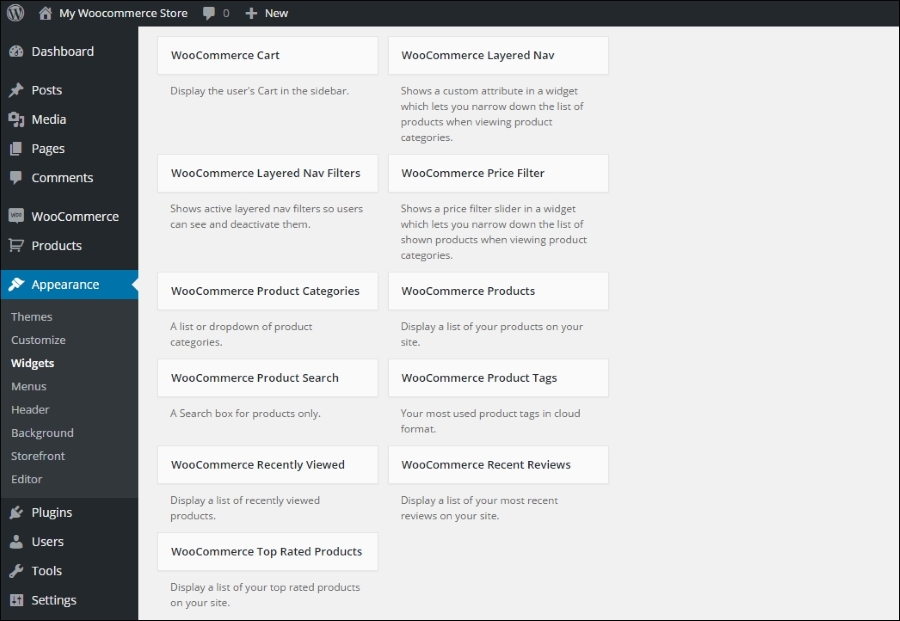
Using these widgets is easy and works just like any other WordPress widget. Using a couple of these in your sidebar gives your visitors the flexibility they need to find their way in your store. In the example below you see we activated the following widgets: WooCommerce Product Search, WooCommerce Products and WooCommerce Product Categories:
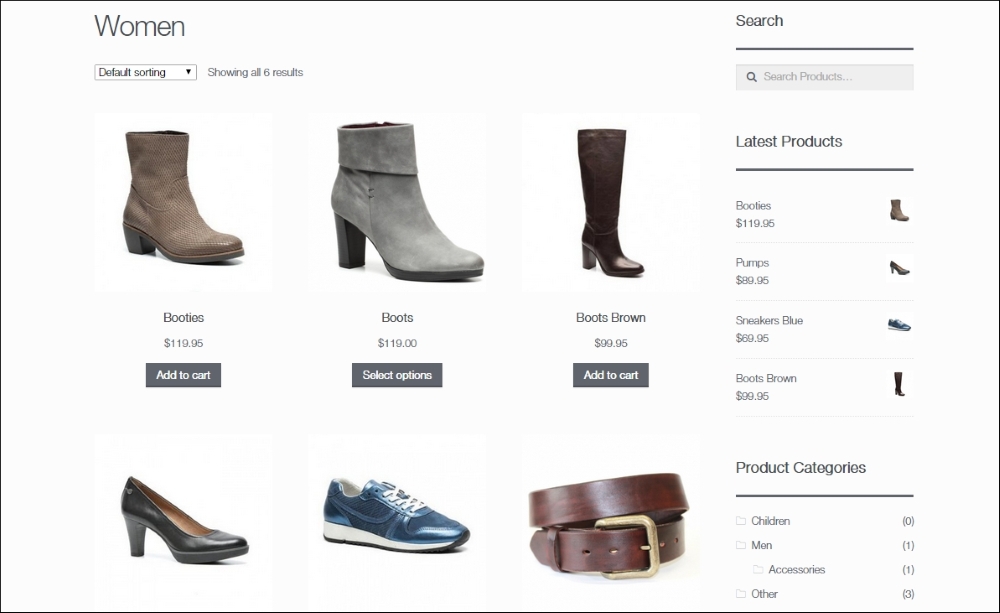
Note that the sidebar is on the right in this example. Generally it makes more sense in an online store to have such a sidebar on the left. This is something you can just set in the Storefront theme. Later on in this chapter we'll give you more information on customizing the Storefront theme.