Table of Contents for
Building E-Commerce Solutions with WooCommerce - Second Edition
 Building E-Commerce Solutions with WooCommerce - Second Edition
Published by
Packt Publishing, 2015
Building E-Commerce Solutions with WooCommerce - Second Edition
Published by
Packt Publishing, 2015
- Cover
- Table of Contents
- Building E-Commerce Solutions with WooCommerce Second Edition
- Building E-Commerce Solutions with WooCommerce Second Edition
- Credits
- About the Author
- About the Reviewers
- www.PacktPub.com
- Preface
- What you need for this book
- Who this book is for
- Conventions
- Reader feedback
- Customer support
- 1. Setting Up WooCommerce
- Installing WooCommerce
- Setting up WooCommerce
- Summary
- 2. Creating Your First Products
- Creating your first product
- Setting the categories, tags, and images for your product
- Summary
- 3. Using Downloadable Products and Variations
- Using attributes
- Setting up variable and grouped products
- Other product types
- Summary
- 4. Payments, Shipping, and Coupons
- Shipping methods and prices
- Using discount coupons
- Summary
- 5. Working with WooCommerce Themes
- Making or buying a theme
- Installing a WooCommerce theme
- Using the Storefront theme
- Summary
- 6. Customizing a WooCommerce Theme
- WordPress theme basics
- Developing WooCommerce themes
- Summary
- 7. Running Your Online Store
- Deploying your WooCommerce store
- Working with sales orders
- Reporting
- Summary
- 8. More Possibilities Using Plugins
- Popular and useful WooCommerce plugins
- A store in multiple languages
- Summary
- Index
The look and feel of your store is completely controlled by your WordPress theme. We already noticed that even a theme like Storefront already delivers good results. It's just better to use a theme that has been created with using WooCommerce in mind. If you would use a standard WordPress theme like Twenty Fifteen or Twenty Sixteen WooCommerce will still work, but layout issues might occur.
We have two possibilities when choosing a design for our store:
- Design and develop a theme from scratch. Or have someone do that for us
- Use a WooCommerce theme that is available on the market
To start with the first option, creating a theme ourselves is not something we could do overnight. It requires extensive knowledge of Web design, WordPress, WooCommerce, PHP, HTML, and CSS, Just to name a few. But maybe, if we wanted to have a unique design that no other shop is using, this could still be a good choice. It just requires more time and a large budget to do so. Creating your own WordPress or WooCommerce theme is a learning experience if you never did it before.
The alternative is using a standard theme. These are themes optimized for WooCommerce and available out of the box. Using a standard theme you can start right away. Some of them are even free, like for instance the good Storefront theme. We'll often find that we need a commercial theme though. Commercial or Premium themes can be found in price ranges from $20 to $200, where the majority of the themes will be offered below $100. If we had a small budget this would definitely be the way to go, since there are hundreds of themes to choose from. Remember that it's always possible to make adjustments on these themes, so that the theme of your choice better fits your needs.
If you decided to use a standard theme you'll face a new challenge: which theme will fit your needs? There are free themes available on the market, but most WooCommerce themes are commercial themes you'll have to pay for. Often they are referred to as Premium themes. These themes are supported by the developer and deliver lots of functions in most cases. That's not always a good thing though. Functionality should be provided by plugins and not within the theme itself. Besides that, having too much functions will just slow down your website. As a beginner this is sometimes difficult to judge. Just pick what you really need and do not go for the theme that offers the most functions. Look for themes that make it easy to customize the layout, colors and fonts. There are a number of resources available online to look for WooCommerce-compatible themes:
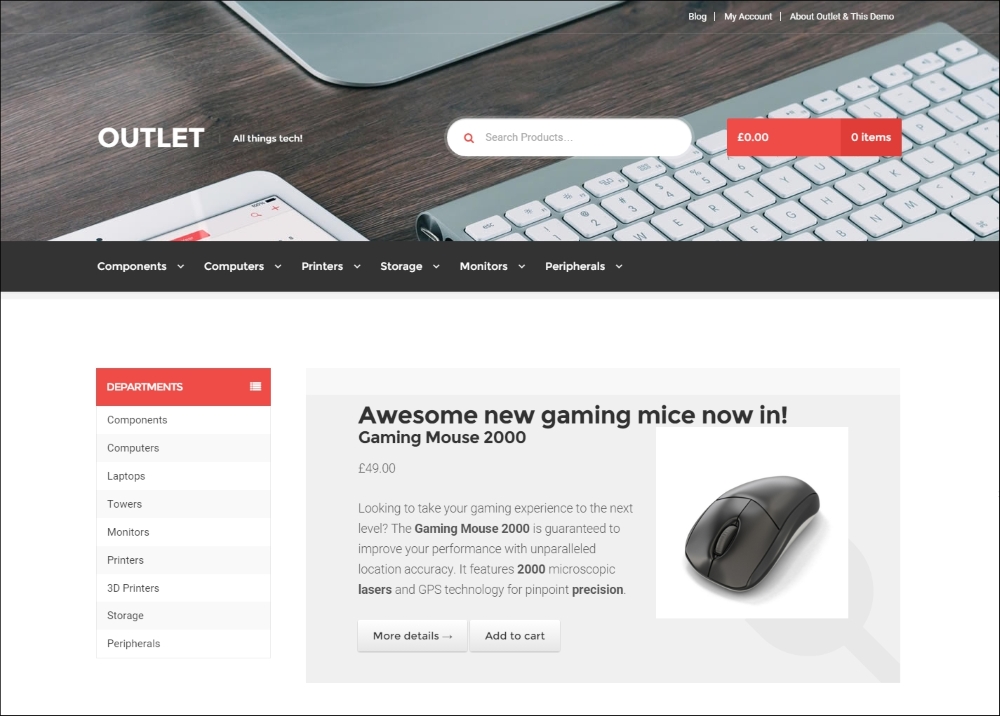
- The WooThemes website (http://www.woothemes.com) from the developers of WooCommerce. In fact, WooThemes exists much longer than their WooCommerce product, which is relatively young. Look at the demos to check how category and product pages will look like. The good thing of a theme created by WooThemes is that it will be an absolutely quality theme and compatible with WooCommerce. Themes found on WooThemes are not the cheapest ones. Pricing starts at around $80. Pay attention to the child themes. They have a low price, but also require the theme that it was built on. The following image shows a screenshot of Outlet, one of the available themes at WooThemes.com:
- ThemeForest at http://themeforest.net/category/wordpress/ecommerce/woocommerce. ThemeForest is a marketplace, where lots of developers are offering themes for WordPress and other solutions. There's a large range of WooCommerce enabled themes available. But please note that the quality may differ. Carefully look at the demos, the comments of other readers, and the last time that it was updated. Reasonably priced themes are around $60.
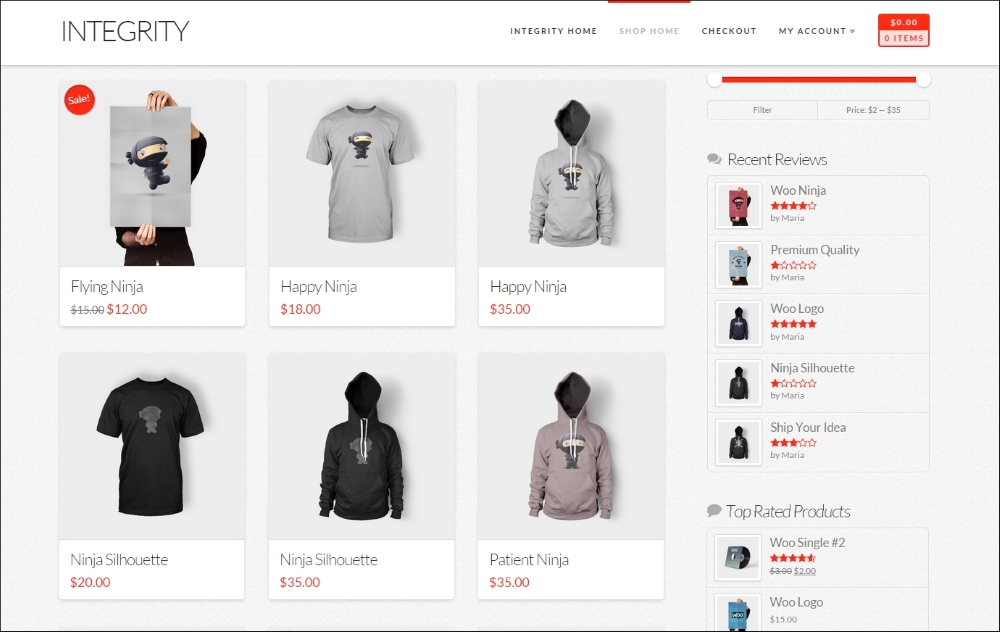
The image below shows the Integrity theme demo created using the X-theme, one of the many versatile and flexible WooCommerce themes at ThemeForest.com:
- Even cheaper themes can be found elsewhere on the Internet For instance at Elegantthemes (http://www.elegantthemes.com/gallery/) or Mojo Themes (http://www.mojo-themes.com/categories/wordpress/ecommerce-wordpress/woocommerce-themes/).
Sometimes, you may find free themes as well. The best resources are WooThemes and the WordPress.org website: http://wordpress.org/themes/. Search for WooCommerce if you're searching on WordPress.org. All themes can be used, but using a theme built for WooCommerce often gives better results out of the box. Be careful building your business on a free theme. Although it seems tempting if you're on a low budget, free themes are often not updated or supported. If there's any free theme we can really recommend, then it would be the Storefront theme, that is also used in this book. It is well written, and a good starting point if you want to learn WooCommerce theme development yourself. It is supported by WooThemes as well, which is an important asset for a free theme.
Tip
I also wrote a roundup of free WooCommerce themes on my blog. If you need to limit yourself to free themes, you should check it out. You may find it here:
http://www.joomblocks.com/best-free-woocommerce-themes-2015.
If you're not yet very familiar with working with different WordPress themes, then the following guidelines may be helpful to come to a good choice:
- Browser compatibility: For users, this isn't always clear, but often older browsers like Microsoft Internet Explorer 8 and older are no longer supported. This means that a visitor using such a browser will see a malfunctioning website. Depending on your audience, this is or isn't a problem. Just pay attention to it and make sure that you understand on which browsers and versions the theme of your choice will work.
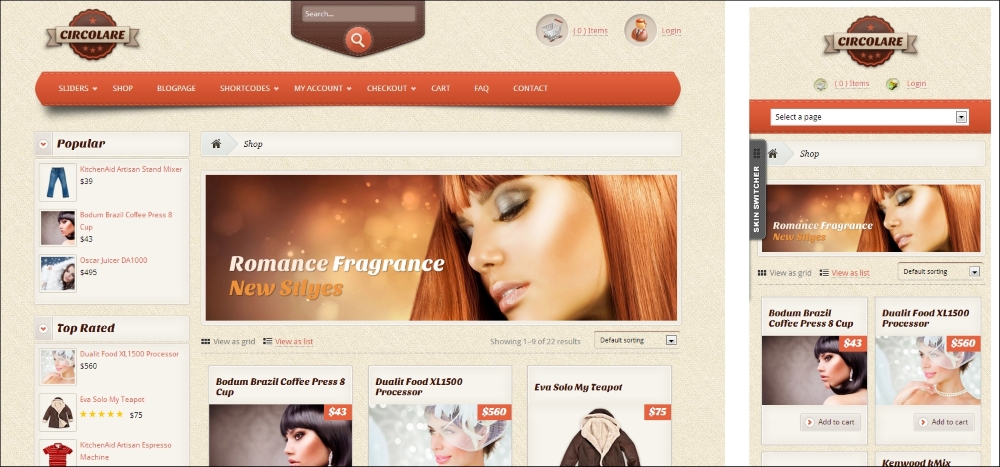
- Smartphone/Tablet compatibility: Nowadays, when building a website, you have to consider how your site will look on mobile devices. Meet this requirement by looking for a Responsive WooCommerce theme. A website built with a responsive theme will look good on all devices, independent of their maximum screen resolution. Themes that are also Retina ready will look good on high resolution screens like the latest iPad 3 as well. See the example below of a responsive theme and how the look and feel will change if the website is visited using a mobile phone (on the right-hand side):
- Is the theme compatible with the latest version of WooCommerce? Check the current version of the WooCommerce plugin and check if the theme developer guarantees that it will work. Also here, when buying a theme from WooThemes, there should be no incompatibility issues.
- When was the theme updated? Especially when buying from third party developers like on the ThemeForest marketplace, it's important to check if the developer is keeping the theme up to date. Having an updated theme is important. An older theme might not be compatible anymore with the latest WordPress and WooCommerce versions.
- How flexible is the theme from the functional point of view? For example, will you be able to easily change colors? Can you change the layout of the theme a bit without coding? Is there enough space in the header for your logo?
- What other functions are being delivered? Also important: do you really need all the functions that are being delivered in the theme? We often see themes with tons of functionality. Using such functions is handy, but your website might break if you're ever going to switch to a different theme. For example, we nowadays, regularly see themes with built-in functions for Search Engine Optimization (SEO). If you would switch themes in the future, you might even lose such data! Even if the theme offers functionality like this, it's better to take advantage of a separate SEO plugin. This will prevent the loss of data if you ever want to change to a different theme in the future.
There are a lot of things that we have to pay attention to when buying a WooCommerce theme. However, when creating a theme from scratch, we need to pay attention to some of these topics as well. In this case, we must have, or gather, the knowledge to be able to build it correctly.