Table of Contents for
Building E-Commerce Solutions with WooCommerce - Second Edition
 Building E-Commerce Solutions with WooCommerce - Second Edition
Published by
Packt Publishing, 2015
Building E-Commerce Solutions with WooCommerce - Second Edition
Published by
Packt Publishing, 2015
- Cover
- Table of Contents
- Building E-Commerce Solutions with WooCommerce Second Edition
- Building E-Commerce Solutions with WooCommerce Second Edition
- Credits
- About the Author
- About the Reviewers
- www.PacktPub.com
- Preface
- What you need for this book
- Who this book is for
- Conventions
- Reader feedback
- Customer support
- 1. Setting Up WooCommerce
- Installing WooCommerce
- Setting up WooCommerce
- Summary
- 2. Creating Your First Products
- Creating your first product
- Setting the categories, tags, and images for your product
- Summary
- 3. Using Downloadable Products and Variations
- Using attributes
- Setting up variable and grouped products
- Other product types
- Summary
- 4. Payments, Shipping, and Coupons
- Shipping methods and prices
- Using discount coupons
- Summary
- 5. Working with WooCommerce Themes
- Making or buying a theme
- Installing a WooCommerce theme
- Using the Storefront theme
- Summary
- 6. Customizing a WooCommerce Theme
- WordPress theme basics
- Developing WooCommerce themes
- Summary
- 7. Running Your Online Store
- Deploying your WooCommerce store
- Working with sales orders
- Reporting
- Summary
- 8. More Possibilities Using Plugins
- Popular and useful WooCommerce plugins
- A store in multiple languages
- Summary
- Index
As you know, WooCommerce is a plugin for WordPress. Even though it might sound strange, it's possible to expand the functionality of WooCommerce with additional plugins. Those are regular WordPress plugins as well, just like any other. The only difference is that these plugins will only work if WooCommerce has been installed.
In this chapter, we'll discuss the following topics:
- Where to find the right WooCommerce plugins
- Popular and useful plugins. We'll have a closer look at:
- WooCommerce and Google Analytics integration
- WooCommerce and the Yoast SEO plugin
- Plugins for advanced products
- Plugins for online marketing
- Plugins for easier store management
- A store in multiple languages
- Free plugins
We already noticed earlier in this book that we probably need additional plugins to support the Payment Method or Payment Service Provider of our choice. There are a number of websites that we can check to see if the functionality we need is available:
- WooThemes: http://www.woothemes.com/product-category/woocommerce-extensions/. The extensions offered here are not always developed by the WooCommerce core team, but by third-party programmers. The plugins found here are of a good quality, but sometimes can be pricey. However, note that programmers will have to make some money as well. By charging an amount for their plugins, they will be able to keep supporting them, which is important if your online business is going to rely on it. The commercial WooThemes plugins include one year of support.
- WordPress: http://www.wordpress.org/extend/plugins. The plugins offered here are free, or have at least a free (limited) version available. We found extensions to support Payment Service Providers and for easier shop management. We'll discuss a few of the free plugins later on in this chapter.
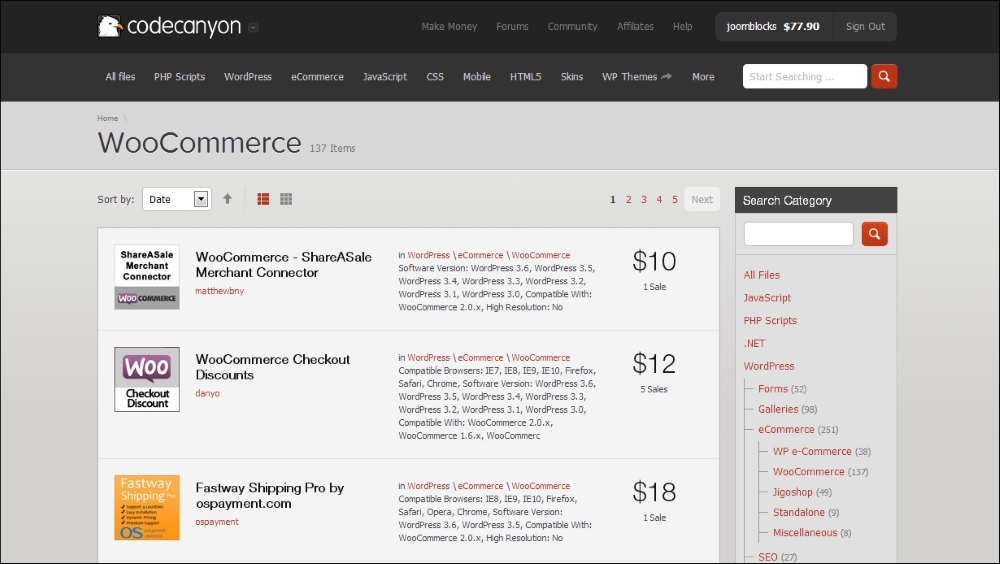
- A valuable resource for commercial, but affordable plugins is CodeCanyon: http://codecanyon.net/category/wordpress/ecommerce/WooCommerce. In here, you may currently find over 700 (!) extensions for WooCommerce. But pay attention: not all of them will be up to date and ready for 2.4, the newest version of WooCommerce. Just as on ThemeForest, CodeCanyon is a marketplace offering extensions from lots of different developers. Carefully check the given ratings and comments by other users . Not every plugin is supported by the developers. If the support is poor, it's very likely that you can find comments on the support and code quality in the comment section:
- Other smaller vendors worth checking out are as follows:
- IgniteWoo (http://ignitewoo.com) is a smaller company which offers themes and plugins.
- SkyVerge (https://www.skyverge.com) is offering a versatile collection of WooCommerce plugins and also offers some free plugins. The premium plugins of Skyverge are sold on the WooThemes website.
Besides these resources, there will be other developers offering their products and services. Not all plugins are mentioned on the websites mentioned above. If you cannot find what you're looking for, give Google a try as well. There are developers delivering WooCommerce plugins directly from their own website. If you're looking for an extension to support your Payment Service Provider or Carrier, don't forget to ask them if they have one available! Sometimes, you might even get it for free in this way.
Whatever plugin you choose to use, there are a couple of best practices that you need to pay attention to when working with plugins:
- Try to minimize the number of plugins that you're using. Too many plugins can be bad for performance if they are not well-coded. Having too many plugins also makes it difficult to technically manage your shop in the future.
- Have a look at the latest update date. This is especially important for free plugins and plugins offered on a marketplace like CodeCanyon. Is the plugin brand-new, then it might not be the best solution to use in a production environment. If the plugin is not being actively maintained anymore, then try to look for a better alternative. Even if the plugin is still working at this moment, problems will arise in the future when new versions of WordPress and WooCommerce are being released.
- Check the reviews of other users, if available.
- Always make sure that you have a full backup of your website available before you start to add or remove plugins. The backup must include a copy of the WordPress database.
When looking closer at the plugin prices, you may notice that some plugins require a yearly renewal, whereas others deliver free updates forever. Vendors change their pricing model sometimes, but, at this moment, you have to take the following into account:
- At WooThemes, you buy the plugin at the full price. After a year, you may renew your license at 50% of the current sales price. If you do not renew, you will no longer be able to download the updates.
- At CodeCanyon, you receive free updates as long as the plugin is being maintained by the developers. Six months of support is included in the purchase price. If you need to extend support, you must pay an additional fee. Be aware that to be able to just download the latest version, it isn't necessary to extend the support period.
All other vendors have varying pricing models and their own way of handling support and updates. Always take a close look at the conditions so that you know what you are going to pay in the future. Keeping your store up to date is important, so please do not stop paying for your extensions just to save some money.
Note that all the prices mentioned in the remaining part of this chapter were the actual prices at the moment of writing. The prices of the mentioned extensions are subject to change.