Table of Contents for
Building E-Commerce Solutions with WooCommerce - Second Edition
 Building E-Commerce Solutions with WooCommerce - Second Edition
Published by
Packt Publishing, 2015
Building E-Commerce Solutions with WooCommerce - Second Edition
Published by
Packt Publishing, 2015
- Cover
- Table of Contents
- Building E-Commerce Solutions with WooCommerce Second Edition
- Building E-Commerce Solutions with WooCommerce Second Edition
- Credits
- About the Author
- About the Reviewers
- www.PacktPub.com
- Preface
- What you need for this book
- Who this book is for
- Conventions
- Reader feedback
- Customer support
- 1. Setting Up WooCommerce
- Installing WooCommerce
- Setting up WooCommerce
- Summary
- 2. Creating Your First Products
- Creating your first product
- Setting the categories, tags, and images for your product
- Summary
- 3. Using Downloadable Products and Variations
- Using attributes
- Setting up variable and grouped products
- Other product types
- Summary
- 4. Payments, Shipping, and Coupons
- Shipping methods and prices
- Using discount coupons
- Summary
- 5. Working with WooCommerce Themes
- Making or buying a theme
- Installing a WooCommerce theme
- Using the Storefront theme
- Summary
- 6. Customizing a WooCommerce Theme
- WordPress theme basics
- Developing WooCommerce themes
- Summary
- 7. Running Your Online Store
- Deploying your WooCommerce store
- Working with sales orders
- Reporting
- Summary
- 8. More Possibilities Using Plugins
- Popular and useful WooCommerce plugins
- A store in multiple languages
- Summary
- Index
The Storefront theme is definitely one of the better free themes. That makes sense because it was developed by the creators of WooCommerce.
The functionality of Storefront is a bit limited. However, you can expand the functionality by installing additional plugins for Storefront, which you have to pay for. Let's first take a look at the changes that you can make by default.
After activating the theme, it will add additional menu items to the Appearance menu in WordPress. Here, you'll find several shortcuts for additional possibilities. WooThemes is a commercial company after all, so there are plenty of links here for more options, which you have to pay for.
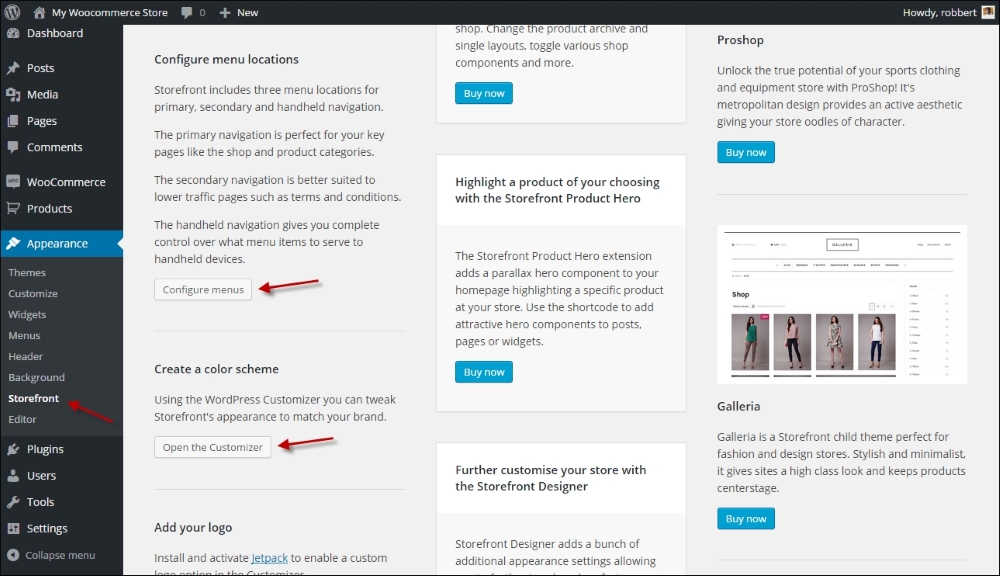
Whether you click on the link to Configure menus or Open the Customizer, in both cases the WordPress customizer will be opened. Since WordPress 4.3, you can change your menus from within the customizer, but the old function using Appearance | Menus is still available:
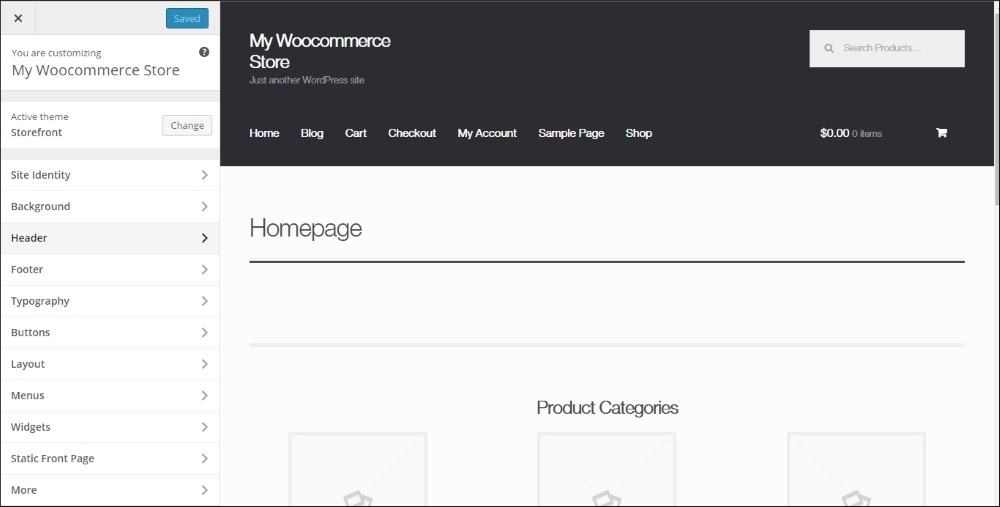
Just navigate the various options to change the items that you need, for example, the background and font colors.
Note that the Layout option on the left gives the possibility to show the sidebar on the left, which makes sense for a typical online store.
It's possible to add a header image to the Storefront theme. But strangely enough, Storefront does not offer the possibility to add your company logo, and the header image isn't really meant for this. To solve this problem, you must download and install the Storefront Logo Plugin, which will add the function to the customizer, at https://wordpress.org/plugins/storefront-site-logo/. Alternatively, you may also use the WordPress Jetpack plugin, which also gives you the possibility to change the logo http://jetpack.me/.
Another plugin that you really want to install when working with the Storefront theme is Homepage control. Use it if you decide to use a regular page as a home page for your website instead of the blog. Download it at https://wordpress.org/plugins/homepage-control/. Once activated, navigate to the customizer again to switch off any area that you do not want to include on your homepage:
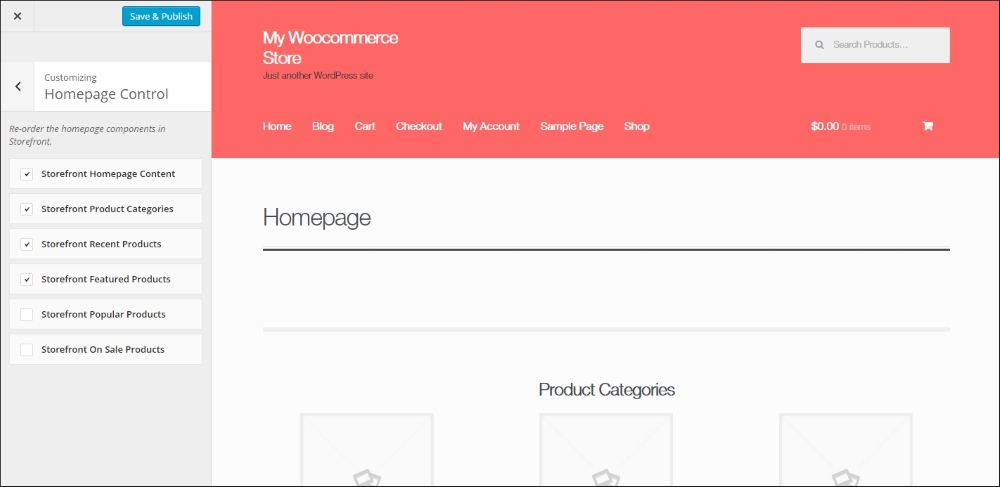
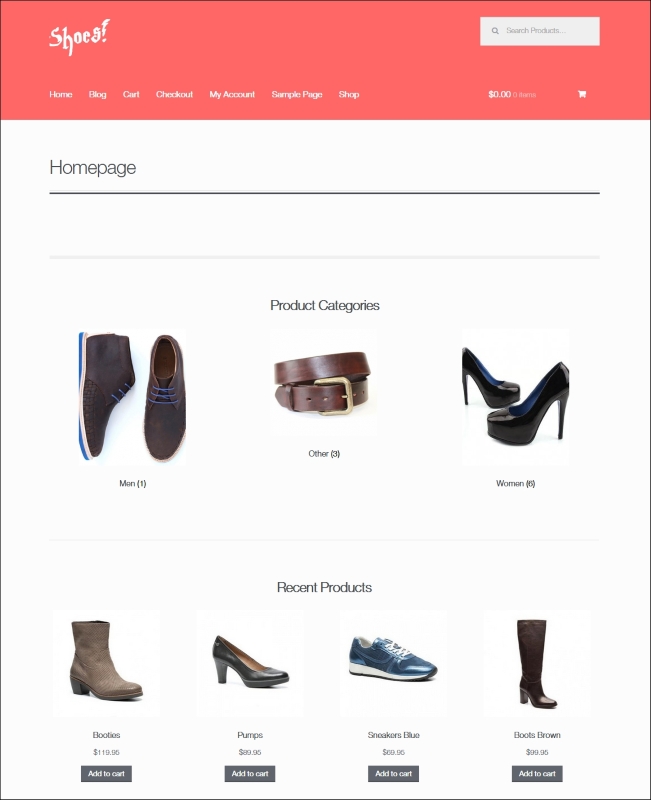
Did you notice that Storefront also shows an image for your product categories on the home page? You can switch these off, but if you want to keep them, navigate to Products | Categories and add an image for every category.
Let's have a look at our current result using the Storefront theme and without changing a single line of code!
Tip
You might want to make more changes to the theme, but changing code is something that we'll discuss in the next chapter. Before we dive into code, please also have a look at the Storefront customization plugin. It's not free, but gives you additional possibilities to change the look and feel of your store (http://www.woothemes.com/products/storefront-woocommerce-customiser/).