Table of Contents for
Running Linux, 5th Edition
 Running Linux, 5th Edition
Published by
O'Reilly Media, Inc., 2005
Running Linux, 5th Edition
Published by
O'Reilly Media, Inc., 2005
- Cover
- Running Linux, 5th Edition
- Preface
- Organization of This Book
- Conventions Used in This Book
- Using Code Examples
- How to Contact Us
- Safari® Enabled
- Acknowledgments
- I. Enjoying and Being Productive on Linux
- 1. Introduction to Linux
- 1.1. About This Book
- 1.2. Who’s Using Linux?
- 1.3. System Features
- 1.4. About Linux’s Copyright
- 1.5. Open Source and the Philosophy of Linux
- 1.6. Sources of Linux Information
- 1.7. Getting Help
- 2. Preinstallation and Installation
- 2.1. Distributions of Linux
- 2.2. Preparing to Install Linux
- 2.3. Post-Installation Procedures
- 2.4. Running into Trouble
- 3. Desktop Environments
- 3.1. Why Use a Graphical Desktop?
- 3.2. The K Desktop Environment
- 3.3. KDE Applications
- 3.4. The GNOME Desktop Environment
- 3.5. GNOME Applications
- 4. Basic Unix Commands and Concepts
- 4.1. Logging In
- 4.2. Setting a Password
- 4.3. Virtual Consoles
- 4.4. Popular Commands
- 4.5. Shells
- 4.6. Useful Keys and How to Get Them to Work
- 4.7. Typing Shortcuts
- 4.8. Filename Expansion
- 4.9. Saving Your Output
- 4.10. What Is a Command?
- 4.11. Putting a Command in the Background
- 4.12. Remote Logins and Command Execution
- 4.13. Manual Pages
- 4.14. Startup Files
- 4.15. Important Directories
- 4.16. Basic Text Editing
- 4.17. Advanced Shells and Shell Scripting
- 5. Web Browsers and Instant Messaging
- 5.1. The World Wide Web
- 5.2. Instant Messaging
- 6. Electronic Mail Clients
- 6.1. Using KMail
- 6.2. Using Mozilla Mail & News
- 6.3. Getting the Mail to Your Computer with fetchmail
- 6.4. OpenPGP Encryption with GnuPG
- 7. Games
- 7.1. Gaming
- 7.2. Quake III
- 7.3. Return to Castle Wolfenstein
- 7.4. Unreal Tournament 2004
- 7.5. Emulators
- 7.6. Frozen Bubble
- 7.7. Tux Racer
- 8. Office Suites and Personal Productivity
- 8.1. Using OpenOffice
- 8.2. KOffice
- 8.3. Other Word Processors
- 8.4. Synching PDAs
- 8.5. Groupware
- 8.6. Managing Your Finances
- 9. Multimedia
- 9.1. Multimedia Concepts
- 9.2. Kernel and Driver Issues
- 9.3. Embedded and Other Multimedia Devices
- 9.4. Desktop Environments
- 9.5. Windows Compatibility
- 9.6. Multimedia Applications
- 9.7. Multimedia Toolkits and Development Environments
- 9.8. Solutions to Common Problems
- 9.9. References
- II. System Administration
- 10. System Administration Basics
- 10.1. Maintaining the System
- 10.2. Managing Filesystems
- 10.3. Managing Swap Space
- 10.4. The /proc Filesystem
- 10.5. Device Files
- 10.6. Scheduling Recurring Jobs Using cron
- 10.7. Executing Jobs Once
- 10.8. Managing System Logs
- 10.9. Processes
- 10.10. Programs That Serve You
- 11. Managing Users, Groups, and Permissions
- 11.1. Managing User Accounts
- 11.2. File Ownership and Permissions
- 11.3. Changing the Owner, Group, and Permissions
- 12. Installing, Updating, and Compiling Programs
- 12.1. Upgrading Software
- 12.2. General Upgrade Procedure
- 12.3. Automated and Bulk Upgrades
- 12.4. Upgrading Software Not Provided in Packages
- 12.5. Archive and Compression Utilities
- 13. Networking
- 13.1. Networking with TCP/IP
- 13.2. Dial-Up PPP
- 13.3. PPP over ISDN
- 13.4. ADSL
- 13.5. Cable Modems
- 13.6. Network Diagnostics Tools
- 14. Printing
- 14.1. Printing
- 14.2. Managing Print Services
- 15. File Sharing
- 15.1. Sharing Files with Windows Systems (Samba)
- 15.2. NFS Configuration and NIS
- 16. The X Window System
- 16.1. A History of X
- 16.2. X Concepts
- 16.3. Hardware Requirements
- 16.4. Installing X.org
- 16.5. Configuring X.org
- 16.6. Running X
- 16.7. Running into Trouble
- 16.8. X and 3D
- 17. System Start and Shutdown
- 17.1. Booting the System
- 17.2. System Startup and Initialization
- 17.3. Single-User Mode
- 17.4. Shutting Down the System
- 17.5. A Graphical Runlevel Editor: KSysV
- 18. Configuring and Building the Kernel
- 18.1. Building a New Kernel
- 18.2. Loadable Device Drivers
- 18.3. Loading Modules Automatically
- 19. Text Editing
- 19.1. Editing Files Using vi
- 19.2. The (X)Emacs Editor
- 20. Text Processing
- 20.1. TeX and LaTeX
- 20.2. XML and DocBook
- 20.3. groff
- 20.4. Texinfo
- III. Programming
- 21. Programming Tools
- 21.1. Programming with gcc
- 21.2. Makefiles
- 21.3. Debugging with gdb
- 21.4. Useful Utilities for C Programmers
- 21.5. Using Perl
- 21.6. Java
- 21.7. Python
- 21.8. Other Languages
- 21.9. Introduction to OpenGL Programming
- 21.10. Integrated Development Environments
- 22. Running a Web Server
- 22.1. Configuring Your Own Web Server
- 23. Transporting and Handling Email Messages
- 23.1. The Postfix MTA
- 23.2. Procmail
- 23.3. Filtering Spam
- 24. Running an FTP Server
- 24.1. Introduction
- 24.2. Compiling and Installing
- 24.3. Running ProFTPD
- 24.4. Configuration
- IV. Network Services
- 25. Running Web Applications with MySQL and PHP
- 25.1. MySQL
- 25.2. PHP
- 25.3. The LAMP Server in Action
- 26. Running a Secure System
- 26.1. A Perspective on System Security
- 26.2. Initial Steps in Setting Up a Secure System
- 26.3. TCP Wrapper Configuration
- 26.4. Firewalls: Filtering IP Packets
- 26.5. SELinux
- 27. Backup and Recovery
- 27.1. Making Backups
- 27.2. What to Do in an Emergency
- 28. Heterogeneous Networking and Running Windows Programs
- 28.1. Sharing Partitions
- 28.2. Emulation and Virtual Operating Systems
- 28.3. Remote Desktop Access to Windows Programs
- 28.4. FreeNX: Linux as a Remote Desktop Server
- A. Sources of Linux Information
- A.1. Linux Documentation Project
- A.2. FTP Sites
- A.3. World Wide Web Sites
- About the Authors
- Colophon
- Copyright
At the heart of Unix lies the concept of a process. Understanding this concept will help you keep control of your login session as a user. If you are also a system administrator, the concept is even more important.
A process is an independently running program that has its own set of resources. For instance, we showed in an earlier section how you could direct the output of a program to a file while your shell continued to direct output to your screen. The reason that the shell and the other program can send output to different places is that they are separate processes .
On Unix, the finite resources of the system, such as the memory and the disks, are managed by one all-powerful program called the kernel. Everything else on the system is a process.
Thus, before you log in, your terminal is monitored by a getty process. After you log in, the getty process dies (a new one is started by the kernel when you log out) and your terminal is managed by your shell, which is a different process. The shell then creates a new process each time you enter a command. The creation of a new process is called forking because one process splits into two.
If you are using the X Window System , each process starts up one or more windows. Thus, the window in which you are typing commands is owned by an xterm process or a reloaded terminal program. That process forks a shell to run within the window. And that shell forks yet more processes as you enter commands.
To see the processes you are running, enter the command ps. Figure 10-2 shows some typical output and what each field means. You may be surprised how many processes you are running, especially if you are using X. One of the processes is the ps command itself, which of course dies as soon as the output is displayed.
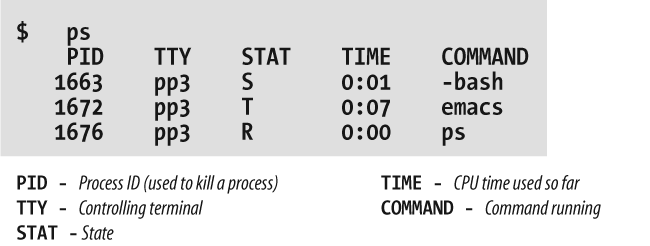
The first field in the ps output is a unique identifier for the process. If you have a runaway process that you can’t get rid of through Ctrl-C or other means, you can kill it by going to a different virtual console or X window and entering:
$killprocess-id
The TTY field shows which
terminal the process is running on, if any. (Everything run from a
shell uses a terminal, of course, but background daemons don’t have a
terminal.)
The STAT field shows what
state the process is in. The shell is currently suspended, so this
field shows an S. An Emacs editing
session is running, but it’s suspended using Ctrl-Z. This is shown by
the T in its STAT field. The last process shown is the
ps that is generating all this
input; its state, of course, is R
because it is running.
The TIME field shows how much
CPU time the processes have used. Because both
bash and Emacs are interactive,
they actually don’t use much of the CPU.
You aren’t restricted to seeing your own processes. Look for a
minute at all the processes on the system. The a
option stands for all processes, while the x option
includes processes that have no controlling terminal (such as daemons
started at runtime):
$ ps ax | moreNow you can see the daemons that we mentioned in the previous section.
Recent versions of the ps command have a nice additional option. If you are looking for a certain process whose name (or at least parts of it) you know, you can use the option -C, followed by the name to see only the processes whose names match the name you specify:
$ ps -C httpdAnd here, with a breathtaking view of the entire Linux system at work, we end our discussion of processes (the lines are cut off at column 76; if you want to see the command lines in their full glory, add the option -w to the ps command):
    kalle@owl:~ > ps aux
    USER       PID %CPU %MEM   VSZ  RSS TTY      STAT START   TIME COMMAND
    root         1  0.0  0.0   588  240 ?        S    14:49   0:05 init [3]
    root         2  0.0  0.0     0    0 ?        S    14:49   0:00 [migration/0]
    root         3  0.0  0.0     0    0 ?        SN   14:49   0:00 [ksoftirqd/0]
    root         4  0.0  0.0     0    0 ?        S    14:49   0:00 [migration/1]
    root         5  0.0  0.0     0    0 ?        SN   14:49   0:00 [ksoftirqd/1]
    root         6  0.0  0.0     0    0 ?        S<   14:49   0:00 [events/0]
    root         7  0.0  0.0     0    0 ?        S<   14:49   0:00 [events/1]
    root         8  0.0  0.0     0    0 ?        S<   14:49   0:00 [kacpid]
    root         9  0.0  0.0     0    0 ?        S<   14:49   0:00 [kblockd/0]
    root        10  0.0  0.0     0    0 ?        S<   14:49   0:00 [kblockd/1]
    root        11  0.0  0.0     0    0 ?        S    14:49   0:00 [kirqd]
    root        14  0.0  0.0     0    0 ?        S<   14:49   0:00 [khelper]
    root        15  0.0  0.0     0    0 ?        S    14:49   0:00 [pdflush]
    root        16  0.0  0.0     0    0 ?        S    14:49   0:00 [pdflush]
    root        17  0.0  0.0     0    0 ?        S    14:49   0:00 [kswapd0]
    root        18  0.0  0.0     0    0 ?        S<   14:49   0:00 [aio/0]
    root        19  0.0  0.0     0    0 ?        S<   14:49   0:00 [aio/1]
    root       689  0.0  0.0     0    0 ?        S    14:49   0:00 [kseriod]
    root       966  0.0  0.0     0    0 ?        S    14:49   0:00 [scsi_eh_0]
    root      1138  0.0  0.0     0    0 ?        S    14:49   0:00 [kjournald]
    root      1584  0.0  0.0     0    0 ?        S    14:49   0:00 [kjournald]
    root      1585  0.0  0.0     0    0 ?        S    14:49   0:00 [kjournald]
    root      1586  0.0  0.0     0    0 ?        S    14:49   0:00 [kjournald]
    root      2466  0.0  0.0     0    0 ?        S    14:49   0:00 [khubd]
    root      2958  0.0  0.0  1412  436 ?        S    14:49   0:00 [hwscand]
    root      3759  0.0  0.0  1436  612 ?        Ss   14:49   0:00 /sbin/syslogd -a
    root      3798  0.0  0.1  2352 1516 ?        Ss   14:49   0:00 /sbin/klogd -c 1
    bin       3858  0.0  0.0  1420  492 ?        Ss   14:49   0:00 /sbin/portmap
    root      3868  0.0  0.0  1588  652 ?        Ss   14:49   0:00 /sbin/resmgrd
    root      3892  0.0  0.0  1396  544 ?        Ss   14:49   0:00 hcid: processing
    root      3898  0.0  0.0  1420  528 ?        Ss   14:49   0:00 /usr/sbin/sdpd
    root      4356  0.0  0.0     0    0 ?        S    14:49   0:00 [usb-storage]
    root      4357  0.0  0.0     0    0 ?        S    14:49   0:00 [scsi_eh_1]
    root      4368  0.0  0.1  4708 1804 ?        Ss   14:49   0:00 /usr/sbin/sshd -o
    root      4715  0.0  0.1  2600 1240 ?        S    14:49   0:00 /usr/sbin/powersa
    lp        4905  0.0  0.3  6416 3392 ?        Ss   14:49   0:00 /usr/sbin/cupsd
    root      5103  0.0  0.1  4176 1432 ?        Ss   14:49   0:00 /usr/lib/postfix/
    postfix   5193  0.0  0.1  4252 1512 ?        S    14:49   0:00 qmgr -l -t fifo -
    root      5219  0.0  0.0  1584  704 ?        Ss   14:49   0:00 /usr/sbin/cron
    root      5222  0.0  0.0 42624  784 ?        Ss   14:49   0:00 /usr/sbin/nscd
    root      5537  0.0  0.1  2264 1216 ?        Ss   14:49   0:00 login -- kalle
    root      5538  0.0  0.0  1608  608 tty2     Ss+  14:49   0:00 /sbin/mingetty tt
    root      5539  0.0  0.0  1608  608 tty3     Ss+  14:49   0:00 /sbin/mingetty tt
    root      5540  0.0  0.0  1608  608 tty4     Ss+  14:49   0:00 /sbin/mingetty tt
    root      5541  0.0  0.0  1608  608 tty5     Ss+  14:49   0:00 /sbin/mingetty tt
    root      5542  0.0  0.0  1608  608 tty6     Ss+  14:49   0:00 /sbin/mingetty tt
    kalle     5556  0.0  0.1  4180 1996 tty1     Ss   14:50   0:00 -zsh
    kalle     5572  0.0  0.0  3012  816 ?        Ss   14:50   0:00 gpg-agent --daemo
    kalle     5574  0.0  0.1  4296 1332 ?        Ss   14:50   0:00 ssh-agent
    kalle     5579  0.0  0.1  3708 1248 tty1     S+   14:50   0:00 /bin/sh /usr/X11R
    kalle     5580  0.0  0.0  2504  564 tty1     S+   14:50   0:00 tee /home/kalle/.
    kalle     5592  0.0  0.0  2384  652 tty1     S+   14:50   0:00 xinit /home/kalle
    root      5593  3.4  4.5 106948 46744 ?      S    14:50   7:12 X :0 -auth /home/
    kalle     5619  0.0  0.1  3704 1288 tty1     S    14:50   0:00 /bin/sh /usr/X11R
    kalle     5658  0.0  1.0 24252 10412 ?       Ss   14:50   0:00 kdeinit Running..
    kalle     5661  0.0  0.8 22876 8976 ?        S    14:50   0:00 kdeinit: dcopserv
    kalle     5663  0.0  1.0 25340 10916 ?       S    14:50   0:00 kdeinit: klaunche
    akalle     5666  0.0  1.7 31316 18540 ?       S    14:50   0:05 kdeinit: kded
    kalle     5673  0.0  1.3 26480 14292 ?       S    14:50   0:00 kdeinit: kxkb
    kalle     5677  0.0  0.5  9820 5736 ?        S    14:50   0:00 /opt/kde3/bin/art
    kalle     5679  0.0  0.0  1372  336 tty1     S    14:50   0:00 kwrapper ksmserve
    kalle     5681  0.0  1.1 24800 12116 ?       S    14:50   0:00 kdeinit: ksmserve
    kalle     5683  0.0  1.4 27464 15512 ?       S    14:50   0:09 kdeinit: kwin -se
    kalle     5686  0.0  1.8 30160 18920 ?       S    14:50   0:05 kdeinit: kdesktop
    kalle     5688  0.1  1.8 31748 19460 ?       S    14:50   0:19 kdeinit: kicker
    kalle     5689  0.0  1.0 25856 11360 ?       S    14:50   0:00 kdeinit: kio_file
    kalle     5692  0.0  1.3 26324 14304 ?       S    14:50   0:02 kdeinit: klipper
    kalle     5693  0.0  0.7 21144 7908 ?        S    14:50   0:00 kpowersave
    kalle     5698  0.0  1.3 25840 13804 ?       S    14:50   0:00 kamix
    kalle     5701  0.0  1.2 24764 12668 ?       S    14:50   0:00 kpowersave
    kalle     5705  0.0  1.4 29260 15260 ?       S    14:50   0:01 suseplugger -capt
    kalle     5706  0.0  1.2 24720 13376 ?       S    14:50   0:00 susewatcher -capt
    kalle     5707  0.0  1.6 28476 16564 ?       S    14:50   0:00 kgpg
    kalle     5713  0.0  1.2 25088 12468 ?       S    14:50   0:02 kdeinit: khotkeys
    kalle     5715  0.0  1.9 30296 19920 ?       S    14:50   0:08 oooqs -caption Op
    kalle     5717  0.0  1.5 28452 15716 ?       S    14:50   0:00 kdeinit: kio_uise
    kalle     5740  0.0  1.0 26040 11260 ?       S    14:50   0:00 kdeinit: kio_file
    kalle     5748  0.0  1.6 30084 16928 ?       S    14:50   0:05 kdeinit: konsole
    kalle     5750  1.8  4.0 57404 42244 ?       S    14:50   3:48 kontact -session
    kalle     5751  0.0  1.6 29968 16632 ?       S    14:50   0:00 kdeinit: konsole
    kalle     5754  0.0  0.5 14968 5976 ?        S    14:50   0:00 /opt/kde3/bin/kde
    kalle     5757  0.0  0.1  4188 1920 pts/2    Ss+  14:50   0:00 /bin/zsh
    kalle     5759  0.0  0.1  4188 1944 pts/3    Ss   14:50   0:00 /bin/zsh
    kalle     5761  0.0  0.2  4684 2572 pts/4    Ss+  14:50   0:00 /bin/zsh
    kalle     5800  0.0  0.9 24484 9988 ?        S    14:50   0:00 kalarmd --login
    kalle     5803  0.0  2.6 36264 27472 ?       S    14:50   0:05 xemacs
    kalle     5826  0.0  0.1  3704 1172 pts/3    S+   14:51   0:00 sh ./sshtunnel
    kalle     5827  0.0  0.2  4956 2348 pts/3    S+   14:51   0:02 ssh -X -L 23456:1
    kalle     5829  0.1  1.9 31008 20204 ?       S    14:51   0:20 kdeinit: ksirc -i
    kalle     6086  0.0  0.1  3444 1244 ?        S    15:07   0:00 /bin/sh /home/kal
    kalle     6107  0.0  0.1  3704 1264 ?        S    15:07   0:00 /bin/sh /home/kal
    kalle     6115  0.7  4.2 71184 43512 ?       S    15:07   1:29 /home/kalle/firef
    kalle     6118  0.0  0.3  6460 3612 ?        S    15:07   0:00 /opt/gnome/lib/GC
    kalle     6137  0.0  0.5  8232 5616 ?        S    15:08   0:03 perl /opt/kde3/bi
    kalle     6186  0.0  2.9 42300 30384 ?       S    15:10   0:03 kdeinit: konquero
    kalle     6497  0.1  1.6 30592 17424 ?       R    15:20   0:11 kdeinit: konsole
    kalle     6498  0.0  0.2  4724 2624 pts/1    Ss+  15:20   0:00 /bin/zsh
    kalle     6511  0.9  3.0 39932 31456 pts/1   S    15:20   1:37 xemacs
    kalle     6720  0.0  0.2  4584 2500 pts/5    Ss   15:32   0:00 /bin/zsh
    root      6740  0.0  0.1  3480 1264 pts/5    S    15:32   0:00 su
    root      6741  0.0  0.1  3608 1732 pts/5    S    15:32   0:00 bash
    kalle     6818  0.0  1.6 30152 17316 ?       S    15:39   0:00 kdeinit: konsole
    kalle     6819  0.0  0.2  4492 2396 pts/6    Ss+  15:39   0:00 /bin/zsh
    kalle     6948  0.0  1.6 29872 16564 ?       S    15:48   0:00 kdeinit: konsole
    kalle     6949  0.0  0.1  4188 2040 pts/7    Ss   15:48   0:00 /bin/zsh
    kalle     6982  0.0  0.1  4556 1908 pts/7    S+   15:50   0:00 ssh cvs.kdab.net
    at        8106  0.0  0.0  1432  536 ?        Ss   17:24   0:00 /usr/sbin/atd
    postfix   8672  0.0  0.1  4220 1448 ?        S    18:09   0:00 pickup -l -t fifo
    postfix   8779  0.0  0.1  4208 1396 ?        S    18:15   0:00 proxymap -t unix
    postfix   8796  0.0  0.1  4744 1784 ?        S    18:17   0:00 trivial-rewrite -
    postfix   8797  0.0  0.1  4904 1848 ?        S    18:17   0:00 cleanup -z -t uni
    postfix   8798  0.0  0.1  4376 1768 ?        S    18:17   0:00 local -t unix
    root      8807  0.0  0.0  1584  700 ?        S    18:19   0:00 /USR/SBIN/CRON
    kalle     8808  0.0  0.1  3112 1144 ?        Ss   18:19   0:00 fetchmail
    root      8822  0.0  0.0  2164  688 pts/5    R+   18:20   0:00 ps aux