Table of Contents for
Linux in a Windows World
 Linux in a Windows World
Published by
O'Reilly Media, Inc., 2005
Linux in a Windows World
Published by
O'Reilly Media, Inc., 2005
- Cover
- Linux in a Windows World
- Dedication
- Preface
- Contents of This Book
- Conventions Used in This Book
- Using Code Examples
- Comments and Questions
- Safari Enabled
- Acknowledgments
- I. Linux’s Place in a Windows Network
- 1. Linux’s Features
- Linux as a Server
- Linux on the Desktop
- Comparing Linux and Windows Features
- Summary
- 2. Linux Deployment Strategies
- Linux Desktop Migration
- Linux and Thin Clients
- Summary
- II. Sharing Files and Printers
- 3. Basic Samba Configuration
- The Samba Configuration File Format
- Identifying the Server
- Setting Master Browser Options
- Setting Password Options
- Summary
- 4. File and Printer Shares
- Printing with CUPS
- Creating a Printer Share
- Delivering Printer Drivers to Windows Clients
- Example Shares
- Summary
- 5. Managing a NetBIOS Network with Samba
- Enabling NBNS Functions
- Assuming Master Browser Duties
- Summary
- 6. Linux as an SMB/CIFS Client
- Accessing File Shares
- Printing to Printer Shares
- Configuring GUI Workgroup Browsers
- Summary
- III. Centralized Authentication Tools
- 7. Using NT Domains for Linux Authentication
- Samba Winbind Configuration
- PAM and NSS Winbind Options
- Winbind in Action
- Summary
- 8. Using LDAP
- Configuring an OpenLDAP Server
- Creating a User Directory
- Configuring Linux to Use LDAP for Login Authentication
- Configuring Windows to Use LDAPfor Login Authentication
- Summary
- 9. Kerberos Configuration and Use
- Linux Kerberos Server Configuration
- Kerberos Application Server Configuration
- Linux Kerberos Client Configuration
- Windows Kerberos Tools
- Summary
- IV. Remote Login Tools
- 10. Remote Text-Mode Administration and Use
- SSH Server Configuration
- Telnet Server Configuration
- Windows Remote-Login Tools
- Summary
- 11. Running GUI Programs Remotely
- Using Remote X Access
- Encrypting X by SSH Tunneling
- VNC Configuration and Use
- Running Windows Programs from Linux
- Summary
- 12. Linux Thin Client Configurations
- Hardware Requirements
- Linux as a Server for Thin Clients
- Linux as a Thin Client
- Summary
- V. Additional Server Programs
- 13. Configuring Mail Servers
- Configuring Sendmail
- Configuring Postfix
- Configuring POP and IMAP Servers
- Scanning for Spam, Worms, and Viruses
- Supplementing a Microsoft Exchange Server
- Using Fetchmail
- Summary
- 14. Network Backups
- Backing Up the Linux System
- Backing Up with Samba
- Backing Up with AMANDA
- Summary
- 15. Managing a Network with Linux
- Delivering Names with DNS
- Keeping Clocks Synchronized with NTP
- Summary
- VI. Appendixes
- A. Configuring PAM
- The PAM Configuration File Format
- PAM Modules
- Sample PAM Configurations
- Summary
- B. Linux on the Desktop
- Configuring Applications and Environments
- Running Windows Programs in Linux
- File and Filesystem Compatibility
- Font Handling
- Summary
- Index
- Colophon
Email is a particularly important part of most networks’ functioning. Many businesses rely on email for both internal and external communications. Naturally, then, Linux can function as an email server—a computer that receives, stores, and forwards email for end users. As part of this function, a Linux mail server can filter out spam and worms from email, thus reducing both nuisance factors and security threats. Linux’s advantages as a mail server over Windows include the low costs of the server and of add-on filters for spam and worms, as well as Linux’s reliability and immunity to the Windows-based worms that are such a problem today. Even if you already run a Microsoft Exchange email server, Linux can be an excellent supplement to this server, providing filtering features that might require paying extra to obtain in Windows.
This chapter begins with a look at common email protocols and some common server software to implement them on Linux. Most of the chapter is devoted to basic configuration of the sendmail and Postfix servers, as well as to additional servers that can be used to deliver mail to clients. Filtering mail for spam, worms, and viruses requires its own coverage, as does a tool that can help users integrate mail delivered to outside ISPs into their own local mail systems.
Before delving into the process of configuring mail servers, you should understand the role of mail servers on a network. The most basic issue is the distinction between push and pull protocols, which differ in whether the sender or the recipient initiates the transfer. Depending on your needs, you might want to configure a push server or a server that runs both push and pull protocols. You should also know what options are available for both push and pull server programs. On a Windows-dominated network, you may already have a Microsoft Exchange server, so knowing how to fit a Linux server into this existing configuration is important. Finally, running a mail server is not risk-free; they can be abused in various ways, and understanding a bit about the threats will enable you to plan your installation to minimize the risks.
The most common email protocol today is SMTP, which is an example of a push mail protocol—the sender initiates the data transfer. Typically, a user runs a mail client (also known as a mail user agent, or MUA) to send the mail to the SMTP server (which is also referred to as a mail transfer agent, or MTA). The SMTP server then delivers the message to other servers, which then send it on until it reaches its destination. This chain can run for an arbitrary length.
Traditionally, users have had login accounts on the mail server computer and have used mail readers on the computer itself. This configuration, though, requires either mail delivery using SMTP to users’ desktop computers or login accounts for all users on a central mail server. Both options are a bit awkward, so a second class of mail server protocols exists: pull mail protocols. These protocols enable the client to retrieve (pull) the mail from the server. If an SMTP server that’s the ultimate destination for a message runs a pull mail server, a user on a desktop computer can run a mail reader that supports the pull mail protocol to read mail directly from the desktop computer, as illustrated in Figure 13-1. Two pull mail protocols are common today: POP and IMAP. (The differences are described in more detail shortly.)
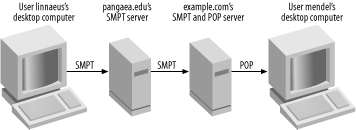
Figure 13-1. A pull mail server enables users to read mail using mail clients on their local computers
Of these two pull mail protocols POP is the simpler one. It provides a single storage area for each user’s messages; users then download the messages and immediately delete them from the server. (Mail readers typically delete the messages automatically.) Users can then create local folders on their desktop computers using the email clients and store their messages that way. IMAP, on the other hand, supports mail folders on the mail server computer, as well as more sophisticated options for retrieving parts of messages. IMAP, isn’t quite as well supported as POP, but its ability to store messages in folders on the server helps when users frequently use multiple computers.
As a practical matter, most networks now use POP, IMAP, or a similar protocol (such as Microsoft’s MAPI) for the final leg of email delivery. If you want to use Linux as a pull mail server, you certainly can; several POP and IMAP servers are available for Linux and are described in a later section. These servers can work with Linux, Windows, and other clients. If you’re not sure whether to use POP or IMAP, you can install and use servers for both protocols; however, each user should probably use just one protocol. Mixing them can cause confusion; for example, messages disappear from an IMAP inbox after a POP client has been used.
Quite a few SMTP servers are available for Linux; however, four servers are the most popular and readily available. These servers differ in their design philosophies, mail storage formats (mbox or maildir, described in more detail shortly), ease of configuration, popularity, and other features:
- Exim
This server, headquartered at http://www.exim.org, uses a monolithic design: one program does most of the work. It supports both mbox and maildir storage formats, with mbox being the default. This is the default server on Debian GNU/Linux and some of its derivatives.
- Postfix
This server is a modular mail server, meaning that various subtasks of mail delivery are handled by separate programs. In theory, this makes it easier to write a server that’s free of security-related bugs. Postfix supports mbox and maildir formats, with mbox being the default. Some distributions, including Mandrake and SuSE, now use Postfix as the default mail server. You can learn more at http://www.postfix.org.
- qmail
This server uses an unusual license that’s not quite open source: binary redistribution is prohibited unless certain conditions are met. Thus, qmail isn’t the default mail server for any major Linux distribution. This server supports both mbox and maildir email storage formats, with maildir being the default. Like Postfix, qmail uses a modular design. Overall, it’s the least compatible with sendmail, which makes it harder to replace sendmail with qmail than to replace sendmail with Postfix or Exim; but qmail has a devoted band of followers.
- Sendmail
The most popular mail server for years has been sendmail (http://www.sendmail.org), which uses a monolithic design and supports the mbox mail storage format. In the 1990s, sendmail acquired a bad reputation for security problems, but such problems have become much rarer since the late 1990s. The main sendmail configuration file format is confusing at best, so most administrators use a metalanguage, known as m4, to create configuration files, but even the m4 configuration files aren’t as easy to handle as the files for most other Linux mail servers.
Throughout the 1990s, sendmail ran on a majority of the mail servers in existence, according to most studies of the issue. More recently, though, sendmail has declined in popularity, while others (Exim, Postfix, qmail, and others, including Windows mail servers) have risen in popularity. Despite this decline, sendmail remains a very popular (perhaps still the single most popular) mail server program on large mail server computers. For this reason, sendmail configuration is described later in this chapter. Because it’s becoming popular as the default server on many Linux distributions, this chapter also describes Postfix configuration. Although Exim and qmail are both perfectly good mail servers, they aren’t described in this chapter, in order to keep the chapter’s size manageable. If your Linux system is already running one of these servers, you can either try to find equivalent options to those described here or you can replace your current server with Postfix or sendmail. Most Linux distributions ship with at least two or three SMTP servers, or at least make them available in an online file repository. You can also check the mail servers’ web sites for links to versions for your distribution.
The preceding descriptions referred to the local mail storage formats
supported by each server. The mbox format uses a single file, to
which email messages are appended. Each user has a mailbox, typically
somewhere in the /var directory tree, to which
the server adds messages as they arrive. The maildir format, on the
other hand, stores messages as individual files in a directory.
Users’ incoming messages may be stored in
subdirectories of users’ home directories. Each
format has its adherents, but your primary consideration should be
compatibility. Local mail clients and pull mail servers must be able
to read messages in the appropriate format. Some programs are limited
in their capabilities, which can dictate your choice of options for
the SMTP server, or even completely rule out an SMTP server. If
you’re building a mail system from scratch, you
might want to assemble a list of software you want to use, based on
features and recommendations from others, then pick the file format
based on what your collection of software supports. If you wish to
replace an existing SMTP server program, the simplest approach is to
pick one that supports whatever format you’re
currently using.
Just as with SMTP, several POP and IMAP servers are available for Linux. Some packages support only one protocol, but many support both. Many of the servers are limited to just one mailbox format, though, and some of the IMAP servers use their own format for folders other than the inbox. On the whole, you may need to hunt a bit to find the server that best suits your needs.
- Courier
This server, located at http://www.courier-mta.org, is a complete mail server package, including support for SMTP, POP, IMAP, and other protocols. Although the full Courier package isn’t one of the “big four” SMTP servers, the POP/IMAP component (available separately from http://www.courier-mta.org/imap/) is moderately popular. It provides access to mail stored in maildir format but not mbox.
- Cyrus IMAP
Although IMAP is part of this popular server’s name, it supports both POP and IMAP. Cyrus IMAP stores POP mail in mbox format but uses its own format for IMAP folders. This server provides more options than some and emphasizes encrypted authentication protocols using its own password database. You can learn more at http://asg.web.cmu.edu/cyrus/imapd/.
- Dovecot
This server, headquartered at http://dovecot.org, is a fairly recent entry to the POP and IMAP server field, but it’s rapidly becoming a popular server. It supports both protocols, as well as both mbox and maildir file formats. The Dovecot documentation indicates that it was written with security as a primary focus. This server provides more options than many POP and IMAP servers, so it’s worth investigating if you have unusual needs.
- nupop
This server was designed for environments hosting a large number of users; it aims to operate as efficiently as possible. It supports POP but not IMAP and maildir but not mbox. Check http://nupop.nuvox.net for more information.
- popa3d
Security, reliability, standards compliance, and performance are the primary goals of popa3d, which is a POP server headquartered at http://www.openwall.com/popa3d/. It’s designed to support mbox mail files, but a patch that provides maildir support is available on its web site.
- qmail-pop3d
This program is part of the qmail package (http://www.qmail.org). As such, it’s most often used with qmail and employs the maildir format that’s the default for qmail. This is a POP-only server.
- QPopper
Despite the Q in their name, this server is unrelated to qmail. Versions prior to 4.0 were commercial servers, but as of Version 4.0, the server is open source. It’s a POP-only server that works with the mbox mail format. Check http://www.eudora.com/qpopper/ for more information.
- UW IMAP
The University of Washington IMAP server (http://www.washington.edu/imap/) has long been the default POP and IMAP server in Linux. This server, which uses the mbox format, is easy to get running but provides few options to fine-tune its operation.
Most of these servers use normal Linux authentication mechanisms, such as Linux’s PAM (described in more detail in Appendix A), although some provide options for using or must use some other authentication mechanism. Broadly speaking, UW IMAP is usually the simplest server to configure, and it’s usually adequate for small sites, particularly if you want to use POP rather than IMAP. (IMAP use with UW IMAP may be complicated if users also have shell access, because the server hardcodes the location of IMAP folders in the user’s home directory, which can be awkward. This isn’t a problem if users don’t have shell access to the server, though.) Dovecot has recently been gaining in popularity and is worth investigating if you find UW IMAP too limiting. Any of the other servers may also be good choices for particular uses—for example, if you only want to use POP or if you want to provide access to maildir-format mailboxes. This chapter describes running UW IMAP later, in Section 13.4.
Mail servers, like all servers, are potential security risks. In fact, mail servers—and particularly SMTP servers—can be more vulnerable than you might at first think, because they must perform some operations as root. For instance, when storing mail, the server needs to be able to write to arbitrary users’ mail queues, which are owned by their respective users. This means that mail servers must run as root, and the complexity of modern SMTP servers means that bugs in the code can give clever intruders access. This is why modular mail servers are, theoretically and all other things being equal, potentially safer than monolithic servers. By isolating tasks that must be run as root to separate programs, other mail server programs can run as non-root users, reducing the risk that a bug will lead to a system compromise.
That said, recent versions of the monolithic Exim and sendmail servers don’t have bad security reputations. I can’t promise that you won’t encounter problems if you use one of them, but the risk isn’t unmanageable for most sites.
In recent years, another email security concern has come to dominate the news: worms and viruses. (Most of these are technically worms by most definitions, but the term virus is frequently applied to them all.) An email worm is a piece of code sent via email that, when run, replicates and sends copies of itself to others, usually via email. Typically, such worms are sent as attachments that appear innocuous. They also might rummage through victims’ address books to locate new addresses, so recipients may trust the worms because they know the apparent senders.
Worms have become a serious threat; outbreaks have become fairly frequent, and the sheer number of worms being sent requires extra storage capacity, faster CPUs, and better network connections on mail servers than would otherwise be required. When a new worm is released and spreads rapidly, the demands placed on all these resources spike, often beyond the capacity of the hardware to cope with the problem.
Another security issue with email is that SMTP servers send their mail without encryption. This doesn’t pose a direct security threat to the mail server computer, but it does mean that email can be intercepted and read if any system between the source and the destination is compromised. For this reason, sensitive data such as passwords and credit-card numbers shouldn’t be sent via email. One approach to fixing this problem is to equip mail clients with encryption tools such as the GNU Privacy Guard (GPG; http://www.gnupg.org). Two GPG-equipped systems can send encrypted messages to each other, although the SMTP protocol itself remains unencrypted.