Table of Contents for
Linux in a Windows World
 Linux in a Windows World
Published by
O'Reilly Media, Inc., 2005
Linux in a Windows World
Published by
O'Reilly Media, Inc., 2005
- Cover
- Linux in a Windows World
- Dedication
- Preface
- Contents of This Book
- Conventions Used in This Book
- Using Code Examples
- Comments and Questions
- Safari Enabled
- Acknowledgments
- I. Linux’s Place in a Windows Network
- 1. Linux’s Features
- Linux as a Server
- Linux on the Desktop
- Comparing Linux and Windows Features
- Summary
- 2. Linux Deployment Strategies
- Linux Desktop Migration
- Linux and Thin Clients
- Summary
- II. Sharing Files and Printers
- 3. Basic Samba Configuration
- The Samba Configuration File Format
- Identifying the Server
- Setting Master Browser Options
- Setting Password Options
- Summary
- 4. File and Printer Shares
- Printing with CUPS
- Creating a Printer Share
- Delivering Printer Drivers to Windows Clients
- Example Shares
- Summary
- 5. Managing a NetBIOS Network with Samba
- Enabling NBNS Functions
- Assuming Master Browser Duties
- Summary
- 6. Linux as an SMB/CIFS Client
- Accessing File Shares
- Printing to Printer Shares
- Configuring GUI Workgroup Browsers
- Summary
- III. Centralized Authentication Tools
- 7. Using NT Domains for Linux Authentication
- Samba Winbind Configuration
- PAM and NSS Winbind Options
- Winbind in Action
- Summary
- 8. Using LDAP
- Configuring an OpenLDAP Server
- Creating a User Directory
- Configuring Linux to Use LDAP for Login Authentication
- Configuring Windows to Use LDAPfor Login Authentication
- Summary
- 9. Kerberos Configuration and Use
- Linux Kerberos Server Configuration
- Kerberos Application Server Configuration
- Linux Kerberos Client Configuration
- Windows Kerberos Tools
- Summary
- IV. Remote Login Tools
- 10. Remote Text-Mode Administration and Use
- SSH Server Configuration
- Telnet Server Configuration
- Windows Remote-Login Tools
- Summary
- 11. Running GUI Programs Remotely
- Using Remote X Access
- Encrypting X by SSH Tunneling
- VNC Configuration and Use
- Running Windows Programs from Linux
- Summary
- 12. Linux Thin Client Configurations
- Hardware Requirements
- Linux as a Server for Thin Clients
- Linux as a Thin Client
- Summary
- V. Additional Server Programs
- 13. Configuring Mail Servers
- Configuring Sendmail
- Configuring Postfix
- Configuring POP and IMAP Servers
- Scanning for Spam, Worms, and Viruses
- Supplementing a Microsoft Exchange Server
- Using Fetchmail
- Summary
- 14. Network Backups
- Backing Up the Linux System
- Backing Up with Samba
- Backing Up with AMANDA
- Summary
- 15. Managing a Network with Linux
- Delivering Names with DNS
- Keeping Clocks Synchronized with NTP
- Summary
- VI. Appendixes
- A. Configuring PAM
- The PAM Configuration File Format
- PAM Modules
- Sample PAM Configurations
- Summary
- B. Linux on the Desktop
- Configuring Applications and Environments
- Running Windows Programs in Linux
- File and Filesystem Compatibility
- Font Handling
- Summary
- Index
- Colophon
Modern Linux distributions rely on the Pluggable Authentication Modules system for authentication. Part III of this book describes three network authentication tools, all of which can be used in conjunction with PAM to provide authentication for arbitrary servers and other programs that require authentication. In order to avoid duplicating content, therefore, this appendix describes PAM in detail; Part III provides a much briefer description of how PAM interacts with the relevant servers.
In order to get the most out of PAM, it helps to begin with some background—what PAM is, what it can do, why it’s used, and so on. You must also understand the PAM configuration file format; PAM configuration involves editing one or more of these files. From there, knowing something about individual PAM modules, including both the standard ones and those described elsewhere in this book, will help you create an appropriate configuration. Finally, some examples of working PAM configurations will help you understand PAM and provide models you can adapt for your own use.
In Linux’s early days, every server or other tool
that had to authenticate users did so by reading
/etc/password, the traditional Unix account
file. This approach was easy to implement, but it had several
problems. One of these was that the file, and hence the encrypted
password, had to be readable by all users, making it vulnerable to
cracking. Another problem is that changes to authentication methods,
such as new password-encryption systems, required changes to all the
programs that could authenticate users. This problem would result in
a nightmarish tangle of upgrades should an administrator ever want to
change the authentication system.
PAM is designed to solve these problems. PAM solves the problem of
world readability of /etc/passwd by implementing
a system known as shadow passwords, in which
passwords are moved out of /etc/passwd and into
a file that can be read only by root—typically
/etc/shadow on Linux systems. (Shadow passwords
can be implemented without PAM, but today PAM is the tool that does
it on all major Linux distributions.) PAM helps minimize the pain of
changing authentication systems by working as a layer between the
tools that authenticate users and the account database. Instead of
accessing /etc/passwd directly, programs consult
PAM, which accesses /etc/passwd. Thus, if the
format of data in /etc/passwd changes,
individual servers don’t need to be rewritten or
even recompiled; only PAM must change. Indeed, PAM can be changed to
support authentication systems that don’t even
consult /etc/passwd. It’s this
feature of PAM that Winbind, LDAP authentication, and some Kerberos
tools use. Rather than consult /etc/passwd, PAM
consults the appropriate network authentication tool.
Tip
In addition to PAM, Linux relies on another software component, the Name Service Switch, for account information. Rather than authentication information, though, NSS provides more mundane information, such as a mapping of UIDs to usernames and the account’s default shell. Like PAM, NSS is designed in a modular way and sits between applications that ask for this information and the actual account databases. Although you may think in terms of authentication, which is what PAM provides, this ancillary information is just as important, so you must configure NSS to link to your authentication system. The chapters on Winbind and LDAP describe configuring NSS to work with these tools, but Kerberos provides no NSS interface, which is a limitation of Kerberos if you want a network authentication system to handle all your account information.
In practice, PAM is a modular tool: it consults libraries to handle
various parts of the authentication procedure. You tell PAM which
libraries to consult with the help of the PAM configuration files,
which are described in the next section. Thus, the overall
authentication system, and its equivalent in pre-PAM days, are
depicted in Figure A-1. PAM’s
modular nature is manifested in this figure by the fact that PAM is
shown accessing three independent authentication tools—the
/etc/passwd file, an NT domain controller, and
an LDAP server. A default configuration is likely to be simpler than
this, but if you want to use a network authentication tool, chances
are you’ll leave the old-style
/etc/passwd authentication intact as a backup
and to provide information for accounts you might not want to define
using a centralized system, such as the root account.
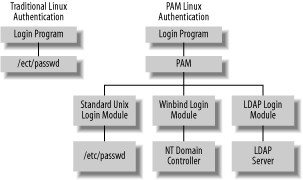
Figure A-1. PAM distances servers and other programs that require authentication from authentication implementations, increasing flexibility—and complexity
In practice, PAM configuration is even more complex than Figure A-1 suggests, for three reasons:
PAM provides management features beyond those related to account authentication. In particular, it supports authentication (verifying that users are who they claim to be), account management (checking for expired accounts, the right to use a particular server, and so on), session management (login and logout housekeeping), and password changes. Each management system must be configured individually; for instance, the modules called in service of authentication may be different than those required for session management.
A single act, such as logging in, may require multiple PAM modules. For instance, many PAM login configurations call a module called pam_deny.so, which explicitly denies access to the system if no earlier module has explicitly granted access. You can even tack on modules that aren’t directly related to authentication, such as modules that display login notices.
Each program that requires PAM’s services may be configured individually. For instance, you might want to use one set of options for authenticating users for console logins and another for authenticating users to use the su command to change their effective UID numbers.