Table of Contents for
Linux in a Windows World
 Linux in a Windows World
Published by
O'Reilly Media, Inc., 2005
Linux in a Windows World
Published by
O'Reilly Media, Inc., 2005
- Cover
- Linux in a Windows World
- Dedication
- Preface
- Contents of This Book
- Conventions Used in This Book
- Using Code Examples
- Comments and Questions
- Safari Enabled
- Acknowledgments
- I. Linux’s Place in a Windows Network
- 1. Linux’s Features
- Linux as a Server
- Linux on the Desktop
- Comparing Linux and Windows Features
- Summary
- 2. Linux Deployment Strategies
- Linux Desktop Migration
- Linux and Thin Clients
- Summary
- II. Sharing Files and Printers
- 3. Basic Samba Configuration
- The Samba Configuration File Format
- Identifying the Server
- Setting Master Browser Options
- Setting Password Options
- Summary
- 4. File and Printer Shares
- Printing with CUPS
- Creating a Printer Share
- Delivering Printer Drivers to Windows Clients
- Example Shares
- Summary
- 5. Managing a NetBIOS Network with Samba
- Enabling NBNS Functions
- Assuming Master Browser Duties
- Summary
- 6. Linux as an SMB/CIFS Client
- Accessing File Shares
- Printing to Printer Shares
- Configuring GUI Workgroup Browsers
- Summary
- III. Centralized Authentication Tools
- 7. Using NT Domains for Linux Authentication
- Samba Winbind Configuration
- PAM and NSS Winbind Options
- Winbind in Action
- Summary
- 8. Using LDAP
- Configuring an OpenLDAP Server
- Creating a User Directory
- Configuring Linux to Use LDAP for Login Authentication
- Configuring Windows to Use LDAPfor Login Authentication
- Summary
- 9. Kerberos Configuration and Use
- Linux Kerberos Server Configuration
- Kerberos Application Server Configuration
- Linux Kerberos Client Configuration
- Windows Kerberos Tools
- Summary
- IV. Remote Login Tools
- 10. Remote Text-Mode Administration and Use
- SSH Server Configuration
- Telnet Server Configuration
- Windows Remote-Login Tools
- Summary
- 11. Running GUI Programs Remotely
- Using Remote X Access
- Encrypting X by SSH Tunneling
- VNC Configuration and Use
- Running Windows Programs from Linux
- Summary
- 12. Linux Thin Client Configurations
- Hardware Requirements
- Linux as a Server for Thin Clients
- Linux as a Thin Client
- Summary
- V. Additional Server Programs
- 13. Configuring Mail Servers
- Configuring Sendmail
- Configuring Postfix
- Configuring POP and IMAP Servers
- Scanning for Spam, Worms, and Viruses
- Supplementing a Microsoft Exchange Server
- Using Fetchmail
- Summary
- 14. Network Backups
- Backing Up the Linux System
- Backing Up with Samba
- Backing Up with AMANDA
- Summary
- 15. Managing a Network with Linux
- Delivering Names with DNS
- Keeping Clocks Synchronized with NTP
- Summary
- VI. Appendixes
- A. Configuring PAM
- The PAM Configuration File Format
- PAM Modules
- Sample PAM Configurations
- Summary
- B. Linux on the Desktop
- Configuring Applications and Environments
- Running Windows Programs in Linux
- File and Filesystem Compatibility
- Font Handling
- Summary
- Index
- Colophon
The first task you must undertake when configuring a Samba server is setting various identification options. SMB/CIFS was designed for non-TCP/IP networks and includes server identification tools that are independent of common TCP/IP naming systems, such as DNS hostnames. SMB/CIFS machines are identified by NetBIOS names, and computers belong to workgroups or NT domains (an NT domain is simply a workgroup with some extra features). Although most recent SMB/CIFS clients can contact servers using DNS hostnames or raw IP addresses rather than NetBIOS names, you must give your Samba server a NetBIOS name and a workgroup (or NT domain) name for interaction with older clients, such as DOS and Windows 9x systems. You may also want to adjust a few additional identification options, which tell the system what operating system to pretend to be, among other things.
A NetBIOS name is similar to a computer’s DNS hostname (without the domain name component). It’s a string of up to 15 characters that can contain letters, numbers, and various punctuation marks. (Using punctuation can be confusing, though, and so is usually best avoided.) NetBIOS names are case-insensitive, although I generally present them in all-uppercase in this book to distinguish them from DNS hostnames, which I present in lowercase.
Tip
Technically, the NetBIOS name as just described is only the
base of the NetBIOS name. The full NetBIOS name
includes a one-byte code that identifies the type of service
available under the name; for instance, a NetBIOS name might end with
a hexadecimal 0x20 to signify a file or print
service. A single computer is likely to register several NetBIOS
names using a single NetBIOS base name and different type codes.
Samba handles this automatically; you just give it the NetBIOS base
name, and it registers the names required based on other
smb.conf options.
You set your computer’s NetBIOS name with the global
netbios name parameter:
netbios name = MANDRAKE
If you don’t include this parameter in the
smb.conf file, the default is to use your
computer’s DNS
hostname, minus the domain component. For instance, if your computer
is called mandrake.greenhouse.example.com, Samba
registers the NetBIOS name MANDRAKE. This default is usually reasonable,
assuming your DNS hostname is set correctly; however, you may want to
set the NetBIOS name explicitly just to be sure. (When you do so,
this setting overrides the DNS hostname for NetBIOS purposes but not
for other TCP/IP protocols.) In most cases, you
shouldn’t try to use different NetBIOS and DNS names
on a single computer because it will most likely confuse your users.
Occasionally, you may want to give a computer multiple NetBIOS names.
Samba supports this option via the global netbios aliases parameter, which enables you to specify names to be
registered in addition to the name provided with
netbios name (or the DNS hostname, if you omit
netbios
name from your
smb.conf file). For instance, suppose that
MANDRAKE should also be known as
MANDRAGORA and MANDRAGORIN>. You can do so by using the
following line in addition to the netbios name
line shown earlier:
netbios aliases = MANDRAGORA MANDRAGORIN
You can use this parameter to give a system multiple NetBIOS names if
it also has multiple DNS hostnames. You can also use it to
consolidate several servers in one. For instance, if you replace two
old file server computers with one new server, you can have the new
server appear under both names by assigning one name with
netbios
name and the second
with netbios
aliases.
You’ll need to define file or printer shares to
match those found on both original servers, though.
Tip
If you use the %L variable as part of a filename
in an include parameter, you can load different
shares depending on which NetBIOS name a client uses to address the
server. This can help minimize user confusion should you want to
consolidate many servers into one; to users, your single server can
look like the two old ones, complete with different shares available
under each name. Be aware, though, that many newer clients, including
Windows 2000 and XP, no longer use NetBIOS names by default, so this
trick may not be useful on all networks. Specifying
smb
ports
=
139 limits Samba to using port 139, and hence
NetBIOS and its naming conventions. This forces the desired behavior
even with most newer clients.
NetBIOS name resolution can work in any of several ways. The most common methods are broadcast name resolution and a NetBIOS Name Server (NBNS) computer, a.k.a. a Windows Internet Name Service (WINS) system. In broadcast name resolution, a client sends a broadcast that contains the name of the system it wants to contact, and that system responds to the broadcasts. Broadcast name resolution is easy to configure (no special Samba parameters are required), but it doesn’t work well in networks with multiple subnets.
If your network includes an NBNS system, you should point Samba at it
with the global wins
server
parameter, which requires the IP address (or DNS hostname, if you
also set hostname
lookups
=
Yes) of the NBNS system:
wins server = 172.24.21.1
Samba 3.0 and later supports multiple NBNS systems (separated by
spaces or commas on the wins server line).
Conceptually, you can consider an NBNS system to be much like a DNS
server; clients contact it to turn names into IP addresses. Unlike a
DNS server, though, an NBNS system requires no explicit configuration
to add hostnames to it. Instead, clients contact the NBNS system when
they start up and at various times thereafter in order to register
their configured names. The wins
server parameter has the dual effect of telling
Samba (or nmbd, to be more precise) to register
with the NBNS system and to use that system for NBNS lookups, when
they’re required.
While you’re setting the wins
server option, you should check to be sure that
wins
support is set to
No. If this value is Yes, Samba
attempts to operate as an NBNS system. This is likely to cause
confusion if your network has an existing NBNS system. Of course, if
you really want your computer to take on these duties, you should set
wins
support
=
Yes, but, in this case, you
should omit the wins
server
parameter; Samba knows to refer to itself for this function when
it’s configured as an NBNS system.
You can tell Samba which name lookup methods to use with the
name
resolve
order parameter, which takes an ordered list of
one to four values:
-
lmhosts This option tells Samba to use an
lmhostsfile, which is conceptually and structurally similar to an/etc/hostsfile: it’s a list of IP addresses and associated NetBIOS names, one per line. The file is typically stored in the same directory assmb.conf.-
host This option refers to lookups using the computer’s normal TCP/IP hostname lookup mechanisms—typically
/etc/hostsand DNS. This lookup method doesn’t work for some service types, so you shouldn’t rely on it exclusively.-
wins This option refers to NBNS-based lookups; it requires that you set
winsserver(orwinssupport=Yes).-
bcast You can have Samba perform broadcast name resolution with this option.
The default name resolution order is lmhosts
host
wins
bcast, but you can remove options or change their
order by specifying them with name
resolve
order:
name resolve order = wins bcast lmhosts
This example causes NBNS lookups to be tried first, followed by
broadcasts, followed by lmhosts lookups. In this
example, ordinary TCP/IP hostname lookups are not attempted by Samba.
The NetBIOS naming system is basically flat; all computers on a network have names in the same namespace, with no hierarchical structure. This contrasts with DNS names, which provide for an arbitrary number of domains and subdomains. NetBIOS avoids name conflicts primarily by restricting the scope of the network; NetBIOS name broadcasts don’t normally pass over routers, and NBNS computers typically serve just one organization’s computers.
NetBIOS does provide the illusion of a two-tiered structure, though, through the use of workgroups and NT domains. On a conceptual level, a workgroup is a collection of computers that are related in some way, such as those in a single department. On a technical level, workgroups are implemented by having members of the workgroup register NetBIOS names based on the workgroup name and using particular service type codes.
In any event, you must tell Samba the name of the workgroup to which
it belongs. You do this with the global workgroup
parameter, which takes a workgroup name as its value. These names
follow the same naming rules as NetBIOS machine names, but because
the computer’s DNS domain name is less likely to be
a suitable substitute, it’s not used as the default
value. Instead, the default if you omit the
workgroup parameter is a compile-time option, but
it’s usually WORKGROUP.
If you fail to set the computer’s workgroup correctly, you may not be able to browse to the server from Windows clients, or the server may appear under its own unique workgroup in the clients’ browsers. Thus, it’s important that you set this option appropriately for your network. If you’re configuring a new network, select a workgroup name as you see fit. Perhaps your organization’s domain name will work, or maybe a subdomain name will be more appropriate. In some cases, you might even use something unrelated, but to avoid confusion, it’s usually best to employ a DNS domain or subdomain name as the workgroup name.
In addition to setting the NetBIOS name, workgroup name, and related options, you may need to attend to a few miscellaneous identification parameters. These can affect how other systems interact with your Samba server:
-
serverstring This parameter sets a free-form string that appears along with the NetBIOS name in many operating systems’ network browsers. In fact, in Windows XP, this string is more prominent than the NetBIOS name.
-
protocol This parameter sets the maximum protocol level that Samba uses. (The
%Rentry in Table 3-1 describes the values that this parameter accepts.) Chances are you won’t need to change this value, but it’s conceivable that downgrading will help when dealing with very old clients.-
announceas You can tell Samba to announce itself as any number of different Windows OSs with this parameter. Legal values are
NTServer(the default),NT(a synonym forNTServer),NTWorkstation,Win95, andWfW. As withprotocol, chances are you won’t need to adjust this parameter except perhaps with some very old clients, which might not be able to cope with newer settings.-
announceversion This parameter sets an OS version number that goes along with the
announce asvalue. The default value for recent versions of Samba is4.9, and this should almost never be changed.
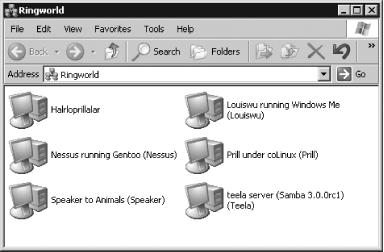
Chances are you’ll only want to set the
server string parameter, which has a direct effect
on clients. This is shown in Figure 3-1, which
depicts a Windows XP computer’s view of the servers
on a network using the My Network Places browsing tool. In most
cases, the NetBIOS name appears in parentheses after the value of the
server
string variable.
(HALRLOPRILLALAR Figure 3-1 is an exception because it lacks the
server string value, or rather, it lacks its
equivalent because this computer is the Windows computer used to take
the screen shot.) Many default smb.conf files
place the %v variable in the
server
string parameter, which
has the effect of displaying the Samba version number to clients, as
in the
TEELA server in Figure 3-1. This information, though, can be useful to
miscreants wanting to break into the computer. To be sure, they can
discover the version in some other way, but there’s
no point in making it easy for them; I recommend not using
%v in your server
string parameter.