It is time for us to leave the pure command line and start working with the AWK control files. As always, when the complexity of the required result set increases, we see an increase in the complexity of the awk code. We will create a status.awk file in our current directory. The file should look similar to the following file:
{ record[$9]++ }
END {
for (r in record)
print r, " has occurred ", record[r], " times." }
First, we will strip down the main code block and this is very simple and sparse. This is a simple way to count each unique occurrence of a status code. Instead of using a simple variable, we feed this into an array. The array in this case is called a record. An array is a multi-values variable and the slots in the array are known as keys. So we will have a collection of variables stored in the array. For example, we expect to see entries for record[200] and record[404]. We populate each key with their occurrence count. Each time we find a 404 code, we increment the count that is stored in the associated key:
{ record[$9]++ }
In the END block, we create the summary information using a for loop to print out each key and value from the array:
END {
for (r in record)
print r, " has occurred ", record[r], " times." }
To run this, the associated command line will be similar to the following:
$ awk -f status.awk access.log
To view the command and output, we have included the following screenshot:
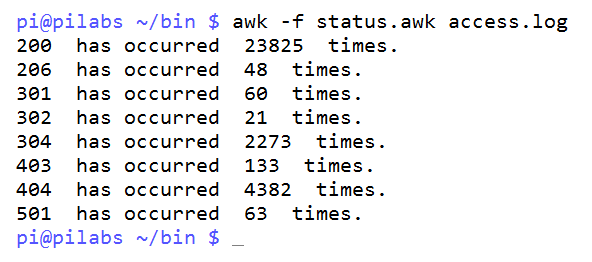
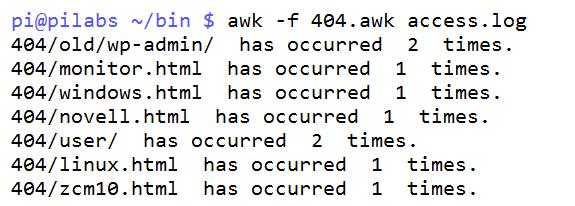
We can take this further and focus on the 404 errors. You could, of course, choose any of the status codes. We can see from the results that we have 4382 404 status codes. To summarize these 404 codes, we will copy the status.awk to a new file named 404.awk. We can edit the 404.awk adding an if statement to work only on the 404 codes. The file should be similar to the following code:
{ if ( $9 == "404" )
    record[$9,$7]++ }
END {
for (r in record)
print r, " has occurred ", record[r], " times." }
If we execute the code with the following command:
$ awk -f 404.awk access.log
The output will be similar to the following screenshot: