In Chapter 6, Iterating with Loops, we created the menu.sh file. Menus are great targets to use functions, as the case statement is maintained very simply with single-line entries, while the complexity can still be stored in each function. We should consider creating a function for each menu item. If we copy the previous $HOME/bin/menu.sh to $HOME/bin/menu2.sh, we can improve the functionality. The new menu should look like the following code:
#!/bin/bash
# Author: @likegeeks
# Web: likegeeks.com
# Sample menu with functions
# Last Edited: April 2018

to_lower() {
    input="$1"
    output=$( echo $input | tr [A-Z] [a-z])
return $output
}

do_backup() {
    tar -czvf $HOME/backup.tgz ${HOME}/bin
}

show_cal() {
    if [ -x /usr/bin/ncal ] ; then
      command="/usr/bin/ncal -w"
    else
      command="/usr/bin/cal"
    fi
    $command
}

while true
do
  clear
  echo "Choose an item: a, b or c"
  echo "a: Backup"
  echo "b: Display Calendar"
  echo "c: Exit"
  read -sn1
  REPLY=$(to_lower "$REPLY")
  case "$REPLY" in
    a) do_backup;;
    b) show_cal;;
    c) exit 0;;
  esac
  read -n1 -p "Press any key to continue"
done
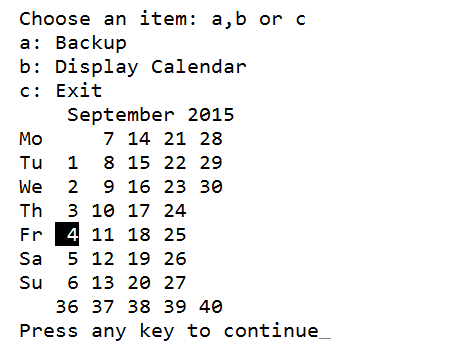
As we can see, we still maintain the simplicity of the case statement; however, we can develop the script to add in more complexity through the functions. For example, when choosing option b for the calendar, we now check to see whether the ncal command is available. If it is, we use ncal and use the -w option to print the week number. We can see this in the following screenshot, where we have chosen to display the calendar and install ncal:
We can also not be concerned about the Caps Lock key as the to_lower function converts our selection to lowercase. Over time, it would be very easy to add additional elements to the functions, knowing that we only affect that single function.