As we have seen so far, it is possible to build simple conditions using command-line lists. These conditional statements can be written both with and without a test. As the complexity of the tasks increases, it becomes easier to create statements using if. This will certainly ease both the readability of the script and the logic layout. To a degree, it also matches the way in which we think and speak; if is a semantic in our spoken language in the same way it is within the bash script.
Even though it will take up more than a single line in the script, with an if statement we can achieve more and make the script more legible. That being said, let's look at creating if conditions. The following is an example of a script using an if statement:
#!/bin/bash
# Welcome script to display a message to users on login
# Author: @theurbanpenguin
# Date: 1/1/1971
if [ $# -lt 1 ] ; then
echo "Usage: $0 <name>"
exit 1
fi
echo "Hello $1"
exit 0
The code within the if statement will run only when the condition evaluates to true, and the end of the if block is denoted with fi - if backward. The color coding in vim can be useful to aid readability, which you will see in the following screenshot:
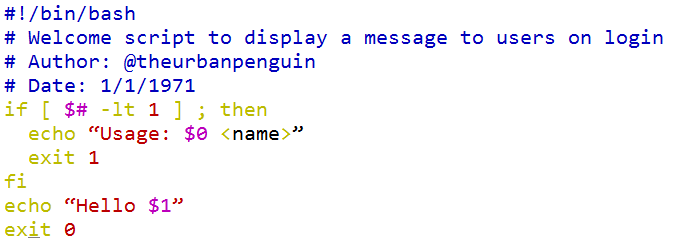
Within the script, we can easily add in multiple statements to run when the condition is true. In our case, this includes exiting the script with an error indicated, as well as including the usage statement to assist the user. This ensures that we only display the hello message if we have supplied a name of the person to be welcomed.
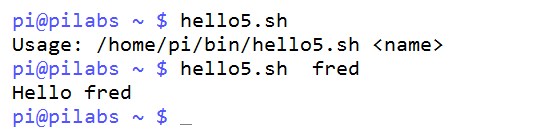
We can view the script execution both with and without the argument in the following screenshot:
The following pseudocode shows the syntax of the if conditional statement:
if condition; then
   statement 1
   statement 2
fi
Indenting the code is not required, but it helps readability and is highly recommended. Adding the then statement to the same line as the if statement, again assists with the readability of the code, and the semicolon is required to separate the if from the then.