
If a user logs onto the server's physical console directly rather than logging on through a remote or graphical pseudo-terminal, then the lastlog output will not display the host field. To demonstrate this, I have logged on to my CentOS host directly to the tty1 console and avoided the GUI. The output from the previous AWK control file shows that we now have the users tux and bob; bob though lacks the host field as he is connected to a console:

Although in itself it's not an issue, it will be if we want to filter the fields and the two row's field numbers will vary where a field is omitted from some lines. For lastlog, we will have 9 fields for most connections and only 8 fields for those that connect directly to the server console. The goal for the application is that we print the username and the date, but not the time of the last login. We will also print our own header in the BEGIN block. To ensure that we use the correct placements we will need to count the fields in each row using the NF internal variable.
For the 8 fields' lines we want to print fields 1, 4, 5, and 8; for the longer lines with additional host information, we will use fields 1, 5, 6 and 9. We will also use printf so that we can align the column data correctly. The control file should be edited, as shown in the following example:
BEGIN {
printf "%8s %11s\n","Username","Login date"
print "===================="
}
!(/Never logged in/ || /^Username/ || /^root/) {
cnt++
if ( NF == 8 )
    printf "%8s %2s %3s %4s\n", $1,$5,$4,$8

else
    printf "%8s %2s %3s %4s\n", $1,$6,$5,$9
}
END {
print "===================="
print "Total Number of Users Processed: ", cnt
}
We can see the command and the output it produces in the following screenshot. We can see how we can create a more suitable display based on information that we want to focus on:
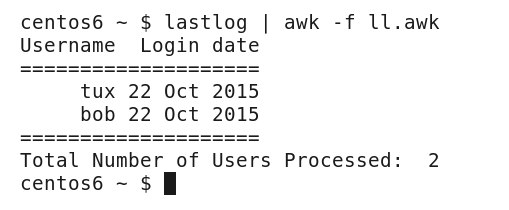
If we look at the output, I have chosen to display the date before the month so we do not display the fields in numerical order. This, of course, is a personal choice and customizable to suit the way you feel the data should be displayed.
We can use the principles of what we have seen in the lastlog control file with output from any command and you should practice with the commands that you want to filter the data from.