
If we are to display text messages to the users and operators executing the scripts, we can provide colors to help in message interpretation. Using red as a synonym for errors and green to indicate success makes it easier to add functionality to our scripts. Not all but certainly a vast majority of Linux Terminals support color. The built-in command echo, when used with the -e option, can display color to users.
To display a text in red, we can use the echo command as follows:
$ echo -e "\033[31mError\033[0m"
The following screenshot shows both the code and the output:

The red text will bring immediate attention to the text and the potential failure of the script execution. The use of color in this way adheres to the basic principles of application design. If you find the code cumbersome, then simply use friendly variables to represent the colors and the reset code.
In the previous code, we used red and the final reset code to set the text back to the shell default. We could easily create variables for these color codes and others:
RED="\033[31m"
GREEN="\033[32m"
BLUE="\033[34m"
RESET="\033[0m"
The \033 value is the escape character and [31m is the color code for red.
We need to take care while using variables, to ensure that they are properly delimited from the text. Modifying the earlier example, we can see how this is easily achieved:
$ echo -e ${RED}Error$RESET"
We use the brace brackets to ensure that the RED variable is identified and separated from the Error word.
Saving the variable definitions to the $HOME/snippets/color file will allow them to be used in other scripts. Interestingly, we don't need to edit this script; we can use the command source to read these variables definitions into the script at runtime. Within the recipient script, we need to add the following line:
source $HOME/snippets/color
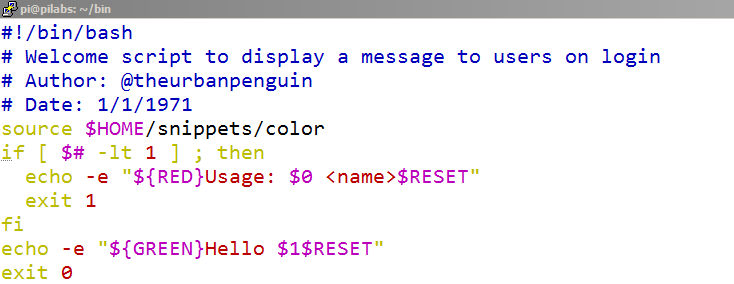
Using the shell built-in source command will read the color variables into the script that is executing at runtime. The following screenshot shows a modified version of the hello5.sh script that we now call hello7.sh, which makes use of these colors:
We can see the effect this has when we execute the script. In the following screenshot, you will see the execution and output both with and without a supplied parameter:
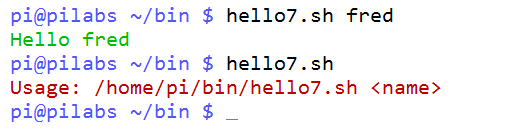
We can easily identify the success and failure of the script through the color-coded output; the green Hello fred where we supply the parameter, and the red Usage statement where we have not provided the required name.