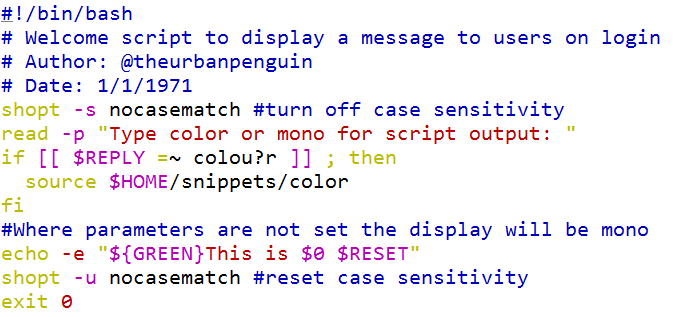
Another simple demonstration of conditional testing using regular expressions will be to expose the US and UK spelling of color, being color and colour respectively. We may prompt the user if they want a color or mono output for the script but at the same time cater for both spellings. The line that will do the work in the script is as follows:
if [[ $REPLY =~ colou?r ]] ; then
The regular expression caters to both spellings of color by making the u optional: u?. Furthermore, we can disable case sensitivity allowing for COLOR and color by setting a shell option:
shopt -s nocasematch
This option can be disabled again at the end of the script with the following command:
shopt -u nocasematch
When we use the variable parameters that we have named $GREEN and $RESET, we affect the color of the output. The color green will only be shown where we have sourced the color definition file. This is set when we choose the color display. Selecting mono will ensure that the variable parameters are null and have no effect.
The complete script is shown in the following screenshot: