After having created the template, we can now use this to create virtual host configurations. In the simplest terms, we need to replace the dummy-host.example.com URL with the sales.example.com or marketing.example.com URL. Of course, we have to also create the DocumentRoot directory, the directory where the web pages will be, and also add some basic content. When we use a script to run through the process, nothing will be forgotten and the edits will be accurate every time. The basics of the script will be as follows:
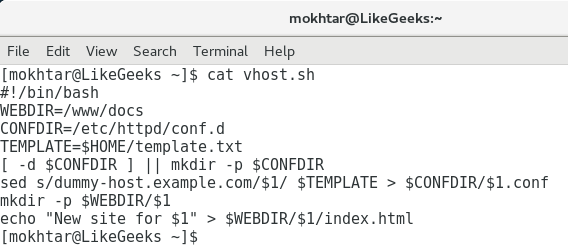
#!/bin/bash
WEBDIR=/www/docs
CONFDIR=/etc/httpd/conf.d
TEMPLATE=$HOME/template.txt
[ -d $CONFDIR ] || mkdir -p $CONFDIR
sed s/dummy-host.example.com/$1/ $TEMPLATE > $CONFDIR/$1.conf
mkdir -p $WEBDIR/$1
echo "New site for $1" > $WEBDIR/$1/index.html
We can ignore the shebang in the first line; we should know this by now. We can start our explanation on line 2 of the script:
|
Line |
Meaning |
|
WEBDIR=/www/docs/ |
We initialize the WEDIR variable that we store in the path to the directory that will hold the different websites. |
|
CONFDIR=/etc/httpd/conf.d |
We initialize the CONFDIR variable that we will use to store the newly created virtual host configuration file. |
|
TEMPLATE=$HOME/template.txt |
We initialize the variable that we will use for the template. This should point to the path of our template. |
|
[ -d $CONFDIR ] || mkdir -p "$CONFDIR" |
On a working EL6 host, this directory will exist and is included in the main configuration. If we are running this as a pure test, then we can create a directory to prove that we can create the correct configuration within the target directory. |
|
sed s/dummy-host.example.com/$1/ $TEMPLATE >$CONFDIR/$1.conf |
The sed command works as an engine in the script, running the search and replace operations. Using the substitute command in sed, we search for the dummy text and replace it with the argument passed to the script. |
|
mkdir -p $WEBDIR/$1 |
Here, we create the correct subdirectory to house the websites for the new virtual host. |
|
echo "New site for $1" > $WEBDIR/$1/index.html |
In this final step, we create a basic holding page for the website. |
We can create this script as $HOME/bin/vhost.sh. Don't forget to add the execute permission. This is illustrated in the following screenshot:
To create the sales virtual host and web page, we can run the script as shown in the following example. We will be running the script directly as the root user. Alternatively, you may choose to make use of the sudo command within the script:
# vhost.sh sales.example.com
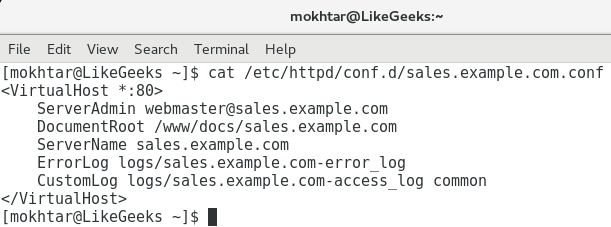
We can now see how easily we can create virtual hosts using a well-crafted script. The configuration file for the virtual host will be created in the /etc/httpd/conf.d/ directory and will be named sales.example.com.conf. The file will look similar to the following screenshot:
The website content must have been created in the /www/docs/sales.example.com directory. This will be a simple holding page that proves the point that we can do this from the script. Using the following command, we can list the content or the base directory that we use to house each site:
$ ls -R /www/docs
The -R option allows for the recursive listing. We have used the /www/docs directory purely as this is set in the original virtual host definition that we extracted. You may prefer to use /var/www or something similar if working in a live environment rather than creating the new directory at the root of your filesystem. It would be a simple matter of editing the template that we created and that too could be done with sed at the time of template creation.