Python is an object-oriented interpreted language that is designed to be easy to use and to aid Rapid Application Development. This is achieved by the use of simplified semantics in the language.
Python was created at the end of the 1980s, towards the very end of December 1989, by the Dutch developer Guido van Rossum. The majority of the design of the language aims for clarity and simplicity, and one of the main rules of the Zen of Python is:
There should be one, and preferable only one, obvious way to do it.
Often systems will have both Python 2 and Python 3 installed; however, all newer distributions are switching to Python 3. We will be working with Python 3.
Since we are using Linux Mint, it comes shipped with Python 3 already.
If you are using another Linux distribution or Python 3 is not found for any reason, you can install it like this:
- On RedHat based distributions:
$ sudo yum install python36
- On Debian based distributions:
$ sudo apt-get install python3.6
Although there is no shell, we can interact with Python using REPL—read, evaluate, print, and loop. We can access this by typing python3 in the command line or python36 if you are using CentOS 7. You should see something similar to the following screenshot:
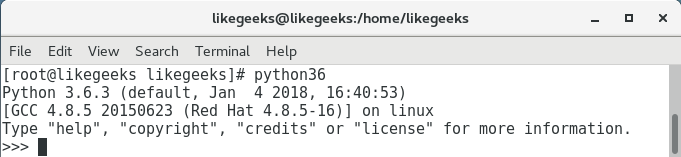
We can see that we are presented with the >>> prompt and this is known as the REPL console. We should emphasize that this is a scripting language and, like bash and Perl, we will normally execute code through the text files that we create. Those text files will normally be expected to have a .py suffix to their name.
While working with REPL, we can print the version independently by importing a module. In Perl, we will use the keyword; in bash we will use the command source; and in Python we use import:
>>>import sys
With the module loaded, we can now investigate the object-oriented nature of Python by printing the version:
>>> sys.version
We will navigate to the sys object within our namespace and call the version method from that object.
Combining these two commands, we should see the following output:

To close this section describing Python, we should take a look at the Zen of Python. From REPL, we can type import this, as shown in the following screenshot:
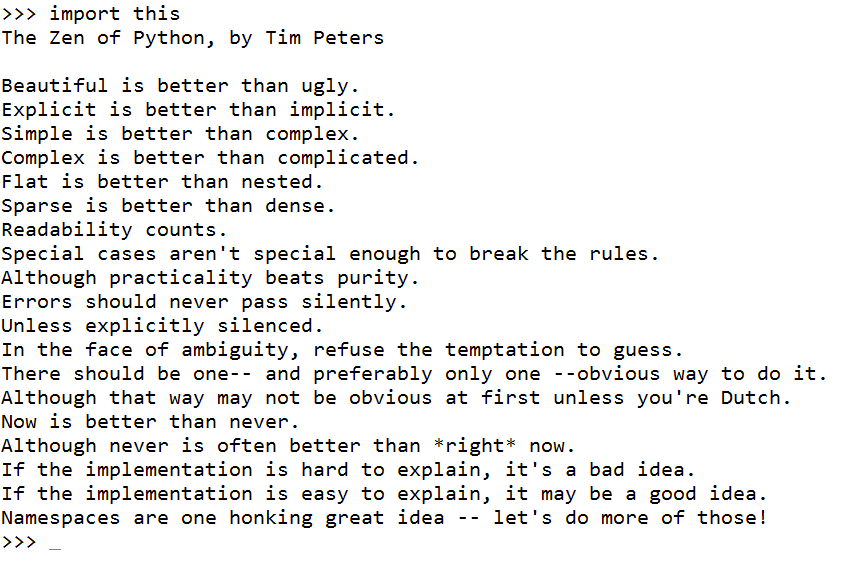
This is far more than just the Zen of Python; it's actually a good rule for all programming languages and a guide for developers.
Finally, to close the REPL, we will use Ctrl + D in Linux or Ctrl + Z in Windows.