A major difference between Python and most other languages is that additional whitespace can mean something. The indent level of your code defines the block of code to which it belongs. So far, we have not indented the code we have created past the start of the line. This means that all of the code is at the same indent level and belongs to the same code block. Rather than using brace brackets or the do and done keywords to define the code block, we use indents. If we indent with two or four spaces or even tabs, then we must stick to those spaces or tabs. When we return to the previous indent level, we return to the previous code block.
This seems complex but it is really quite simple and keeps your code clean and uncluttered. If we edit the arg.py file to prevent unwelcomed errors, if an argument is not supplied, we can see this in action:
#!/usr/bin/python3
import sys
count = len(sys.argv)
if ( count > 1 ):
    print("Arguments supplied: " + str(count))
    print("Hello " + sys.argv[1])
print("Exiting " + sys.argv[0])
The if statement checks if the argument count is greater than 1 or not. We now store for ease, the argument count has its own variable, which we call count. The code block starts with the colon and then all of the following code that is indented with four spaces is part of the code that will execute when the condition returns to true.
When we return to the previous indent level, we return to the main code block and we execute the code regardless of the status of the condition.
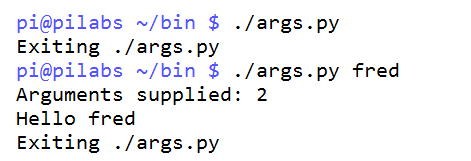
We can see this illustrated in the following screenshot, where we can execute the script with and without the argument: