Table of Contents for
Web Design Blueprints
 Web Design Blueprints
Published by
Packt Publishing, 2016
Web Design Blueprints
Published by
Packt Publishing, 2016
- Cover
- Table of Contents
- Web Design Blueprints
- Web Design Blueprints
- Credits
- About the Author
- About the Reviewer
- www.PacktPub.com
- Preface
- What you need for this book
- Who this book is for
- Conventions
- Reader feedback
- Customer support
- 1. Responsive Web Design
- Getting familiar with the basics
- Using media queries for responsive design
- Working with responsive media
- Building responsive layouts
- Summary
- 2. Flat UI
- Flat UI color
- Creating a flat UI layout
- Summary
- 3. Parallax Scrolling
- Color classes
- Using SVG font icons
- Getting the fonts
- That's no moon!
- OMG, it's full of stars!
- Clouds, birds, and airplanes
- The rocket
- Terra firma
- Next up, the CSS
- Styling the objects with CSS
- Styling the ground objects
- Writing the JavaScript effects
- Setting the row height
- Spreading the objects
- Spreading the clouds
- Loading the page functions
- Smoothening the scroll
- Updating elements on the scroller
- Collecting the moving elements
- Creating functions for the element types
- Setting the left positions
- Creating the rocket's movement function
- Finally, moving the earth
- Summary
- 4. Single Page Applications
- Getting to work
- Getting the old files
- Object and function conventions
- Creating utility functions
- Working with the home structure
- Setting up other sections
- Performing housekeeping
- Creating a callBack function for the API
- Summary
- 5. The Death Star Chapter
- Dropping in the parallax game
- Loading elements from JSON
- What can be done in the shared levels service
- Editing the home JavaScript
- Creating the other pages – credits and leaderboard
- Creating the second level
- Summary
- Index
Now that we have tamed that, the rest will be easy. Let's move on to the leaderboard and credits. These will be very easy compared to the levels. Most of the hard work is done already. We will work on them simultaneously, as they are so similar. So, let's start with the JSON objects. They copy the same format we used to load the objects in level1.json. Only use one object set, and the data set includes person and credit. I'll use my family, because they deserve the credit for allowing me to write the book. See my following example:
{
    "objectgroups": {
        "credits": {
            "objects": [
            {
                "person": "Ben LaGrone",
                "credit": "Author"
                },
            {
                "person": "Anel LaGrone",
                "credit": "Wife"
                },
            {
                "person": "Daphne LaGrone",
                "credit": "Daughter"
            },
            {
                "person": "Darby LaGrone",
                "credit": "Daughter"
            }
            ]
        }
        }
    }
Next, open your leaderboard.json in the leaderboard directory, and create something similar, but instead of credits, we will have leaders, and the values will be person and score. See the following example:
{
    "objectgroups": {
        leaders": {
            "objects": [
            {
                "person": "BSL",
                "score": 100
            },
            {
                "person": "AK",
                "score": 999
            },
            {
                "person": "SOS",
                "score": 500
            },
            {
                "person": "BSL",
                "score": 100
            },
            {
                "person": "AK",
                "score": 999
            },
            {
                "person": "SOS",
                "score": 500
            }
            ]
        }
    }
}
In your credits directory, edit the credits.html file. It will start with a link back to home containing a fa chevron to the left with the classes white, and left-link. Next, we need a title in a Header 3 element, followed by an opening unordered list with the ID credits-list, and then close your list. See the simple example next:
<a id = "back" href = "#home">
<i class = "fa fa-chevron-left fa-3x white left-link"></i>
</a>
<h3>Credits</h3>
<ul id = "credits-list"></ul>
In this same directory, the home-credits.html file looks the same, only instead of the H3 header having the title, we have the text Credits inside the HREF's child i element, and the i element is a right chevron, not a left. The HREF follows the UL. See the following example:
<ul id = "credits-list"></ul>
<a href = "#credits" class = "right-link">
<i class = "fa fa-chevron-right fa-3x white">Credits</i>
</a>
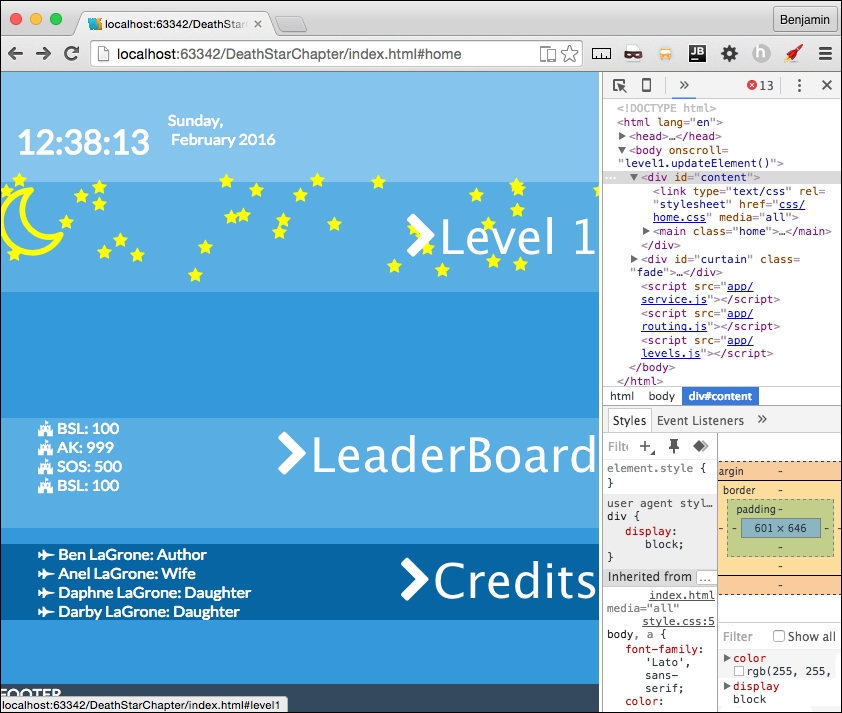
To tie it together, we need the credits.js JavaScript. In the credits.js file, start by making the familiar patterns object, credits = {};. Then, create the function to parse the AJAX, credits.parseAjax, which gets the variables xhr and id. This pattern should be so familiar it's boring by now. Inside, create a new variable called data equaling the parsed xhr response text. Next, create a new variable called creditsLength. This function can give us a limited preview of the credits for the home page, then a full credits list for the credits page. The variable is equal to a ternary statement; if the location hash is home, then 4, otherwise, the length of the credits object. Let's take a look at the setup code so far before we start building the HTML. See the following sample code:
credits.parseAjax = function (xhr,id) {
var data = JSON.parse(xhr.responseText);
var creditsLength = window.location.hash.split('#')[1] === 'home'? 4 : data.objectgroups.credits.objects.length;
//TODO write more code
}
Next, create a new variable, creditsHTML, equaling a blank string. Then, iterate with a for loop for the creditsLength number, adding to creditsHTML for each iteration a LIST ITEM containing a SPAN with a font awesome element for a bullet point and the person value, followed by another SPAN with their credit value, then close the LIST ITEM, and close the for loop. Next, get the element by the ID credits-list, and add to its inner HTML creditsHTML. Finally, add the fade class to the element with the ID curtain. See the next example for the remainder of the credits.parseAjax function:
var creditsHTML = '';
for (i = 0; i < creditsLength; i++) {
creditsHTML += '<li><span><i class = "fa fa-fighter-jet"></i> ' + data.objectgroups.credits.objects[i].person + '</span>: ' + '<span>' + data.objectgroups.credits.objects[i].credit + '</span></li>';
}
document.getElementById('credits-list').innerHTML = creditsHTML;
document.getElementById('curtain').className = 'fade';Almost there. The function will not call unless we call it. Create a conditional statement just like level1.js if the location hash is home, else call the services.getPage function with pageRoute.data, the string credits, credits.parseAjax callBack, and the id variable. If the first condition is true, it is the home page, call the same function, but supplying the path to the data. See the following example code:
if(window.location.hash.split('#')[1] === 'home'){
services.getPage("./app/credits/credits.json",'credits', credits.parseAjax, id);
} else {
services.getPage(pageRoute.data, 'credits', credits.parseAjax, id);
}Do the exact same for the leaderboard. In leaderboard.js, replace everywhere the text credits with leaderboard, and leaderboardHTML will have a score value instead of the credit value.
See the following JavaScript:
var leaderboard = {};
leaderboard.parseAjax = function (xhr, id) {
var data = JSON.parse(xhr.responseText);
var leaderboardLength = window.location.hash.split('#')[1] === 'home'? 4 : data.objectgroups.leaderboard.objects.length;
var leaderboardHTML = '';
for (i = 0; i < leaderboardLength; i++) {
leaderboardHTML += '<li><span><i class = "fa fa-fort-awesome"></i> ' + data.objectgroups.leaderboard.objects[i].person + '</span>: ' + '<span>' + data.objectgroups.leaderboard.objects[i].score + '</span></li>';
}
document.getElementById('leaderboard-list').innerHTML = leaderboardHTML;
document.getElementById('curtain').className = 'fade';
};
if (window.location.hash.split('#')[1] === 'home') {
services.getPage("./app/leaderboard/leaderboard.json", 'leaderboard', leaderboard.parseAjax, id);
} else {
services.getPage(pageRoute.data, 'leaderboard', leaderboard.parseAjax, id);
}Follow the same routing for the home-leaderboard.html and leaderboard.html files.
Now, let's take a look at the home page! Open up your browser and refresh it: